Problem with Christina hair by OOT
 gconrad4_4d3aa258e4
Posts: 79
gconrad4_4d3aa258e4
Posts: 79
in The Commons
I keep getting this terrible wide part in both Victoria 4 and Genesis 2 female. What am I doing wrong? I've tried moving it slightly up on the y axis, enlarging it slightly, nothing works. Anyone else having this problem?
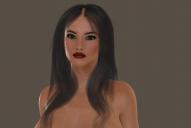
christina hair.jpg
1224 x 822 - 165K

Daz 3D is part of 
Connect
DAZ Productions, Inc.
7533 S Center View Ct #4664
West Jordan, UT 84084
Licensing Agreement | Terms of Service | Privacy Policy | EULA
© 2026 Daz Productions Inc. All Rights Reserved.
Comments
Looks like your scalp is invisible.
It comes with a smoothing modifier applied already. make sure the model you are using is set in the collision section and see if that helps.
I don't see that issue with the Iray materials for the G2F version. Maybe there is something with your surface settings?
I'm using Poser 9. Forgot to mention. Iray is but a distant dream. I'll try some of these things. The picture is a G2 female in Poser. Took 5 hours to render. I have no better luck with the V4 version.
You can render Iray on any PC with the later versions of DS installed, it's just slow if you don't have a GTX card. A render like the one you have posted would probably take less than an hour unless you have a really slow PC.
EDIT: did a test, 2-3 hours may be more correct actually.
I cannot do DS. I'll try again sometime. My computer is from 2012. I'll check what a GTX card is, but doubt if I have one. It's one of those on board things, AMD Radeon HD 6410D. I've never had to check the collision section in Poser before, and never had this kind of trouble with hair..
Today I realized whenever something looks ugly in Poser 10, it's because I need to turn off gamma correction. It destroys so many things and causes so many problems, I can't see what it's for. Also ruins Ad Gladio Ludus Sword Brotherhood, Atlas by SAV...