Has anyone successfully installed Michael 8 with connect?
 Kev914
Posts: 1,143
Kev914
Posts: 1,143
On my old computer, I installed him, but the icon had that ! on it and he wouldn't load. I ended up having to install him with DIM.
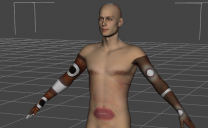
On my new computer, I was happy to see that he had an icon with his picture on it when I installed with Connect. But I just tried to load him, and I got an error. It said to see the log. But then Michael appeared, and he looked like the picture. I then tried to apply his body texture and I just get an error. Plus when I right and switch to the product view, I noticed that some of items have icons that indicate that files are missing.
Correct me if I'm wrong, but I can't see anyway I could have caused this. All I did with open the install pane and click on the M8 picture.
I know someone else got him to work, by doing the manual install. Guess I'll try that, and if that fails, it's hello DIM!
Also, am I correct in believing that M4/V4 etc have to be installed through DIM because they don't seem to show up in the install panel.
I am getting a good working knowledge of how Connect and all the panels work, however I have say that sorting is messed up. I sorted by Recent First, so I think that my latest orders will be at the top and M2/V2 should be at the bottom. So I've been installing for the last couple of days and getting into the 4's, so I'm thinking I'm making progress at least. But I just noticed that some of Genesis 3 is all the way at the bottom. So either I don't understand what Recent First means...or sorting is messed up.
Also, does anybody know if there is any correlation between Connect and DIM. I'd like to think that there is a way to filter out all the thinks I've installed with Connect in DIM, but I fear that is not the case.

Daz 3D is part of 
Connect
DAZ Productions, Inc.
7533 S Center View Ct #4664
West Jordan, UT 84084
Licensing Agreement | Terms of Service | Privacy Policy | EULA
© 2026 Daz Productions Inc. All Rights Reserved.
Comments
Also, how do you install a manual connect download. there are sea and sep files.
i did manual d/l he works fine. wasnt encrypted
your picture looks like a uv problem. he's got lipstick on his torso
misapplied makeup png, or layer editor problem
And how do you uninstall something that was installed with Daz Connect. I found some instructions by searching the forum. But I can't follow them. It says to go to the installed tab. Not the install pane. But the available installed, etc don't seem to be there anymore with the latest version of DS.
To uninstall via DAZ Connect, select the product icon, right click and select Uninstall. You can do this from Installed, or in my example, from All.
Thanks. I couldn't find those tabs like all, etc. But now that I see your picture, Lindsey, I was able to find them.
I was able to install Michael 8 successfully, but I had to use DIM.
I tried to use the manual method, but I guess I'm doing something wrong. I downloaded the two files. I put them in the cloud folder and then went to DS and tried to "Install offline products" nothing seemed to happen. Other than a small window opened and closed so fast there was no way for me to read it. Do I need to create a folder called "Install" in the cloud folder? Or do I need to create a folder called "1_45773" and put the files in there? Or what?
Thanks again.
A Connect-installed Michael 8 is working for me. What was the errro message you received?
Here are some of the errors. I think there is more. I did see one that said syntax error "[" expected. Also, when I explored the products, some of the icons indicated the files could not be found.
2017-09-05 22:50:51.162 WARNING: fileinput\dzassetdaz.cpp(5767): Could not find target property for formula: Genesis8Male:/data/DAZ%203D/Genesis%208/Male/Morphs/DAZ%203D/Michael%208/FBMMichael8.dsf#FBMMichael8?value in file : /data/DAZ%203D/Genesis%208/Male/Morphs/DAZ%203D/Michael%208/pJCMMichael8ShoulderBndUpL_HDLv2.dsf
2017-09-05 22:50:51.162 WARNING: fileinput\dzassetdaz.cpp(5767): Could not find target property for formula: Genesis8Male:/data/DAZ%203D/Genesis%208/Male/Morphs/Daz%203D/Michael%208/FBMMichael8.dsf#FBMMichael8?value in file : /data/DAZ%203D/Genesis%208/Male/Morphs/DAZ%203D/Michael%208/pJCMMichael8ShoulderBndDownR_35_HDLv3.dsf
2017-09-05 22:50:51.162 WARNING: fileinput\dzassetdaz.cpp(5767): Could not find target property for formula: Genesis8Male:/data/DAZ%203D/Genesis%208/Male/Morphs/Daz%203D/Michael%208/FBMMichael8.dsf#FBMMichael8?value in file : /data/DAZ%203D/Genesis%208/Male/Morphs/DAZ%203D/Michael%208/pJCMMichael8ShoulderBndDownL_n35_HDLv3.dsf
2017-09-05 22:50:51.163 WARNING: fileinput\dzassetdaz.cpp(5767): Could not find target property for formula: Genesis8Male:/data/DAZ%203D/Genesis%208/Male/Morphs/Daz%203D/Michael%208/FBMMichael8.dsf#FBMMichael8?value in file : /data/DAZ%203D/Genesis%208/Male/Morphs/DAZ%203D/Michael%208/pJCMMichael8ShinBndBckR_105.dsf
2017-09-05 22:50:51.163 WARNING: fileinput\dzassetdaz.cpp(5767): Could not find target property for formula: Genesis8Male:/data/DAZ%203D/Genesis%208/Male/Morphs/Daz%203D/Michael%208/FBMMichael8.dsf#FBMMichael8?value in file : /data/DAZ%203D/Genesis%208/Male/Morphs/DAZ%203D/Michael%208/pJCMMichael8ShinBndBckL_105.dsf
2017-09-05 22:50:51.163 WARNING: fileinput\dzassetdaz.cpp(5767): Could not find target property for formula: Genesis8Male:/data/DAZ%203D/Genesis%208/Male/Morphs/Daz%203D/Michael%208/FBMMichael8.dsf#FBMMichael8?value in file : /data/DAZ%203D/Genesis%208/Male/Morphs/DAZ%203D/Michael%208/pJCMMichael8ForearmBndR_HDLv2.dsf
2017-09-05 22:50:51.163 WARNING: fileinput\dzassetdaz.cpp(5767): Could not find target property for formula: Genesis8Male:/data/DAZ%203D/Genesis%208/Male/Morphs/Daz%203D/Michael%208/FBMMichael8.dsf#FBMMichael8?value in file : /data/DAZ%203D/Genesis%208/Male/Morphs/DAZ%203D/Michael%208/pJCMMichael8ForearmBndL_HDLv2.dsf
2017-09-05 22:50:51.163 WARNING: fileinput\dzassetdaz.cpp(5767): Could not find target property for formula: Genesis8Male:/data/DAZ%203D/Genesis%208/Male/Morphs/Daz%203D/Michael%208/FBMMichael8.dsf#FBMMichael8?value in file : /data/DAZ%203D/Genesis%208/Male/Morphs/DAZ%203D/Michael%208/pJCMMichael8FootBndFwdL.dsf
2017-09-05 22:50:51.163 WARNING: fileinput\dzassetdaz.cpp(5767): Could not find target property for formula: Genesis8Male:/data/DAZ%203D/Genesis%208/Male/Morphs/Daz%203D/Michael%208/FBMMichael8.dsf#FBMMichael8?value in file : /data/DAZ%203D/Genesis%208/Male/Morphs/DAZ%203D/Michael%208/pJCMMichael8CollarBndUpR.dsf
2017-09-05 22:50:51.163 WARNING: fileinput\dzassetdaz.cpp(5767): Could not find target property for formula: Genesis8Male:/data/DAZ%203D/Genesis%208/Male/Morphs/Daz%203D/Michael%208/FBMMichael8.dsf#FBMMichael8?value in file : /data/DAZ%203D/Genesis%208/Male/Morphs/DAZ%203D/Michael%208/pJCMMichael8CollarBndUpL.dsf
2017-09-05 22:50:51.163 WARNING: fileinput\dzassetdaz.cpp(5767): Could not find target property for formula: Genesis8Male:/data/DAZ%203D/Genesis%208/Male/Morphs/Daz%203D/Michael%208/FBMMichael8.dsf#FBMMichael8?value in file : /data/DAZ%203D/Genesis%208/Male/Morphs/DAZ%203D/Michael%208/pJCMMichael8ChestLowerBndFwd.dsf
2017-09-05 22:50:51.163 WARNING: fileinput\dzassetdaz.cpp(5767): Could not find target property for formula: Genesis8Male:/data/DAZ%203D/Genesis%208/Male/Morphs/Daz%203D/Michael%208/FBMMichael8.dsf#FBMMichael8?value in file : /data/DAZ%203D/Genesis%208/Male/Morphs/DAZ%203D/Michael%208/pJCMMichael8AbdomenUpperBndFwd.dsf
2017-09-05 22:50:51.163 WARNING: fileinput\dzassetdaz.cpp(5767): Could not find target property for formula: Genesis8Male:/data/DAZ%203D/Genesis%208/Male/Morphs/Daz%203D/Michael%208/FBMMichael8.dsf#FBMMichael8?value in file : /data/DAZ%203D/Genesis%208/Male/Morphs/DAZ%203D/Michael%208/MCMMichael8Navel.dsf
2017-09-05 22:50:51.167 WARNING: fileinput\dzassetdaz.cpp(5767): Could not find target property for formula: Genesis8Male:/data/DAZ%203D/Genesis%208/Male/Morphs/Daz%203D/Michael%208/FBMMichael8.dsf#FBMMichael8?value in file : /data/DAZ%203D/Genesis%208/Male/Morphs/DAZ%203D/Michael%208/eJCMMichael8HeadTwistR_HDLv3.dsf
2017-09-05 22:50:51.167 WARNING: fileinput\dzassetdaz.cpp(5767): Could not find target property for formula: Genesis8Male:/data/DAZ%203D/Genesis%208/Male/Morphs/Daz%203D/Michael%208/FBMMichael8.dsf#FBMMichael8?value in file : /data/DAZ%203D/Genesis%208/Male/Morphs/DAZ%203D/Michael%208/eJCMMichael8HeadTwistL_HDLv3.dsf
2017-09-05 22:50:51.167 WARNING: fileinput\dzassetdaz.cpp(5767): Could not find target property for formula: Genesis8Male:/data/DAZ%203D/Genesis%208/Male/Morphs/Daz%203D/Michael%208/FBMMichael8.dsf#FBMMichael8?value in file : /data/DAZ%203D/Genesis%208/Male/Morphs/DAZ%203D/Michael%208/eJCMMichael8HeadBndFwd_HDLv2.dsf
2017-09-05 22:50:51.205 Begin Loading Character Addons...
2017-09-05 22:50:51.352 File loaded in 0 min 0.1 sec.
2017-09-05 22:50:51.352 Loaded file: genesis 8 male eyelashes.duf
2017-09-05 22:50:51.352 Loaded Morph Deltas in 0 min 0.0 sec.
2017-09-05 22:50:51.352 Loaded file: MCMMichael8Navel.dsf
2017-09-05 22:50:51.367 Loaded Morph Deltas in 0 min 0.0 sec.
2017-09-05 22:50:51.367 Loaded file: FHMMichael8.dsf
2017-09-05 22:50:51.367 Loaded Morph Deltas in 0 min 0.0 sec.
2017-09-05 22:50:51.367 Loaded file: PHMMouthRealism_HD_div2.dsf
2017-09-05 22:50:51.420 Loaded Morph Deltas in 0 min 0.0 sec.
2017-09-05 22:50:51.436 D:/Users/piano/Documents/DAZ 3D/Studio/My Daz Connect Library/data/cloud/1_45773/data/daz 3d/genesis 8/male/projection morphs/daz 3d/michael 8/mcmmichael8navel_proj.dsf (1,1): Syntax error - expected '{' or '['
2017-09-05 22:50:51.436 Error reading file: MCMMichael8Navel_proj.dsf
2017-09-05 22:50:51.436 D:/Users/piano/Documents/DAZ 3D/Studio/My Daz Connect Library/data/cloud/1_45773/data/daz 3d/genesis 8/male/projection morphs/daz 3d/michael 8/mcmmichael8navel_proj.dsf (1,1): Syntax error - expected '{' or '['
2017-09-05 22:50:51.436 Error reading file: MCMMichael8Navel_proj.dsf
2017-09-05 22:50:51.451 Loaded Morph Deltas in 0 min 0.0 sec.
2017-09-05 22:50:51.451 Loaded file: PBMNavel_proj.dsf
2017-09-05 22:50:51.467 Loaded file: PBMNavel.dsf
2017-09-05 22:50:51.489 Loaded Morph Deltas in 0 min 0.0 sec.
2017-09-05 22:50:51.489 Loaded file: PHMEyelashesExpand.dsf
2017-09-05 22:50:51.520 D:/Users/piano/Documents/DAZ 3D/Studio/My Daz Connect Library/data/cloud/1_45773/people/genesis 8 male/characters/michael 8/materials/iray/michael 8 eyelashes.duf (1,1): Syntax error - expected '{' or '['
2017-09-05 22:50:51.520 Error reading file, see log for more details.
2017-09-05 22:50:53.162 Finished Loading Character Addons
2017-09-05 22:50:53.167 File loaded in 0 min 4.2 sec.
2017-09-05 22:50:53.180 Loaded file: michael 8.duf
Some good news is that I discovered that you can screen out the connect installed content from DIM.
And it appears that sorting by order date recent first gives results more like I expected.
Also, I remember seeing that same syntax error on my old machine too, when I tried to install M8 by connect.
Sounds like a corrupt file, the syntax error (which is the one we probably most need to see). It may not be the Genesis 8 male/Michael 8 file but some other add-on that is causing the issue.
Thanks. I'm positive I downloaded the 1_45773 package again. I did copy my Daz Connect folder over from the old pc. But Michael 8 wasn't installed through Connect, because I had almost the same problem on the old machine. I first installed through connect, but michael 8 and some of the parts had icons indicating that files were missing. And when I tried to load him, I only got an error. I had to uninstall and install via DIM. On the new machine, basically the same thing happened. But this time I got an error and Micheal 8 did load with the crazy texture.
There was another forumite, who had the same problem as me, but he got his to install by going the manual install route. I tried that but I must being doing something wrong. I downloaded the two files and then dropped them in the Cloud directory, then I opened Daz and clicked on the install offline products. When I did that, a small window opened and closed just as fast it opened. I couldn't read what it said. It happened too fast. And nothing installed. The instructions said something about an installing directory which was inside the cloud directory, but I didn't see any such directory. I don't know if I was suppose to create it, or what.
Yes, the offline installers go in a folder named Install in the Data/Cloud folder - you will have to create it yourself.