how to create a coffee material in 3DL
 sriesch
Posts: 4,243
sriesch
Posts: 4,243
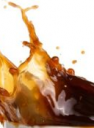
I have a splash object, and I'm trying to apply a material that looks like coffee (3DL). Any suggestions for existing materials I can use, or directions I should take to create it?
I attempted to modify a few liquid materials I had, and also played around with AOA's subsurface shader and the metalized glass shader's Amber setting, but haven't had any luck so far probably just due to limited knowledge. Hoping somebody can get me pointed in the right direction.

Daz 3D is part of 
Connect
DAZ Productions, Inc.
7533 S Center View Ct #4664
West Jordan, UT 84084
Licensing Agreement | Terms of Service | Privacy Policy | EULA
© 2026 Daz Productions Inc. All Rights Reserved.
Comments
Is your machine unable to do Iray? Because honestly, that would be a snap with Iray materials. AllenArt has some free Iray shaders that would work with some minor adjustments:
http://www.sharecg.com/v/81421/gallery/21/DAZ-Studio/AllenArt-Drinking-Glass-prop-for-Iray-with-shaders
http://www.sharecg.com/v/81300/gallery/21/DAZ-Studio/AllenArt-Iray-Gelatin-Gel-Shaders-for-Daz-Studio
If you can't do Iray, you might try Fisty's Liquids:
http://www.sharecg.com/v/82337/browse/7/Material-and-Shader/Fistys-Liquids-DS-Shaders-Poser-MT5s
I've not tried them as I've never used 3Delight, but Fisty makes good products so they might work for your needs. :)
If you're using 3delight. I'd reccomend this shader as your best bet. AFAIK its the only 3delight shader for daz that does absorption (the thicher parts of the mesh get darker) which is very noticable in your reference image.
Yoink
Thanks for the suggestions. I actually have both products installed. I'm experimenting with Tofuson's realistic glass shader, but still not having much luck though. Is anybody familiar with the parameters and what they mean? I've experimented with several, but unclear results.
That's looking pretty good! :)
I'm not happy with it yet. A large amount of the coffee is black rather than coffee colored, including a lot of the smaller droplets that should be lighter colored. I haven't been able to get it close to the reference picture in the first post.
In your image...is that 'checkered' section 'nothing'?
If so, that is your problem with the too dark. You need a COMPLETE environment to get liquid/glass to work correctly, without refracting the 'void'.
It doesn't appear to be caused by the missing environment. (the temporarily hidden floor has been restored, and your comment did prompt me to notice the sides of the room were missing so I've added a cube surrounding everything.) However, to eliminate a lot of my scene elements as possible causes, here's just the coffee floating free in the seascapes skydome (the grey bottom is part of the skydome which is a complete sphere.) I'm wondering if one of the surface parameters, or a combination of them, make the material more transparent and I just need to adjust that? Or I have some other setting wrong.
Hmmm, ok, interesting. I tested the same material on genesis1, and got the attached result. Very red, with some dark spots, and a bit of light brown in a few places. Wondering if scale affected it I scaled the coffee splash up to vaguely the size of genesis, and got this. The small droplets are suddenly much more transparent, although the thicker blob remains extremely dark, as does the disk section.
Yes, scale matters...very much so, as the absorption is based on a factor of so much attenuation/meter.
Also, normals play a very important role. If the normals in the disk section are pointing the wrong way, then it will never lighten up...
I looked at the shader network in the shader mixer... and remembered why I'm scared of the shader mixer. :-) Perhaps it could be modified to adjust for scale if I can figure out what corresponds to the attenuation per meter. Possibly the render bias parameter (without the need to actually modify the shader)? At this point I'm randomly pushing buttons and I haven't yet figured out how the color exactly corresponds to anything, but here are some experiments, using just the top section of the one object that seems to be working and ignoring the disk and the other object that might have the normal issue (I'll need to reinstall hexagon and read up on normals, but that's a bigger project that I want tonight.):
Looking through your settings, one guess I have ist the you need to get rid of the refraction and reflection bias, which makes the the refraction and reflection effective only after a certain depth, that is where size matters and it works better in the large scale as the thin areas don't even come into the range of them to work.
Instead I would reduce the reflection to about 50% and, I don't see if that shader works with fresnel and or Subsurface scattering, those are the values the will get your shader into the coffee pot
I try to avoid the mixer as its the uncanny valley for me as well, i use the sliders that are available in the usual surface tab. I know there are option hidden in the mixer that will give you even better results but thats out of my range.
Important part with rendering stuff like that 1. always have an environment and 2. put the Max ray trace depth to at least 4 ( for tests that is ok but if you wnat a quality render where the coffe is not just a small thing go even higher, depends a bit on your computer how much it can handle in reasonable time
Looking at the way the disk looks in the unrendered parts of the shot, there is definitely something up with geometry...