anyone getting black bars in viewport with 4.9.4.122?
 CO3DR
Posts: 163
CO3DR
Posts: 163
This morning, I was puzzled to see these black bars when starting DAZ Studio. I received a Windows Update last night, and am going to be pretty quick to blame that, but wanted to check here just in case. The display port looks normal sometimes when I hover over the View Cube, but they come back when I move the mouse a little, or off the View Cube.
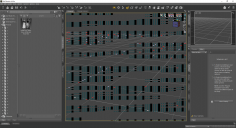
2017-09-03.png
1920 x 1040 - 268K
Post edited by CO3DR on

Daz 3D is part of 
Connect
DAZ Productions, Inc.
7533 S Center View Ct #4664
West Jordan, UT 84084
Licensing Agreement | Terms of Service | Privacy Policy | EULA
© 2026 Daz Productions Inc. All Rights Reserved.
Comments
Of course, the other thing I did yesterday, as I rebuild my DAZ Studio installation, is install all of the add-ons I have.
When I restarted DAZ Studio, the corruption was different. The first two screenshots were taken at this time, with the mouse hovering over different windows. First, I uninstalled any add-on that didn't indicate 4.9+ in its name. Still had corruption, no pictures. Then, I uninstalled ALL of the add-ons except for PostgreSQL and the Valentina CMS conversion add-on. The last picture, which still has SOME viewport corruption but very little, is the third picture. Restarting my computer and running memory diagnostics after this post...
Are your video card drivers up to date?
If you have an Intel motherboard chipset as your primary video display, try running DAZ Studio with the nVidia card via the nVidia Control Panel; that fixed my issues with it.
I am using the on-board (Intel HD Graphics 530) graphics. Windows Update says I have the most up to date version, 22.20.16.4749 (7.24.2017) I used to have the monitor connected through my GeForce boards, but I need to track down the threads that discuss whether to do that. I don't really play a lot of computer games, and the only one applicable (Rocket League) looks pretty good through the on-board graphics - just a little chunky at the start.
Keeping this thread on the visual corruption issue, today, I'm not seeing any corruption at all, but I also have no DAZ Studio add-ons installed (except for the PostgreSQL ones). I don't remember the results of the memory diagnostic; it took so long I walked away. But, my OS is behaving just fine, so I'm now more inclined to see this as a problem with one of the add-ons.
After starting DAZ Studio a few more times, all I can say is "sometimes" I get the video corruption. Sometimes DAZ Studio looks normal and works normally. And sometimes, it looks normal at startup, but once I hover over the View Cube, I get the black lines. And sometimes, it would just start with the black lines.
My only DAZ Studio add-on's right now are the two PostgreSQL ones.
I upgraded the Intel HD 530 drivers to the latest from Intel (22.20.16.4771); newer than Windows Update. Still had black bars.
I installed 4.9.4.122 on another PC. No black bars.
I switched from the Intel HD 530 integrated graphics to the GeForce card. No black bars.
The only other variable I can think of is that I am running a pre-release of the Windows 10 Fall Creators Release (Build 16278). I hope someone else is trying DAZ with the Fall Creators Release.
I'm considering this resolved - just don't use Integrated Graphics.
Those black bars are entirely due to the Intel graphics...so, yeah, pulling it out of the loop is solving it.