No valid CMS connection - Please help.

Charlie JudgeCharlie Judge Posts: 13,314
edited July 2017 in The Commons

I uninstalled everything DAZ including DIM. Then I reinstalled DIM and used it to install DS 4.9, PostgreSQL CMS, and PostgreSQLCMS from Valentina CMS Conversion.Now I keep getting the dreaded 'A Valid CMS connection could not be established.'  I have tried uninstalling and reinstalling but to no avail.

Any suggestions?

Thanks,

Charlie
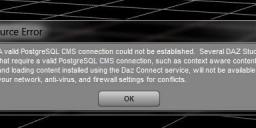
PostgreSQL.jpg
588 x 192 - 21K
Post edited by Charlie Judge on

Comments

  • fixmypcmikefixmypcmike Posts: 19,705

    What OS and security software?

  • Charlie JudgeCharlie Judge Posts: 13,314
    edited July 2017

    What OS and security software?

    Windows 7 home (64 bit) and Avast free edition. Before I uninstalled everything I had DS 4.6 and that worked.

    Post edited by Charlie Judge on
  • fixmypcmikefixmypcmike Posts: 19,705

    Make sure DS and PostgreSQL are whitelisted for local connections.

  • Charlie JudgeCharlie Judge Posts: 13,314

    Make sure DS and PostgreSQL are whitelisted for local connections.

    I'm not sure how to do that

  • zombietaggerungzombietaggerung Posts: 3,863
    edited July 2017

    I've been getting that message everytime I open DAZ since I updated to 4.9. Everything still works, but it's super annoying. Of course I don't use Smart Content or Connect, so I shouldn't have to worry about it right?

    Post edited by zombietaggerung on
  • Charlie JudgeCharlie Judge Posts: 13,314

    I've been getting that message everytime I open DAZ since I updated to 4.9. Everything still works, but it's super annoying. Of course I don't use Smart Content or Connect, so I shouldn't have to worry about it right?

    Actually, that seems to what is happening to me. I get the message everytime I open DS but it looks like CMS is working anywa. I still dee smart content anr have "Products' and 'Catagories' in my content library.

  • Sensual ArtSensual Art Posts: 645

    I had tons of similar issues with the CMS earlier. Try using the standalone installer with admin privs and launch the studio with admin rights every time. At least it seems to work reliably that way in windows.

  • retiretomauiretiretomaui Posts: 392

    I've been down this road. Sigh...

    You don't need to uninstall and reinstall everything, if you're experiencing the same issues that I was. I simply went into DIM and uninstalled the 64 bit Postgre. Then, I reinstalled it from DIM, all in one sitting. It took about two minutes total. After that, DAZ ran properly for several sittings. Eventually, the same thing would happen and I'd have to redo the process, but at least for a few days it ran properly. It wa a pain, but a workable workaround.

    Try it, if may just be that one issue.

    Bob

  • Charlie JudgeCharlie Judge Posts: 13,314

    I've been down this road. Sigh...

    You don't need to uninstall and reinstall everything, if you're experiencing the same issues that I was. I simply went into DIM and uninstalled the 64 bit Postgre. Then, I reinstalled it from DIM, all in one sitting. It took about two minutes total. After that, DAZ ran properly for several sittings. Eventually, the same thing would happen and I'd have to redo the process, but at least for a few days it ran properly. It wa a pain, but a workable workaround.

    Try it, if may just be that one issue.

    Bob

    It didn't help. I still get that message rvry time I start DS; but as I said above, it seems like CMS is running anyway. I don't know if it id PostgreSQL or the old Valantina

  • I've been down this road. Sigh...

    You don't need to uninstall and reinstall everything, if you're experiencing the same issues that I was. I simply went into DIM and uninstalled the 64 bit Postgre. Then, I reinstalled it from DIM, all in one sitting. It took about two minutes total. After that, DAZ ran properly for several sittings. Eventually, the same thing would happen and I'd have to redo the process, but at least for a few days it ran properly. It wa a pain, but a workable workaround.

    Try it, if may just be that one issue.

    Bob

    It didn't help. I still get that message rvry time I start DS; but as I said above, it seems like CMS is running anyway. I don't know if it id PostgreSQL or the old Valantina

    Charlie Judge, did you ever get this issue resolved?  I don't mean to hijack your thread, but I thought it would be better to post here instead of starting a thread on the same issue. I opened DAZ 4.9.4.115 today, and I got the same error message you did.  All I did was manually install the Dress Shoes for G3M Sunday.  It worked just fine yesterday (Monday), and now today (Tuesday), I get the error message.  I always maually intall everything.  I never use DIM or anything else.  I open the zip file and copy everything in it to the correct corresponding folder, so I can't believe that is causing the issue because it never happened before.  I didn't update DS since this version I have was released.

  • Boorsman said:

    I've been down this road. Sigh...

    You don't need to uninstall and reinstall everything, if you're experiencing the same issues that I was. I simply went into DIM and uninstalled the 64 bit Postgre. Then, I reinstalled it from DIM, all in one sitting. It took about two minutes total. After that, DAZ ran properly for several sittings. Eventually, the same thing would happen and I'd have to redo the process, but at least for a few days it ran properly. It wa a pain, but a workable workaround.

    Try it, if may just be that one issue.

    Bob

    It didn't help. I still get that message rvry time I start DS; but as I said above, it seems like CMS is running anyway. I don't know if it id PostgreSQL or the old Valantina

    Charlie Judge, did you ever get this issue resolved?  I don't mean to hijack your thread, but I thought it would be better to post here instead of starting a thread on the same issue. I opened DAZ 4.9.4.115 today, and I got the same error message you did.  All I did was manually install the Dress Shoes for G3M Sunday.  It worked just fine yesterday (Monday), and now today (Tuesday), I get the error message.  I always maually intall everything.  I never use DIM or anything else.  I open the zip file and copy everything in it to the correct corresponding folder, so I can't believe that is causing the issue because it never happened before.  I didn't update DS since this version I have was released.

    Nope. it's the same as before. I still get the message when I start DS; but evens I have smart content andalso can have a product section in the content library. So, it seems like CMS is running even though the message says there is "no valid connection"

  • mjc1016mjc1016 Posts: 15,001
    Boorsman said:

    I've been down this road. Sigh...

    You don't need to uninstall and reinstall everything, if you're experiencing the same issues that I was. I simply went into DIM and uninstalled the 64 bit Postgre. Then, I reinstalled it from DIM, all in one sitting. It took about two minutes total. After that, DAZ ran properly for several sittings. Eventually, the same thing would happen and I'd have to redo the process, but at least for a few days it ran properly. It wa a pain, but a workable workaround.

    Try it, if may just be that one issue.

    Bob

    It didn't help. I still get that message rvry time I start DS; but as I said above, it seems like CMS is running anyway. I don't know if it id PostgreSQL or the old Valantina

    Charlie Judge, did you ever get this issue resolved?  I don't mean to hijack your thread, but I thought it would be better to post here instead of starting a thread on the same issue. I opened DAZ 4.9.4.115 today, and I got the same error message you did.  All I did was manually install the Dress Shoes for G3M Sunday.  It worked just fine yesterday (Monday), and now today (Tuesday), I get the error message.  I always maually intall everything.  I never use DIM or anything else.  I open the zip file and copy everything in it to the correct corresponding folder, so I can't believe that is causing the issue because it never happened before.  I didn't update DS since this version I have was released.

    But did you update your AV/security software?


  • I'm sorry your still having issues with it.  After I posted this, I went and uninstalled a program called DriverAssist and restarted my computer and that fixed it for me.  I don't know it that program was the culpit because I installed it days ago.  Thank you for your quick response.

  • mjc1016 said:
    Boorsman said:

    I've been down this road. Sigh...

    You don't need to uninstall and reinstall everything, if you're experiencing the same issues that I was. I simply went into DIM and uninstalled the 64 bit Postgre. Then, I reinstalled it from DIM, all in one sitting. It took about two minutes total. After that, DAZ ran properly for several sittings. Eventually, the same thing would happen and I'd have to redo the process, but at least for a few days it ran properly. It wa a pain, but a workable workaround.

    Try it, if may just be that one issue.

    Bob

    It didn't help. I still get that message rvry time I start DS; but as I said above, it seems like CMS is running anyway. I don't know if it id PostgreSQL or the old Valantina

    Charlie Judge, did you ever get this issue resolved?  I don't mean to hijack your thread, but I thought it would be better to post here instead of starting a thread on the same issue. I opened DAZ 4.9.4.115 today, and I got the same error message you did.  All I did was manually install the Dress Shoes for G3M Sunday.  It worked just fine yesterday (Monday), and now today (Tuesday), I get the error message.  I always maually intall everything.  I never use DIM or anything else.  I open the zip file and copy everything in it to the correct corresponding folder, so I can't believe that is causing the issue because it never happened before.  I didn't update DS since this version I have was released.

    But did you update your AV/security software?


    I have Viper Anti-virus and I checked and it is up to date.

  • mjc1016mjc1016 Posts: 15,001
    edited September 2017

    In the past almost every AV has interferred (falsely...except in one case where it was(maybe?...it may still be happening) an ongoing intentional issue) with Postgre.  So, checking to make sure that it is whitelisted in the Av/Security software is one of the first steps when CMS suddenly quits working.

    Post edited by mjc1016 on
Sign In or Register to comment.
