Daz Studio model doesn't play nice with other renderers
 northern_95c9a3735f
Posts: 3
northern_95c9a3735f
Posts: 3
Hi,
I am having problems rendering Saab'a alKair in Max and other applications, I wondered if anyone knew what to do about it?
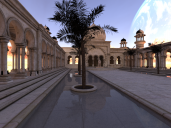
Please look at the render below - as you can see from the black areas on the towers and pillars, among other places, the textures don't wrap properly on import.
They do on FBX-import, but then on Obj-export, the mesh just goes batshit with randomly flipped normals, creating even more black areas the texture won't wrap around in the mesh - its as if something is either missing or not really firing in the texture channel
I've tried:
- UV Mapper to fix the normals, as it was a DAZ/Poser mesh, that usually fixes it.
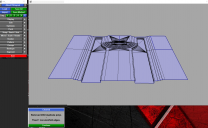
- UVL's clean function, which gave a result like the other attached image
- Manually trying to reset the texture UV channel, but that was just time-intensive and a pain
- Photoshopping the texture so we could cover the black (as we used the model in a real time tech-demo)
- Various settings for import/export - from faceted mesh to Poser settings in the Max Obj importer/DAZ Obj/FBX exporter
- Alembic
- Also tried to set the textures to baked in the Surface tab
- A trip into Unfold3D
- Installing my much disliked copy of Poser 11 and seeing if that did the trick, with their exporter - it did not
I am kind of stumped, here, and I also have a boss who was less than pleased with the resultts of using this model, as we also used it to a demo of light- and complete map baking
It's also cost me time I don't really have - which was a PitA too.
So - anyone, what went wrong here, what should I have done that I did not?
~s

Daz 3D is part of 
Connect
DAZ Productions, Inc.
7533 S Center View Ct #4664
West Jordan, UT 84084
Licensing Agreement | Terms of Service | Privacy Policy | EULA
© 2026 Daz Productions Inc. All Rights Reserved.
Comments
What options are you using on export? There's a collapse UVs setting in the OBJ exporter - which is sued to place all the UDIMs into the 0,1 square. However, if the mapping uses out-of-limit UV values to tile then collapsing will produce the wrong result.
Tried that, Richard, got the same result :(
I know the obj format has limits in what textures can do. I guess fbx should be better. Also you have to find out if it's an export or import issue. I'd use the free fbx converter from Autodesk to check it out.