Tools have gone missing in Custom Workspace
 Granville
Posts: 702
Granville
Posts: 702
Hi, BigBrain Daz People.
I have inadvertently removed the tools from the top in DS. I can't find the menu to reload them across the top. Does anyone know how I can load the tools back?
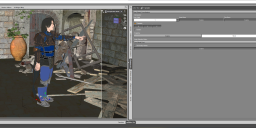
Missing toolbar.png
3837 x 1036 - 3M

Daz 3D is part of 
Connect
DAZ Productions, Inc.
7533 S Center View Ct #4664
West Jordan, UT 84084
Licensing Agreement | Terms of Service | Privacy Policy | EULA
© 2026 Daz Productions Inc. All Rights Reserved.
Comments
If you mean a tool bar: Window>Workspace>Customise, on the right, in the Activities tab, expand to show the tool bar list, right-click on the missing one, and select (I think) Enable.