1969Minibike - who helps me to polish it?
 Wolpi
Posts: 323
Wolpi
Posts: 323
Is there anybody who purchased the lovely Bike and can tell me how to apply the textures?
There is no subfolder for the texture and bump files and they are not found automatically. It's more than difficult to apply the textures part by part . And when the program asks for the missing files it's impossible to call up the bump file since the maps are not visible in the Textures folder,

1969 Minibike.jpg
772 x 399 - 34K
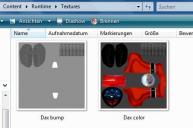
Textures subfolder.jpg
447 x 296 - 23K
Post edited by Wolpi on

Daz 3D is part of 
Connect
DAZ Productions, Inc.
7533 S Center View Ct #4664
West Jordan, UT 84084
Licensing Agreement | Terms of Service | Privacy Policy | EULA
© 2026 Daz Productions Inc. All Rights Reserved.
Comments
It sounds like the product isn't installed correctly. How did you install it, and what is the full path to the texture folder
I installed it manually: it's unusual that the textures don't come with a subfolder for the TEXTURES folder. So the program doesn't seem to find the files within the RUNTIME - TEXTURES folder. It is looking for a strange path instead (Library - People - ... )
So what is the full path to the Textures folder?
Content - Runtime - Textures - Dax color
Content - Runtime - Textures - Dax bump
I just tried to put both the maps into the Textures folder without creating a subfolder - but it isn't found neither
The Content folder shouldn't be there, assuming it is inside your actual content directory (My Daz 3d Library or whatever you use).
What's the full path (e.g. C:\Users\Public\Documents...)?
Is there a folder named "Content" inside your actual library folder?
Nope, of course "content" is in the unzipped file only and not in my library.
Within in the content folder there is "runtime - textures - Dax color/ Dax bump".
Actually there should be a sub-texture folder as "Runtime - textures - PerspectX - Dax color" or "Runtime - textures - Motorbike - Dax bump" or something like that.
So the color and bump files are listed in my explorer but not visible in my library when DAZ asks me for the path to them.
I managed to apply the color map manually but most parts of the bike stay grey then. I would have to color pneus and all metal chrome parts myself then. And I don't know how to apply the bump file manually.
What a pity.I really loved this bike.
According to the file list in the readme \Runtime\Textures is the correct location. Texture files - and the Runtime folder in general - do not appear in the content panes; if you can see the Runtiem folder then your diectory set-up is not correct.
No, since there are no additional textures for the POSE folder I didn't expect to find texture files (the runtime folder in no way) in the content pane and of course it doesn't appear there.
I just expected that the program would find and apply the textures automatically when I choose the bike in the VEHICLES folder.
And since the texture and bump files are the first and only ones in my TEXTURES folder that came without subfolder I can not even tell the program the path to them when it asks for it. The maps are just invisble in the TEXTURES folder then.
Lacquered parts and pneus are ok now. Eventually somebody can help me with the settings for nice metal chrome effects.
The missing file alert should tell you what the expected path is.
Nice hint :)
But as said the strange path leads to a different item in my people folder. I placed the texture files there though just to see what would happen - they are invisible and can't be found!
I think the pack is faulty and again this is a case I would like to contact the creator. Regrettably DAZ doesn't support the direct commnunication, do they?
So what is the path in the error? What is the full location of the file on your HD, and what is the path to the content directory?
I have this and it loads with everything for me. The path for the body color, for instance, is
C:/Users/Public/Documents/My DAZ 3D Library/Runtime/Textures/DAX color.jpg
Does your path match?
Ooh great! You got it also! Yep, the path is the same where I installed it, even though it does't please me to put maps loose into my Textures folder.
The program didn't find or recognize the bump file though.
I examined the file alert again and noticed that it asks for "carbon_bump" png.
As my earlier screenshots above show there is only a file called "Dax bump" and then it is a jpg image!!
This is why it can not find it. (And it makes me wonder why it is working with you)
So I converted the jpg Dax bump.jpg to carbon_bump.png
Now it is found but it still doesn't work.
Never mind. Since I managed to apply the lacquering at least I only need help with the chrome and metal parts and the bump map.
It would be fantastic if you could make some screenshots of the concerning settings or tell me some essential values for that.
That doesn't appear to be anything to do with the product, judging by the folder names.
This means the designation of the file the file alert is asking for is not necessarily the one which is required?
...
Now, I think the two texture maps and their unusual directory are ONE problem. But I managed it.
The other problem which probably has nothing to do with the textures is the lack of shiny chrome and metal effects.
So it seems I have to color the tires myself and experiment with shaders and settings ...
I have to agree with Richard, have you tried deleting it in DIM and downloading and installing it again?
Mine is a stock install, other than converting it for iray with Uber, and adding the stock "rubber" shader
to get rid of the gloss on the tires and seat. Can't do that with the grips, as they share a surface with
the headlamp glass (which gives a very strange reflection when out in the woods!)
Here they are: