[SOLVED] Problem with geocraft...
 nicstt
Posts: 11,715
nicstt
Posts: 11,715
I use the follow process to fit a geocraft, and it works, or it appears to.
1. Rig the prop first, (Dont add a subD; Set the target item (such as as Genesis figure to Base and turn subD to zero).
2. Select Geom on Target (Make sure target is selected.) - Geocraft should be fitted.
3. Right-click (on Target) and select Geometry Assignment>Set AutoHide faces for Attachment.
4. Select Geocraft Item in Dialogue.
5. Select Ring of polygons on base; it is the outmost ring of geometry visible around the Geocraft.
6. Right-click (on Target) and select Geometry Assignment>Set Graft Faces for Attachment.
7. Select Geocraft Item in Dialogue.
8. Fit to NONE and refit.
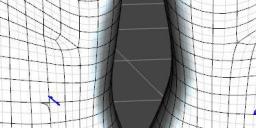
The two figures both have the geocraft fitted, yet the one on the right, you cant tell. I played around with subD and other settings, but they both have the same settings on the figures and on the craft. The geometry is not misalligned, so it should match up. Pretty sure I've forgotten a step as I managed it previously. I'm almost believing its something to do with G8, but it doesn't make sense.
EDIT:
For reference for others, the instructions above worked for me; I changed instruction 1 to match what worked.

Daz 3D is part of 
Connect
DAZ Productions, Inc.
7533 S Center View Ct #4664
West Jordan, UT 84084
Licensing Agreement | Terms of Service | Privacy Policy | EULA
© 2026 Daz Productions Inc. All Rights Reserved.
Comments
I see, actually the left is not correctly graft working.
then there is no need to set sub-D first, it make more complex to check actually it working.
then I usually first,>Set Graft Faces for Attachment. then next set,, AutoHide face.
though I do not know, we need to keep this order. but to check graft item,
we must need to change current tool from geometery editor(though it is just confrim) to another one, eg node selection tool.
then once un-fit, and fit again. then if change sub-D for Actor, graft item auto apply sub-D.
And you say most outer mesh around Attach geometry to set as graft facet. ,, but as for me,,
I set surface which most inner faces of the attach roop "edge"
(we need, same place Loop edge only, to graft work for base (actor mesh) and attachment. ,though usually we tend to keep loop face,,)
, then set most inner loop poligons of edge, as graft facet. in my pic blue colored faces = graft faces which I set for genesis8
green line is attachment loop edge. at least as for me,, it work about all graft item,,(include hand made more complex one,and convert from genesis3, set again graft faces)
then I include those blue facet as auto-hidden facet too.
Thank you for your reply:
Out of curiosity, do you set Genesis female (in this case as the target for the geocraft) to base resolution?
... And I use the settings in the image for rigging the geocraft.
Edit
What I have noticed is, that the geocraft won't apply if the target is set to subD base. It has to be high resolution, and turning the target to high res from base very slightly reduces its size.
HI,,, Yes I keep base untill actually test them. you need not change sub-D at all. I do not think it has meaning, when we use TU too. (it all return as base, when ciculate transfer process I believee,, though we do not see it)
And before Josh tutoriall said,, even though we export and sub-D ,then make atttachment, then return base,, import work,, but he confirmed, it not work current daz studio,
(when I see it,, he said so)
and your setting is no problem. (though it depend on how you rig,, as you know well) . it is right. I just use default setting. we can change weight or add rig later. after set facet of attachment,without change node name, or move edge loop I believe.
then now I test, for my purpose,, intentonally only keep loop edge, but add triangle, and move other vertex of the attachment faces. to corrupt facet which need to keep same position (we often heared so before), but actually if I just keep loop position, and try samething,, it work . so that we need not care, about faces just keep loop edges at same point of genesis figures. (if we use them).
If you need to apply sub-D (high resolution) for graft item, to see sub-D effect, I think it something wrong, and not work as graft item.
all my graft item , I do not apply sub-D for atachment at all.. (so thare is no high resolution option for target attachment, it only sub-D fit to and actor (source) apply sub-D)
It wont work if I have sub D on main figure set to Base.
I have to leave it at high resolution. As you can see, it is attached in the figure, yet not correct. I even did a new export of Genesis at base resolution to make sure I hadn't moved vertices by accident.
I understand what you say, (just read again)
but I set sub-D for base, to clear show it work as grafted item, but even though I do not set sub-D for base figure, it still work as grafted item,
actually hide poligons, and keep UV about I leave it off.
I'll do a test on a fresh genesis figure, set everything to base; then export, remove a section and send it back, then there is no posibility of moving the mesh. I'll post results.
1. I load grafted item without fit to, genesis8 and graft item keep zero base. then it not fit to. so that it not show as graft item, we can see seem or double faces.
so that I can see clear seem.
2. I set graft item fit to genesis8F, but keep base resolution for genesis8. it now work as grafted item.
And I make it from imported obj again, unfortunately I did not save it, then I never touch resolution for genesis3female when I set TU and set group.
I just keep base resolution.(no sub-D) for genesis8.
then as your top pic, you alredy applied sub-D. is not it? but it not work as graft item about left. I think, it not matter you apply sub-D for base figure.
and it is not only aobut this sample graft . I modfied genesis3 anatomy (which are sold more complex one,, somewhere,,) for G8.
it show same thing, I need not set-sub D for base to aattach and work as grafted item.. (though we usually set sub-D to show Graft item work then auto apply sub-D for item)
You also have to set the ring on the geograft as a graft face, but to the figure itself. I was having that problem the other night and that's what fixed it.
I setting geometry to hide that corresponds to the shape of the graft and a ring of geometry as graft face.