Daz-Hexagon welding props to boots.
 vinnyfranklin
Posts: 6
vinnyfranklin
Posts: 6
Im making some native american clothing items by modifing other stuff( there are 3 million natives still alive in the usa, you guys should make more native clothing items.). What I am trying to do is weld this shield to the boots so it stays put when I pose the character. I don't know if that can be done in Daz so I was thinking Hexagon could help. Any ideas? My speak Daz well and some Hexagon so I sould be able to understand. Thank you in advance.
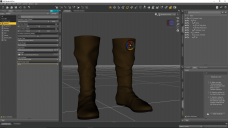
daz boots.PNG
1920 x 1080 - 489K
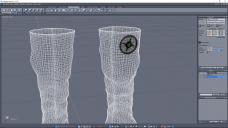
hexagon boots.PNG
1920 x 1080 - 264K

Daz 3D is part of 
Connect
DAZ Productions, Inc.
7533 S Center View Ct #4664
West Jordan, UT 84084
Licensing Agreement | Terms of Service | Privacy Policy | EULA
© 2026 Daz Productions Inc. All Rights Reserved.
Comments
If you want it to move with the boot it may be enough to parent it to the figure's left shin
I tryed what you said Richard with some sucsess. If the knee bends the shield moves but standing poses work ok. I think I need it to become part of the boot for it to work well. Thank you for the info.
In Hexagon, if you weld two pieces together, you will loose the UV map.
if you export boots and shield decal , at same time, they are joined as one obj. (not use hexagon bridge, but just export from DS and Re-import)
then use transfer utility , and transfer weight ,rig from Boots not work? if protected to transfer weight about shield area,,
you can keep shield separate, but transfer weight from Base figure mesh to the Shield part only. then can use it individual accessory (rig) I think.
it may bend well along to the rig and keep more better distance, than just parent I think. and JCM morphs will be auto-transfered as same as boots.
are there any modelling programs that you know of that will allow such a weld, and keep the UVs as they are?
tnx,
--ms
The next step is to create a Rigid Follow node on the boots and parent the shield tot hat - that will ensure it moves with any morphs.