EYEdeas 5 G8F
 xyer0
Posts: 6,510
xyer0
Posts: 6,510
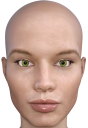
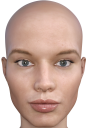
EYEdeas 5 Extended for Genesis 8 Female(s) had dark outside corners when rendered. I've changed the sclerae, used the presets, but I'm still getting this look. Anybody know anything about this? This is V8 with First Class Faces 02 and Jolina skin. The first render is EYEdeas 5, and the second is Jolina eyes sans G3 workaround. If anyone else has this product, could you try it out and see what you get?
Arki suggested that I reduce the Refraction to remove the shadow.

Daz 3D is part of 
Connect
DAZ Productions, Inc.
7533 S Center View Ct #4664
West Jordan, UT 84084
Licensing Agreement | Terms of Service | Privacy Policy | EULA
© 2026 Daz Productions Inc. All Rights Reserved.
Comments
OK. The darkened corners are shadows caused by the eyeball's being too small to fill the socket. I scaled up the X axis (red) to 118 (on this character) 107 (on G8F base) to fill the socket sufficiently without the eyeball spilling out of the eyelids during movement. Of course, this means that the iris/pupil is no longer perfectly circular (if I scale up the Z axis as well to maintain the sphere, then I have to move the eyeball backwards, creating another conundrum). But the shadows are gone. Now, my dear Watson, to the case of the disappearing lacrimal. Or not.
Very dissappointing. I have this product in my cart but can't be bothered with workingaround.
@ALLIEKATBLUE Please don't take my findings as definitive. However, I merely loaded and rendered. I got the same results on G8F Base, although I did not post them. This is why I was hoping someone else who owned the product could try it. One thing I liked about this product was that the sclerae are not mirrored or duplicated, like Victoria 8's (and most other characters). The iris colours are too vibrant for my tastes, but I prefer photos of actual irises, and too much is always better than not enough.
Oh no, I haven't removed it from my cart because I do want the brows and lashes. Just glad that someone mentioned that this may be an issue now so I don't have to search around for a solution. Thanks for your imput
I think the EYEdea (sorry, just had to put it like that ) was to pull the inner sides of the eye away from the corner so they weren't as flat as they are by default.
Thanks for the pun! I had not considered that. You know, the human eyeball is not a sphere, but I don't know (and cannot presently find out) if the G8F eyeball is a sphere.
It will all get sorted. Arki got in touch with me and gave me some suggestions that I have been unable to implement because of an ongoing render. She was not able to reproduce my results, and I'm using default everything except Render Settings / Lighting Resolution = 4096. These are the best sclerae natively available for G8F once I pump up the gloss. So, I'm going to find out what I'm doing differently.
@ALLIEKATBLUE Arki suggested that I back off on the Refraction to remove the shadow. I will do that and post my result tonight. While I have your attention, there's something that I want to mention: Your renders are the bomb. You've got style. Thank you for being so yeeeewww! ("bad," "cool," etc. seemed insufficient).
@xyer0, thanks so much for that. I was having a crummy day and that brightened my mood. I always thank the Gods for friends I don't even know. Looking forward to your eye renders.
Per Arki's instructions, I lowered the Surfaces/EyeMoisture/Base/Refraction Index from 1.20 to 1.00. She said it could be "1 or any other value below 1.15."
First image: G8F with EYEdeas 5 as loaded (Refraction Index @ 1.20). Second image: Ditto with Refraction Index @ 1.00
As you can see, that rectified the issue. So, now you know. Now to get some wetness and shine on those eyeballs. I went for the lower value because I'm an extremist. Thanks @Arki for a brilliant product and excellent customer service.
"You is kind. You is smart. You is important."
I recommend this product - the eyebrow morphs alone are worth the price.