Normap map too shiny
 RobertDy
Posts: 277
RobertDy
Posts: 277
Hi,
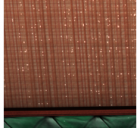
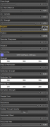
I bought a product called bar interior and its surfaces tab isn't like the usual 3Delight menu, see attachment. When I render the wall has these weird shiny bits, see other attachment. How do I remove these shiny bits? The only way was I edited the normal map but that made the wall too dark.
Thanks!
wall.png
181 x 169 - 59K
surface.png
315 x 802 - 40K

Daz 3D is part of 
Connect
DAZ Productions, Inc.
7533 S Center View Ct #4664
West Jordan, UT 84084
Licensing Agreement | Terms of Service | Privacy Policy | EULA
© 2026 Daz Productions Inc. All Rights Reserved.
Comments
That PA usually uses custome Shader Mixer sahders on their DS materials, which is why they don't have the standard options. Are you using 3Delight or Iray to render?
3delight. Any way to go about this?
I have that set, but the wall I am looking at has different options - which wall surface are you looking at? Of course it may be i need to update my copy, it's a pre-DIM install.
I see what you mean about the firefly-like effect. I thought lowering Specular Strength would kill it but even going quite a long way down isn't helping. having looked at teh network imported into Shader Mixer it isn't actually adding a great deal to the Default Daz Shader - though that may be because more features are available now than were when the product was created.
Umm...does that mean that nothing can be done about it apart from removing the normal map?
The normal map shows the effect becuase it add pseudo relief to the surface, so the bits that are "facing" the light source catch the light (or reflect the light) while the areas thata re "facing" away don't. Adjusting the nomral map won't change the glossiness, it will just replace scattered highights with bigger highlights. Experiment a bit more with the Glossiness, Specular, Reflection or Refraction settings, or try using a different shader (or even a generic material).