Subdivision surfaces whacky after import into DS
 aaráribel caađo
Posts: 691
aaráribel caađo
Posts: 691
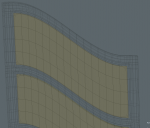
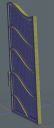
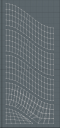
I modeled a bentwood door and frame in Modo using subdivision modeling. In Modo, the glass panels are flat even when subdivided. After I brought the parts into Daz Studio and applied subdivision, the glass became distored, curving not just on the outline (like in Modo), but along the unstressed planes, too. Is there a way to control for this? I'd prefer not to add extra geometry just to keep this fairly light.
All the Modo screenshots show the door in subdivided state. The full render shows how the glass distorts in DS.


Daz 3D is part of 
Connect
DAZ Productions, Inc.
7533 S Center View Ct #4664
West Jordan, UT 84084
Licensing Agreement | Terms of Service | Privacy Policy | EULA
© 2026 Daz Productions Inc. All Rights Reserved.
Comments
Try adjusting the Edge Interplation setting in Parametrs>Mesh Resolution in DS, or the SubDivision Algorithm (which did yu use in modo - shift-tab for "Psubs", which is CatMark, or plain tab?) Did you make use of edge weights in modo - annoyingly those don't seem to export to FBX, though I'm sure they did in the past.
Thanks, Richard. I just used regular tab, rather than Psubs. I didn't use any edge weighting, since I didn't know how to get them into DS (or use them much). I think I tried differetn SubD algorithms in DS, but I'll try again to see if I can get a better result. Or try switching to Psubs in Modo to see how CatMark will look.