[Resolved] Missing Objects
 Fuerchan
Posts: 63
Fuerchan
Posts: 63
Hello,
When I open one of my DS objects I have this message :
Joint [MissingObject 01.jpg]
Then I rename the folder "Objectsperso", but I have this message:
Joint MissingObject 02.jpg
How do I open my objects from the "! Perso" folder ?
Thank you ;-)
F.
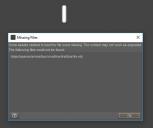
MissingObject 01.jpg
503 x 422 - 22K
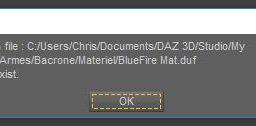
MissingObject 02.jpg
519 x 126 - 18K
Post edited by Fuerchan on

Daz 3D is part of 
Connect
DAZ Productions, Inc.
7533 S Center View Ct #4664
West Jordan, UT 84084
Licensing Agreement | Terms of Service | Privacy Policy | EULA
© 2026 Daz Productions Inc. All Rights Reserved.
Comments
Could you go into a bit more detail about what you are doing please.
Hello,
I created objects in 3D.
Then, to use them as asset, I saved these objects in a folder in "My Libary", called "! Perso" and in formats:
- Scene
- Scene SubSet
- Installation Presets
Since then, I had to rename the file, in the past, I do not remember (...). And the link is no longer anywhere.
And, even if I rename my source folder as requested in the error message, this does not solve the problem but created another one (Message 2).
Thank you
F.
The error is not asking you to rename your source folder - it is telling you it can't find the files. Did you use File>Save as>Support Asset>Figure prop Asset (or Sceen Assets), or did you just save as a scene file? Where is the OBJ file - somewhere in My Library or still in another location?
Hello,
The fjier obj is placed in:! Perso / weapons / bacrone / ke 0300.obj
But DS seeks it in:! Objectsperso / weapons / bacrone / ke 0300.obj
It would be necessary to modify the path of obj (if possible) so that DS will look for the object in:! Perso / weapons / bacrone / ke 0300.obj
If possible, how?
Thank you
F.
The path is stored in the .duf file - could you upload that (either attach it to a post or put it up on Dropbox or the like and post a link).
Hello,
Here is the .duf file.
Thank you
F.
If you unzip the .duf file (I used 7Zip, but you can use the batch Convert pane in DS) and open it in a text editor you can find and correct the path -for example, in your file it's one line 847
So presumably to match your existing folder names you need to edit it to
The extract above also shows that the converted files DS initally looks for are in /data/auto_adapted/KE%200300_885/geometry_7443157f_cbf2_a45f_f75b_28bae6bb4f9c/
Hello,
I made the changes in the .duf file (I placed the .obj file in an appropriate folder) and writing this:
Perso \ Weapons \ Bacrone \ Obj \ KE 0300.obj
But now another error message appears when I want to insert the object to the scene.
Also, I do not have a KE 03200 file in / data / auto_adapted / ...
Does this error come from there?
Thank you
F.
You need to use / not \ as the folder separator in the .duf file - did you?
Hello
Indeed, the problem came from there. I was able to recover a good part of my objects.
Other problems arise ... But one thing at a time ... It will make another subject, perhaps ...
Thanks for the help.
F.