Decent water for boat images
 jdavison67
Posts: 690
jdavison67
Posts: 690
in The Commons
I typically do not buy boats from DAZ because I can't find any water objects that looks good.
I see there is a new boat for sale, and the water in the promo images looks good, but where do we find water and boat wakes, that we can use to render with the same results?
JD
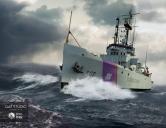
01-coastguard-cutter-daz3d.jpg
1404 x 1080 - 277K

Daz 3D is part of 
Connect
DAZ Productions, Inc.
7533 S Center View Ct #4664
West Jordan, UT 84084
Licensing Agreement | Terms of Service | Privacy Policy | EULA
© 2026 Daz Productions Inc. All Rights Reserved.
Comments
unfortunately It's all postwork, see this thread
https://www.daz3d.com/forums/discussion/163746/coastguard-cutter-commercial
Yeah, I would buy a 3D water package that looked like that in a heartbeat.
For water (not wakes or splashes), you can try iReal Ocean Water.
In THIS IMAGE, I made my own water and splash meshes, but modfied Will Timmins's procedural water shader from one of his procedural iray packs.
Ocean Wide is a nice option for this and converts to Iray well.
Just about any flat plane primitive can be made into a water surface. Create a plane primitive in DS, scale as needed, add a good texture, bump map or displacement map to match (to create waves or ripples on the water surface in render), set transparency, glosiness, and reflections and you'll have a good water surface. Or if you have them available any number of water/glass presets can be made workable and are available in a variety of shader sets here.
As for ships wakes, there's a set of freebie ones over at ShareCG in obj format that can be imported and used as props in DS, all you need to do is match the glossiness, transparency and colour so that it'll suit the effect you're trying to get (or apply the same shaders you used on the water primitive), scale as needed to fit aroudn the boat you're using, and manualy parent them to the ship in your scene tree. http://www.sharecg.com/v/25282/gallery/5/3D-Model/Wakes
tried that for an image I was working on and just couldn't get a believable wake look. I could get the 3d part down, but finding a realistic looking shader for the wake and froth was next to impossible.
It takes a bit of tinkering to get things looking right... I used the wakes I mentioned and a simple plane primitive for the water in these images...
Nice work, love the last one with the carrier. I have an image i was working on with a moving DDG and while I could get the trailing wake looking half way decent, the bow wake I could never seem to get it right. I changed up the scene and you can see a bit of the trailing wake in this image
To get the bow splashes for the wakes I created a couple of primitive planes that I scaled one smaller and longer than the other and overlapped on each side of the bow along with the wakes props from that set. I added a transparency map of a wave with the foam at the top and a texture to match... it worked out quite nicely. A small touch of post-work just to blend the splashes into the rest of the wakes and presto! :)
I can dig through my files and see what settings I used on my water surfaces if people are interested...
I used a similar technique to do the water surfaces in this image (though a different prop set for the water running from the fountain and the splashes), the ripples in the water were accomplished with a displacement map...
Great ideas here.
Thanks to all!
Jd
@FSMCDesigns where did you find a model of an Arleigh Burke (Aegis) class destroyer? Although I would love a Ticonderoga class model since that is what I served on, CG-57 USS Lake Champlain.
Its a commercial game model I helped design for a game community. I can point you to the purchase site and a possible way to get it into DS (different format for the game) if interested. I had the source files since I helped model it, so it was easier for me to get it into DS.
BTW Thanks for your service!