Content Library: Do you like Subfolders or not?
 Scavenger
Posts: 2,677
Scavenger
Posts: 2,677
in The Commons
Looking for group opinions....if you have a model with a bunch of options, like say Hide/Show controls for the walls...Do you prerfer them to be all in a single folder, or do you prefer them to be organized, like by the sections of the model?
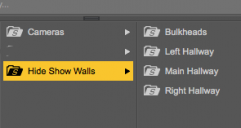
Screenshot 2017-04-13 19.13.33.png
295 x 157 - 12K

Daz 3D is part of 
Connect
DAZ Productions, Inc.
7533 S Center View Ct #4664
West Jordan, UT 84084
Licensing Agreement | Terms of Service | Privacy Policy | EULA
© 2026 Daz Productions Inc. All Rights Reserved.
Comments
I prefer to have sub folders especially if it is for iray/3delight materials. I get quite frustrated if they are all mixed in because quite often they don't have visible difference in the icons.
Subfolders
And Addendum.. can you have too many subfolders?
Subfolders.
They're not as useful when I feel like paging through my content libraries, but their advantages far outweigh that small annoyance.
As for too many subfolders... The point at which there are too many subfolders varies depending on the product.
I like subfolders too.
Laurie
I've never run into too many sub folders. But I frequently run into not enough subfolders
Really depends.. but I've found from use of two different set of shaders: One set I have Iray/Iray Shaders and Iray/Iray Mats, then 3DL/3DL Shaders and 3DL/3DL Shaders, so two folders with two folders inside each. In the other product I have the 4 folders "loose", so just Iray shaders, Iray Mats, 3DL Shaders, 3DL Mats. I end up using the one with the 4 loose folders a lot more. Then I got frustraited with even that much and just made custom actions of the ones I use the most. LOL But besides the point.. use 'em where they make sense but keep 'em loose if you can get way with it. But talking about folders within folders within folders, would much rather have at least one or two levels of subfolders instead of a bunch of stuff just thrown together.
I prefer subfolders as long as they're logically and intuitively done. Where things get irritating is when some vendors do things like stick props inside pose files while others do the inverse and stick pose files inside props, or when a product contains things for both G3F and G3M and the vendor just shovels everything into a G3 folder. And there are cases where subfolders are just a bad idea, such as when you have a dedicated pose to make a particular bit of footwear fit, yet the pose is in a different folder.
+ 1 for subfolders!
Only if it serves a real purpose. It's kind of annoying in some cases, like having a subfolder for just one thing. I don't like needing to click 6 folders deep to find stuff, so I usually reorganize stuff to streamline it anyways. Say a character set. The folder structure I use is "Character Name" inside that I make sure all the inject type stuff is in there, then if there are materials, that is in a subfolder called iray. And that's it. A clothes set, the clothes loads are in the main folder, then I have an iray materials folder inside that. Foot poses I make sure end up right after the shoe in the main folder. I like to keep stuff simple and streamlined as possible.
-1 for subfolders. +0.5 for tag based classification. +1 for nested tags.
I think the rigid tree structure of folders heavily restricts content classification. It may be 'adequate' for certain intent and purposes, but as a generic mechanism for content classification they are a BAD practice, if not an archaic one. Take the example for materials. There was a time when those were listed under some 'Mats' folder. Everybody assumed that it was sufficient as the content was intended only for a single application which used only one rendering engine. Fast forward a few years and we eventually had Iray in addition to 3dlight. Now we need another level of material classification - 3DLight and Iray as the materials are incompatible with each other. Okay, not a big deal, henceforth we just need to name the materials folder as Iray/3dlight instead and everything would be hunky dory. Just remember, hundreds of old content still use Mats. Fast forward a few more years and now we have Studio v4.8 and v4.9 with different Iray versions which require different shader 'optimizations'. So what do we have now? A ton of content with Iray materials with no indication to which version they are 'optimized' for. (May be some artists were considerate enough to provide materials for both versions in separate folders, but lets not get there). Now we have a bunch of Iray folders with recently released items which look good on v4.9 but may not look as good on v4.8 and there is not way to tell that from the folder structure (unless the artist was considerate or you had a fantastic memory of remembering that this content was released after v4.9). If you are catching my drift, you can see where this is leading us to.
Now imagine if I had a tag based classification (and search) of content. As content consumer I just need to create a new tag and assign it to the materials. Materials that renders 'acceptably' in 3dlight as well as Iray gets tagged with both tags. When a new (incompatible) generation of studio/Iray is released all I have to do is rename my existing Iray tag to Iray4.8 and start using Iray4.9 tag for new content. Note the important difference between renaming folders vs renaming tags. Folders are local to each content and hence has to be renamed individually for each content. Tags are global and can be easily renamed universally. This is besides the obvious advantage of tags that you can assign multiple tags to a piece of content depending upon the number of criteria they satisfy (without reworking on entire folder structures) each time the criteria evolves or new criteria are added.
Using tags brings another set of challenges - missing the convenience of hierarchy that we are so accustomed to while using folder structures for classification. But if the tags can be nested arbitrarily based upon the convenience (or any convention) then the notion of hierarchy can be built on top of tags. Gmail tags, anyone?
I'm not familiar with Daz having a tag based system?
I like subfolders - but I rearrange my own.
So I might put the main model in the main folder, and sub-folders for 3DL / IRAY mats, another sub for 'part' models, props - depends on what it is and how it's used.
The metadata for content library does have a rudimentary support for tags. Though its present intent (and perhaps implementation) is limited to search, yet I believe that functionality can contribute in this direction should a plugin developer be interested.
I agree. I quite often come across products organised like this:
Vendor Name
Product Name
Materials
3Delight
Iray
I usually reorganise the directories to look like this:
Product Name
Mats 3DL
Mats Iray
Cheers,
Alex.
Subfolders are great.
Changing where any folder appears with ! is extremely annoying; I've actually returned an item that was in part due to that.
subfolders
Yes and no. I hate when they are "Vanity folder>My vanity Folder Props>Product Name>Props>....." Some people go way over board.
If a product has 100 shaders, and some are cloth, metal, glass, liquid.....Then yes, sort those out into subfolders. "Shader Presets>Prod Name>appropriate sub folder"
If I have to dig through 5 levels to get to something it really annoys me. If I have to wade through 50 icons and try to figure out what's what....it really annoys me. Use folders for clarification, but I'm with nicstt...stop the !Vanity stuff. I am way less likely to even find your stuff when it begins with a ! as I have already skimmed past those to the alphabetical section. Also - don't prefix every material folder with MAT {product name} There are a million of those and they are also annoying to wade through. If it is in the Materials folder, I KNOW they are "MATs" alreay.
Yes please
I streamline by delting anything 3DL (not going back). Then you one folder for material/shaders. Unless of course the artist breaks material for figures into eyes, makeup, lips etc. Even those folder can be deleted since the differences are pretty clear.
I should add that I don't bother using Studio's categorization since my folder structure does that for me. I also keep an updated spreadsheet for all product I have purchased.
Not sure what y'all mean about vanity ! stuff?
It would mean putting the products under:
/Silent Winter/Props/Glass Jar/Prop/[Glass Jar]
or even worse:
/!!Silent Winter/Props/Glass Jar/Prop/[Glass Jar]
The name at the front is unnecessary when a suffix of intitials would do (so as not to overwrite another vendor's same-name product).
/Glass Jar SW/[Glass Jar]
Subfolders for me as well. Especially mats folders for Iray and 3Delight. It drives me insane if I can't tell which is which. The vanity stuff doesn't bother me much, once I find it once I categorize it into my own folders anyway so I never see it again.
+1
Subfolders please!
Definitly subfolders. Anything that helps me stay organized is a help.
I'm all for subfolders as well, if there are enough items that tossing them all in together creates unnecessary clutter. It helps that I don't use the CMS or Smart Content or categories anyway, so I can easily create/delete subfolders as necessary. And much too often it's very, very necessary...
As for !vanity !folders, I keep seeing PAs use them for Textures and (for Poser items) Geometries folders. Why? It's worse than useless, us users can't see these folders anyway.
Actually, it's not useless. Suppose you have 10 shirts in your collection from 10 different vendors and they all name the texture/geometry 'shirt'jpg' and 'shirt'.obj' and they're all in the main Textures/Geometries folders. Each new install would overwrite the previous one. When they're in named sub-folders, they're unique.
Unless you're only referring to the ! in front of the folder name, in which case, I agree 100%
And re vanity folders. I use the folder Props/maclean/product for all my stuff. Some people don't like it, some do. And if I change after more than 10 years, some people will like that, some won't.
I was originally persuaded to use a 'maclean' folder by the people at DAZ, and I reluctantly agreed. (I'm not so vain as to insist on having my name plastered all over people's HDDs). But having used the same system for all these years, changing now would simply annoy some customers.
<nod> That's what I meant. I don't think I've seen anyone manage (yet) to put one into the /data/ folder, but I suppose it's only a matter of time...
I haven't decided if I like that or not...I seem to for characters..makes it easier to find them, while clothes I guess I don't associate so much with the individual vendor as I do characters.