Willow Creek Render Presets for Iray (Commercial)

hi guys, just a heads up to mention I've started inlcuding Iray render presets to match the camera presets that come with my environments,so you'll now be able to get the same images that you see in the promos..starting with Willow Creek you'll find a new folder of render and camera presets,the cameras have locked dimensions(which you change in camera settings>dimensions),the render presets adjust lighting and render/tonemapping settings.


Cheers

S
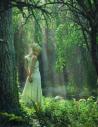
001-Willow-Creek.jpg
1000 x 1300 - 708K

Comments

  • Griffin AvidGriffin Avid Posts: 3,838

    Great idea. Hey, now that you're here, do you have to approve those third-party lighting/iray lighting presets for your products?

    Do you have any say in them?

    There's one for your Urban set(s) and I wondered what you thought of that whole idea....

    Might be nice if you got some pennies since they are selling an extension to your product...

  • Griffin AvidGriffin Avid Posts: 3,838

    Oh and I grabbed your creek just now. Being an advanced, power-user do you know or have suggestion for what a person could do to turn that set into an alien environment?

    Is there some kind of color or shading setting I could alter to, let's say make the plants blue-ish...?

    Weird question, I know.....

  • StonemasonStonemason Posts: 1,242

    I'm fine with that,any add-on to my stuff still means you need to buy my stuff to use it :) ..so I'm not losing anything..I don't have any of them though and have no idea how good they are..and I don't need to approve them,I find out about them the same day you guys do.

  • StonemasonStonemason Posts: 1,242

    you could edit the texture maps?..change the tranlucency color maybe?..dunno,I made an alien environment years ago but it was all using emissive shaders and took forever to render so I dumped it,Howiefarkes has a nice alien environment but it's for Carrara not DS https://www.daz3d.com/darkwald ,I imagine thats the kind of look you'd want,

    then again,Endor is an alien planet and it looks remarakably like a redwood forest ..so maybe just put in an alien or crashed spaceship and your all set

    avxp said:

    Oh and I grabbed your creek just now. Being an advanced, power-user do you know or have suggestion for what a person could do to turn that set into an alien environment?

    Is there some kind of color or shading setting I could alter to, let's say make the plants blue-ish...?

    Weird question, I know.....


  • ALLIEKATBLUEALLIEKATBLUE Posts: 2,983

    This set looks beautiful, in my cart now.  Was wondering where you got the cute rope swing in the last promo pix.

  • StonemasonStonemason Posts: 1,242

    thanks,

    the rope swing is from this set https://www.daz3d.com/dance-of-the-butterfly-poses-and-props

    the dress I used includes morphs to fit those poses and props so check that out too https://www.daz3d.com/isidora-dress-for-genesis-3-female-s

  • ALLIEKATBLUEALLIEKATBLUE Posts: 2,983

    Thank you, lovely effect.

  • azoohouseazoohouse Posts: 664

    Help please! I built an Iray scene using camera 08 (the stump). I applied the camera 08 iray render settings. The aux viewport is also showing camera 08 scene. Problem is, when I click render it begins to render from what appears to be camera 05???? How is this even possible? Can anyone help me with this?

  • StonemasonStonemason Posts: 1,242

    is your main viewport using camera 8? , I just tested camera 8 with render preset 8 and it's working fine on my end

  • azoohouseazoohouse Posts: 664

    is your main viewport using camera 8? , I just tested camera 8 with render preset 8 and it's working fine on my end

    Yes. I loaded the Willow Creek set, Changed the camera in the viewport using the dropdown menu to camera 8. Added the squirrel to the stump. Applied the camera 8 render settings. Clicked render. It wasn't correct scene so I cancelled. Change the Aux viewport also to camera 08. Clicked back on main viewport to highlight it again. Clicked render again. Same problem. It appears to be rendering the scene from camera 05.


  • azoohouseazoohouse Posts: 664
    azoohouse said:

    is your main viewport using camera 8? , I just tested camera 8 with render preset 8 and it's working fine on my end

    Yes. I loaded the Willow Creek set, Changed the camera in the viewport using the dropdown menu to camera 8. Added the squirrel to the stump. Applied the camera 8 render settings. Clicked render. It wasn't correct scene so I cancelled. Change the Aux viewport also to camera 08. Clicked back on main viewport to highlight it again. Clicked render again. Same problem. It appears to be rendering the scene from camera 05.


    I just clicked defaults to reset render settings. Clicked render and the scene began rendering correctly. I cancelled and applied camera 08 render setting once again. It began rendering a different view once again. Weird!

  • azoohouseazoohouse Posts: 664
    azoohouse said:
    azoohouse said:

    is your main viewport using camera 8? , I just tested camera 8 with render preset 8 and it's working fine on my end

    Yes. I loaded the Willow Creek set, Changed the camera in the viewport using the dropdown menu to camera 8. Added the squirrel to the stump. Applied the camera 8 render settings. Clicked render. It wasn't correct scene so I cancelled. Change the Aux viewport also to camera 08. Clicked back on main viewport to highlight it again. Clicked render again. Same problem. It appears to be rendering the scene from camera 05.


    I just clicked defaults to reset render settings. Clicked render and the scene began rendering correctly. I cancelled and applied camera 08 render setting once again. It began rendering a different view once again. Weird!

    Oh my gosh!!! I feel so dumb! It was rendering correctly all along. The scene is HUGE! My monitor is small and I didn't realize that I was only seeing a small corner of the entire scene. My apologies to you, kind sir, for taking up your valuable time. I going to go hide in a corner now. Too embarassed. :(

  • TaozTaoz Posts: 10,307

    I'm trying to render this, currently Camera 3 and Preset 3, but the default render size is gigantic (4300x2150). So I've tried to changed it to a smaller size but it doesn't seem to register it, it keeps rendering at 4300x2150. What's going on here?


  • StonemasonStonemason Posts: 1,242

    As mentioned above ,the cameras have locked dimensions(which you can change in camera settings>dimensions),use the camera pane to adjust image size,or open the camera pane and set 'use local dimensions to Off' if you want to control it in render settings.

    When using Iray it's a good rule to render much larger than your intended image size,then scale it down in Photoshop(or similar).it means your not waiting around for hours to get a clean image, when you scale down most of the noise will be cleaned up.

  • TaozTaoz Posts: 10,307

    As mentioned above ,the cameras have locked dimensions(which you can change in camera settings>dimensions),use the camera pane to adjust image size,or open the camera pane and set 'use local dimensions to Off' if you want to control it in render settings.

    When using Iray it's a good rule to render much larger than your intended image size,then scale it down in Photoshop(or similar).it means your not waiting around for hours to get a clean image, when you scale down most of the noise will be cleaned up.

    Oh, OK. Haven't read the previous posts, guess I should have. Thanks!

  • GreybroGreybro Posts: 2,622

    hi guys, just a heads up to mention I've started inlcuding Iray render presets to match the camera presets that come with my environments,so you'll now be able to get the same images that you see in the promos..starting with Willow Creek you'll find a new folder of render and camera presets,the cameras have locked dimensions(which you change in camera settings>dimensions),the render presets adjust lighting and render/tonemapping settings.


    Dude

    I am loving your work so hard right now!


    This is a fantastic feature to and and frankly one I've often wondered why more products didn't include. Thank you.

  • GreybroGreybro Posts: 2,622

    I did a 360 render of Willow Creek and posted it on my facebook before I even realized that the trees didn't go all the way. It still looks great and the water .... just wow. I expect to see trout swimming around in there or something.

    https://www.facebook.com/JohnnyBrento

    That's my page and the WC photo is a few post down. Didn't want to direct link to it because then you wouldn't get the 360 viewer.

  • That looks great...except for the missing tree tops. I purchased and planned to use the scene for 360 renders, too, but now I'm not so sure. Why is it like that?

    Greybro said:

    I did a 360 render of Willow Creek and posted it on my facebook before I even realized that the trees didn't go all the way. It still looks great and the water .... just wow. I expect to see trout swimming around in there or something.

    https://www.facebook.com/JohnnyBrento

    That's my page and the WC photo is a few post down. Didn't want to direct link to it because then you wouldn't get the 360 viewer.


  • TaozTaoz Posts: 10,307
    Greybro said:

    I did a 360 render of Willow Creek and posted it on my facebook before I even realized that the trees didn't go all the way. It still looks great and the water .... just wow. I expect to see trout swimming around in there or something.

    https://www.facebook.com/JohnnyBrento

    That's my page and the WC photo is a few post down. Didn't want to direct link to it because then you wouldn't get the 360 viewer.

    Note that only people already on Facebook are allowed to see it.

  • ToborTobor Posts: 2,300

    hi guys, just a heads up to mention I've started inlcuding Iray render presets to match the camera presets that come with my environments,

    Sounds terrific! But ... another reason to keep buying your stuff, and for me to be out of money all the time! wink

  • GreybroGreybro Posts: 2,622

    That looks great...except for the missing tree tops. I purchased and planned to use the scene for 360 renders, too, but now I'm not so sure. Why is it like that?

    Greybro said:

    I did a 360 render of Willow Creek and posted it on my facebook before I even realized that the trees didn't go all the way. It still looks great and the water .... just wow. I expect to see trout swimming around in there or something.

    https://www.facebook.com/JohnnyBrento

    That's my page and the WC photo is a few post down. Didn't want to direct link to it because then you wouldn't get the 360 viewer.


    I'm going to re-examine the setup and render this in a huge size over the weekend. I imagine the HDRI was setup that way but it could also be user error on my part just having the camera too low. Not sure yet.

  • GreybroGreybro Posts: 2,622
    Taozen said:
    Greybro said:

    I did a 360 render of Willow Creek and posted it on my facebook before I even realized that the trees didn't go all the way. It still looks great and the water .... just wow. I expect to see trout swimming around in there or something.

    https://www.facebook.com/JohnnyBrento

    That's my page and the WC photo is a few post down. Didn't want to direct link to it because then you wouldn't get the 360 viewer.

    Note that only people already on Facebook are allowed to see it.

    Yup. Hope Daz includes a viewer option here soon.

Sign In or Register to comment.
