Michael 7 Lip Issue in Reality/Luxrender
 neontrout
Posts: 4
neontrout
Posts: 4
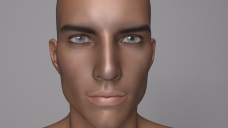
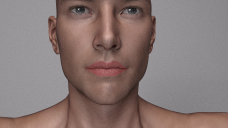
Apologies if I'm posting this in the wrong spot, but it was the only place I figured it would make sense. I'm having a problem where whenever I render a scene in Reality/Luxrender using Michael 7, the lips always appear unnatural, as if he were wearing lipstick. I've tried changing the texture from glossy to skin, as well as some other little tweaks but nothing seems to fix it. This is the only figure I have this issue with; G3M, V6, and everything else I own work fine. Attached are two test scenes where you can see the issue, one with M7 Mateo and one with M7 default.

Daz 3D is part of 
Connect
DAZ Productions, Inc.
7533 S Center View Ct #4664
West Jordan, UT 84084
Licensing Agreement | Terms of Service | Privacy Policy | EULA
© 2026 Daz Productions Inc. All Rights Reserved.
Comments
Have you installed the genesis 3 male presets for reality? If not grab them here, might fix your issue right there so try this first:
http://preta3d.com/reality-automatic-presets/
I general it looks to me like the specularity is too bright for the glossiness, and the gloss is a bit high across the board, skin and lips. But try the preset first. Download it, open daz, open reality, open the preset manager form the top menu bar and 'import'. Just in case you have not played with the preset manager. Then open a new scene, import michael 7 and see if issue persists.
Try setting the Specular Maps Gain to 0.5 and Gamma to 2.20
I already tried the presets, to no avail. I noticed no difference before and after. Thanks for the suggestion, though! I also tried fooling around with the glossiness, but the lips were still oddly colored, just matte.
I have the gamma set to 2.20 in LuxRender, but I'm not sure where to change the Specular Maps. Sorry if I sound silly, but where do I do that?
In reality.
you could also try loading both figures side by side and compare the surfrace settings of one to the other, then adjust. So check at the very least the materials tab glossiness and specularity settings, and the modifiers tab bump/normal settings, for the lips, skin, everything.
As an off the top of my head 'try this', for the lips - go to reality, in the materials panel, select the lips, make the glossiness 7500 and the specularity 30/30/30. This is for starters. Run the render see what you get. If the lips are still blown out and shiny dial the spec down to 20 (dont touch the gloss). If they look okay but you want more highlight slide the specularity up a bit, say 40 or 50, see what happens. Theoretically you should be able to set the glossiness to just about anything, but the specularity is what makes or breaks the surface appearance. If you want really shiny 'wet' lips dial the glossiness all the way up, 9500-10,000, then you dial down the specularity until its 'right'.
I'm having a similar problem, and I wish I had a render. I scrap them after, but I'm working on one now as I type this and the problem is still present. I've just been doing female renders with Reality 4.2.0.15327 plugin for Daz Studio 4.9 Pro. I usually apply lipstick to them everytime, but for some weird reason the lipstick renders a glossy unappealing orange. It really ruins the picture for me since it takes hours upon hours to render. I'll make sure to post an Iray and Reality render since I'm rendering side by side for a comparison.
Best to ask things like this over at the reality forums on the preta3d website.
http://preta3d.com/forums/index.php
But since you are here, what are your materials settings for the lips? If you can screenie the materials tab (for the diffuse, spec...) and the modifiers tab Ill see if I can offer useful input.
I will say that if I use iray materials with reality I tend to have to do a LOT more fiddling in the materials pane, 3delight in general just seems to be closer to correct by default.
Totally forgot about this thread! Thanks for your help. I got it to work, it just takes a lot of fiddling like you said. It's good to know I'm not the only one who runs into this challenge.
I still have this problem. What did you have to do?
Wow, I'm bad at checking posts.
I still have the problem. I think it was a fluke getting it to work once. I really wish there was a fix to this!
Post images of your reality materials tab settings for the lips, might be able to help if I can see what youre doing.
http://prntscr.com/g2tddu
These are my lip settings. Well, it's what they are by default when I open Reality with a Genesis 3 Male character.
Ok cool. Your lips have a texture in the specular channel, without seeing it I am guessing that is the cause of your lip color issue. We are going to 'beef it up' by making it darker. To do this we need to combine it with some color.
Try this (bear with me as this is off the top of my head, at work so cannot reference my computer):
In the specular channel, right click on the gear icon and select 'texture combine'
You should now see the texture combine panel, with your fwsaaidenfaces.jpg texture and now a color channel combined with it. Dial the color channel all the way down to say 50. Pay attention to the preview window in reality, it should give you an idea of the render result, pay attention to the overall color of the lips and the specularity 'shiny spot' as you slide the black to white slider up and down. If the lips are still too shiny/wrong dial down. If they are dead/dark dial the color up. Try a render.
Basically you are trying to find the sweet spot to get the specularity right.
Your glossiness is fine, 7,000s is not high at all for lips. Skin usually is in the 3000-7000 range. Once you have a handle on the specularity you should try making them look 'wet'. Dial your lip glossiness all the way up to 10,000. If the color blows out dial the specularity way down, then work back until the lips look like they are wet and shiny.
This is a starting point. Once you get a handle on specularity you can experiment with using other colors in the texture combine along with the specularity image that comes with a figure, especially when lipstick is involved as the specularity should have a tint of the base lipstick color coming through.
Here is an example of skin settings that CalladsEssence was nice enought to share some time ago. This is reality 2.5 so interface is a bit different but just have a look, the middle panel is her lips settings. Do not be concerned about that she is using a pastel-ish purple and Im telling you to use a very dark grey, the issue is the lips image texture, in her case the image for specularity is rendering fine (Rybelle_faceS) she is just adding tint. But the principle is the same. (FYI In another panel she converts the eye reflection to glass, do not do that, always turn off eye reflections when using reality, click the little eye in the reality materials panel next to eye reflection).
http://calladsessence.deviantart.com/art/Gen2F-Skin-settings-by-Callad-383057101
Food for thought. Good luck!