face not showing up on LIE
 Toobis
Posts: 993
Toobis
Posts: 993
in The Commons
So am trying to add an injury to a V4 characters face. I have not used the LIE in forever but I do remember the mat of the thing you opened it up on was supposed to appear in the box in the LIE so you know what you are working on but as you can see there is nothing there (in pics below 1 and 2) did I do something wrong? this applies to anyhting I try and add things to with the LIE. Anyone know whats up here?
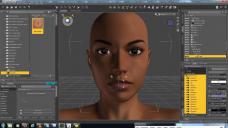
1.jpg
1920 x 1080 - 420K
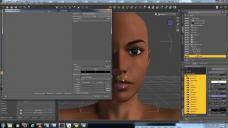
2.jpg
1920 x 1080 - 373K

Daz 3D is part of 
Connect
DAZ Productions, Inc.
7533 S Center View Ct #4664
West Jordan, UT 84084
Licensing Agreement | Terms of Service | Privacy Policy | EULA
© 2026 Daz Productions Inc. All Rights Reserved.
Comments
in the surface tab just click on face instead of all the surfaces
Thx.
Click on the face in the surfaces tab, then click on the little black arrow here:
That will make a list pop up, near the top of the list it will say Layered Image Editor. Click on that. When the Layered Image Editor window pops up, click on the little "+" to add a new layer, here:
Then click where it says "Source: None" and navigate to what image you want to add:
You can then adjust the blend mode and position. I recommend using "Zoom To Fit" to see the entire face map. Once it's positioned where you want and in the blending mode that you want click Accept. It might take a few seconds to load after that. It will then create a temporary file that is a bend of your face map and the L.I.E. image you added.
Be warned - If you close out Daz Studio I don't think it saves the layered image you just set, even if you save it as a "material preset". To keep that new face map image combined with the L.I.E. image I think you have to bring that temp file image into an image editing program and save it as a TIF, JPG, or PNG and save it where you can easily find it in the future. Then you can load it into the face map slot and save that as a Material Preset - that way you don't have to go through the hassle of using the L.I.E. again to layer that image over that face map.