How do you achieve Waxy realistic Skin in DAZ Studio?
 nokoteb99
Posts: 943
nokoteb99
Posts: 943
Mine skin looks nothing like that. I've seen other people s renders, the skin looks like waxy realistic. HOw do you achieve that? And with 3DDelight.
Look here's mine, totally unrealistic skin, it's not waxy. they look plastic.
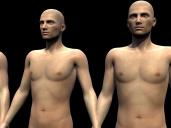
gggg.jpg
800 x 600 - 205K
Post edited by nokoteb99 on

Daz 3D is part of 
Connect
DAZ Productions, Inc.
7533 S Center View Ct #4664
West Jordan, UT 84084
Licensing Agreement | Terms of Service | Privacy Policy | EULA
© 2026 Daz Productions Inc. All Rights Reserved.
Comments
I guess i should use UberEnvironemnt? is that it? I read about it before says it creates more realistic skin
You want SubSurface Scattering (SSS), and then it's a matter of getting the settings right.
If you are using 'out of the box' skin, I strongly suspect the culprit is Velvet. Theoretically it mimics the effect of fine hairs, but in practice I think it makes skins look TERRIBLE.
See how you like it without.
Another approach I think makes for nice skins is experimenting with Reflection. A small amount (like 5-10%) can add a realistic look to a character. Much more than that and the figure looks wet or metallic.
How do i use Subsurface scattering, how do i apply it?
I've never used Velvet but looking at those models from the neck up there is something that is making it look like you have texture to a different head compared to the body. And part of the reason they look fake is context. Put them outdoors in an atmosphere like Europe outdoors and they will look more real. Plus one rarely sees a picture that there is 100% focus in the picture with no haze or anything but that is what iRay renders will give you.
Those models are just the base Genesis 2 male with the textures it came with
If you are using 3Delight, then like was mentioned, go into the Surface properties and turn off the Velvet for all the skin surfaces, first.
To me they look OK in the right environmental context. You need to post an example render of a context that you want your render to look like.
Well like this. And this was done in DAZ Studio
Ok, let me pull that up...
Ah, cool. The default uses UberSurface, which is great -- it's a lot faster than the other common type (AoA SSS shader). Turning off velvet is nothing more than clicking Velvet to Off for everything.
It already has SSS in it.
Also, a lot of 'realistic' stuff will look best with an environment, like a skydome or in a room or whatever.
See how you like the skins in a room, with no velvet.
If you want to try out the realistic skin approach of mine, select the first three surface templates (face, torso, limbs, basically), shut off Specular, turn on Reflection, set it to Raytrace, and then set Reflection Weight to, oh, 10% and Reflection Blur to 30%. See how that looks, too! (But DEFINITELY with an environment/room, because otherwise it'll act weird with nothing to reflect)
That doesn't look any more realistic to me.
1. You need to render with a bright light located overhead and slightly to your left.
2. In photo / image editing SW like photoshop or gimp apply a blur filter to the finished render but only a slight blur - that we help hide the tell-tale signs your eyes are detecting that it's a modeled image and not a photograph. With experience though you'll stop you'll still no they are rendered but the eyes for whatever reason seem to like a slight blur over 100% focused.
This thread has a lot of information on getting the most out of 3Delight...
http://www.daz3d.com/forums/discussion/55128/3delight-laboratory-thread-tips-questions-experiments/p1
Hey guys I'm back and Glad to report I'm achieving better results now that I'm using Uberenivronment2. It's awesome. Comparing the first picture i posted to this ,this is a lot better. i like it. I used Uber and a distant light
How is it done in Iray then?
I really don't like how skin look in iray, they often look like in the days before SSS. Or very very glossy. It seems impossible to aquire that 'waxy' look like you see in 3dlight, not to mention the 'SSS-look' where fine areas like ears, fingers, toes, nose tips et cetera are sliglhly transparent/lit from behind.
Thanks for the tip but nothing made a difference. I want to achieve waxy skin like this following picture. My latest attempt was just adding UberEnvironment. that's all i do. and it looks like the picture of the two people above. but it doesn't look waxy. The ears and skin don't have that transparent thing.
this is a picture of what i want to achieve.
I'm using UberEnvironment and i don't know what settings to use so that the ears and overal skin looks translucent like the above hand picture . Currently the ears are the worse. they look like total plastic
Any new answers? im looking for the same as above.
old thread, all is fixed using Translucent on iRay, done!