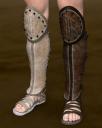
Centurion sandals not equal


Daz 3D is part of 
Connect
DAZ Productions, Inc.
7533 S Center View Ct #4664
West Jordan, UT 84084
Licensing Agreement | Terms of Service | Privacy Policy | EULA
© 2026 Daz Productions Inc. All Rights Reserved.
Comments
You aren't the first to encounter this, though I don't see a solution http://www.daz3d.com/forums/discussion/59137/iray-many-rendering-issues/p1
If this is Iray, it may be the gamma setting problem? There was a post in here that addressed it for a different shoe set: http://www.daz3d.com/forums/discussion/comment/899211/#Comment_899211
Looks like this comes with two materials sets, but mistakenly used both on load.
Can you find any materials options for this product? If so, can you apply the one you want to just the right or left boot?
If not, try selecting the boot with the materials you like, then select all the surfaces for that boot in the Surfaces tab. You can then copy all the surfaces, select all the surfaces in the other boot, and paste. Sometimes you can copy over only one surface at a time. When this happens you'll need to select then copy/paste each surface separately.
Yes, I just loaded the set and it is a problem with the gamma. If you select the sandals in the scene tab, then go to the surfaces editor and click on the diffuse image maps of the affected surfaces (right sandal surfaces), then choose image editor from the pop-up menu and set the image gamma to zero, this fixes the issue.
Thanks! Indeed, changing the gamma did the job.