HDR Light Set Problem

I decided to but this set http://www.daz3d.com/daz-studio-iray-hdr-outdoor-environments
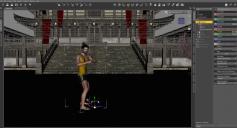
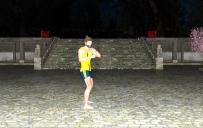
I was thinking I was getting the light and maybe a nice scene in the back ground. Please look at my pictures and tell me what I'm doing wrong. :(
It's blocking out most of my building and the light is crazy bright. I'm sure this is user error. If anyone can point out what I'm doing wrong I'd really appreciate it. Or do I just have the wrong idea of what this product is and what it's supposed to be used for?

Daz 3D is part of 
Connect
DAZ Productions, Inc.
7533 S Center View Ct #4664
West Jordan, UT 84084
Licensing Agreement | Terms of Service | Privacy Policy | EULA
© 2026 Daz Productions Inc. All Rights Reserved.
Comments
I'm not sure what is going on. I use that set a fair bit and have never had that happen. Did you apply both the light and the background? You are set to render in Iray?
First turn off the camera headlight....that's what's driving the 'over exposure' in the foreground.
Then, move EVERYTHING above the 'floor'...the cut off is not caused by the HDRI, it's caused by the rest of the building being above the floor. The 'shadow catcher' that is the floor works both ways...
Thank you both. That made a world of difference! I should have thought of that.
Khory, I'm not sure which I applied honestly in that one. I saw after that there were seperate file for the background and light. I tried just adding the light to see if I could take advantage of it without the the background but the background seems to load anyway. Also i think the height of the building is blocking some of the sun because it's darker inside the walls.
Rather than moving the entire set up or down, in the Environment settings of the Render settings, simply switch off the ground. It's only needed if you have no mesh serving as ground that will catch the shadow.