Weird Sine wave in symmetrical normal maps.
 ghastlycomic
Posts: 2,531
ghastlycomic
Posts: 2,531
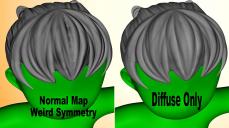
I have a mesh that is symmetrical and the UV map unwraps down the middle and is mirrored and overlapped so that the texture maps only have to be one half the figure and it is mirrored to the other half.
Daz Studio applies the Diffuse map correctly, mirroring it to the other side without distortion but the normal map produces a weird sine wave right along the UV seam in the middle. Any idea why DS is doing this and how to fix it? Is this a bug or is there a setting I need to modify?

Daz 3D is part of 
Connect
DAZ Productions, Inc.
7533 S Center View Ct #4664
West Jordan, UT 84084
Licensing Agreement | Terms of Service | Privacy Policy | EULA
© 2026 Daz Productions Inc. All Rights Reserved.
Comments
What did you use to create the normal map?
How much 'padding' is there along the edges?
The normals were made in CD-Coat using Maya/Blender normals. There's 5 or 10 pixel padding I can't remember which.
I usually use about 6...but have noticed odd things with less than that.
It looks like a classic interferrence pattern, basically the edges are equal and opposite (the opposite could be from flipping across the seam). It would be more work, but you could try pulling the map into an image editor and either selectively blurring, just the padded area or masking it (that may lead to a sharp seam, though...so I'd try a little blur first).
Increasing the padding and blurring it didn't seem to help.