upgrading to 4.9 concerns
 sarge74
Posts: 121
sarge74
Posts: 121
So I am still using 4.7. When I upgraded to that, I was still using DAZ 3.0. When I installed the new version, I was unable to load any of my old scenes. I believe it was due to the reorganization of my content/runtime. After a while I was able to find all my old content and got back to work, but never did get all my old scenes back (.DAZ files?)
Now I'd like to upgrade to 4.9 and get into the new models like G3 (still using and happy with V4/M4) and the new Iray stuff. But I am very leary about it after what happened last time. I have scenes I'm working for a comic book. I very much enjoy the hobby Daz has provided and would love to move forward, but will I loose everything again? (oh the lost hours!) Will the upgrade reorganize my runtime/content and make my scenes unloadable? Attached is a screen shot of my content as it is currently. I very much would like to keep my old stuff where it is cuz I know where all my stuff is! Input would be appreciated by those of you who know this stuff better than me!

Daz 3D is part of 
Connect
DAZ Productions, Inc.
7533 S Center View Ct #4664
West Jordan, UT 84084
Licensing Agreement | Terms of Service | Privacy Policy | EULA
© 2026 Daz Productions Inc. All Rights Reserved.
Comments
Try the beta. You can install the beta without effecting your current install, so you can test it out and see how it does.
I have 4.8 and the 4.9 beta installed at the same time with no issues. I don't know about 4.7, but for me the saved scenes and items have been interchangeable between both, as I have gone back and forth frequently.
Well that's encouraging. Thankyou! Hoping it would be that way for me and the 4.7.
As long as Ds is linked to your current content setup, old scenes should work.
And yes, I agree, try the beta first
Where were you saving your old scenes? Directly into a Content Library folder, or using File>Save from the menu into some other folder location?
Also, there have been a few weirdnesses reported with upgrading to the last couple of D|S versions; can you check your Content Directory Manager dialog to make sure all your old folder settings were properly carried over to the new version?
Lots of backups first.
Make sure you have copies of the old files; make sure you copy the settings in App Data Roaming, and whereever you store install manager (presuming you use it). You can also chose to uninstall the SQL components to keep Connect and it's DRMed database off you system; i ignore the popup that tells me Studio can't find it (which is the intent).
I File>Save into other folder on my external drive. I have never used the Content Directory Manager. I've always just installed files manually. Thank you.
I will definately plan on saving a back up of my content files before doing anything. I'm afraid I don't know anything about the App Data Roming or the what the SQL components are. Care to elaborate for this dumby? Your input has been very much appreciated. Thanks
Be aware that this isn't the recommended way to save scene files — you should be saving directly into one of your Content Library folders using the "+" button at the bottom of the Content Library tab.
You mean the DIM, which is the Installation Manager — I never use that either.
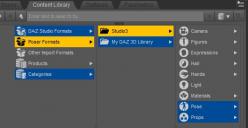
The CDM is completely different, and something you must use, or D|S can never find any content at all. Go to the Content Library tab, click on the Options button at top right, and select Content Directory Manager from the menu that drops down. Open the sections for DAZ Studio Formats and Poser Formats; these are the folder settings that must be checked to make sure they're the same between the full release version and the beta.
Note that you must have all the folders in DAZ Studio Formats also set in Poser Formats, even if you don't use Poser. This is because all old content from the DAZ store, and the vast majority of freebies and items from other stores, are in Poser format.
i'm thinkin of goin for it too, even though my rig is offline. 9.2 is what they up to?
hold me ... scared lol
Thanks for the input. Wish I understood it better but I think I know what you're explaining to me. So the CDM is something you MUST use in the new version huh? Not sure I like that.
CDM is pretty much the same as the older entry for your content directory.
CDM = Content Directory Manager...the part of Studio that allows you to set/manage your content folders. It has been a 'requirement' for a very long time.
No, it's not new, it's something that's always been there, a critical part of D|S. If you've never seen it before, it might be because you've never used anything except the default settings, and you've been lucky so far that the defaults have never been disrupted. You'd better at least look at the current directory settings so that you're familiar with them, it might save a nasty surprise later if any problems crop up.
but, can still do manual installs, unzip, plop it in ?
Yes. I have a lot of non Daz content.
kewl. ty
upd be my weekend project this weekend.
just in case, kept b/u of 4.8 and 4.6 installers.