The girl on the Daz homepage
 Sensual Art
Posts: 646
Sensual Art
Posts: 646
Does anyone know who she is? The closest resemblance I could find was with Snowflake for A7. But the skintone, eyebrows and eyes seem slightly different.

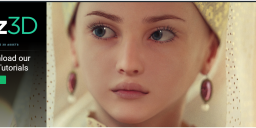
Daz3D-Home.png
1328 x 655 - 1M
Post edited by Chohole on

Daz 3D is part of 
Connect
DAZ Productions, Inc.
7533 S Center View Ct #4664
West Jordan, UT 84084
Licensing Agreement | Terms of Service | Privacy Policy | EULA
© 2026 Daz Productions Inc. All Rights Reserved.
Comments
The eyebrows look like they could be one of the recently released (last month or so) fibermesh brows.
That's Belle 6
I saw the image in the gallery month's ago and it impressed me so much I saved it.
Thanks @nelsonsmith. Found it here: http://www.daz3d.com/gallery/#images/130791/
Yeah, that's Belle, especially how the bottom lip changes color. And those are NOT mesh eyebrows, either. This is her default no make up face.
I'd LOVE to know what kind of lights and skin settings were used for this render, or at least a hint.
...now this is good looking skin, far better than many examples I've seen. It really does look like a photo.
I don't bother with the gallery much because it seems almost as overwhelming as as DA sometimes with so many submissions coming in (prefer the old setup we used to have).
Well that no 3DL skin that's for sure !!!!
Iray all the way :)
...the creator used the PD Iray Shader Kit 1 so yes, not a 3DL skin. There is also an Iray skin map for Belle 6 that was released after the figure (I have it myself).
While stunning, I am still not totally sold on Iray for my needs and the hardware I have. It would be interesting to know just how long the setup time was for this and how much adjustment needed to be done to achieve that level of quality. It certianly isn't "out of the box", even with the PD Iray shader tool.
Although naturally PD Iray Shader Kit 1 was used to reshade the dress and/or head piece, so would have had no effect on the final skin. That was manipulated by either another shader, or was the effect straight out of iRay.
Was about to say the same thing.
All in all, I think the image is a very good example of what someone who knows their stuff is able to acheive with prior generation objs; as Belle 6 is not a generation 3 figure, and you've got people that would give just about anything to get a render of that quality using all the new toys and believed that they needed the new stuff to get that quality. As the saying goes, "It's not the tools, but how you use them."
...still would like to know more background. Was it all a lot of tedious manual adjustment? Were there other skin shaders involved?
Used to read the Fiddling with Skin in Iray thread but bailed after it became way too nit picky techincal to the point that most of the discussion was going way over my head. Even after using what I was able to glean from that thread, my characters' skins look like they are made of soft rubber.
Which skin map is Iray for Belle? None of them say they are specifically for Iray. I just redownloaded Belle to look and see if I missed it.
Here's Belle 6 with default skin, converted through http://www.daz3d.com/iray-smart-converter-and-advanced-skin-managers-for-genesis-2
I usually use the Setting 3 for conversion. This is default setting 3, no other adjustments.
The light is a soft light probe.
I think the most telling thing about the image is they choose to slightly blur the girl and massively blur the background; that way the girl looks focused while being blurred enough to hide those iRay frustrations we all know about.
That's actually part of why it is so striking. For one, it directs your eye to her. Two, depth of field is a basic element of photography. It is not a telling element of Iray frustration as much as it is what makes a good photograph. Actually, to look at it a different way, that you can apply real world photography techniques to Iray is a pretty great feature.
Oh, I wasn't questioning the depth of field, that's pretty standard and good composition technique, but where most of us go wrong in our iRay renders is in not introducing a bit of blur into the main subject matter of the photo. Most real portrait photographers do this and cameras are designed to do this because they of in business of making flattering pictures of people.
...still would like to know the skin settings.
Below is my render of Belle 6 in Daz Studio iray, after applying to her one click of http://www.daz3d.com/n-g-s-anagenessis-2-revolution
I think that the promo image of the girl on the Daz homepage would take weeks or months or even years of tweaking of the materials
to achieve similar results (at least for me) and I do not have such time available for that only task.
That's a good realistic looking render but not a photo most portrait studios would take. Looking at your render I now think they also use light bloom in the iRay Render setting as well.
I had a go at it. I threw this together very quickly. I think that Iray Smart Converter and/or NGS could achieve good enough looking skin. But the real key is getting the lighting right. My light is not as warm, and it is likely that some bloom was used in the original pic. I had a point light on one side and a regular light in front and above.
You"ve come pretty damn close to achieving the look.
I think you're right that it isn't so much tweaking of dials, but rather understanding lighting and the basics, for which there isn't always a one click solution to. Those that develop that eye for such details will be the ones who consistently attain that high quality in their work, and not everyone has that patience or committment.
I agree, you've come pretty close. I like it.
...I fear you are right about months of time making subtle adjustments along with subsequent test rendering. For me there comes a time of diminishing returns and I felt I hit that just before I quit from the Iray Skin thread.
Yeah. I don't doubt that the original pic had carefully crafted skin settings, but I have a feeling that those settings aren't far off from what Iray Smart Converter offers. I chose the 3rd setting for Caucasian skin. The only changes I made were to the eyes. I changed the PBR from "Roughness" to "Glossiness" for the Cornea, Eye Reflection, Iris, and Pupil. I also set the Glossy Weight of the Iris and Pupil to 0. And that was it, this pic is basically Iray Smart Converter out of the box, and it only has 2 light sources. (That's why I pimp ISC at almost every opportunity, Kyoto!) I set the Cornea Bulge morph at 1.5, which allows the light to catch the cornea better (a tip I read here a while back.)
I'm pretty guilty of not messing with lights too much. Its one thing I need to get better at. Part of it is that my gpu is bit limited, so I avoid doing too much with a 3d environment around. In this picture, my background in just a flat plane primitive with a stone shader on it. Since I planned on it being out of focus, I didn't put much into it. I have a feeling that the original pic did something very similar to disguise his background. All in all, I think this pic took about 30 minutes to render on my four year old 670 2gb, which is pretty good. If I had a "real" background, it would have taken much longer.
Another note, poor Belle is still in a T pose! The only posing I did was on her eyes, LOL.
There's an iray skin for Belle 6??? Can you tell me what it is please? I so need that.
Did you use the iray smart converter for that image? This one: http://www.daz3d.com/iray-smart-converter-and-advanced-skin-managers-for-genesis-2 ?
Cos that is fantastic!!!!! I love it!
Might be this
http://www.daz3d.com/amazing-skins-for-belle-6-and-brodie-6-bundle
That product specifically states 3dl only. It will NOT work for Iray.
Here's the newer pic, with better focus and more holiday themed background.
Thank you! I'm playing with it right now - I forgot I had that converter. LOL. Belle 6 was always one of my fave skins for that line in 3delight. I've adjusted her eyes as you mentioned in your post too. I've got a spotlight in front of her face, and a point off to the side...and a hdr in the environment thingy. Quite pleased with the results actually, so thank you so much!
Nope. They are only for 3Dlight and not for IRay.
Here is the one for IRay "IG Iray Essentials - Victoria 6 & Michael 6" Read the ReadMe section it claims to have those files:
http://docs.daz3d.com/doku.php/public/read_me/index/21926/start
Not sure if that was being referred here. Also a quick Google search brought out two more results:
The opensource iray shaders for Belle 6 at Github: https://github.com/Astuceman/Daz-Iray-Shaders/tree/master/Shaders
and