Can I fix this buying a better monitor?
 Super cheese sandwich
Posts: 633
Super cheese sandwich
Posts: 633
in New Users
lately posing the eyes and head it's a big challenge because I'm my monitor (Samsung 19 HD) it's hard to see small things due the definition. I wonder If I change my monitor (Samsung 24 Full HD) this issue would be solved
pd. Any experience and advice will be very appreciated
Thanks for answer!
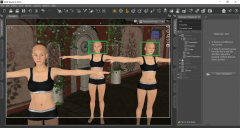
3030.png
1366 x 728 - 1M

Daz 3D is part of 
Connect
DAZ Productions, Inc.
7533 S Center View Ct #4664
West Jordan, UT 84084
Licensing Agreement | Terms of Service | Privacy Policy | EULA
© 2026 Daz Productions Inc. All Rights Reserved.
Comments
Why not zoom closer to the head and pose from there? Are you worried about losing camera placement? If so - Create, New camera, show options, copy active view. That way you can have a camera hold that position whilst you use your perspective view to fly around the scene and get everything set up, like posing etc. No matter what resolution your screen is, if you get far enough away from your subject, it's going to be difficult to micro-manage discrete elements like facial posing.
I have a ten year old 27" FHD monitor and it doesn't help that much. What you have to do is 'click-select the head' then on the top right hand side of your viewport the 5th white icon down, is a framing box with a cross in the middle - after selecting the hand, the forearm, the head you click that framing box with the + in it and it zooms to your currently selected object. You then use you middle mouse button to scroll closer or further back once you zoom in closer.
You could also use a script for the eyes and or head. that way its already posed for you
Look-At-The-Camera script http://www.daz3d.com/forums/discussion/242/
stare-at-the cam http://www.daz3d.com/forums/discussion/42014/
but If you are really wanting to get a bigger monitor, and using character posing as a reason and or excuse to get one. then I say go for it!
Thanks for all the answers!