how to point Daz to my auto adapted folder?
 Aristoc
Posts: 254
Aristoc
Posts: 254
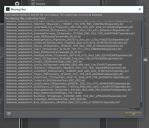
I copied Daz 4.8 from HDD on a new SDD. When I load some saved scenes .duf, only the characters appear but the scenery/background is grey blocks and I get an error. Some other scenes I had loaded but no problems at all.?? Just some scenes like this.
I know where the auto_adapted folder is with the files....but dont understand how to get daz to point to it again? if that makes any difference?
Can you assist? Thanks.
Capture2.JPG
667 x 572 - 106K
Capture3.JPG
668 x 609 - 62K
Capture5.JPG
1145 x 604 - 61K
Post edited by Aristoc on

Daz 3D is part of 
Connect
DAZ Productions, Inc.
7533 S Center View Ct #4664
West Jordan, UT 84084
Licensing Agreement | Terms of Service | Privacy Policy | EULA
© 2026 Daz Productions Inc. All Rights Reserved.
Comments
For starters, remove the Users/Public/Documents/My Daz 3D Library/data line...
OK I removed that.
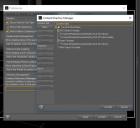
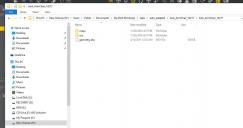
I noticed that when I find and open the directory / files Daz is looking for (AoA ....) ,in Windows Explorer (see right side of the attachment) I can see the extra files like geometry.dso. However, when I open the same folder from within Daz Content Directory manager > Edit , I dont see those files there? (the folder on the left) . Is that right?
You are in the maps folder on the left...the Windows view is up one level from that.
ok matching folders being viewed. on the left it's from daz content directory manager. on the right it's from windows explorer ?
Many scens I have work fine. .but some with certain content, don't get loaded.
You don't — the auto_adapted folder should already exist in your /data/ folder, which must be directly inside the content location specified in your
Content Directory Manager (that is, it must never be inside a folder inside your content folder). The CDM must never point directly to the /data/ folder or anything else inside the content location. The file view you showed in your first post is correct.
One possibility; when you copied the content from your old drive, are you absolutely sure you copied everything? Could there have been an extra content location containing another /data/ folder containing another auto_adapted folder? Note that this is how DAZ|Studio handles multiple content locations, it ignores the actual location of the content folder(s) and treats all your content folders as one big content folder.
Interesting. While working on this I read a suggestion to delete the scene or clothing or content that didn't load properlty (gray blocks) etc. Then re-load that part back in. For example I reloaded the scene and on another i reloaded a pair of shoes. This re -created the original scene. I then saved this scene. When i opened it again , or other scenes with similar content that also gave me trouble..it seemed to work! i guess i will have to keep checking other saved scenes along the way as a possible work around? while my scenes load into daz i do get a briefe daz studio not responding error but it resolves itself.