color wheel from circular plane
 wprinz_43fe1596d7
Posts: 6
wprinz_43fe1596d7
Posts: 6
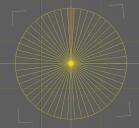
The is not 3 D, but I would like to make a custom color wheel (with spacific colors from my scenes). I got as far as making a circular wheel with 50 segments using :
www.youtube.com/watch?v=mTqUy6T1UaM (a tutorial). (see attachment).
I would like to bust it apart so that each segment would be a component of the cylinder and could have its own surface properties, like difuse color. Maybe I should give up and try in illustrator or something. However, I want to make sure that the HSL values are identical to those in my Daz Scene.

Daz 3D is part of 
Connect
DAZ Productions, Inc.
7533 S Center View Ct #4664
West Jordan, UT 84084
Licensing Agreement | Terms of Service | Privacy Policy | EULA
© 2026 Daz Productions Inc. All Rights Reserved.
Comments
If you have the disc with the polygons, just select each polygon in turn with the Geometry Editor tool, then right-click and from the menu select Geometry Assignment>Create Surface from Selected and give it a name (such as Seg1, Seg2 etc.). Then you can assign materials properties to each one separately in the Surfaces pane.