Removing orphans from house...I mean content library
 Scavenger
Posts: 2,677
Scavenger
Posts: 2,677
in The Commons
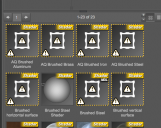
I somehow (well, I think I know) have a bunch of orphaned file references in the content library. (pic 1)
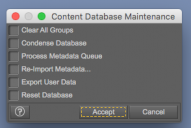
I thought I recalled there was a command to fix that in the database maintence window, but that doesn't seem to be the case (pic 2).
Anyone help?
Screenshot 2016-11-11 21.26.06.png
445 x 354 - 56K
Screenshot 2016-11-11 21.25.42.png
294 x 197 - 26K

Daz 3D is part of 
Connect
DAZ Productions, Inc.
7533 S Center View Ct #4664
West Jordan, UT 84084
Licensing Agreement | Terms of Service | Privacy Policy | EULA
© 2026 Daz Productions Inc. All Rights Reserved.
Comments
Are they all in one folder or is it a global problem? There were a couple of options which were no longer relevant for the DS4.9 database schema and were removed.
Don't know... neither "Show in mapped folder" or "browse to file location" turn up.
I suspect they're there because I loaded a file used in the previous install of Daz and they're (at least this bunch) are referencing something I never bothered to reinstall.
If you go to Content Library > Categories and go to that category, can you select all and then right-click > remove orphaned items?