How I can pose a model that I imported as .3ds, .max, .obj etc.
 theromil_fb5dc9df21
Posts: 2
theromil_fb5dc9df21
Posts: 2
in The Commons
Hi everybody,
I am importing a model into Daz 3D 4.0 with format as 3ds, .max, .obj etc.
For example a stick man model. (You can see attached picture.)
Any body know that how I can apply pose to this model?
Thanks all in advance.
Ergun
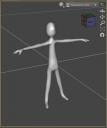
Capture.JPG
482 x 575 - 29K

Daz 3D is part of 
Connect
DAZ Productions, Inc.
7533 S Center View Ct #4664
West Jordan, UT 84084
Licensing Agreement | Terms of Service | Privacy Policy | EULA
© 2026 Daz Productions Inc. All Rights Reserved.
Comments
You can't without rigging it and it isn't easy. This will give you an idea of what is invloved
http://www.daz3d.com/forums/discussion/122171/a-rigging-tools-pdf-guide-nearly-complete#latest
You can try the transfer utility to copy an existing rig for personal use inside DS, but I find it rarely works well.
Before you can pose it you need to rig it. Is it already split into groups in the mesh or is it a single group? You can check by selecting the Geometry Editor tool and then, with the OBJ selected in the scene, looking at the lists in the Tool Settings pane.
If you have Mixamo Fuse it is included with Photoshop subscription there is a free rigging tool included,sometimes it actually works.