Starting to suspect mesh lights are of the devil
 exstarsis
Posts: 2,128
exstarsis
Posts: 2,128
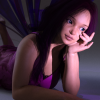
I decided to render a nice little avatar picture for myself. Set up a simple shot: girl, clothes, accessories, HDRI probe lighting, a spotlight.... oh, and I decided to give the Luma Lights that I'd picked up in August a try. Back then I hadn't understood enough to use them but I figured now I did.
This is what happened. My tiny little 400x400 picture (with a lovely floor pattern from the Luma setup) iterated up to 15000 times within three hours, still had enough graininess to not look done, then crashed Daz. I set it up and tried again. Adjusted a few things in the noise filter hopefully. Left it to run. It not only crashed Daz it crashed my whole computer. OK. Well. I tweaked a couple more tiny things hopefully, made sure not to touch my computer at all after letting it run and..... came back to finding it rebooted.
FINE. I took out the mesh light and stuck a spotlight in its place behind the colored disc. Well, the colored disc did nothing to the spotlight, but you know what? At 1200 iterations at 20 minutes, it's at 85% converged and looks way, way better than the version I saw on crashed_Daz.
The devil, I tell you.

Daz 3D is part of 
Connect
DAZ Productions, Inc.
7533 S Center View Ct #4664
West Jordan, UT 84084
Licensing Agreement | Terms of Service | Privacy Policy | EULA
© 2026 Daz Productions Inc. All Rights Reserved.
Comments
Yes, mesh lights are the spawn of the underworld.
Whenever possible, I render with HDRI alone or Sun-sky alone. It's not always possible, particularly for interior shots. But this has just caused me to try and script every scene possible of my webcomic out-doors so I don't have to deal with mesh lights. And even indoors, I usually try to use spotlights or pointlights with a rectangle geometry rather than mesh lights. For whatever reason, mesh lights drive the iteration count and render time by at least an order of magnitude, sometimes several orders. And no I am not exaggerating.
You can roughly figure out how much longer it will take by multiplying the number of faces you are turning into an emitter by how long it takes to render a single quad or point light with rectangular geometry.
So if it takes 1 sec to render a single quad light and are turning a 300 face item into an emitter it will add about 5 minutes...3000 faces...50 minutes.
I kind of wonder if the PAs who make and sell mesh lights do that kind of math.
I almost always exclusively use planes (one poly) for a mesh light. If I want any other kind of light, I use a photometric one.
Laurie
In 3Delight you could use ambient to make things like buttons glow. They didn't emit light but it looked like they did. Cool, used it all the time. Now with Iray I don't think there's an equivalent way to fake a glowing light without making it ... glow. Unless I'm missing something. Which, I hope I am!
Use a 'mask' (create an image of JUST the items you want lit...buttons, for example, by making a copy of the diffuse map and filling in EVERYTHING except what you want lit with solid black...it can be a colored/black and white image. Then place that image in the emission channel...if colored the light will be the colored parts, if b&w, you need to set a light color), use a geoshell and remove all but the bare minimum (hide with geo-edit tool/remove) polys for the buttons, place a single poly plane in front of the button (scaled to the correct size) and use that...and several other ways to reduce the 'hit' that large numbers of faces causes.
The single poly plane in front of the item will be the fastest...the mask the slowest.
Also use photometric lights for almost everything...reserve 'mesh lights' for only those things that really, really need them.
I actually like using mesh lights, or a combination of mesh and photometric lights. I typically just use planes for mesh lights, but sometimes use more complex shapes when needed (like scene props). I've seen a lot of posts about people having problems with mesh lights, but I seldom have any issues. Of course I've been using them for years, first in Lux, then in Octane, so maybe I'm just used to using them.
For this image I uses Ultra Genesis Studio lights, three light setup with HDRI for softer shadows/ambient light. This is the only commercial light set I've picked up for Iray (other than HDRI's and Iray Worlds Skydome) because I find lighting so easy in Iray. The Ultra Genesis Studio lights are designed like real lights, so they are a bit slower than simple planes, but this image still took less than 30 min. using a laptop with a GTX 970M.
This render is lit with 3 mesh lights (planes) and an HDRI for a bit of ambient. The HDRI didn't add much to the lighting due to the prop (Stonemason's Level 19) only being open at one end. Even with the low lighting it only took about 20 min.
@DustRider "For this image I uses Ultra Genesis Studio lights, three light setup with HDRI for softer shadows/ambient light"
For giggles, have you ever tried using a photometric spot with geometry instead of a mesh light? I have found that the spots with geometry do a more than credible job of mimicing a softbox.
Of course using a simple plane as a mesh light won't impact render tome significantly. FWIW, I have found that simple planes with a gold or silver surface work just like a reflector in a photo studio. With Iray, no surprise I suppose.
I really liked your Girl 7 render when you initially posted it and tried to duplicate it. Must say, it wasn't nearly as simple as it looks, so kudos.
I've done quite a few timing tests...a simple, single poly plane is just fractions of a second slower than a point light with rectangular geometry.
One thing...the dimensions for the light geometry is in cm...so 100 is about a yard.
I mostly use photometrics with geometry now, unless it's something where I really need the geometry to emit (it's an obvious flame or light bulb, for instance). Even then, sometimes I can get away with using a photometric point light with geometry in place of a bulb (and this is mandatory on older products where they didn't put the flame of a candle or bulb of a light on a separate mat zone).
I don't like to use simple geometries as mesh lights because of the difficulty of hiding them in a more complex scene (especially if there's anything reflective in a scene). They "fixed" the Iray shader so you can no longer set opacity to 0 and still have emission work, so I sadly can't use that method any more. If you don't find that annoying, there's really no reason not to use low poly geometries.
My initial objection to photometrics, that they didn't look as good with skin, no longer applies if you use a large geometry (100 to 200 per side, or a 200x400 rectangle, etc) because the light gets softer the larger the geometry is.
Ah..so they did fix it. I was wondering that since I was setting the opacity to something like .00001 and my mesh lights would still show up. I'm bummed about this one since it was one of my favorite tricks I learned when I started using Daz a year ago.
@ mjc1016 "I've done quite a few timing tests...a simple, single poly plane is just fractions of a second slower than a point light with rectangular geometry.
One thing...the dimensions for the light geometry is in cm...so 100 is about a yard"
Which would be a smallish softbox in a photography studio.
FWIW, Dustrider said he was using Ultra Genesis Studio Lights. Those claim to mimic actual box lights including internal reflections, so they must have more geometry than a single plane.
This made me curious so I tested it myself. I added a couple of mesh lights and it took three times as long to render vs rendering with just the HDRI. ...I'm definitely sticking to HDRIs as often as possible. lol
To each their own. I use mesh lights for a lot of interiors and sun sky for exterior. I find meshlights to be easy to use. Time is more to do with how much lighitng your using I dont like HDRI at all.
If I need general lighting, I use photometric. If I need in-scene lighting, like candles and whatnot, then meshlights.
I don't generally use HDRI lighting. For outdoors I usually rely on Sun/Sky.
But I highly suggest, whatever you use? Supplement with spotlights and diffusers (point light set to 'big square') just out of frame. Seriously, unless it's a specific effect you are shooting for, don't just assume if you put everything in the right place you'll get a decent image.
I do like spot lights and use them quite a bit. :)
I love using colored spotlights to add a bit more "mood" to an image. Like this one I used a white spot light on one side (entirely too bright on hind sight, but you live and learn) and then a blue/green spot light on her other side:
I think the blue/green one helped place her a little bit more in the scene, imo.
Spot lights can also make decent faux sun light. I used a spotlight here and placed it behind her and pointed at her in the approximate spot where the sun would be coming through the trees:
Which I think turned out kind of neat. :) I'm definitely doing more lighting experiments lately and am having a lot of fun with spotlights.
I often struggle with this. I end up with these intricate scenes where the main figure just blends into the background because the lighting is too even.
Yeah, or the main figure sticks out like a sore thumb. lol Lighting is definitely tricky, but I'm learning. :) Slowly but surely I think I'm getting better at it. Still have a long way to go, but I've only been doing 3D art for about six months, so I try not to be too hard on myself. Though I just know another six months from now I'll probably look at the art I'm doing now and cringe and grit my teeth over how bad the lighting and everything is. lol But that will be good, as it will mean I'm growing and learning and, hopefully, getting better. :)
Hi Fastbike - I've used photometric lights with geometry, and like mjc1016 noted, they are about the same speed as simple planes. But they are great for some things, and pretty much a no-brained for setting up, being able to look through them like a camera is fantastic. I'm using photometric lights more, but I've used mesh lights so much that they they are very easy for me to use with predictable results, and a simple plane with an EIS profile can generate some interesting and great results.
Reflectors are great! I've used them with Carrara's internal renderer in full GI mode, Lux, Octane, and Iray. I haven't tested to see if they impact rendering speed except with Carrara, where they are faster than adding additional lights.
Thanks for the compliment and sorry for posting the same image. It takes quite a bit of time fo me to set things up "just right"(not that it is really just right, but fits what I want). For the render of The Girl, IIRC, I used one soft box light on the left side of the image, above and slightly in front of her. I used a second larger soft box on the right side of the image, slightly behind her. The third light was a box light that is desgned like a spot light, and it was on the left side of the camera. As you noted, the Ultra Genesis lights are designed to mimic the effects and geometry of real lights.
Edit: I also used a low intensity studio style HDRI I got with Octane.
...the only HDRI I use with Iray is the free neutral one Mec4D created which works well for fill or ambient light when doing "studio shots".
Overall I find that I get the best performance and appearance with characters in a scene using AoA's advanced lights in 3DL In Iray, characters look like rubber dolls placed in a photo scene whether I am using Sun/Sky, Photometric, or Emissive lighting
That's why rim lighting! It really helps pick out a figure from the background. Put one of those big soft squares behind and to one side of your figure, set it to a color and crank it up until you see the rim appear on the character in test renders. I usually use 3500K warm orange lights, but if it's a very cool-palette scene I might use blue or green.
Even with that, though, sometimes you still have to plan the color palette too - you generally can't have a black knight in a black stone courtyard on a dark night and have it turn out well. And matte is never the best choice (if there is a choice) because it kills highlights that also help pick out silhouettes.
Great tips! Thank you! :)
I had dozens and dozens of mesh lights used for the Carnival props - ferris wheel, carnival barker booth, swing ride, merry-go-round, and so on and it only crashed DAZ when I had 2 or more Genesis 3 characters in it.
..CPU or GPU?
16 GB RAM on 2nd Gen intel i5 with Intel HD Graphics 3000.
...ah, CPU. That would certianly crash my system then as I only have 12 GB.
I am really liking the AoA lights for 3DL. For Iray, heck, I don't know, except that mesh lights are just way beyond my little card's capacity right now. They clearly have some cool functions, but it's not very useful to take 3 hours to render a very simple non-HD portrait.
@divamakeup "Great tips! Thank you! :)"
If you want to have some more fun with lighting, start tinkering with the "White Point" in the Tone Mapping tab. For instance, you can emulate moonlight when using a daylight HDRI by setting the White point to something like 255, 212, 212 (you want the color "opposite" of blue-white moonlight. There a couple more steps, but it's something to tinker with. I figure I owe you for the "Divamakeup" method to fitting V4 shoes on G3F.
Sweet! Thank you! :D I've been playing with Tone Mapping a bit lately (mainly the Burn Highlights and Crush Blacks), but I've not tried changing White Point. Thank you for the tip! :)
Regardless of your choice of mesh vs. photometric lights in IRay, if you're having difficulty getting lighting that you're happy with, consider watching some online photography strobe lighting tutorials. As a photographer, I really love that I can replicate real world lighting in IRay. Rim lighting, cross lighting, Rembrandt, beauty, short, broad, 3-point...anything I can do in studio or on location, I can set up in Daz using IRay, so it's all transferable knowledge. And using V3Digitimes' Light Manager Pro is like using a wireless transceiver in the real world to adjust all my strobes without having to run all around--only better, because with LMP, I can "gel" my lights too!
If you really get into learning about lighting, you might be interested in watching some of the courses on CreativeLive; they cover the gamut, and you can watch the live broadcasts for free (typically, courses loop for free the day of the live broadcast, which is great if Pacific Time in the US doesn't fit your schedule). For a reasonable fee, you can buy a course to watch whenever you wish. CL instructors are some of the top pros in the business, so it's a great centralized location for a wide variety of content (they also offer courses on other subjects, from business to Photoshop--and even do a week-long "Photoshop Week", running simultaneous tracks).
Adorama TV is another fantastic (and free) resource; the original host, Mark Wallace is terrific at making the technical bits easy to understand.