Help with DS on Windows!
 Wonderland
Posts: 7,137
Wonderland
Posts: 7,137
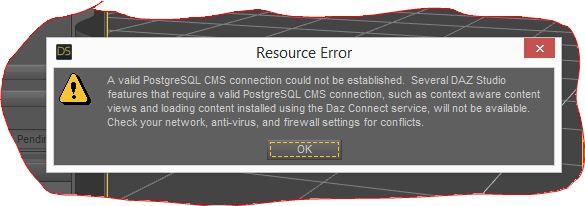
I'm a Mac person and have no idea what I'm doing on Windows. I got this message. I have no idea even how to create a proper screenshot, the snipping tool makes you do by hand which is hard on a laptop. Isn't there a quick way to just make a selection like with the keyboard like on a Mac?
Also this says Daz Studio Standard. Is there a pro version? I don't think the one on my Mac says standard...
Anyway, here's the screenshot. What do I do? Thanks.
Oh I don't currently have any virus software installed.


Daz 3D is part of 
Connect
DAZ Productions, Inc.
7533 S Center View Ct #4664
West Jordan, UT 84084
Licensing Agreement | Terms of Service | Privacy Policy | EULA
© 2026 Daz Productions Inc. All Rights Reserved.
Comments
We need to know what kind of PC you have? Does it have Windows 7 or 10. Is it 32bit or 64bit operating system. Left click Window Start button. Move Mouse to Control Panel and click. Open up System all the data on your pc system will be there.
Did you install PostgreSQL CMS (separate package from the main DS application).
You need to enter youtr Pro serial number to convert from Standard to Pro.
I'm doing a fresh install. This time it's downloading differently for some reason with the postgre stuff so hopefully it will work. I think I put in the wrong serial number because it downgraded to standard but the free one says pro...
Now DIM froze. Urgh! It's Windows 8.1 Intel Core i7-451U CPU @200GHZ. 12GB RAM 64-bit Operating Sustem x64. Laptop
Having so many problems! Will appreciate your help!
What security software?
No security software. I have a whole new set of problems involving DIM, I put in a support ticket to tech support.. I got a pop up from DIM saying I wasn't authorized right over my existing DIM with my name and things I had already downloaded. This is a second computer but I was under the impression you can use two computers and everything downloaded fine the first time but I thought it might be corrupt so I tried to download DS a second time after deleting the first one, so not sure if that was the problem...
Are you sure the email and password are correct?
I've experienced a couple of times that DIM suddenly rejected my (saved) login so I had to create a new one. You could try that, just leave the login that doesn't work as it is and create a new one.
What I mean is add a new account using the same login, (click the drop down box, like this):