

Everywhere iRay...

2»

Comments

  • Oso3DOso3D Posts: 15,090

    nelsonsmith: I've found a lot of older stuff works fantastically in Iray, provided you have the time and familiarity to adapt it. Heck, V4/M4 stuff can look amazing. The power of a shader to transform a surface makes a huge difference.

    The big exceptions are:
    Stuff that's explicitly 3DL, like funky shaders.
    Stuff with baked in surfaces, like 'here's one map that includes windows and walls and faucets and everything.'
    Models not welded nicely that turn into abstract sculpture if you try to SubD.

    I actually like going through old content and refurbishing it. Some of it is as good or even better than current stuff, if there's even a replacement.

    Like the octopus; it's over 16 years old, but it looks really cool in Iray, and has great posing controls.


  • nelsonsmith: I've found a lot of older stuff works fantastically in Iray, provided you have the time and familiarity to adapt it. Heck, V4/M4 stuff can look amazing. The power of a shader to transform a surface makes a huge difference.


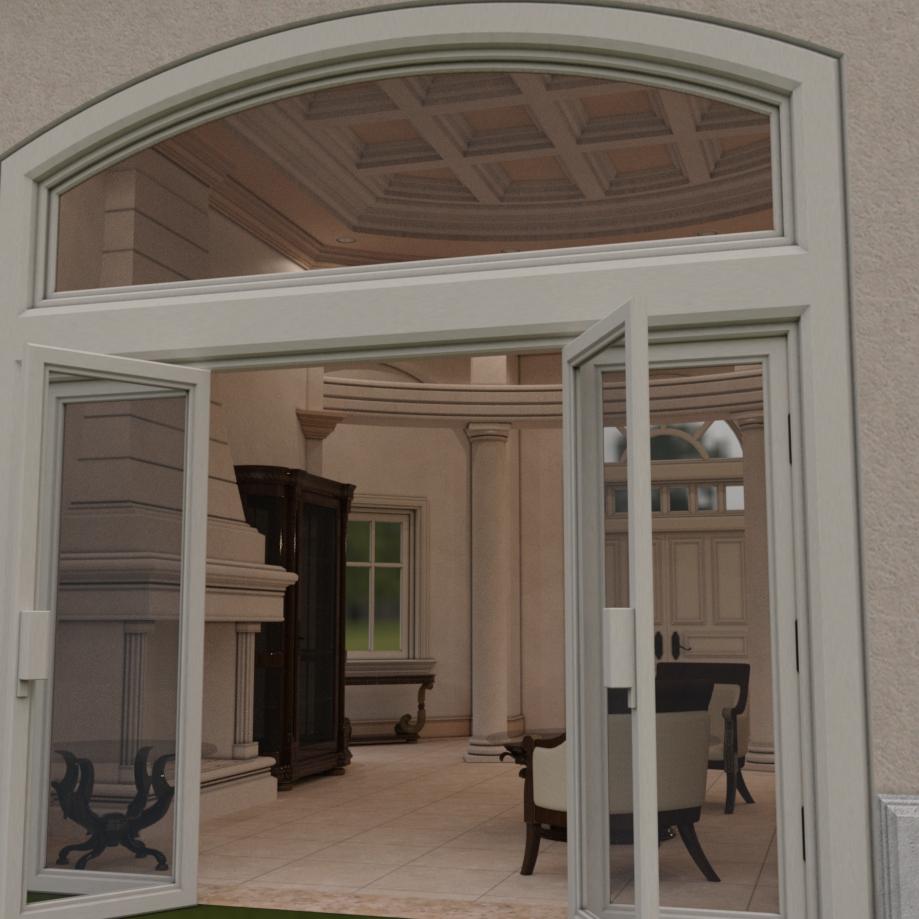
    Definitely true, you can get some great results if you have the time and inclination to modify it.  Below are some before and after shots of the Dream Home Living Room w/Furniture (iray render with base autoconverted textures vs. some work with the Geometry Editor and Iray specific shaders).


  • nelsonsmithnelsonsmith Posts: 1,337
    edited September 2016

    nelsonsmith: I've found a lot of older stuff works fantastically in Iray, provided you have the time and familiarity to adapt it. Heck, V4/M4 stuff can look amazing. The power of a shader to transform a surface makes a huge difference.

    You're preaching to the choir; however I never might have come to that knowledge if it hadn't been for the galleries (and the forums), and the ability to see some of the older stuff put to use by people who knew what they were doing.   

    Post edited by nelsonsmith on
  • kyoto kidkyoto kid Posts: 42,010
    edited September 2016
    Artini said:

    It is bad enough there is no longer new content with Lux shaders Reality can use, but now there some only support IRay. Not all of us are on NVidia equipment. How easy is it to convert these to either LuxRender or 3Delight?

    Have you tried to render in iray on CPU only? It is not that bad. In my opinion is faster, than in 3Delight especially if you render some hair.

    You do not need to wait in iray, until the render complete. Most of the time, you will get a decent image much faster (even with about 30% of completion).

    I'll do it all the time, when I do not have access to the computer with Nvidia card.

    ...I found the opposite was true. 

    I did a side by side test of the same scene at the same resolution, one optimised for 3DL (using AOA's advanced lights), the optimised for Iray (I manually converted all the shaders to Iray before rendering)  The 3DL one took 14 minutes to render while  the Iray one, just over two hours. There were transmaps (hair and foliage), as well as reflectivity (a mirror, shiny metal, and glass).  For the 3DL version I added bounce lighting in the  foreground by using a low intensity wide angle spotlight with no falloff or shadows underneath the ground plane.   I found the texture details to be more distinct in 3DL than they were in Iray.

    Post edited by kyoto kid on
  • MEC4DMEC4D Posts: 5,249

    My metal shaders are Phisically based shaders controlled by maps and calibrated and optimized for iray for spectual shader base mixer under Uber iray , Top coat it is only way to get level of IOR , using just specualr don't give you the desire effect on angles , and using IOR less than 1 is not for making metals , I don;t want to go into the details about my commercial product but if you want a desire effect you need to start at IOR 12 to 100 for metals when using top coat Chanel what is nothing else than additional specular layer just wih IOR function no matter what it is called by DAZ , the result of your metal will be based on the scene or HDR environment you use , if you keep it by the rules everything will blend and match perfectly , if you cheat on some point so will be your results . IOR at 1 under top coat is not 100% it will give you more of tarnished effect .. or weird reflection effect  , the rules are quiet simple and there is not big silence behind , all blox in Uberiray are from MDL blocks of iray , so if you create your own metal shader via MDL blocks or Uberiray the result will be the same , iray may not be the 100% perfect unbiased render engine ( you eye will not catch the difference ), but the MDL shaders are just perfect , a lot of people convert my iray shaders to other applications and works as good since all uncompressed PBR data are stored in the maps and not values 

    AllenArt said:
    Havos said:
    AllenArt said:
    Havos said:
    AllenArt said:
    Nyghtfall said:

    It is bad enough there is no longer new content with Lux shaders Reality can use, but now there some only support IRay.

    Correct me if I'm wrong, but prior to Iray, everything available from DAZ used only 3DL mats.  They've never released anything with Lux shaders.

    There's nothing special about Iray mats that prevent Reality from converting them.  The only difference is how Iray and Lux render materials, and that's where some adjustments may be necessary to get the results you want.

    I took the liberty of rendering two material balls using each engine's native Gold metal shader preset.  The Gold on the Iray ball is from the DAZ Uber preset.  The Gold on the Lux ball is from the Metal preset in Reality.  I've done nothing with the shader itself, and the only lighting I used comes with each image's scene file.  As you can see, Iray and Lux render the same metal quite differently.

    I think that is because Luxrender computes metals in a different way as the shader setups for Iray. Metal has IOR (and each kind of metal a different one) and yet the metals in Iray don't use an IOR. Luxrender also includes other physical components in its metals that Iray either doesn't even have nodes for or that are not included in the generic metal shaders included in the Iray shaders folder that comes with DS.

    Laurie

    There are several IOR settings in iRay's Uber shader, are you saying iRay does not use them?

    I haven't seen any place on the uber shader to set IOR for any reflection other than the top coat (which most clean, shiny metals wouldn't have). The only IOR I've seen is for thin film on metal flakes, thin film on top coat and on a refraction. Not on a fresnel for a metal shader. But there is for a Luxrender metal material. That is not to say that one can't build an MDL metal shader using fresnel IOR values for metals in Shader Mixer. I don't KNOW if you can do that because I know nothing about MDL shader language ur Shader Mixer. But I do know a bit about the inner workings of the text file material settings for Luxrender because I used to write them out by hand when Snarlygribbly was working on Pose2Lux for Poser (long before Reality came to Poser). But on the Iray uber shader there is no IOR setting for a metal, per se. And as much as I loooove Iray, I will agree that metals at least, look better in Luxrender to me than they do in Iray ;).

    Laurie

    I have only seen IOR on top coat. Mec4D's metal shaders do use top coat for metals and IOR, and they also use frensel. These are top notch shaders (IMHO) and do create some very nice looking metals.

    I'm sure they are, but since I don't have them, I have no idea how they're set up, if they're based on the uber shader or custom shaders. The promos look like her metals are multi-layered and I would expect them to have top coat if that's the case, but I was talking more straight, jewelry style metals like the examples given earlier in the thread. For those, using top coat only doesn't look so good, especially with that great big round artifact right in the center of the object when the IOR is set below 1.00. In that case, the metals included in the Iray uber shader folder look better, so those are the way to go. I did mention above that those and any that you've bought are very likely better than any metal one could get with just a top coat and IOR setting on the uber shader.


  • AllenArtAllenArt Posts: 7,175

    Then I'm looking in all the wrong places for IOR values ;).

    Laurie

  • Artini said:

    It is bad enough there is no longer new content with Lux shaders Reality can use, but now there some only support IRay. Not all of us are on NVidia equipment. How easy is it to convert these to either LuxRender or 3Delight?

    Have you tried to render in iray on CPU only? It is not that bad. In my opinion is faster, than in 3Delight especially if you render some hair.

    You do not need to wait in iray, until the render complete. Most of the time, you will get a decent image much faster (even with about 30% of completion).

    I'll do it all the time, when I do not have access to the computer with Nvidia card.

    No, but I shall. Does it support network rendering? I do that quite often with Lux via Reality.

Sign In or Register to comment.