animate2 issue
 Toobis
Posts: 993
Toobis
Posts: 993
in The Commons
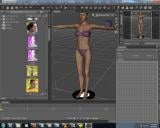
Am right at the start of learning animate and am trying to do some experimenting creating movements to animate with the simple puppeteer box but it appears I cannot select V4 at all. When I select her I can only move her around with that circle below her but not select her individual limbs. How can I do that please? (pic)
new.jpg
1280 x 1024 - 277K

Daz 3D is part of 
Connect
DAZ Productions, Inc.
7533 S Center View Ct #4664
West Jordan, UT 84084
Licensing Agreement | Terms of Service | Privacy Policy | EULA
© 2026 Daz Productions Inc. All Rights Reserved.
Comments
Hi select V4 and open the "power pose"panel to make sure she is active.
K thanks i'll try it. K so this is the only way you can make movements to your character in animate2? its not possible just to do it the normal way like when you are just doing a normal render and clicking on bodyparts etc.
Hi from your screen shot you do not appear to be using the aniMate plugin from gofigure that uses the nonlinear aniblock system,
And you should be able to select V4 by clicking body parts like any other figure
but I am still running 4.7 so its hard to tell if the problem is related 4.9 and V4 being so Old a figure
What is animate plugin from gofigure?!?! this a nerw version that I will need to buy?!! and no it won't let me click her bofy parts.
Toobis, GoFigure made the aniMate and aniMate2 plugin. Take a moment to read the stuff at this link: http://gofigure3d.com/site/index.php?option=com_content&view=article&id=92&Itemid=86
If you bought aniMate2, it's activated after the free trial by entering the serial number which would be in your list of serial numbers for your account. DAZ has the basic aniMate for free in Studio.
They and DAZ have video tutes on YouTube as well.
It doesn't look like you have the Animate Lite plugin installed or, if you do, it isn't one of your tabs. I would first go to Help>About Installed Plugins. In the list of plugins, you should find Animate. Is there a checkmark ticked in the box? If not, then click the box. My understanding is that the lite version still comes with DAZ Studio for free. I have the paid version so I can't check. If it is installed, you might just need to add the Animate Tab to your tabs. To do that right click next to the Timeline Tab and select Add Pane>Animate and that should put the Animate tab on your desktop. After that, I highly suggest watching one the great starter videos that DAZ3D has on their YouTube channel to get started.
I never use that Animate Tool that you've chosen from the toolbar. I'm not sure why it's there except to possibly preview animations. I never use it. I always use the plugin from the Tab. You can also animate inside the key frames and use Puppeteer.
Yeh I did register animate2 when I began. Still confused why its doing this. A little vid so you know exactly what I mean how I can't select her......
You probably want to select the 'Node Selection Tool' or the 'Active Pose Tool'. There is also an aniMate2 Tool that will let you select from animation aniBlocck sets at the bottom - that is white font letters on aquamarine blocks. It's nearly unreadable with so little contrast and size. However, the involuntary actions and probably all the rest of the aniBlocks don't work on Genesis 3 characters and I have no ideal if a utility to translate them to be compatible with Genesis 3 characters is in the works.
Either switch back to the Node Selection Tool (big Mouse Cursor Arrow at Top) or pose and animate using the Scene Tab plus the Posing, Shaping, & Parameters tabs (depends on what sort of animation you are doing).
Why do you have Transforms selected?
Get rid of the little circle under Vickie. With that selected, you can't chose any body part to modify. You need to select either the cursor or the cursor with the circle thing on it. Then you can chose your aniblock, pause the animation anywhere and make changes to the figure. You won't be able to make any changes to the figure while she stands on that Animate Circle thing.
How do I get rid of the circle under vickie please? I have no idea how it even got there to begin with.
Here is a screenshot. The one that is highlighted in yellow is my favorite cursor, but you can pick any of those three to get a normal cursor. You must have clicked on the tool with the big 'M' to get the Animate Tool which is useful for a quick preview of aniblocks if you are just going down the list of animations, but not for actual animation. If ever in doubt about which cursor you have, it is always the one that is highlighted in yellow at the top of your workspace across the top.
Sorry for the late reply but yeh K this will do for now. Thanks people.