HP Yuyu for Aiko 7 cat ears problem, solved (I think)
 tombraider4ever
Posts: 776
tombraider4ever
Posts: 776
I just bought HP Yuyu for Aiko 7, I used the morph for the cat ears but when I load a hair it covers the cat ears and looks weird, I tried to load the hair first then the ears but it's the same. I havent tried every hair I have for genesis 3 yet, but I would like to be able to use what hair I want.
Is there anyone else with this problem? I hope there's a fix for this beacause I love thoose cat ears :)
Here's a screenshot directly from Daz, I used Bridget Hair:
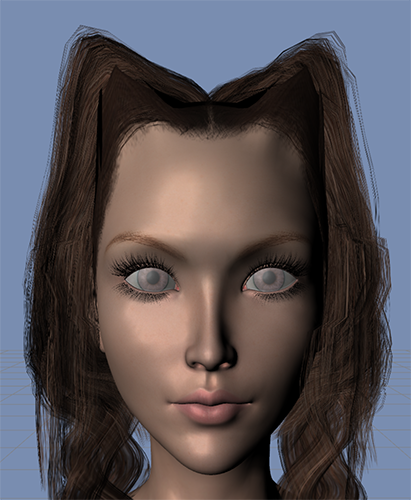
Edit: I think I solved it, you have to "unfit" the hair, move it into place and then it turns up morphs for the Yuyu ears and head. I don't know if I am doing something wrong, but the Yuyu morphs doesn't show up for the hairs if it's fitted.

Daz 3D is part of 
Connect
DAZ Productions, Inc.
7533 S Center View Ct #4664
West Jordan, UT 84084
Licensing Agreement | Terms of Service | Privacy Policy | EULA
© 2026 Daz Productions Inc. All Rights Reserved.
Comments
Elf ears will give you the same problem to greater or lesser degree. Parenting to rather than fitting to usually gets aroud it, although sometimes you have to be careful about the hair passing *through* the ears.
I think that there should be a note somewhere about this in the description or a readme of this product, I checked my daz library but I havent found any, perhaps I am looking in the wrong place.
Before you put the hair on the character, go to the cat ear morph on the parameters tab and turn the autofollow off. Then put the hair on normally, and it should work properly. If that doesn't work, show hidden parameters on the hair, look for the cat ears morph, and manually dial it out.
Thanks for the advice! :) I will try it when the render is finished, I couldn't wait to try this awesome model out :)