-
-
 NEW
NEW
-
-
-
$49.99
Artist:Compatible Figures:N/AFile Formats:DUFSKU:118578Optional License Add-Ons:
$1.99*Unless otherwise specified, no discounts or offers will apply to License Add‑Ons.
Optional License Add-Ons:
$1.99*Unless otherwise specified, no discounts or offers will apply to License Add‑Ons.
-
Details
Currently supports Windows Only.
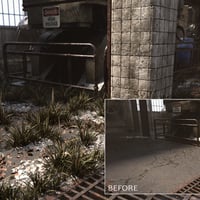
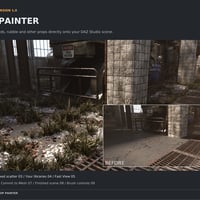
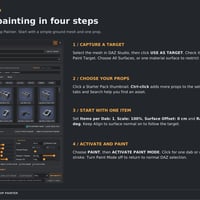
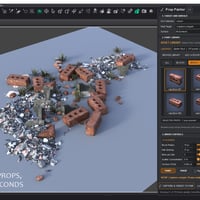
Prop Painter is a fast, intuitive DAZ Studio plugin for placing and scattering props directly onto scene surfaces.
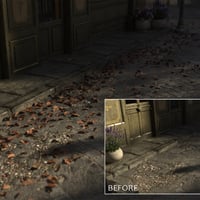
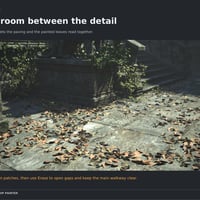
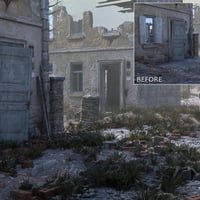
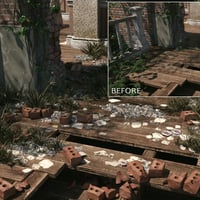
Instead of positioning leaves, rubble, bricks, gravel, litter, vegetation and other small scene elements one by one, simply choose the props you want to use and paint them into the scene. Use single-click placement for precise control or paint across larger areas to build up natural-looking detail quickly.
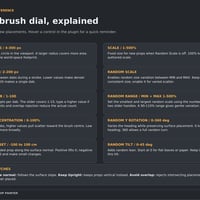
Prop Painter creates true DAZ Studio instances, helping keep scenes lightweight even when working with large numbers of objects. Random scale, Y rotation, tilt, spacing and scatter controls help break up repetition, while surface alignment, Keep Upright, overlap avoidance and automatic grounding help props sit naturally on the geometry beneath them.
You can use the included Starter Pack or work with compatible props from your existing DAZ Studio library. Favorite assets can be saved into custom Prop Painter categories for faster access, while original content files remain untouched.
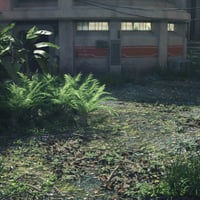
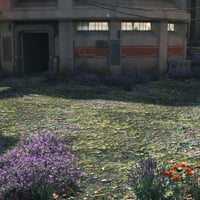
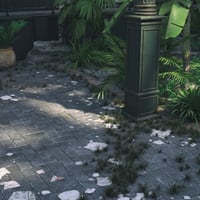
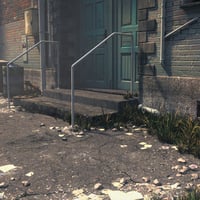
Whether you are dressing a street with litter and rubble, scattering leaves across a forest floor, adding gravel and debris around a ruined building, or simply placing a few props quickly and accurately, Prop Painter turns repetitive scene dressing into a fast, visual workflow directly inside DAZ Studio.
Paint it. Place it. Bring your scene to life.
Quick Plug in Installation:
- 1.There are 2 installers: 1 content installer and 1 plug-in installer. The content installer gets installed like regular content.
- 2. Install the Plug-in via DIM. The plug-in files are located in your library under \General\Stonemason\Prop Painter.
- 3. Run the PropPainter_Setup.exe file.
- 4. Be sure to select the correct version/file location.
- 5. Refer to Prop Painter Installation Instructions.pdf located in the Manuals folder for more detailed information.
What's Included and Features
-
Prop Painter :
- Surface Painting: Brush props onto floors, terrain, walls and other scene surfaces.
- Single-Click Placement: Place individual props with precise control.
- DAZ Studio Instances: Instance-based painting with automatic grouping.
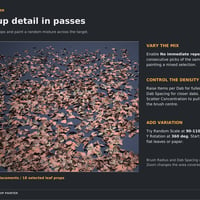
- Mixed Props: Paint with a random mixture of selected assets.
- No Immediate Repeat: Avoid consecutive repeats in mixed selections.
- Brush Radius: Adjust the size of the viewport brush.
- Items per Dab: Control the number of placement attempts per dab.
- Dab Spacing: Adjust the distance between dabs while dragging.
- Scatter Concentration: Spread props broadly or gather them toward the brush centre.
- Fixed or Random Scale: Use a consistent size or a minimum-to-maximum range.
- Random Y Rotation: Vary prop heading through up to 360°.
- Random Tilt: Add variation to the lean of painted props.
- Surface Alignment: Orient props to follow the surface beneath them.
- Keep Upright: Keep props vertical when painting onto slopes.
- Automatic Grounding: Position props against the surface using their geometry.
- Surface Offset: Raise or lower props relative to the surface.
- Avoid Overlap: Reject placements that intersect existing painted props.
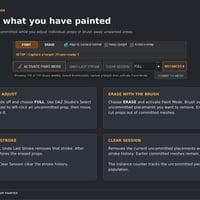
- Erase Brush: Brush away uncommitted painted props.
- Undo Last Stroke: Undo a paint stroke or restore an erased stroke.
- Target Surface Selection: Paint across an object or restrict painting to one material surface.
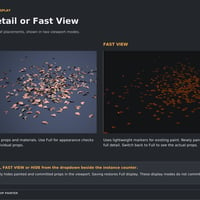
- Fast View: Show existing paint as lightweight markers while new paint remains full-detail.
- Hide Painted Props: Temporarily hide painted and committed props in the viewport.
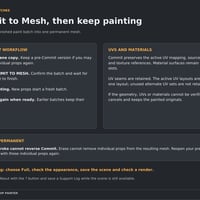
- Commit to Mesh: Combine a paint batch into one permanent mesh with its active UVs and materials.
- Repeat Commit: Paint and commit further batches while keeping earlier meshes intact.
- Individual Editing: Select and adjust uncommitted props with standard DAZ Studio tools.
- Clear Session: Clear uncommitted paint while keeping committed meshes.
- Starter Pack: Includes blocks, bricks, gravel, leaves, grass, debris and paper.
- Existing Libraries: Browse and paint compatible DUF props you already own.
- Favorites and Categories: Save and organize references without changing original asset files.
- Thumbnail Browser: Browse props visually, filter by category and search by name.
- Instance Counter: Track the current uncommitted painted population.
- Tools Menu Access: Open Prop Painter from the DAZ Studio Tools menu.
-
Props :
- 03 sdp Block
- 11 sdp Block Debris
- 12 sdp Brick
- 09 sdp Brick Rubble
- 05 sdp Debris
- 10 sdp Grass
- 15 sdp Gravel
- 18 sdp Leaf
- 32 sdp Paper Debris
-
Textures include :
- 21 Texture, Displacement, Normal, Roughness (512 x 512 to 2048 x 2048)
- Optimized for Daz Studio Iray
Quick Plug in Installation:
- 1. There are 2 installers: 1 content installer and 1 plug-in installer. The content installer gets installed like regular content.
- 2. Install the Plug-in via DIM. The plug-in files are located in your library under \General\Stonemason\Prop Painter.
- 3. Run the PropPainter_Setup.exe file.
- 4. Be sure to select the correct version/file location.
- 5. Refer to Prop Painter Installation Instructions.pdf located in the Manuals folder for more detailed information.
Notes
- This product includes:
- 1 DSON Core Installer
- 1 General Installer




Daz 3D is part of 
Connect
DAZ Productions, Inc.
7533 S Center View Ct #4664
West Jordan, UT 84084
Licensing Agreement | Terms of Service | Privacy Policy | EULA
© 2026 Daz Productions Inc. All Rights Reserved.