-
Where did the cutie pie cyber goth mask and hair go?
EightiesIsEnough said:
I suspect that the products you are wondering about are likely gone due to the demise of the 3Delight render engine as of today. I also noticed yesterday that pwToon is also gone from the Shop, and pwToon required 3Delight.
Removing shaders that will no longer work may well be down to the removal of 3Delight but I doubt other products will be pulled, at least not preemptively.
I suspect that the users who had products in the Shop that were designed for 3Delight have removed their products, as they knew the end was coming.
That said, I expect that more products will be or are removed from the Shop or other sites selling 3D items.
Where did the cutie pie cyber goth mask and hair go?I suspect that the products you are wondering about are likely gone due to the demise of the 3Delight render engine as of today. I also noticed yesterday that pwToon is also gone from the Shop, and pwToon required 3Delight.
I suspect that the users who had products in the Shop that were designed for 3Delight have removed their products, as they knew the end was coming.
That said, I expect that more products will be or are removed from the Shop or other sites selling 3D items.
Announcement about phasing out 3Delight - do we lose our 3Delight products?Havos said:
Silent Winter said:
Masterstroke said:
There are 3delight to Iray converters here in the store.
But will they be compatible with the new Studio version? Will we still see 3DL-era products load in with the 3DL shaders in the surfaces tab to then be converted?
If so, then all's well at my end. As much as I'll miss 3DL for PWToon, the FilaToon shader does all but one thing for that now. Beyond that, I haven't used 3DL in years (but have used one of those converters you mention - https://www.daz3d.com/rssy-3delight-to-iray-converter which works great).
All older products that only have 3DL shaders will load up with the Daz Studio Default shader exactly as they do now, and will work with the Iray renderer exactly the same as they do now (the renderer auto maps all Daz Studio Default shaders to Iray Uber) . The shaders will still exist, only the renderer is going away. https://www.daz3d.com/rssy-3delight-to-iray-converter ;should work the same way as it does now.
Groovy :)
Announcement about phasing out 3Delight - do we lose our 3Delight products?Silent Winter said:
Masterstroke said:
There are 3delight to Iray converters here in the store.
But will they be compatible with the new Studio version? Will we still see 3DL-era products load in with the 3DL shaders in the surfaces tab to then be converted?
If so, then all's well at my end. As much as I'll miss 3DL for PWToon, the FilaToon shader does all but one thing for that now. Beyond that, I haven't used 3DL in years (but have used one of those converters you mention - https://www.daz3d.com/rssy-3delight-to-iray-converter which works great).
All older products that only have 3DL shaders will load up with the Daz Studio Default shader exactly as they do now, and will work with the Iray renderer exactly the same as they do now (the renderer auto maps all Daz Studio Default shaders to Iray Uber) . The shaders will still exist, only the renderer is going away. https://www.daz3d.com/rssy-3delight-to-iray-converter ;should work the same way as it does now.
Announcement about phasing out 3Delight - do we lose our 3Delight products?Masterstroke said:
There are 3delight to Iray converters here in the store.
But will they be compatible with the new Studio version? Will we still see 3DL-era products load in with the 3DL shaders in the surfaces tab to then be converted?
If so, then all's well at my end. As much as I'll miss 3DL for PWToon, the FilaToon shader does all but one thing for that now. Beyond that, I haven't used 3DL in years (but have used one of those converters you mention - https://www.daz3d.com/rssy-3delight-to-iray-converter which works great).
Asha 9Censored said:
I'm always oddly surprised when people recognise our work, I even went back to see if our name could be found anywhere, but then again, our info slides aren't the most original aha!
The shape I sadly can not take credit for as before it's the texturing that I do, but I'm glad you seem to like it!I don't like your textures, I love them.
For decades (literally) I've used many different methods to get a comic/toon look and feel in DAZ Studio that I never quite got, though often close with things like PWToon and a gazillion Photoshop plug-ins and actions.
When Filatoon was finally available for Mac users and the Willow 9 sci fi stuff came out, it re-ignited my interest in using DAZ Studio again (I'd paused my 3D used to pursue 2D avenues like Cartoon Animator and Moho).
Your Toon textures for Lucas 9 and Mira 9 (and now Asha 9) are my current go-tos.
The only problem with them is that there's not enough of them. I really want to buy more, so if you're not too busy, please make a bunch of them.

Here's the three Censored texture sets that I'm using for my next animation (the Mira 9 and Asha 9 are both used on the three females to give a little shading variety):
 New purchases going MIA
memcneil70 said:
Also knowing what the item is, would help to determine what version of a program is needed to be ticked in DIM for download.
I bought a pair of V4 highheels and found out I needed to have a very old version of DAZ Studio ticked so they would be recognized. I was so new I didn't understand there were 'Legacy' products that would not show up for Daz Studio 4.5 if that was all that was ticked. (And now I get ALL the Legacy products available for the earlier generations. I just don't install them.)
Where does this Legacy content install? Is Legacy the same as DAZ Studio 3? It's not is it, as for example, I have pwToon for DAZ Studio 3 but I don't have DAZ Studio 3 installed, I have DAZ Studio 4 installed along with pwToon for DAZ Studio 4 installed.
OK, nevermind, it turns out except for one solitary updatte to an old product all the legacy product content was installed in newer version. I did check all the application checkmarks, even 32-bit, in DIM now though. And I did download all of it, but instead of installing it, I just hid it in the Ready to Install Tab.
Need some help with pwtoon and lightingHi all! Using Daz Studio 4.22. As you can see from the screengrab, the lighting I've got in my scene is very minimal and is concentrated on one specific point. This isn't my final lighting but I'm just using it to demonstrate how little lighting is in the scene yet the output render shows a fairly even lit scene. I'm currently using the pwtoon shader preset on my scene but right now, the lighting is providing this default lighting across the whole scene when it shouldn't be lighting anything other than this one tiny section. I am rendering in 3Delight as I'm not aware of being able to render pwtoon outside of 3Delight, I have "Auto Headlamp" turned to "Never", I have set my Environment Mode in "Environment options" to "Scene Only" but still nothing. I've even turned down the environment intensity just in case. I also have headlamp mode off in my camera. Does anyone have any ideas here? Thank you in advance for any help you may be able to provide!


 Need help with Oso Toon Shaders
I am trying to render a toon image using the original Oso Toon Shaders (not the FilaToon variety), but after applying the shaders, when I try to render the image as an iRay render, it comes out as a 3D version.
I added such shaders to a Genesis 3 figure that previously had a pwToon shader treatment. What do I have to do in order to render as a 2D toon image and not as a 3D render?
Toon Eye ProblemYes, Macs do not get Filament in DS 4.
The toon characters are set up for Filament, so they won't work immediately in Iray and even with tweaking won't look as intended. If you want toons you could also look at using pwToon in 3Delight - though you would have to do all the material set up yourself, and probably not use the special toon eyes.
Easy FilaToon [Commercial]wsterdan said:
vrba79 said:
I too noticed how the presets for this look a LOT like PWtoon presets, and that is a VERY good thing.
Since Mac users only got Filament and Filatoon this week, I wasn't watching the thread "Anime Toons and Filatoon Shader Q&A". I'm reading through it now and see that you were posting about the benefits over pwToon since last year, I'm sorry if I've been preachign to the choir. Thanks for being a good sport and just nodding quietly while I gushed non-stop, much appreciated.
Mac users are finally able to enjoy Filatoon? Welcome to the party!
Easy FilaToon [Commercial]vrba79 said:
I too noticed how the presets for this look a LOT like PWtoon presets, and that is a VERY good thing.
Since Mac users only got Filament and Filatoon this week, I wasn't watching the thread "Anime Toons and Filatoon Shader Q&A". I'm reading through it now and see that you were posting about the benefits over pwToon since last year, I'm sorry if I've been preachign to the choir. Thanks for being a good sport and just nodding quietly while I gushed non-stop, much appreciated.
Easy FilaToon [Commercial]I too noticed how the presets for this look a LOT like PWtoon presets, and that is a VERY good thing.
Easy FilaToon [Commercial]vrba79 said:
3Diva said:
noshobawolf_f994bf986d said:
Ok. Let me say not any specific complaints about the product. What I am talking about is being able to do something with it. That is not a product problem. Sorry if what I said came across wrong.
Oh! That's a relief! lol :) I am not sure what is meant by "do something with it" - something specific that someone was trying to do? Or just not able to do anything with it? I would love to see what face book page and post you guys are talking about. I don't normally use face book so a link would be appreciated.
As for doing American comic book style, I think that's achievable.
Here are a few different styles that I think could work with a comic.
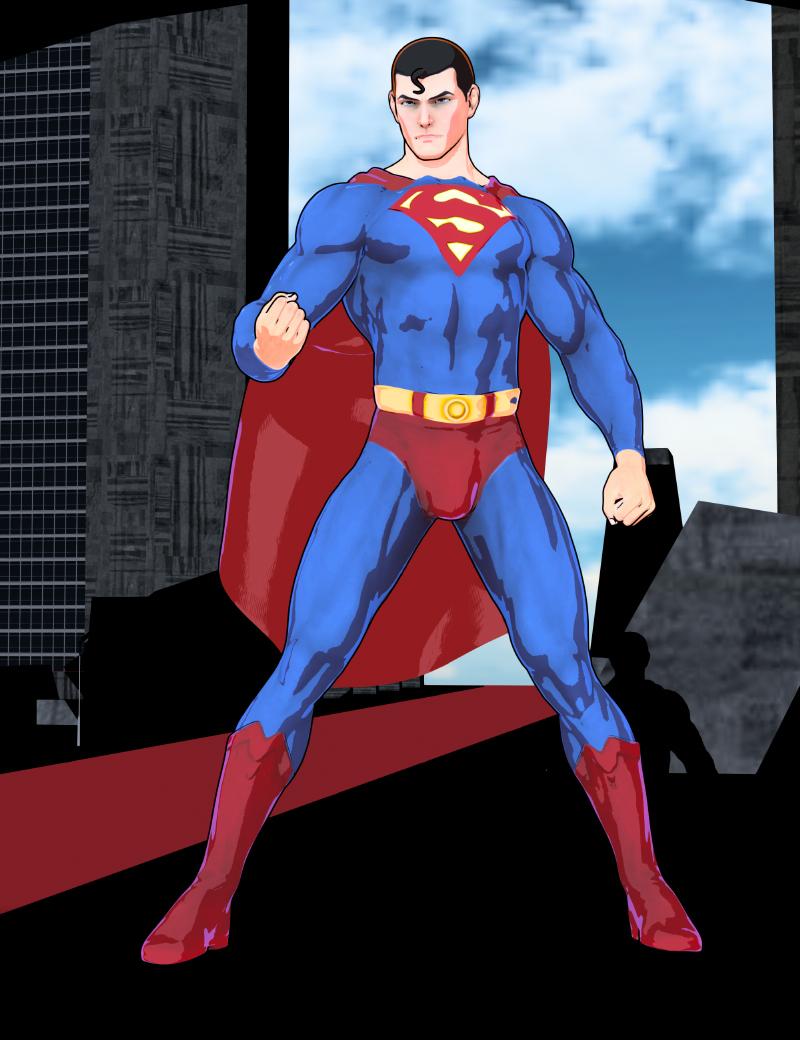
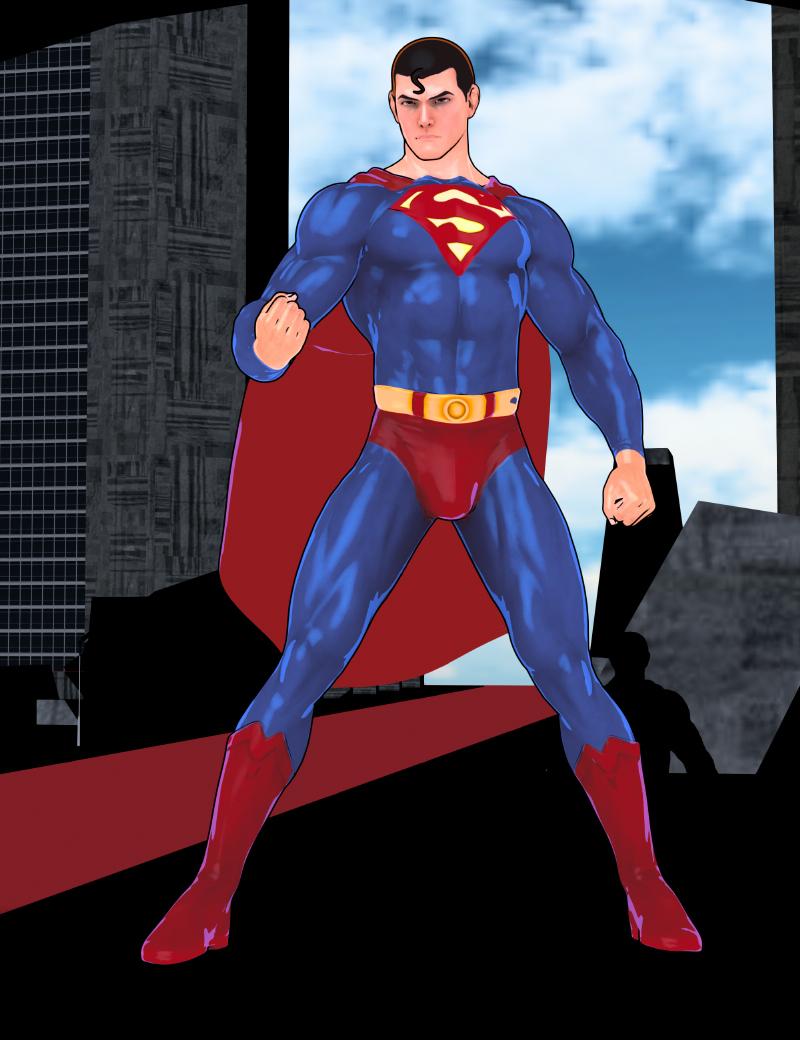
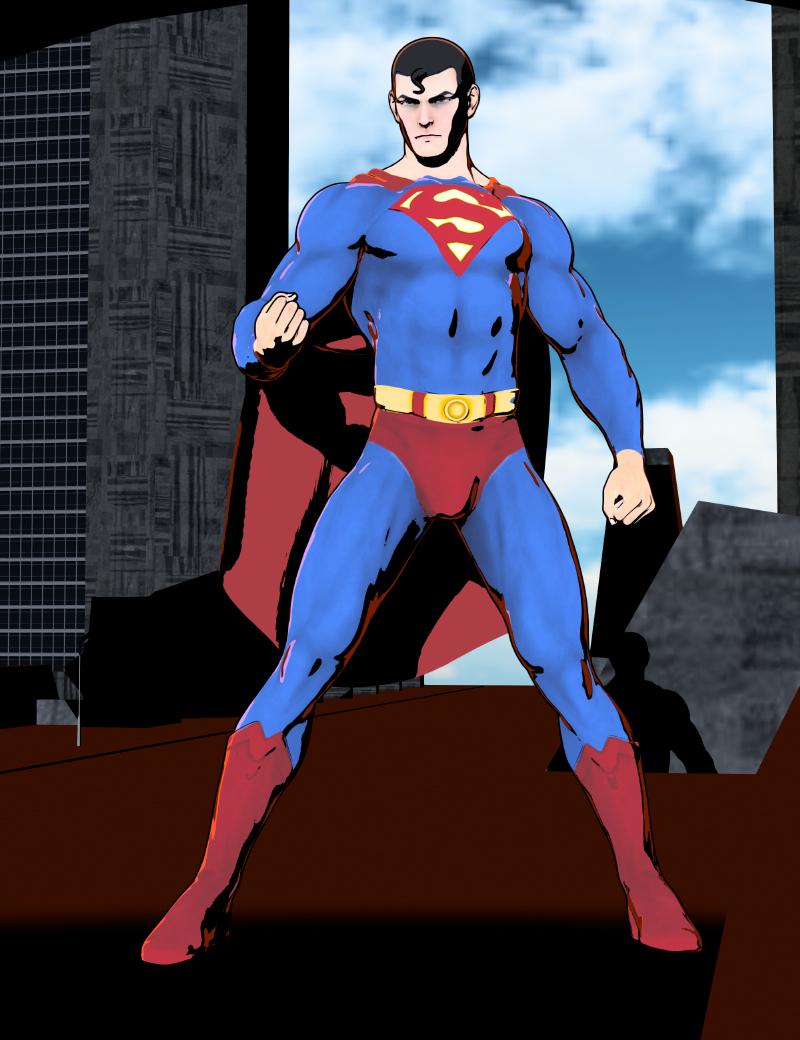
I think if people play around with the different presets, they can find a large variety of different styles can be made. :)
Wow! This really is just like PWToon!
I was a huge fan of pwToon and rendered hundreds, if not thousands of images with it, but this is easly 10x better. Imagine having all of or more than the control of pwToon, but it's instantaneous. No minutes- or hours-long renders, it's in the viewport, all the time. Huge posters in seconds, a minute of 1080p animation finished in an hour.
I'd been hoping to have something this to use in my retirment, and now... it's here.
It's been a great week for me for DAZ Studio, and Easy Filatoon has sped things up immensely. It's paid for itself the first day or two.
Have you guys had any success creating 2D style images from your Daz Studio renders?wsterdan said:
Diaspora said:
I think filatoon might be the better approach for the time being. 3Diva, I'll buy your product soon because it sounds spot on for what I need.
I picked it up when it came out and now that I can render Filatoon on the Mac, I actually used it today! It worked perfectly. I've been trying to get a nice. consistent 2D look out of DAZ for decades, and while pwToon came close, it was too slow and tended to give me varying qualities (I found I had to have different settings if a character was closer to or further away from the camera, etc.). Easy Filatoon gave me better results toon-wise in the first hour I used it than I got out of pwToon after months of usage.
I'm still experimenting, but this is what I got pretty much on my first try; here's my first two attempts at a 2D-style animation using her product on the character, clothing and starship bridge.
NOTE: the forward-facing animation used a lip sync pose I made years ago with DAZ's 32-bit lip sync, the second one is my very first attempt at hand-keying the lip sync, head movements and eye blinks. Man, soooo much practice is needed!
https://sterdan.com/wp-content/uploads/2025/04/Captain-Corbett-Opening.mp4
https://sterdan.com/wp-content/uploads/2025/04/Capt-Knight-Not-to-me.mp4
very tidy
Have you guys had any success creating 2D style images from your Daz Studio renders?Diaspora said:
I think filatoon might be the better approach for the time being. 3Diva, I'll buy your product soon because it sounds spot on for what I need.
I picked it up when it came out and now that I can render Filatoon on the Mac, I actually used it today! It worked perfectly. I've been trying to get a nice. consistent 2D look out of DAZ for decades, and while pwToon came close, it was too slow and tended to give me varying qualities (I found I had to have different settings if a character was closer to or further away from the camera, etc.). Easy Filatoon gave me better results toon-wise in the first hour I used it than I got out of pwToon after months of usage.
I'm still experimenting, but this is what I got pretty much on my first try; here's my first two attempts at a 2D-style animation using her product on the character, clothing and starship bridge.
NOTE: the forward-facing animation used a lip sync pose I made years ago with DAZ's 32-bit lip sync, the second one is my very first attempt at hand-keying the lip sync, head movements and eye blinks. Man, soooo much practice is needed!
https://sterdan.com/wp-content/uploads/2025/04/Captain-Corbett-Opening.mp4
https://sterdan.com/wp-content/uploads/2025/04/Capt-Knight-Not-to-me.mp4
The Mac FAQinquire said:
And what of Apple metal? I thought I read about that in the announcement this morning?
Any hint at all as to when there might be a native Apple Silicon version?Apple Metal is used in the interface and previews. There's been no hints at all of a native Apple Silicon version, but this is an Alpha, not even a Beta. Hopefully it'll come out somewhere down the line.
That said, seeing Filatoon characters rendered pretty much realtime as I'm setting up a scene is – to me at least – glorious; I never got to see any pwToon effects until I rendered, this is such a treat, and rendering the Filatoon scene at a second-and-a-half per frame... I'm a happy camper. So, so much faster than pwToon ever was.
Easy FilaToon [Commercial]3Diva said:
noshobawolf_f994bf986d said:
Ok. Let me say not any specific complaints about the product. What I am talking about is being able to do something with it. That is not a product problem. Sorry if what I said came across wrong.
Oh! That's a relief! lol :) I am not sure what is meant by "do something with it" - something specific that someone was trying to do? Or just not able to do anything with it? I would love to see what face book page and post you guys are talking about. I don't normally use face book so a link would be appreciated.
As for doing American comic book style, I think that's achievable.
Here are a few different styles that I think could work with a comic.
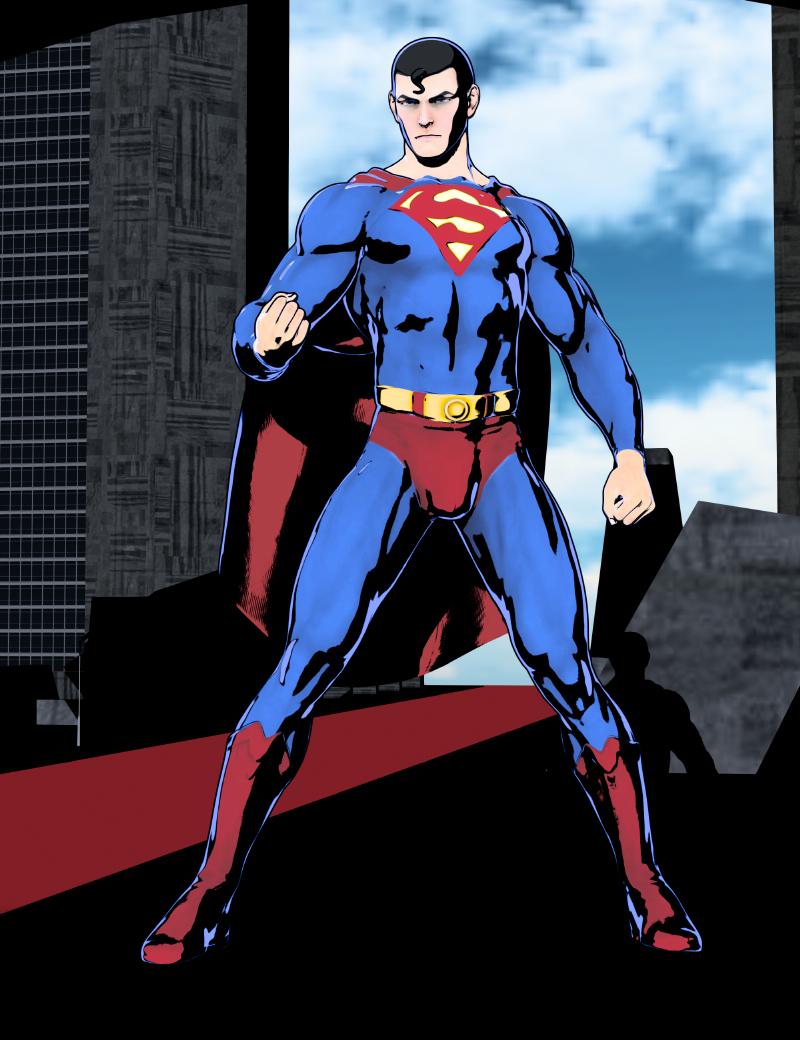
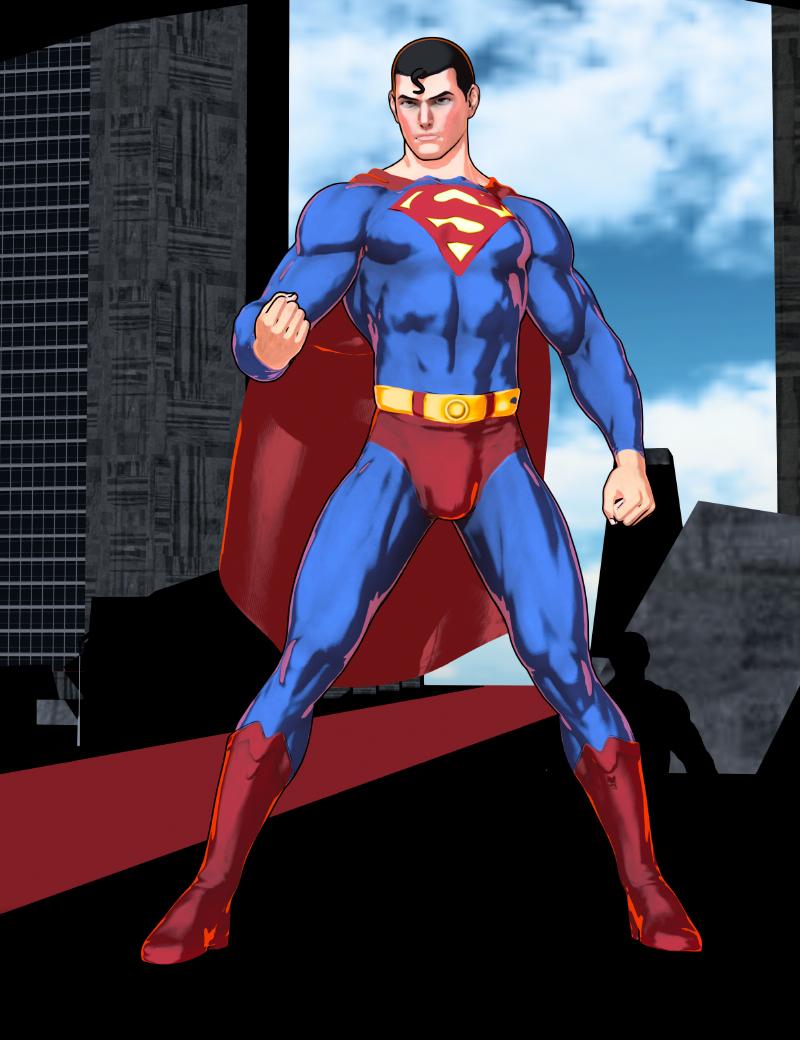
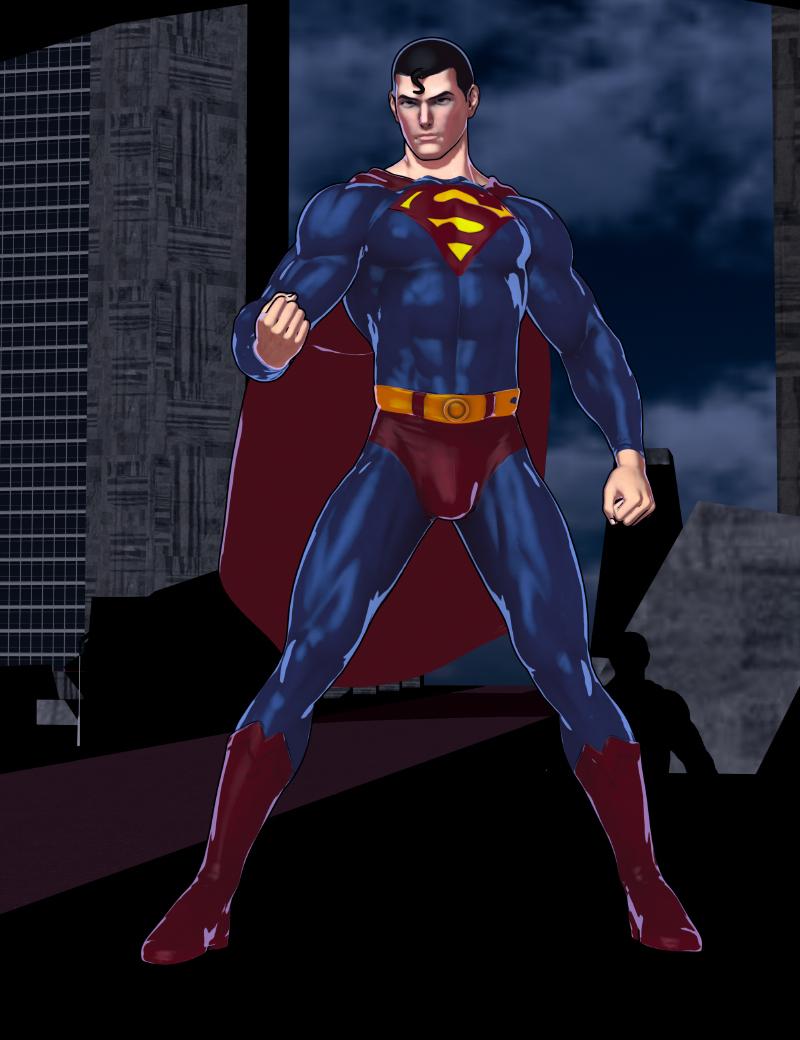
I think if people play around with the different presets, they can find a large variety of different styles can be made. :)
Wow! This really is just like PWToon!
FilaToon / Cell shaded rendering with Filamentjuvesatriani said:


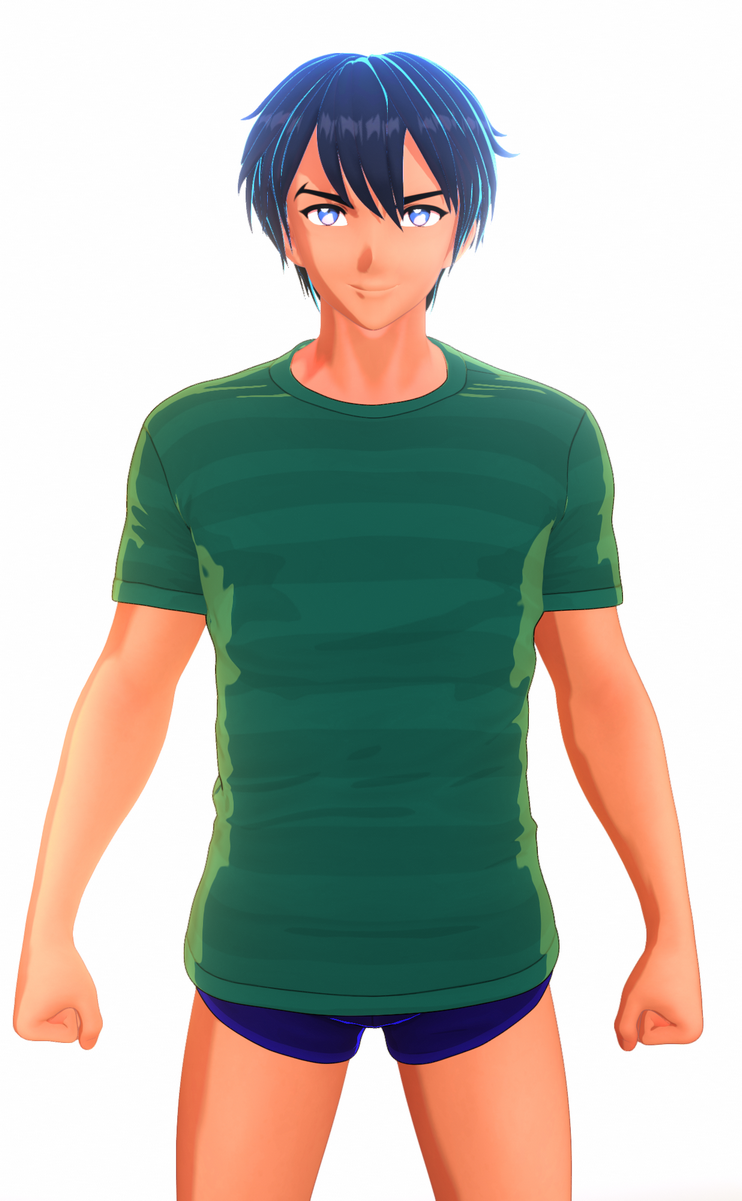
Filatoon and filament drawing options seem easier to handle than my old method using pwToon and photoshop . Here my first test using these new features . Using Linear than reinhard mode , so I can tweak it just like using photoshop . Still need digging how to make better shadow though . And it`s maybe the right time back using DAZ studio again
Yeah, in many ways it feels like a sucessor to PWToon! Your tests look fantastic with it.
FilaToon / Cell shaded rendering with Filamentjuvesatriani said:
Filatoon and filament drawing options seem easier to handle than my old method using pwToon and photoshop . Here my first test using these new features . Using Linear than reinhard mode , so I can tweak it just like using photoshop . Still need digging how to make better shadow though . And it`s maybe the right time back using DAZ studio again
Look amazing.
Great to see you posting again in Daz forums.
Daz 3D is part of

Connect
DAZ Productions, Inc.
7533 S Center View Ct #4664
West Jordan, UT 84084Licensing Agreement | Terms of Service | Privacy Policy | EULA
© 2026 Daz Productions Inc. All Rights Reserved.










