-
Clothing Prop into Normal Clothing
What figure is the clothing for? Transfer utility is for weight mapped figures like the Genesis line, for figures using Poser parametric rigging like V4 you'd use different tools.
Clothing Prop into Normal ClothingAll Daz clothing begins life as a static prop. Look for tutorials on the Transfer Utility.
Daz to Maya Update 1.7Hi,
I get this issue on the option "Rig or Re-target Skeleton" - DazToMaya 1.8 with Maya 2020 or 2022 versions. When I click on the option, nothing change on the model. No new rig. The model stay in T position. But these new things appears in the Maya's Outliner (Wich doesn't comes as seen on the DAZ videos with the same hierachie):- Geometry
- ExportSetup
- hip_ctrl_zero
And I get this error message:
"// Error: file: C:/Users/MACPRO03/Documents/maya/modules/DazToMaya/scripts/DAZTools.mel line 1694: Could not add constraint or connections."The Basic Genesis 8 model stay in the T pose. I have tried to reinstall several time the DazToMaya plugin. Doesn't want to work even with the github files...
Is someone to help or get same issue ? Thank you in advance for a help ;-)The complete log error is:
1- For the import sequence:
import maya.cmds as cmds
import DazToMaya
if int(cmds.about(v=True)) > 2020:
import importlib
importlib.reload(DazToMaya)
else:
reload(DazToMaya)
DazToMaya.run()
# pymel.core : Updating pymel with pre-loaded plugins: mayaHIK, invertShape, curveWarp, substanceworkflow, hairPhysicalShader, ATFPlugin, ikSpringSolver, retargeterNodes, RokokoMotionLibrary, sweep, AutodeskPacketFile, lookdevKit, Type, Boss, bifrostGraph, meshReorder, modelingToolkit, MayaMuscle, matrixNodes, bifmeshio, deformerEvaluator, shaderFXPlugin, objExport, bifrostshellnode, ufeSupport, GPUBuiltInDeformer, mayaVnnPlugin, substancemaya, svgFileTranslator, GamePipeline, tiffFloatReader, MASH, poseInterpolator, bifrostvisplugin, cacheEvaluator, mtoh, ik2Bsolver, xgenToolkit, AbcExport, gameFbxExporter, OpenEXRLoader, Unfold3D, mayaCharacterization, mtoa, rotateHelper, AbcImport, autoLoader, sceneAssembly, gpuCache, Substance, mayaUsdPlugin, OneClick, renderSetup, ArubaTessellator, substancelink, quatNodes, fbxmaya #
Daz to Maya, run() method
win32
d2m start
file -f -new;
// Result: untitled //
file -f -new;
// Result: untitled //
Importing Daz...
// Logfile: "C:\Users\MACPRO03\Documents\maya\FBX\Logs\2020.1\maya2022imp.log" //
setAttr -type "string" Genesis8Male.StudioNodeName "Genesis8Male";
setAttr -type "string" Genesis8Male.StudioNodeLabel "Genesis 8 Male";
setAttr -type "string" Genesis8Male.StudioPresentationType "Actor/Character";
setAttr -type "string" Genesis8Male.StudioPresentationAutoFitBase "/Genesis 8/Male";
setAttr -type "string" Genesis8Male.StudioPresentationPreferredBase "";
setAttr -type "string" Genesis8Male.ControllerScales "Youth Morph=-0.445;CTRLGunnar=0;CTRLCaspian=0;CTRLHugren=0.0599999;CTRL-RSC-GarethHD=0.036;FBMRealBodiesJules=-0.0324572;Beast HD=0.17;CTRL-FIYousef=0.03;CTRL-E3DYonni=0.021;CTRL-E3DWalker=0.065;CTRL-E3DTamati=-0.014;CTRL-E3DSeb=-0.025;CTRL-E3DLeonard=0.03;CTRL-E3DLeon=0.02;CTRL-E3DKichiro=-0.0499999;CTRL-E3DGui=-0.025;CTRL-E3DGanaatarDemon=0.026;CTRL-E3DGanaatar=-0.026;CTRL-E3DDonovan=0.012;CTRL-E3DBjarke=0.032;Daniel=0.0650001;CTRLVladimir8=0.056;CTRLValentino8=-0.048;CTRLTheBrute8=0.17;CTRLScar8=0.056;CTRLMrWoo8=-0.105;CTRLMichael8=0.04;CTRLLee8=-0.06;CTRLLandon8=0.04;CTRLKjaer8=-0.02;CTRLJonathan8=0.04;CTRLHolt8=0.068;CTRLDiego8=-0.018;CTRLDasan8=-0.02;CTRLDain8=0.044;FBM_CGI_Miklos_Body=0.03;FBM_CGI_HKClaus_Body=0.02;CCRafael=-0.018;CCMagnus=0.1515;CCJack=-0.0172213;CCDragomir=0.0453";
AutoIK...
namespace fix finished
// Error: line 1: No source attribute was specified. //
// Error: line 1: The source attribute 'm5philliplashes.outColor' cannot be found. //
// Error: line 1: setAttr: No object matches name: Genesis8Female.drawStyle //
------------------------------------
------------------------------------
// Error: line 1: Non-deletable node 'perspShape' cannot be deleted. //
// Error: line 1: Non-deletable node 'persp' cannot be deleted. //
// Error: line 1: Non-deletable node 'topShape' cannot be deleted. //
// Error: line 1: Non-deletable node 'top' cannot be deleted. //
// Error: line 1: Non-deletable node 'frontShape' cannot be deleted. //
// Error: line 1: Non-deletable node 'front' cannot be deleted. //
// Error: line 1: Non-deletable node 'sideShape' cannot be deleted. //
// Error: line 1: Non-deletable node 'side' cannot be deleted. //
// Error: line 1: setAttr: No object matches name: Genesis3Male.drawStyle //
// Error: line 1: setAttr: No object matches name: Genesis3Female.drawStyle //
// New character 'Character1' was created.
parentConstraint -mo -weight 1;
// Result: lBigToe_parentConstraint1 //
parentConstraint -mo -weight 1;
// Result: lSmallToe1_parentConstraint1 //
parentConstraint -mo -weight 1;
// Result: lSmallToe2_parentConstraint1 //
parentConstraint -mo -weight 1;
// Result: lSmallToe3_parentConstraint1 //
parentConstraint -mo -weight 1;
// Result: lSmallToe4_parentConstraint1 //
parentConstraint -mo -weight 1;
// Result: rBigToe_parentConstraint1 //
parentConstraint -mo -weight 1;
// Result: rSmallToe1_parentConstraint1 //
parentConstraint -mo -weight 1;
// Result: rSmallToe2_parentConstraint1 //
parentConstraint -mo -weight 1;
// Result: rSmallToe3_parentConstraint1 //
parentConstraint -mo -weight 1;
// Result: rSmallToe4_parentConstraint1 //
// New Rig: Character1_ControlRig was created.
// Error: line 1: setAttr: No object matches name: Scalp.cosinePower //
// Error: line 1: setAttr: No object matches name: SummerLash_1006.alphaGain //
DazToMaya Complete!
2- For the Retarget Skeleton sequence :
---- Running DAZ Rigger v1.02 ----
// Warning: file: C:/Users/MACPRO03/Documents/maya/modules/DazToMaya/scripts/DAZTools.mel line 491: New name contains invalid characters. Illegal characters were converted to "_". //
---- Geometries grouped ----
// Error: file: C:/Users/MACPRO03/Documents/maya/modules/DazToMaya/scripts/DAZTools.mel line 1694: Connection not made: 'hip_scaleConstraint1.constraintScaleX' -> 'hip.scaleX'. Destination attribute must be writable. //
// Error: file: C:/Users/MACPRO03/Documents/maya/modules/DazToMaya/scripts/DAZTools.mel line 1694: Could not add constraint or connections. //Best hairs for Kiko?@Gordig Yep the Kitsune morph as the ears are part of the base, so they tend to create issues with hair... just trying to work out what products will work well without having to use Dforce for everything (long story but DF is a bad idea for this project)
g8 male elbow distortionLooks like a JCM is firing when it's not supposed to. Have you recently installed any characters or other morph packs?
Why use custom characters?Despite pointing out the goat morph as an example of what people are talking about, I actually really like that morph and am glad that it exists, because it gives me something that otherwise doesn't really exist. There's less need for that kind of thing when we're dealing with human figures, where there are a lot more options available, and obviously it would be better if it were actually a hand-sculpted morph, but I'm still glad I have it.
Why use custom characters?Yes needing multiple characters and/or morph packs to use one new character is definitely a no for me.
I still grumble at descriptions and product info on whether or not textures will work on the base model if you don't have the extra characters or morph packs or both.
I got lucky with Mabel cause she doesn't use a morph or character for her look, so I know it will work on the base model and I now have a texture for when I want an elderly character in my render.
Why is saving a new morph asset saving thousands of new files?oooohhhh okay strange, the tag wordings implied the morph gets applied to all of those body parts if you check them or something. so I would need to know which body part category my morph is in and locate it i assume?
1930's-1940's Hollywood Glamour G8.1M head morphs. No textures.What a beautiful render, SapphireBlue. So emotional and romantic. I like how she touches him gently and his vulnerability in response. Great stuff. That plus the background, rain and lighting all add up to a thing of beauty. Perfect finale for your story, I'd say. Congratulations!


I'm giving Debonair and Charming a spin again. This time it is ... Sci-fi! It's quite ambitious and complex, so I don't know if I'll manage to do it. I've also introduced a new character that I have sculpted. His name is Hal - a big guy, ex-astronaut. When I'm done with my rendering, I'll post it and upload the morph for you guys to download. If you like Rugged, you'll love Hal (I like to think at least)!
Thanks again for another enchanted moment, SapphireBlue! You made me happy.
AOBB
Best hairs for Kiko?Do you mean specifically her kitsune morph?
Why is saving a new morph asset saving thousands of new files?You only want your own morph selected, having everything selected as in your screen shot means you get a copy of everything.
Baseball Animations for Gen 8.1 does not work with Lincoln figureHmm, I don't know why it wouldn't work, I don't have Lincoln to test it, but what should work is load in Kayden, dial him out and dial in Lincoln. Then you're using a character you already know works with the morph you want to use. It's not the ideal answer or use, but it is a workaround if you really wanted to use Lincoln in your shot.
Dial Fusion for Genesis 2 to 8.1 (Commercial)Thank you so much for this tool!
I noticed that TG4 morphs are being saved "additive" way in the final dial (this is for G8M and G81M), since the default value of that morph is 21. Alt-left-click doesn't go back to that value though.
It looks like this:
{
"output" : "Genesis8_1Male:/data/DAZ%203D/Genesis%208/Male/Morphs/3D%20Universe/G8MTG4/int3duG8MTG4Age.dsf#int3duG8MTG4Age?value",
"operations" : [
{ "op" : "push", "url" : "Genesis8_1Male:#DF-LatinoBody?value" },
{ "op" : "push", "val" : 21 },
{ "op" : "mult" }
]
},
But after resetting and aplying the dial, this morphs goes from default 21 to 42. :)
I also wanted to ask, if it's better to make a "dial" from 100% sized figure?
Why is saving a new morph asset saving thousands of new files?Thank you, Richard. Im just creating a custom morph using morph loader pro then freezing the erc then going to Save as/Support Asset/Morph Asset I have tried it a few different times with various custom morphs and each time it creates about 14,000 files in the new folder with names from other products I have in my library.
Why is saving a new morph asset saving thousands of new files?When I save a new morph asset the new folder will have thousands of dsf files from other products I have installed. How do I prevent it from adding all of those? Thank you for any help!
Why use custom characters?murgatroyd314 said:
The worst offender I've seen for sale was Kelpie for the original Genesis, which is no longer in the store. She required four different named characters plus a morph set, and only one of those was listed as a required product on the store page.
...yeah I actually have her. Already had Teen Julie from the YT5 bundle who was one of the required figures (listed on the Wiki). I believe she also required Vicky5 (who I already had) and Hitomi5 (who I had to purchase)
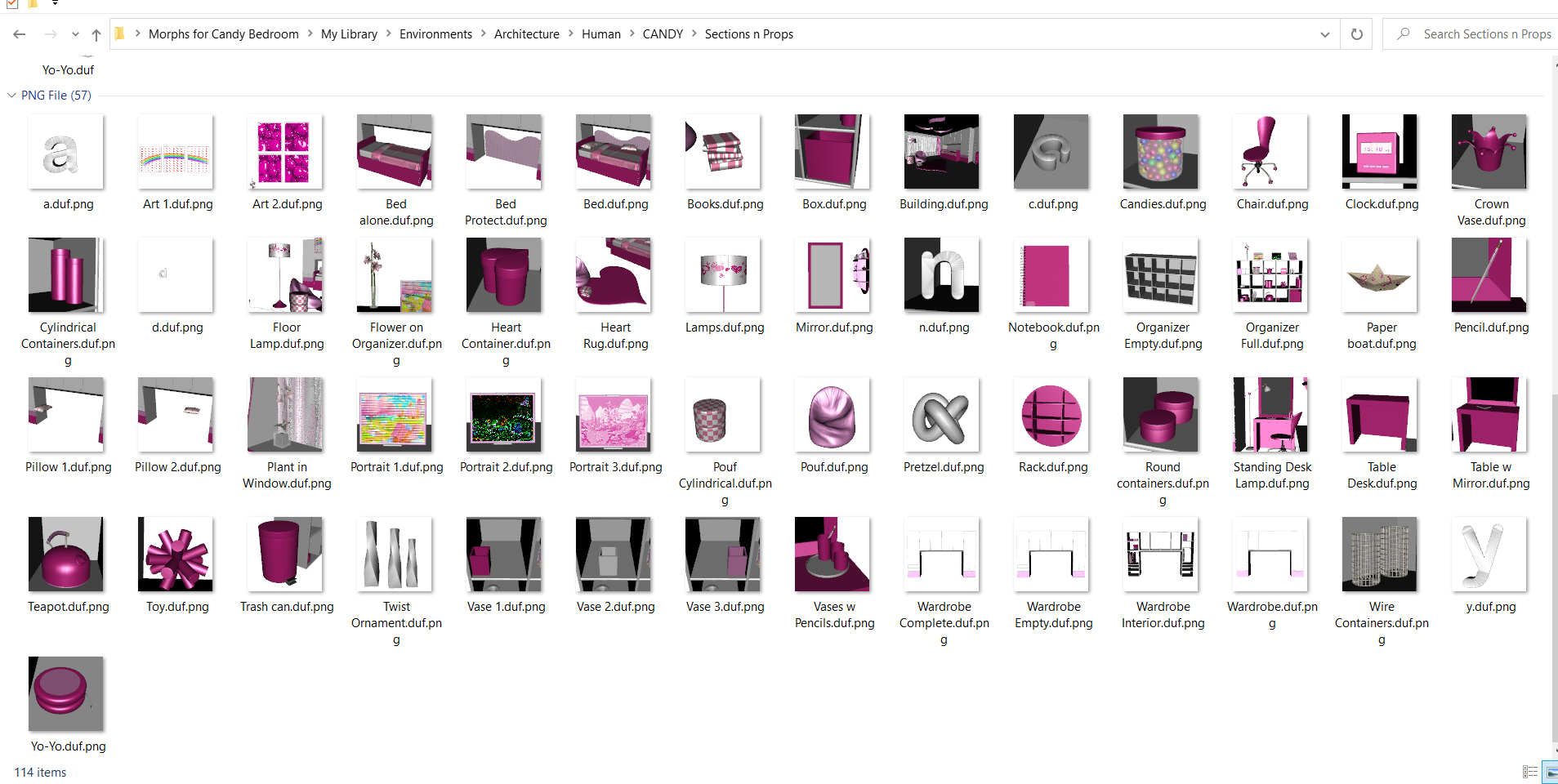
Morphs and scene subsets for Prop in Candy BedroomOne has to own the Candy Bedroom for any of this release to work. The set loads as a full scene.
So to load individual props I made a whole bunch of scene subsets {no geometry in these}.
I also made a few morphs - one for the notebook on the table {it's a box!}, one to scatter the books on the rug, a few to remove lids on some of the cannisters. Also a few for the bed - one to raise the cover and lower the foot board so one can try to dForce the blanket down - make a morph of your reshaped blanket - then dial out those morphs. A couple of extra morphs to raise/lower the headboard and the footboard {kids can hide under the bed, yes!}.
 Help: what AMD CPU for a RTX 3080?
RL_Media said:
One major thing that getting a more beast CPU helped with is viewport lag. I used to get lag in viewport with anything more than one or two people in the scene. If I try to move any slider even, it would lag for a second or two, then start moving. Was major annoyance when trying to make tweaks to anything. Now I can have even 40 people in scene, and there is no lag. I had a 1600X I think, then went to a 3900X.
Hate to be the bearer of bad news, but core count had very little to do with your lag problems.
For the most part, the only time core count matters is in regards to rendering. This is mainly due to almost all functions in DS still being single core.
Viewport lag is, mostly, driven by your gpu. When the cpu causes a lag problem, is in relation to other functions, such as Smoothing modifiers. These are, unfortunately, still single core functions.
For sliders, that 'lag' is because of how the genesis series works.
What most people aren't aware of, is that, the morph dials don't fully load initially, when in a 0 state, but only the presentation data(what the slider looks like on screen) is loaded and a link to the full file(DSF) is created.
When you move a slider, then DS reads the rest of the file and creates the necessary links and changes the figure accordingly.
The amount of 'lag' is going to, again, be determined by single core speed, as well as, drive type, speed and interface, and the complexity of the particular morph(dsf) file.
How to load my installed morph in Daz 4.20You don't need to use the Morph Loader, and in fact can't with products made for DS because the .obj files are converted into Daz files. If it's installed properly, the morphs should just appear on your G8M. Look under Full Body.
How to load my installed morph in Daz 4.20Hi everyone, I'm using Daz Studio 4.20 Pro. with Genesis 8 male. I purchased Growing Up for Genises 8 Male (s). I installed it using the Install Manager. It shows where the product was installed and I find a bunch of .dsf files I navigate to the location using Windows File Explorer . Watching tutorials on youtube it seems that I need to use Morph Loader Pro then click on Choose Morph Files and search for the morph file. Using the Morph Loader Pro I navigate to the folder where supposedly the morph was installed but didn't find any .obj file or anyghing. I looked under the Paramaters tab after selecting the Genises 8 Male and saw nothing related to the morph I downloaded and installed. I look under the shaping tab and got the same results... nothing.
Obviously I'm doing everyghing wrong. I apoligize for being such a newbie but can someone please give me an idea how to get my morph loaded in Daz 4.20? I would really appreciate it after spending the better half of a day looking for solutions.
Thanks a lot for any help with this.
Daz 3D is part of

Connect
DAZ Productions, Inc.
7533 S Center View Ct #4664
West Jordan, UT 84084Licensing Agreement | Terms of Service | Privacy Policy | EULA
© 2026 Daz Productions Inc. All Rights Reserved.