-
Whimper Whine... M7 taking a long time!Get 50% off Micheal 7 if you own Victoria 8 pro pack...I'm Animated, are you? -CONTEST INSIDE! - (ceck the last post, page 8)
I don't think that's the case. Some people have shown some items and had them released within a week or two of the preview.
Hey, in the absence of any real news, people start spreading rumors. I was just doing my share. At least I didn't go for my usual "kidnapped by aliens" rumor.
Nahhh! Animated girl is in an eternal date with Michael 7 in a tropical island drinking daikiris in the beach...shhhhh! don't say it to Animated boy and/or Victoria 7.
NGM V4 DisasterI am not sure what's going on here. I am using Victoria 4.2 in Poser Pro 2014 SR5. I have loaded Victoria with the Morphs++ and the NGM V4. I go into the Pose Library and under NGM_V4 I click on NGM_0. This is the result:
FREEBIE CHALLENGE --- September and The Leaves Are TurningThank you! :D The background is Autumn Thicket - DS Creative - Issue 1 - page 33 (it comes with 3 backgrounds (image files) in the download, all very beautiful).
Yes, it's Iray (used lights that come in Daz already) It's my favorite render, too bad it takes so many hours in my computer... (I urgently need to learn 3Delight) But I heard if a person has that special nividia (?) graphics card it goes very fast! (the problem is that i make it in a laptop, so it uses the processor, and it's not possible to change the graphics card, not to say its probably expensive).
I love DS Creative! They publish in the middle of the month right? I can't wait for the next one! Do you participate in the magazine? You could save them as .pdf and read in your free time (if you have any hehe). I particularly would love to have a physical copy of the magazine in hands... I find it a bit hard to read on pc :|
Oops! I totally missed the fact that you listed the background as the first item on your freebie list - I've got to read this lists better!

I know what you mean about long render times especially with the physical based render engines. I don't know if it is just my machine or if others are running in to the same issue, but when I use the 3Delight engine in Studio 4.8, the shadows and lights don't seem to work the same as they used to before Iray was added. Anyway it would probably be cheaper for you to buy the Reality 4.1 plugin for DAZ (especially since it is on sale this month) than to install new processesor or buy a newcomputer. The new version of Reality has really shortened render times compared to the original version. You can check out their promo video here: https://www.youtube.com/watch?v=aSY-YW1RVj0
That's ok :) Well, I don't know how 3Delight used to work before Iray because when I joined Daz3d my software already came with Iray... Which render do you use more/prefer? I just watched the Reality 4.1 video and I fell in love with it - WHAT is that render?! So perfect! When you buy Reality 4.1, if it gets upgraded to 4.2, for example, do you have to buy again? I would love to buy so many things in here, but I will have to wait my currency go up again (my country is going through hard times lately). Hopefully it will be better by the end of the year (I'm happy to see Daz has lots of promotions!). The time reduction from the renders was incredible! From 2 hours to less than 10 minutes is a huge improvement! I should start making a list of products I want for when they have promotions... (I think I need to have more items before getting a better render...) I think Victoria bundles are a great thing to purchase (I just wouldn't know the difference between them).
I used to use 3Delight exclusively until I purchased Reality a couple of years ago. The folks at Preta3d.com are very good about the upgrades. So far the incremental updates (i.e.Reality 4.0 to 4.1, etc) have all been free. I only recently went from Reality 2 to Reality 4 which was just a lower "upgrade" price. I've actually haven't played much with Iray yet since I'm just more comfortable with Reality but some of the test renders I've tried look promising and many of the Iray renders I've seen posted here are very impressive! I always say, stick to what you are comfortable with and what works for you! Great art is not about the tools but the artist!

I have to say all the Daz bundles are a great deal. Keep them on your wishlist because they frequently go on massive sales, up to 70 to 80%. The only difference between the bundles really is how much is included. The higher priced bundles usually having every thing the other bundles have. For example, usually everything in the "starter bundle" is part of the "complete bundle", and everything in the "complete bundle" is in the "pro bundle". Of course, sometimes you just don't need or want something in a bigger bundle so you can save money for a different bundle later!
 FREEBIE CHALLENGE --- September and The Leaves Are Turning
Thank you! :D The background is Autumn Thicket - DS Creative - Issue 1 - page 33 (it comes with 3 backgrounds (image files) in the download, all very beautiful).
Yes, it's Iray (used lights that come in Daz already) It's my favorite render, too bad it takes so many hours in my computer... (I urgently need to learn 3Delight) But I heard if a person has that special nividia (?) graphics card it goes very fast! (the problem is that i make it in a laptop, so it uses the processor, and it's not possible to change the graphics card, not to say its probably expensive).I love DS Creative! They publish in the middle of the month right? I can't wait for the next one! Do you participate in the magazine? You could save them as .pdf and read in your free time (if you have any hehe). I particularly would love to have a physical copy of the magazine in hands... I find it a bit hard to read on pc :|
Oops! I totally missed the fact that you listed the background as the first item on your freebie list - I've got to read this lists better!
I know what you mean about long render times especially with the physical based render engines. I don't know if it is just my machine or if others are running in to the same issue, but when I use the 3Delight engine in Studio 4.8, the shadows and lights don't seem to work the same as they used to before Iray was added. Anyway it would probably be cheaper for you to buy the Reality 4.1 plugin for DAZ (especially since it is on sale this month) than to install new processesor or buy a newcomputer. The new version of Reality has really shortened render times compared to the original version. You can check out their promo video here: https://www.youtube.com/watch?v=aSY-YW1RVj0
That's ok :) Well, I don't know how 3Delight used to work before Iray because when I joined Daz3d my software already came with Iray... Which render do you use more/prefer? I just watched the Reality 4.1 video and I fell in love with it - WHAT is that render?! So perfect! When you buy Reality 4.1, if it gets upgraded to 4.2, for example, do you have to buy again? I would love to buy so many things in here, but I will have to wait my currency go up again (my country is going through hard times lately). Hopefully it will be better by the end of the year (I'm happy to see Daz has lots of promotions!). The time reduction from the renders was incredible! From 2 hours to less than 10 minutes is a huge improvement! I should start making a list of products I want for when they have promotions... (I think I need to have more items before getting a better render...) I think Victoria bundles are a great thing to purchase (I just wouldn't know the difference between them).
Thank You PAs For Participating In The SaleI haven't rendered many of them, but the ones I want to play with first are:
Z Comfort In Red (rendered and really like the way the poses are parented to the couch so perfectly. Darken the couch in Diffuse for an elegant maroon or brown)
FWSA Natasha HD for Victoria 7
My number one favorite (that I have rendered) is Backyard Retreat. SO AWESOME! (a few posts back)
If anyone wants to showcase what they've bought, I've opened my Art Studio thread up to the forum members (it had been Invited Guest Contributors the last three or four threads. We're on number 6) The link is in my signature. Please put the renders in the posts, not as only attachments, so they are easily seen. Also put the name and link of the product used. Help spread the word about the products you really like! (You'll see some of the ones from this month already rendered, that might help you decide on this last day if you want to add anything to your treasure trove.)
LOL ty for posting this; just realised I haven't used Backyard Retreat yet and I actually have a use for it... I'd forgotten.
Backgraound peopleIs there a better way to have a small crowd of people in the background of a scene? I want to have 2 main characters with a small crowd in the background watching. Thank you
There is Loretta and Lorenzo LoRes in the store here which would do that job niccely : http://www.daz3d.com/lorenzo-and-loretta-bundle
Depending on your requirements, there's also First Bastion's A Distant Army Approaches. In addition to Lorenzo and Loretta, Predatron sells a number of other lo-rez figures that might be useful to you.
If you have any older figures such as Victoria 3 (or, better yet, Victoria 1), they have low polygon counts, and would do to fill a background.
Billboards, as described in earlier posts, can work well, but you need to set them up under the same lights as your main figures. You'll probably want to do something like:
- Place your main figures.
- Get the lighting set up to light them the way you want.
- Save your main scene.
- Add one background figure
- Make sure the lights also work for that background figure in various positions. If you made any changes, resave the scene.
- Delete the foreground figures.
- Render the background figure to an image (make sure that your software is set to generate the alpha channel so you can 'cut out' the figure)
- Add in additional background figures one by one, or as a group, and render.
- Re-load the scene with the main figures, load in your billboards in the appropriate positions, and render.
Some software supports 'replication' or 'instancing'. For example, Carrara's surface and multi-replicators are good for producing a crowd (here's one example, and here's another).
Remember that if your figures or billboards aren't quite perfect, you can use depth-of-field to ensure that your main figures are in sharp focus, while the background crowd are slightly blurred. In addition to hiding some defects, it also adds a nice sense of depth to the image.
Thank You PAs For Participating In The SaleI haven't rendered many of them, but the ones I want to play with first are:
Z Comfort In Red (rendered and really like the way the poses are parented to the couch so perfectly. Darken the couch in Diffuse for an elegant maroon or brown)
FWSA Natasha HD for Victoria 7
My number one favorite (that I have rendered) is Backyard Retreat. SO AWESOME! (a few posts back)
If anyone wants to showcase what they've bought, I've opened my Art Studio thread up to the forum members (it had been Invited Guest Contributors the last three or four threads. We're on number 6) The link is in my signature. Please put the renders in the posts, not as only attachments, so they are easily seen. Also put the name and link of the product used. Help spread the word about the products you really like! (You'll see some of the ones from this month already rendered, that might help you decide on this last day if you want to add anything to your treasure trove.)
Dress made in MD5 will not fit th V6Victoria 6 is not the default in daz. As you say she is a morph for G2F. However if you made a dress around a morph you can still get that to work fine with a few extra steps.
When using the transfer utility:
For source Pick G2F
For Item shape pick Morph
Scroll through the list to find the V6 morphFor target pick the dress, and you can leave item shape as default.
Check Reverse Source Shape from target.
Press accept.You will notice the dress fits, but it has automatically generated the morph for the V6 shape. For example the bust area my now suffer shrink wrap. this is no problem.
Select the dress
click morph loader pro icon.
Choose Morph files
Pick the OBJ you saved from MD
Change the Name to match the name of the morph (Victoria 6 probably, but it needs to be exactly the name of morph)
Reverse Deformations NO
Overwrite Existing: Deltas Only
Accept.The automatically created morph will be replaced with your manually shaped one. now the dress will look perfect for V6.
You can also use this process to make custom fixes for other shapes. Say you want to reuse this dress on Aiko, but the shrink wrap boobs are annoying, you can fix up the obj just for aiko and import and override the system generated Aiko morph. When you dial out a morph, this fix morph will also dial out. So it will only be used when needed.
Dress made in MD5 will not fit th V6There are changes from 4.5 / 4.6 , the changes are where the menu and tools are located. Because when I am following a tutorial for Daz 4.5 they are not in the same place in 4.8. But it should not be any problem anyway.
I did make the dress around Victoria 6 (Default in daz) Victoria 6 is maybe a morph from Genesis 2F, so I will try the G2 F instead. I will report back how that went.Thank you so much for taking time to answer.
fitting Harpy to other figsSo, I just got the Creatura Harpy and it's working on V4 as advertised. I'm trying to experiment a bit though, and tried fitting it to Genesis and G2F (specifically want to try it with the Raven). For Genesis it worked surprisingly well. For G2F the ends of the wings bunch up a bit. But in both cases there's a problem with the feet. The insides of the feet are merging with each other, no matter where I move them:

Anyone got advice on how to fix it, or is it just not going to work on new generation stuff?
Victoria 4-7 morphsI'm sure it has been asked before, but searching the archives for hours has left me braindead.
Is there a Daz program(s) that will allow me to let's say for example, take the PrettyBaseIV body morph for V4 and transfer it to V5, V6, V7 (G1F, G2F, G3F)?
Thanks!
Victoria 7 Pro questionYou should find the MAT file in DAZ Studio Formats > My DAZ 3D Library > People > Genesis 3 > Materials > Victoria 7. There are both 3Delight and Iray materials, Victoria 7 Gen Mat is the one you need I think.
Victoria 7 Pro questionSo I paid for the pro bundle. I notice that there are some textures missing on the body parts like the genitals. No matter what I do, they are gray. Is there something I am doing wrong or are they just gray and thats it?
Using Genesis 2 (female) clothing on Victoria 4 (Not really working)You can transfer morphs from V4 to G2F either manually (there's a tutorial somewhere in the forums) or using Dimension3D's Generation X2 program with the Genesis 2 add-on ( http://www.daz3d.com/genesis-generation-x2 and http://www.daz3d.com/genx2-addon-for-genesis-2 )
For character skins you'll need this product in order to add the V4 UVs to G2F: http://www.daz3d.com/victoria-4-for-genesis-2-female
Using Genesis 2 (female) clothing on Victoria 4 (Not really working)You can convert V4 characters to G2F with just a few clicks, however you need a few products to achieve this:
http://www.daz3d.com/victoria-4-for-genesis-2-female
http://www.daz3d.com/genesis-generation-x2
http://www.daz3d.com/genx2-addon-for-genesis-2
The first one is needed to get you V4 character's texture onto G2F, and the last two are needed to get the morph moved over. The result will not be exactly the same, but will be near identical, and you should get much better bends on the G2F figure. Note you can also transfer the morph manually to avoid buying the last two products, but it is much easier to use Generation X. If you poke around the forums you should be able to find a tutorial to help transferring the morph manually.
The first product you have to buy, but it also gives you the ability to put all your V4 wardrobe onto G2F.
Below is a render of a V4 character I transferred over using Generation X. The character is here: http://www.daz3d.com/francesca-for-v4
V4 is in the middle, and Genesis and G2F are either side of V4, but I can not remember which is which. As you can see, they look very similar.
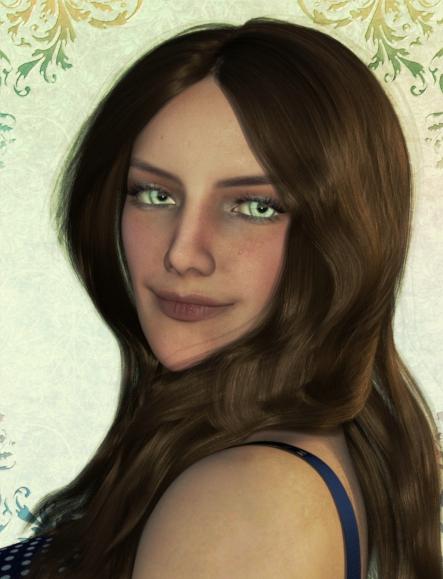
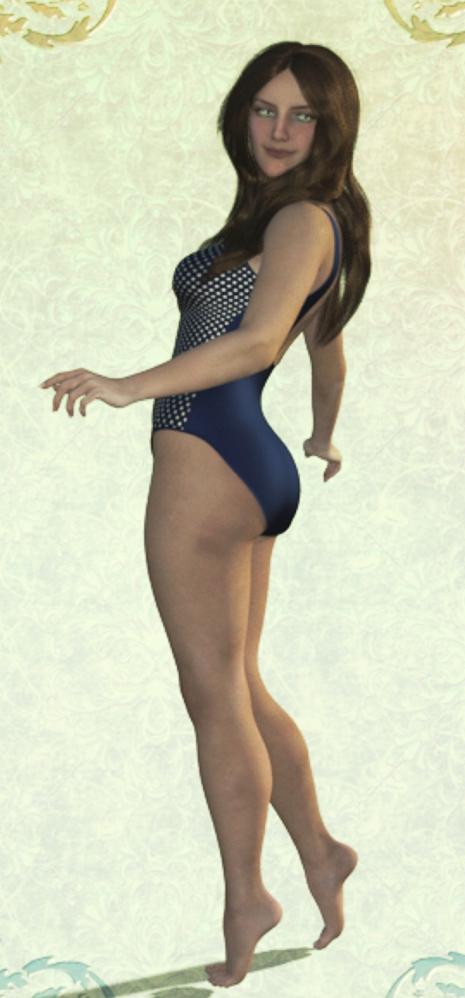
NEW! Novica & Invited Guest Contributors Tips & Product Reviews Pt 6This is Illicites for Genesis 3 Female(s) and she has a very good render time IMO. She's wearing One Piece Bathing Suit which is a steal of a deal. Look at all the materials you get- that could have been a different product but it's all in one! It gives you a nice variety and is very classy. Note the second thumbnail in the product page- the booty is COVERED and not a tiny piece of material. She's wearing Christina Hair, which I've already mentioned.
I like her figure- she's not a skinny model, she is solid but curvy.
Edit: Pose was from Capsces Fun and Flirty Victoria 7
 Using Genesis 2 (female) clothing on Victoria 4 (Not really working)
Hello ^^,
Does anyone has a solution? its really furstrating that the genesis 2 clothing don't fit right when used on V4...
I tried auto convert and redirect transform but it still doesn't change...
Even if there is a product that does that I would be happy to know about it :)
What the heck is going on here?Ah, but I read my email in text mode; here's what I got.
Clap if you believe in fairies, and amazing deals with up to 60% Off
View In Browser - https://app.bronto.com/mail/message/preview/?type=html
Buy one for 40% off, two for 50% off, or three+ for 60% off!
New Featured Items
- Dara for Victoria 7
- Sexy Platform Sandals 2 for Genesis 3 Female(s)
- i13 Eclectic Style
- i13 Shower Set
- Divination for Poker Play
- DG Iray Sci-Fi Surface Lights Shader
- Ambient Moves Volume 1
- Spritely Poses for Josie 7Still Featured Items
- Rayn for Genesis 3 Female(s) Bundle
- Rayn for Genesis 2 Female(s) Bundle
- Rayn Character and Hair for Genesis 3 Female(s)
- Rayn Clothing for Genesis 3 Female(s)
- BFF Poses for Rayn and Skyler Genesis 3 Female(s)
- Rayn Character and Hair for Genesis 2 Female(s)
- Rayn Clothing for Genesis 2 Female(s)
- BFF Poses for Rayn and Skyler Genesis 2 Female
- Longitude & Latitude Lighting and Render Presets for DS Iray
- Nature - Trees Pack 2Featured Artist Catalogs
- gypsyangel
- dx30
- ironman13
- FeralFey
- DestinysGarden
- PosermocapEven More Items
Character Creation for Game Developers
- Morph3D's MCS - The most versatile and powerful figure platform for creating 3D characters in UnityAdd [email protected] to your safe sender list to ensure our emails make it to your inbox.
This email was sent to you by Daz Productions, Inc.
Daz Productions, Inc. | 224 South 200 West | Salt Lake City, UT | 84101And here's what I get at the other end of the link
Daz 3D is part of

Connect
DAZ Productions, Inc.
7533 S Center View Ct #4664
West Jordan, UT 84084Licensing Agreement | Terms of Service | Privacy Policy | EULA
© 2026 Daz Productions Inc. All Rights Reserved.