-
Rig Humanoide
Good morning everyone
I would like to ask: do you know any good tutorials, preferably on video (my native language is not English) on humanoid figures and rigs?
From what I understand, the 'transfer utility' tool can be used to or as 'copy'/'paste' skeletons into new meshes (obj) with the same UV map and mesh subdivision (similar, not equal) of a model , eg g8 for similar object, would that be correct?
As I use 'Wrap 4d' for retopology - which makes this job of having subdivisions similar to the daz models a lot easier - I ask.
Thanks.
[Released] Turbo Loader for Genesis 8 and 8.1 [Commercial]memcneil70 said:
Thank you! I have uninstalled a number of G3F, G8F and on two systems, I am restricting loading characters to just Core/numbered characters, and some special PA characters with incredible textures or morphs. And all the morph/shaping packages, I have had to restrict to the basic ones and just a few PA ones that I used a lot.
This will help me a lot.
Question: Folks have written that pose sets also bog down load times, and I found I have over 3400 of them, many from Pro Bundles that are repetitive. Will you be doing something like that or is this a wrong assumption and poses have no effect on load times?
Pose presets (i.e., a file that holds bone orientations to apply to a figure) should have no effect on load times. However, I imagine a pose property would have effect on the load time, though I must admit I have never even considered them as I buy very few of those types of products.
[Released] Turbo Loader for Genesis 8 and 8.1 [Commercial]Thank you! I have uninstalled a number of G3F, G8F and on two systems, I am restricting loading characters to just Core/numbered characters, and some special PA characters with incredible textures or morphs. And all the morph/shaping packages, I have had to restrict to the basic ones and just a few PA ones that I used a lot.
This will help me a lot.
Question: Folks have written that pose sets also bog down load times, and I found I have over 3400 of them, many from Pro Bundles that are repetitive. Will you be doing something like that or is this a wrong assumption and poses have no effect on load times?
How do I copy an expression without transforms when applying a pose?Copy/paste isn't selective about properties. A script could be written to transfer only certain property gorups, though writing it in the first place would probably not be simple or quick.
[Released] Turbo Loader for Genesis 8 and 8.1 [Commercial]I had the opportunity and honor to test run TurboLoader.
Over the years, I accumulated a LARGE library of characters and morphs (>600 G8.x females, about 200 G8.x males, plus a lot of shaping morphs). With every morph, loading a character takes longer.
Loading a single figure usually takes about 5 minutes on my rig.
...and that scales with the number of figures you need to load.For one of my scenes, showing a dance club before the pandemic, I needed people. LOTS of people. I tried with billboards, but that did not produce the results I need.
Starting from a kitbashed version of
https://www.daz3d.com/underground-dance-club-and-bar I added 10 females of the G8.x flavor, and 6 males of the same generation. The scene did work quite nicely (apart from not being able to render it on an RTX3090 without reducing the clothing textures first). But the load time was just a pain in the back. The scene required more than half an hour, just for loading, plus a couple of minutes until it finally showed up.
One sample render of that scene: //gcdn.daz3d.com/gallery/image/1199529/1642760446/main.png
In comes TurboLoader
Running the scene through the Scene Configuration script produced a configuration file of morphs to turn on for that scene. I disabled all the other (character) morphs, then loaded the configuration file created for my scene. Restarting DS, and re-loading the scene.
I couldn’t even grab a coffee. Less then three(!) minutes later, the scene started to show.
[Released] Turbo Loader for Genesis 8 and 8.1 [Commercial]Rakete said:
I actually did something similar for my library, but I just wrote a script to move morphs into separate directories for each product so that I can enable/disable them via the Content Directory Manager. I am wondering if this product does anything to the files when morphs are disabled/enabled (like rename them or something like that), or if there if there is a way inside daz to disable a morph without touching any files?
Either way, this does look like it could be a much nicer solution then my script, so I might end up buying it, but I would probably have to change how I organize my library currently.
I didn't even think of your way (though obviously it works
 , except you might have issues with Daz Connect installed products; I would have to think more about it except with Daz Connect installed products you would have to copy from the cloud numbered directory down).
 Turbo Loader renames the file extension for disabled morphs so that DS cannot see them (they stay in the same directory and no new directories are created so changes to the file system directory table should be very minimal). Currently, there is no way through the API to have DS unload or load morphs (I asked
 ). After disabling morphs, you need to create a new scene or reload a scene. However, enabling morphs can be done just by loading another character in the current scene.Could Luthbel PLEASE update Eldritch Seeker to G8/8.1 ?
lou_harper said:
FSMCDesigns said:
lou_harper said:
My problem is this. Shirt doesn't follow lower arm bend. Upper arm is fine, but anything below the elbow is nada. Same with coat.
Could be because of the morph since it works fine for me. I just tried it our on GM8 and I think it autofits well
Hav you tried on an 8.1 figure? Because that's what I'm using.
Well I just trtied it and got good results, not as good as 8, but no sleeve issues
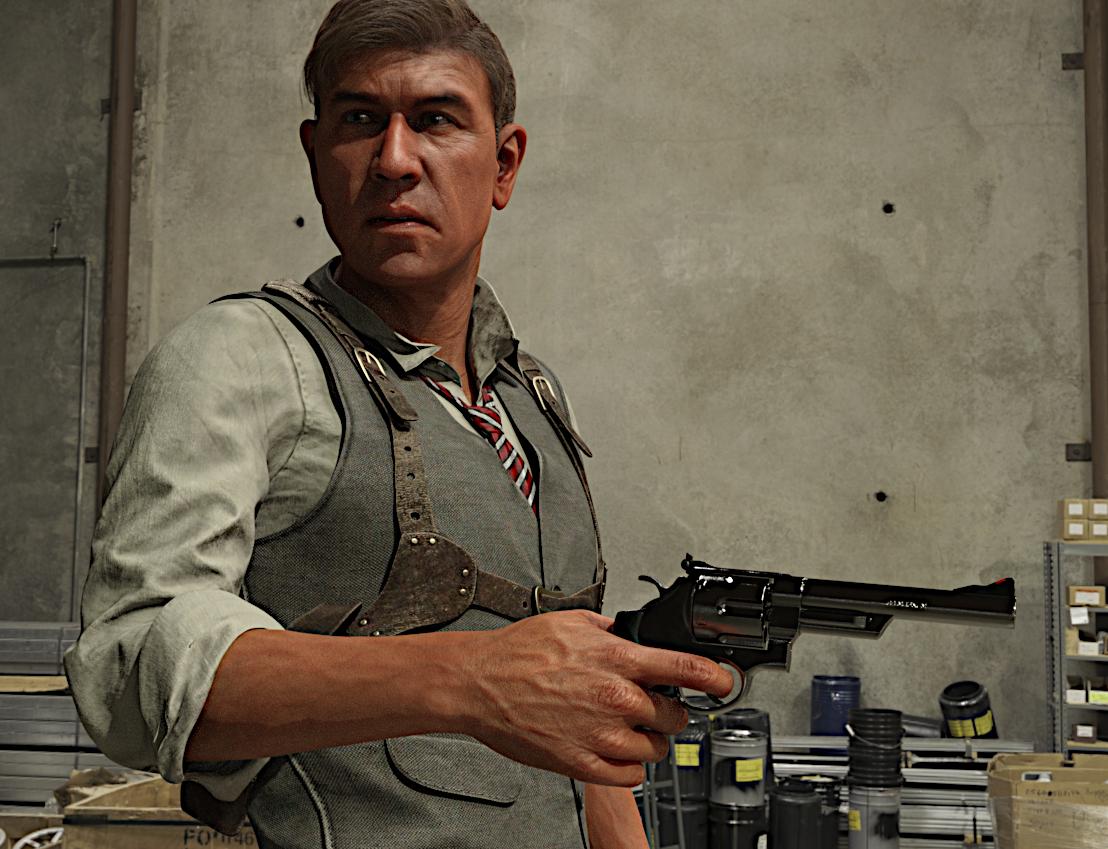 Could Luthbel PLEASE update Eldritch Seeker to G8/8.1 ?
FSMCDesigns said:
lou_harper said:
My problem is this. Shirt doesn't follow lower arm bend. Upper arm is fine, but anything below the elbow is nada. Same with coat.
Could be because of the morph since it works fine for me. I just tried it our on GM8 and I think it autofits well
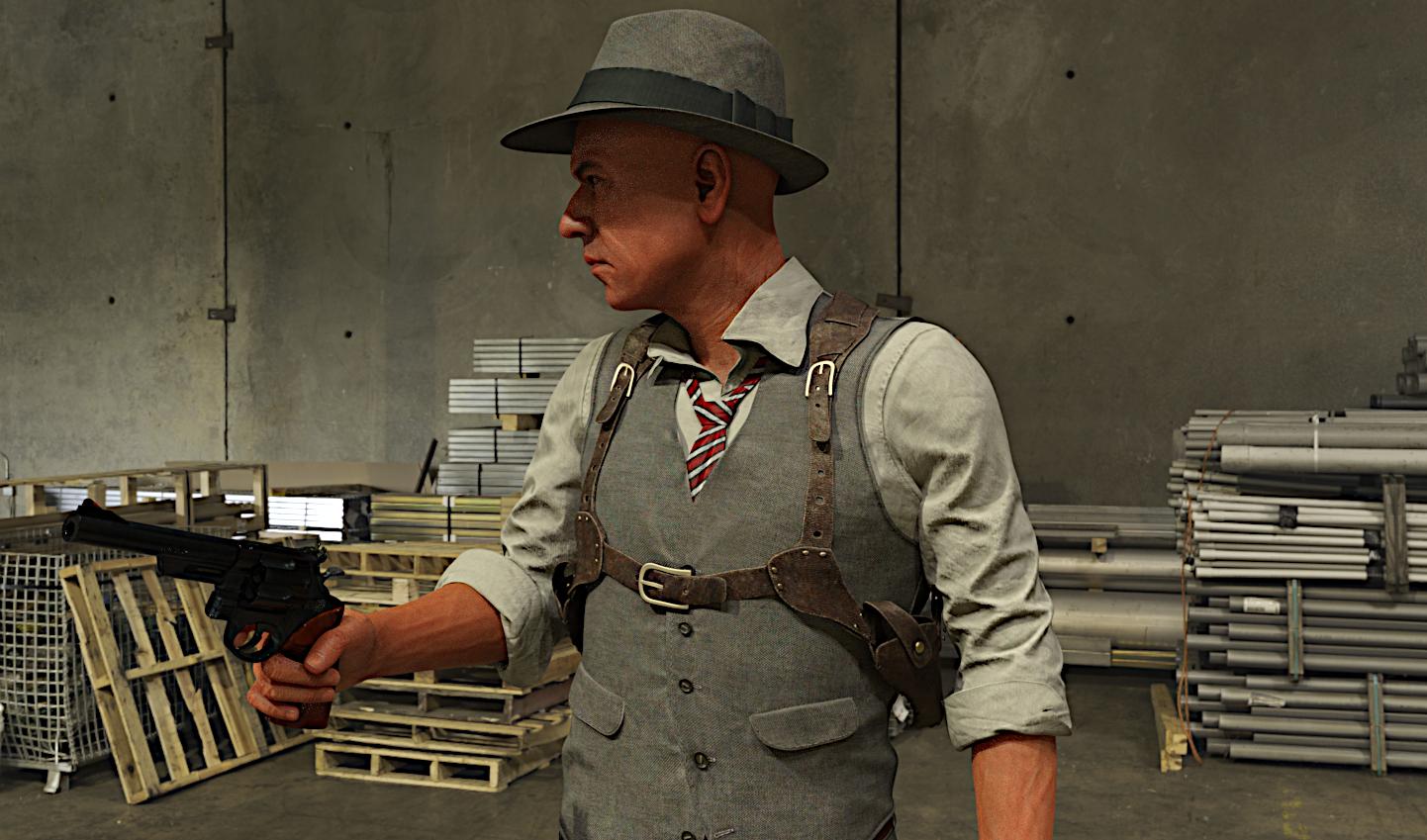
Hav you tried on an 8.1 figure? Because that's what I'm using.
Mullings for the Day - and be wary of job offersThat was a close call, thankfully there was a happy ending :-)
.................................
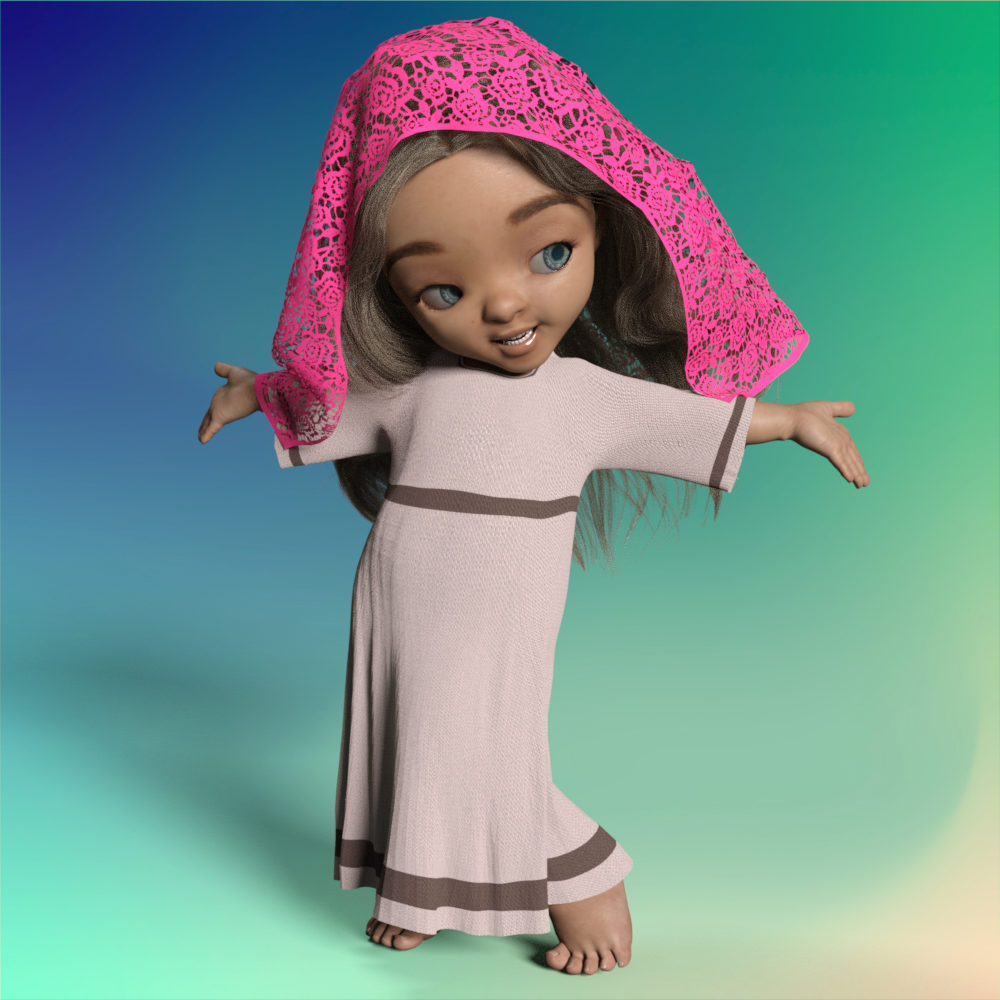
Today's mullings ... I finished doing all I'm doing atm for this head scarf. Made a few pose morphs using dForce and the Bootiful Poses for Bugga Boo.
This character needs an instruction booklet lol ... at least for what I've got going here so far.
1. Load figure, then dial in Bugga Boo OR load Bugga Boo.
2. With Bugga Boo selected, then load the gown. At no point in using this does one want to have the full-sized figure in place of the short Bugga Boo. The gown will go real goofy.
3. With "nothing selected" one loads into the scene the hair for which I made a fit {my first hairfit, probably broke every rule in the book but it works for me}, select the hair and apply the hairfit I made. Then parent the hair to the head. All its morphs will work :-) My laptop system cannot handle dForcing hair, looking forward to one day getting a nice desktop that can.
4. With Bugga Boo selected one then can load the Lady's Scarf "prop" file. It will load in place over the hair that is on Bugga Boo. :-) If one forgets, it will load in a strange place and size, I do not know why.
5. With Bugga Boo selected, apply a pose - if using my pose morphs on the gown, then look for a pose that I've got a morph for. On the Parameters Tab find the match morph for the gown and apply it. Select the Lady's Scarf to have it appear on the Parameters Tab and if there's a pose morph for that pose, it can then be applied.
6. When resetting the "POSE ONLY" for Bugga Boo, remember to dial out the clothing(s) morphs.
7. The gown and the head scarf can be simulated using dForce ... select the item, add a dForce modifier, have Bugga Boo at the 30 mark, use the timeline for the simulation, let it work from the default position to the new pose. Do NOT freak out about mid-point when the gown might look real goofy WHEN simulating the head scarf. By 30 all should be well ;-)
8. I need to do a few more tests and package up the items -- if anybody is interested in this outfit.
 Why do some characters load from the smart content figure window, and others don't?
I understand the logic of it. Earlier generations were based on named figures, by which I mean that the base female for gen4 was Victoria 4, and the base male was Michael 4. I could be misremembering, because I wasn't around in those days, but I believe there were also multiple bases, so Aiko 4 wasn't a morph of Victoria, but a separate figure, and so on. With Genesis, the figures started from a generic base, and Michael, Victoria etc. we're morphs on that base. The first generation of Genesis was also unisex, which I'm guessing they expected would work out better than it did. Put all that together, and it makes at least some sense to treat it like an entirely new line, rather than simply the next iteration of how they'd been doing things.
Does Daz to Blender Bridge work with Blender 3.1?Thanks. I guess I'll have to transfer everything to blender through 2.92, since I haven't been able to get Diffeo to work yet.
[Released] Turbo Loader for Genesis 8 and 8.1 [Commercial]I actually did something similar for my library, but I just wrote a script to move morphs into separate directories for each product so that I can enable/disable them via the Content Directory Manager. I am wondering if this product does anything to the files when morphs are disabled/enabled (like rename them or something like that), or if there if there is a way inside daz to disable a morph without touching any files?
Either way, this does look like it could be a much nicer solution then my script, so I might end up buying it, but I would probably have to change how I organize my library currently.
[Released] Turbo Loader for Genesis 8 and 8.1 [Commercial]evacyn said:
Now this is something to get excited about. Love your products and can't wait for this one! For products installed manually, is there a way to edit them so that they will appear in this product (and something like Character Mixer)? Or is the morph metadata not easily editable? Thanks!
I am glad you like it and thank you for your support!
If there is no metadata for the morphs, Turbo Loader will make a "product" using the name of the parent directory of the morphs. If you look at the "Turbo Loader for Genesis 8" promo, there is a "product" named Bambi which does not have metadata.
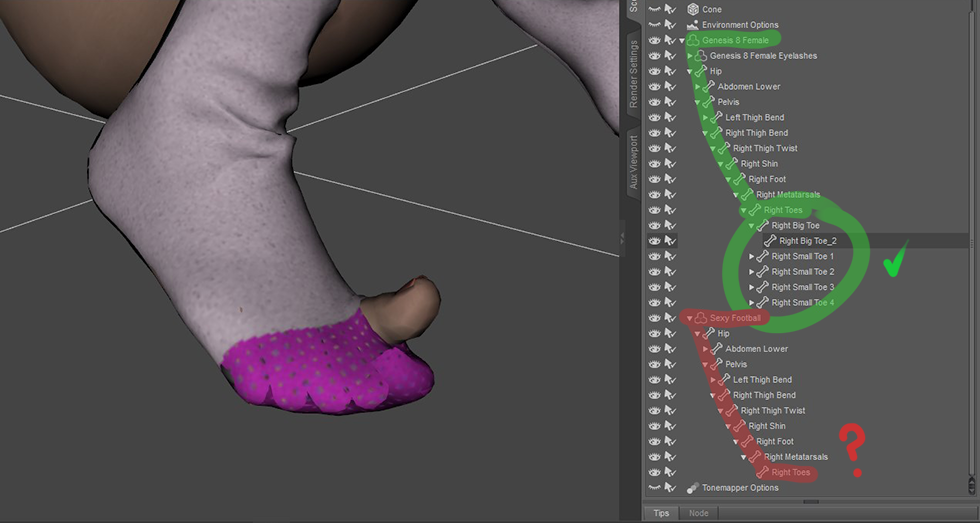
[Released] Turbo Loader for Genesis 8 and 8.1 [Commercial]Now this is something to get excited about. Love your products and can't wait for this one! For products installed manually, is there a way to edit them so that they will appear in this product (and something like Character Mixer)? Or is the morph metadata not easily editable? Thanks!Transfer Utility > missing some bones influence [SOLVED]When using DAZ's Transfer Utility to rig socks, I encounter the following problem : Toes go through the mesh. Reason being that Transfer Utility ads only the following bones to to control a foot : Metatarsals > Right Toes. But there aren't all the bones existing in the Genesis 8 such as Right Big Toe, Right Big Toe 2, etc.
How can I rig imported assets so that DAZ adds ALL of Genesis 8's bones ? Or maybe, how can I add bones manually in order to be able to fix the weighing of specific body parts ?
Would be cool to avoid that kind of issue when posing :
 Why do some characters load from the smart content figure window, and others don't?
Chezjuan said:
As noted above, a character is a set of shapes, materials, and occasionally other items (eyebrows, facial hair, etc.) for a base figure. The actor (as labeled in Daz Studio) is the character preset that loads the base figure and applies the initial shapes, materials, and other items.
I beleive that what you are calling "morph presets" above are the same as a Shaping Preset. A shaping preset allows you to save morph settings for a particular figure, which can be applied to any other figure of the same generation (or shared between G7, G8, and G8.1 if you have the same packages across them) as long as the morphs are present. For example, if you take the base Genesis 8 Female and use the Genesis 8 Female Body Morphs and/or Genesis 8 Female Head Morphs to create a unique look, you can save that preset so it can be applied to another G8F figure. A custom designed morph (like a deformed arm) that is created somewhere else and imoprted into Daz Studio with Morph Loader (or included with a character or other product) would be a morph asset.
A materials preset is similar to a shaping preset in that it allows you to save the specific mix of materials you have applied to the figure. Really, all the materials included with a character are materials presets (skin, eyes, lips, nails, etc.) and can be applied to any figure if the same generation (Genesis - Geneis 2) or multiple generations (Genesis 3 - Genesis 8.1), though only forward, so a G7 material will load for G8, but not vice versa by default. Of course in most implementations, while you can apply eyeshadow across figures, it replaces the whole face material so if the base skin is from a different character package, the face will not match.
All products in the store list everything you get in the What's Included and Features section, down to the textures. The "Details" is just the sales pitch, and some PAs are much better at writing them than others. I wish more items would call out the DAZ assets used in the promo images and note items that are not from DAZ like custom characters, assets from other stores, etc. ( i.e. hair and outfit not sold by Daz), but I know that there are many PAs who commission the promo images and don't have this info.
ETA note about sharing shaping presets between G7-G8.1.
Thank you for the clear explanation. Only thing I found confusing was the reference to 'G7'. I was under the impression that it went from G3 to G8 with nothing in between?
Star Trek Builders Unite 8: THE REBOOTNight-Forager said:
Demonslayer said:
I've been working with XCalpro's Gorn head, retexturing and creating morph targets. :)
For anyone interested, I also have created a fan film called "The Gorn Imperative."
Please enjoy!
I watched it a few months ago. I'd really like to see where you take the sequel, especially since the Gorn are so severely underutiilzed in Star Trek.
I'm glad you liked it! There's another one in production right now. I have a series of these in the works, and will also be combining with the Saladin stories.
Meanwhile, this is another one I did last month, different topic. :)
I also finally released "Invasion!" Part 1 that some of you will remember I've been working on for the last ten years, LOL!
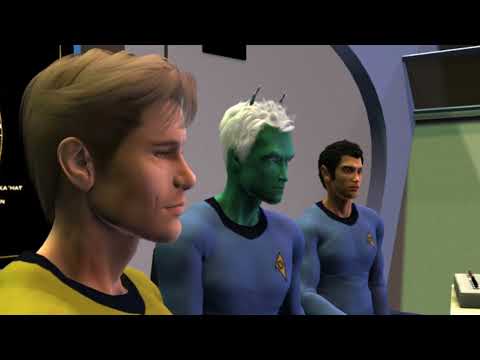
Ken :)
Star Trek Builders Unite 8: THE REBOOTbluto said:
Demonslayer said:
I've been working with XCalpro's Gorn head, retexturing and creating morph targets. :)
For anyone interested, I also have created a fan film called "The Gorn Imperative."
Please enjoy!
Any chance we will be sharing that morph ?I will be sharing it when it's all done. Goal is to have one that can blink, have nostrils flare, maybe even a tongue. It's an experiment at the moment in 3ds Max. :)HH Sayble for Genesis 8.1 Female [Commercial]N3p3nth3 said:
Herschel Hoffmeyer said:
black_angel_x said:
I always waited for the matching char out from Mystique 2, sadly the Model delivered isn´t as nice as the Mystique 2-Version. I mean the Mystique 2-Version hat that special touch between natuarl beauty and beauty idealized but now it just look like the beauty idealisazion was overdone. I kind of hope the real Mystique 2-Version will come out too. just my opinion.
Outside of the breasts, all the details in the Mystique 2 character are actually turned up (for the body) and the face was not mine. Her skin tone is more tan. Is it mostly the body or the face we're referring to? I'm just confused and trying to narrow the reason. I think someone prior to you said the same thing that all dials are turned up on Sayble over Mystique character. Like I said, outside of the breasts, all dials are about 60% of that character. The breasts in the Mystique character were the included breast morph in the Mystique 2 line.
When I was talking about "150 %", I didn't mean the dial level so much as facial features that I would describe as exaggerated. Also I didn't quite catch what you meant about the character being dialed in at 60

Still hoping you find a way to release those boots!
When you dial up a character, that morph is dialed up. 60% of that custom character (that I made) was dialed up to be used as a base starting point to sculpt the final morph for Sayble.
The Boots are coming! :)I can't get the morph loader pro tool to work.SUbD Level or Base resolution is on the Figure itself, on the parameters pane, before export. Although as I remember it, DAZ will just unsubdivide your morph model to base resolution, and as long as you haven't added or deleted any vertexes in your sculpting process it will still work fine. With that said it's really a lot easier to sculpt in base resolutiuon anyway, since DAZ does not give us the ability to make our own HD morphs.
You may want to uncheck Write Seperate Objects. I'm not sure if that matters, but I checked the settings I use and I don't have that checked. Also for this purpose surfaces are not needed, so you could uncheck that if you want.
The important parts are the import into, export out of, and sculping itself in whatever modeling program you're using. That's where you get the options to Preserve Vertex order and Polygroups. I'm assuming you're using Blender, since that's the import and export scale you've chosen.
Depending on what version of Blender you're using there may or may not be Keep Vertex Order and Polygroups options for both import and export, but there will be for either import or expot, I can't remember which one now. Screenshots here are from Blender 3.0.1.
As far as the sculpting goes, you need to make sure that whatever tool you are using does not add or subtract any vertexes. This means no Remesh, Retopo, or Dynotopo. You can only move vertexes around.
Hopefully this helps.
Daz 3D is part of

Connect
DAZ Productions, Inc.
7533 S Center View Ct #4664
West Jordan, UT 84084Licensing Agreement | Terms of Service | Privacy Policy | EULA
© 2026 Daz Productions Inc. All Rights Reserved.