-
When will the next generation figure come?
There was about two years between Genesis and Genesis 2 Female (it is hard to measure as Genesis released with the beta of DS4, so the starting point is unclear). It was two years pretty exactly between Genesis 2 Female (and Victoria 6) and Genesis 3 Female (and Victoria 7). Two years per generation is pretty standard - the fourth generation was exceptional, and its tail-off as Poser users continued to use it as the latest after Genesis was released has possibly made it seem even longer.
Characters in front pictures of "Lilyanne Hair" and "Kelsie Hair"?What characters were used to create front pictures of "Lilyanne Hair" and "Kelsie Hair"?
http://www.daz3d.com/lilyanne-hair-for-genesis-2-female-s-and-victoria-4
http://www.daz3d.com/kelsie-hair-for-genesis-2-female-s-and-victoria-4Thanks!
DAZ 3D Compatibility MatrixHonestly, it's of only very limited utility. None of the words underneath each character, when you open them out, are clickable links. It sort of tells you what goes with what, but for the most part, you can kind of figure that out just from names. If it has a 5 after the name, it goes with the Genesis generation. 6 is Genesis 2. 7 is Genesis 3. 4 is pre-Genesis unimesh.
As long as the compatibility matrix isn't a page you can DO something from, like click a link and get all the V7 characters or some such, then the page is only minimally helpful. And as a practical issue, since they seem to be adding one new Genesis 3 figure per month, at least, the table would look very odd very fast. So far, the only matches between Genesis 2 and Genesis 3 are Victoria and Belle. Every other Genesis 3 figure is new, which would make that table very long indeed. (Also, Victoria is at the top of the table and Belle is at the bottom, so people might never scroll down far enough to figure out that Belle 7 even exists.)
On top of all that, even when the page was maintained better, it was effectively orphaned. It got unlinked in one of the site revisions, and became impossible to find if you didn't know it existed. (Actually, as far as I can tell, it's still unlinked. How on earth did you find it?)
Breast morphs and Ripcage G3FBut you are right, it is in the eye of the beholder and I think V7 for example looks like a drug addict. The thing is if you name something V7 V for Victoria, the figure should be in line with its precursors and not totally different V7 has absolutely nothing to do with Victoria. But well it is okay, seems that a lot of people like anorexic looks and oversized breasts. The glute for example is really good and has good morphs, also other parts of the body but the breasts not and also not the face.
And the problem with the bad crafted breast morphs is a problem so I do not see why not to name this and the thing that some morphs like "nipple hight" for example would be good to have is also a thing one can name and that the face and its morphs makes it difficult to create a good character is also true and I am also not the only one having this opinion.
NEW! Novica & Invited Guest Contributors Tips & Product Reviews Pt 6DYK October 7
Mansion Backyard has nice plants along the fenceline, and plants in pots scattered throughout. If you're looking for a two story house with a pool and also some yard, this one will let you host some awesome parties! (Both Iray and 3DL, but 3DL "requires tweaking.")
FWSA Camile HD for Bethany 7 is no longer a new item, and is already 58% if you're a PC member. Then add your discounts, she's a steal!
FWSA Dayna HD for Eva 7 is also for Eva 7 and 58% off to start with. At these prices, consider adding them to the gene pool.
Iray Shaders Glass gives you different levels of the rainbow effect, frosted effect, metallic level, and even antique effects. Not your typical "oh it's a glass" look.
Vintage Ice Cream Cart doesn't have any ice cream, so I looked up products which do: Tourist Props (not on sale) and Cafe Italia (not on sale)
Rotor Heads Gdds 76 Helicopter is really neat- has medical and police versions, and more. The cabin inside also change.
And the Steel Refinery products are in the featured stores, they were showcased here recently. Grab 'em on sale!
I won't purchase any more FWSA characters for G3F until DAZ fixes FWSA Adaline HD for Victoria 7 (lump on belly on clothed figure). I submitted a bug report, but it hasn't been fixed. I don't want to take any more chances on unreturnable characters by the same artists that may have the same problem.
Genesis3 Lips and NosesI am noticing that there are a lot of third party figures that look too much like Victoria 7. Maybe this has something to do with what you are seeing?
October 2015 New User Contest (WIP-THREAD)To me it looks like you have to much specularity or glossiness assigned to her skin surfaces. I have attached a screen shoot of a Victoria 4 face texture as I have set it up for Lux. It is not perfect but it will give you a starting point. I have a soft box and default reality light. for the scene. The second image is of the render going through its paces right now. Like I said my textures are not optimized but it does show you that what might work for skin values. Hope this helps.
Thanks DollyGirl. I set up the specularity and in fact all the settings to match your screenshot but the blue was still there, albeit a little better. I then turned of the SSS as suggested by icecrmn and that worked. I was trying to get a bit of a glow from the warmth of the bath so I added some TopCoat and that worked well.
October 2015 New User Contest (WIP-THREAD)With regards to your question about SSS Direction, Sickleyield indicates that: "Adding a higher SSS amount will make your atmosphere more dusty. I used an incorrect value of SSS direction at first. According to DAZ's docs, "Negative numbers (-) backscatter to the direction of the light source. Positive numbers (+) forward scatter away from the direction of the light."" So depending on your settings for density of the dust prop and the amount of light you have in the scene you will see different results. But what she is saying is that for "real" type rendering you follow the rule of thumb. Bottom line though you are the artist and it is what you see and feel looks good that counts.
Thanks DollyGirl. I'm doing a render using reality and I thought that the reason I was getting a strange reflection light was due to the direction so I've played with this a bit to see if I can see a difference (with no luck). However, in the Reality manual I found the following which helped explain the direction thing a bit better also:
"Set at zero (0) will cause the light to be scattered equally in all directions. Set to a positive value will cause the light to be scattered forward, relative to the direction of the light. Set to a negative value causes the light to scatter in the opposing direction of the light source, similarly to what happens when one uses the car high-beams wheel driving inside fog."
I'm at a lose as to why I'm getting this reflection type effect on the face and arms etc (see attached). Has anyone any idea how to fix this... rendering is in Reality 4.1 (which I'm trying to learn). I will try it in iRay also to see if the same thing happens.
To me it looks like you have to much specularity or glossiness assigned to her skin surfaces. I have attached a screen shoot of a Victoria 4 face texture as I have set it up for Lux. It is not perfect but it will give you a starting point. I have a soft box and default reality light. for the scene. The second image is of the render going through its paces right now. Like I said my textures are not optimized but it does show you that what might work for skin values. Hope this helps.
Victoria 4 Body and Face for G3F?What I do not get in my brain is. Victoria 4.2 was THE FIGURE in 3D so why not take this body and face shape and the morphs and also morphs++ and create a G3F V4.2 with some additional morphs??? Something I will never understand. The face of V4.2 was 100% better than all what we have now.
Your opinion - Personally I totally disagree I disliked V4, I couldn't stand her face; and if you want V4.2 so badly wait until GenX arrives for GF3 and port everything over.
I also think you might want to stop and think before you consistantly berate what we have today if GF3 wasn't well like the figure would not have taken off as well as it has, different peeople like and want different things, and it doesn't matter how many posts you make in support of your preferences if they are not the preferences of the money spenders then you won't get them.
Selbsthilfegruppe DAZ Studio - Beispiele, Fragen, Diskussion und sonstiges Gequatschehi Arnold
danke für den link
kannst du bitte kurz einen effektiven weg beschreiben wie du damit ordentliche Ergebnisse erzielt hast
also welche figur für upload
welches format usw
alles für daz 4.8 bitte
Hallo Ruphuss, gern geschehen. Leider hat Mixamo/Adobe irgendwann zwischen Ende Juli und Anfang Oktober die DAZ Figuren Victoria 4 und Michael 4, neben einigen anderen alten Mixamo Standard-Figuren, aus ihrem Figurensortiment entfernt. Ich hab' das Glück, dass ich mich schon vor einigen Jahren bei denen registriert und die beiden schon von Anfang an als Rigging Target in meinen Assets gespeichert wurden.
Ich brauche also nur einen der beiden als Zielcharakter für eine bestimmte Animationen auswählen, diese im "Biovision (.Bvh)"-Format herunterladen, in Studio mit "File", "Import" für meine Figuren importieren und letztendlich im "aniMate2" Tab mit "Create aniBlock From Studio Keyframes" daraus ein aniBlock basteln zu lassen, welches man dann mittels eines selbstgebastelten "Korrektur-aniBlocks" auch mit Genesis/Genesis2 verwenden kann.
Neue Nutzer haben's da jetzt etwas schwerer, und müssen wohl leider mit Mixamo's AutoRigger-Funktion vorlieb nehmen, um ihre DAZ-Figuren nach Mixamo zu importieren:
in DAZ Studio eine Szenerie nur mit der jeweiligen zu exportierenden Figur erstellen, keine Kamera(s) oder Lichter!
Figur im Scene Tab auswählen, "File", "Export" anklicken. Da wir eine bereits voll geriggte Figur haben und dessen Konfigurationen beibehalten wollen, entweder mit der "Biovision Files (*.bvh)" oder der "Autodesk FBX (*.fbx)" Option [wahlweise mit oder ohne Texturen] exportieren. *.bvh ist hierbei die Option mit dem geringsten Umfang, und es wird lediglich das "Skelett" der Figur in Mixamo's Vorschau angezeigt, logischerweise.
Auf der Mixamo-Webseite einloggen und dort die Option "UPLOAD" ankilcken; im neuen Fenster dann "Select character file" anklicken, zu der aus Studio exportierten Datei browsen, diese anklicken und Mixamo's AutoRigger verrichtet sein Werk. Wenn die neue Figur nicht in den Assets angeziegt wird, die Ansicht der Mixamo-Webseite kurz mit der "F5" Taste auffrischen.
Ob es an Mixamo's AutoRigger oder an Studio's Exportfunktionen liegt, kann ich nicht genau sagen (obwohl ich eher letzteres argwöhne, DAZ war noch nie für überwältigend korrekt arbeitende Exportscripts berühmt... eher berüchtigt), aus einem Mixamo AutoRig erstellte BVH's bedürfen nach dem Import in Studio einer mehr oder weniger intensiven Nachbearbeitung. Um das in aniMate2 zu bewerkstelligen zu können, benötigt man die Vollversion, in aniMate2 Lite lassen sich die aniBlocks leider nicht editieren. KeyMate/GraphMate würde bestimmt auch funktionieren, nur sind mir die zu A) zu umständlich und B) die verfügbare Dokumentation dafür DAZtypisch dünn.
Ich muss mal der Reihe nach ausprobieren, welche der 50.000 *.fbx-Optionen die wenigsten Schwierigkeiten macht (falls es überhaupt eine gibt).
Wrong result with Female bot armor?Thank you! I didn't realize that I had to change "Bot_head" instead of the Victoria node!
Photoshop Question: Cut /Paste To Layers / ShadowsDon't forget you can use DAZ models like Victoria and Genesis and pose them so that they will cast a shadow onto a background, in a quick render. The "background" could be a couple of simple planes, or a morphing plain or there are even some actual background MODELS - like a no-seam background in a photography studio say. Just grabbing Genesis' arms and legs allows you to do a quick and dirty job of posing him or her.
Be sure to create one or two "distant lights", and in the parameters pane, turn shadows "on" for the light(s) you create. Raising and lowering the light(s) will suggest shorter or longer shadow possibilities; you may play with the settings until you get something that you like.
Once I have an idea of what I want my final "shadow" artwork to look like, I will often draw it in a vector drawing program. Then I'll paste it in as a new layer with the transparency set to somewhere around 50, where the available range is from 1 to 100, "1" being invisible and "100" being 100% opaque.
Curves in your vector drawing will allow you to easily "alter" the shape of the shadow some more, and once you've exported your shadow as a bitmap, PS filters will let you further fudge and/or warp and modify the edges as desired.
Book CoversI am sorry you are having such a rough time! I really like this cover, it may not be what you were aiming for but it works. The people don't look plastic and its beautiful to look at. ( I read ALOT, and book covers, as you know, can draw someone in). I would click on this. Prayers for your father as well.
Thank you so much Sonja!
I'm glad you like the cover. Avid readers unite! I am one which is why I started writing. I'm also glad the characters don't look plastic. I think its because of the advent of Victoria 7 and G3 that I feel the skin textures are now majorily wanting when I had been quite pleased before. I just dropped some cash - medicore amount really - on skin stuff for iray and a few texture things. Nothing like a round of shopping to get back into the swing of things. lol! Didn't spring for Victoria yet. I want to get my money's worth out of G2 first. Besides the heroes are one of the big things in romance, so hopefully M7 will be coming out soon.
Okay, more stuff to do! Then I'll be back to harrass the guys - then everything will be back to normal I hope. lol! Thank you agian!
Cheers,
Kath
So how much trouble am I in?Hundreds? I think I own in the thousands by now (been here since Michael an Victoria 1.0) Be afraid, be very afraid! ...and have a ball ;)
Is it uv mapped and have plenty of morphs?
Wrong result with Female bot armor?Okay, with the standard double click to load Victoria 6, the face texture is Rybelle_face.jpg - I have taken some step by step screen shots here as well.
On a side note - Eyes, Lips and eyelashes can be applied as normal after this is done.
Victoria 4 Body and Face for G3F?What I do not get in my brain is. Victoria 4.2 was THE FIGURE in 3D so why not take this body and face shape and the morphs and also morphs++ and create a G3F V4.2 with some additional morphs??? Something I will never understand. The face of V4.2 was 100% better than all what we have now.
Wrong result with Female bot armor?
No problem, I'll grab some screen shots later. In the meantime just check it's the correct jpg you're adding, there are normally 3, the standard texture and then bump and specular, the other two normally have an addition like a letter (facea.jpg for example)Thank you; could you please show a picture on the steps involved? After applying the robotic material I find it difficult to get back the old face. I think that changing the diffuse gives me the specular instead, because the face becomes black/grayish. How shoud I do it for example on Victoria 6?
Wrong result with Female bot armor?Thank you; could you please show a picture on the steps involved? After applying the robotic material I find it difficult to get back the old face. I think that changing the diffuse gives me the specular instead, because the face becomes black/grayish. How shoud I do it for example on Victoria 6?
Contest ~~~ Entry Thread~~~ Because I Said So! (October 2015)The Shortcut
"You SERIOUSLY thought that was a good idea?" Entry #1
Teen Josie 7
AtmoCam for Iray
Ridge Walk Mountains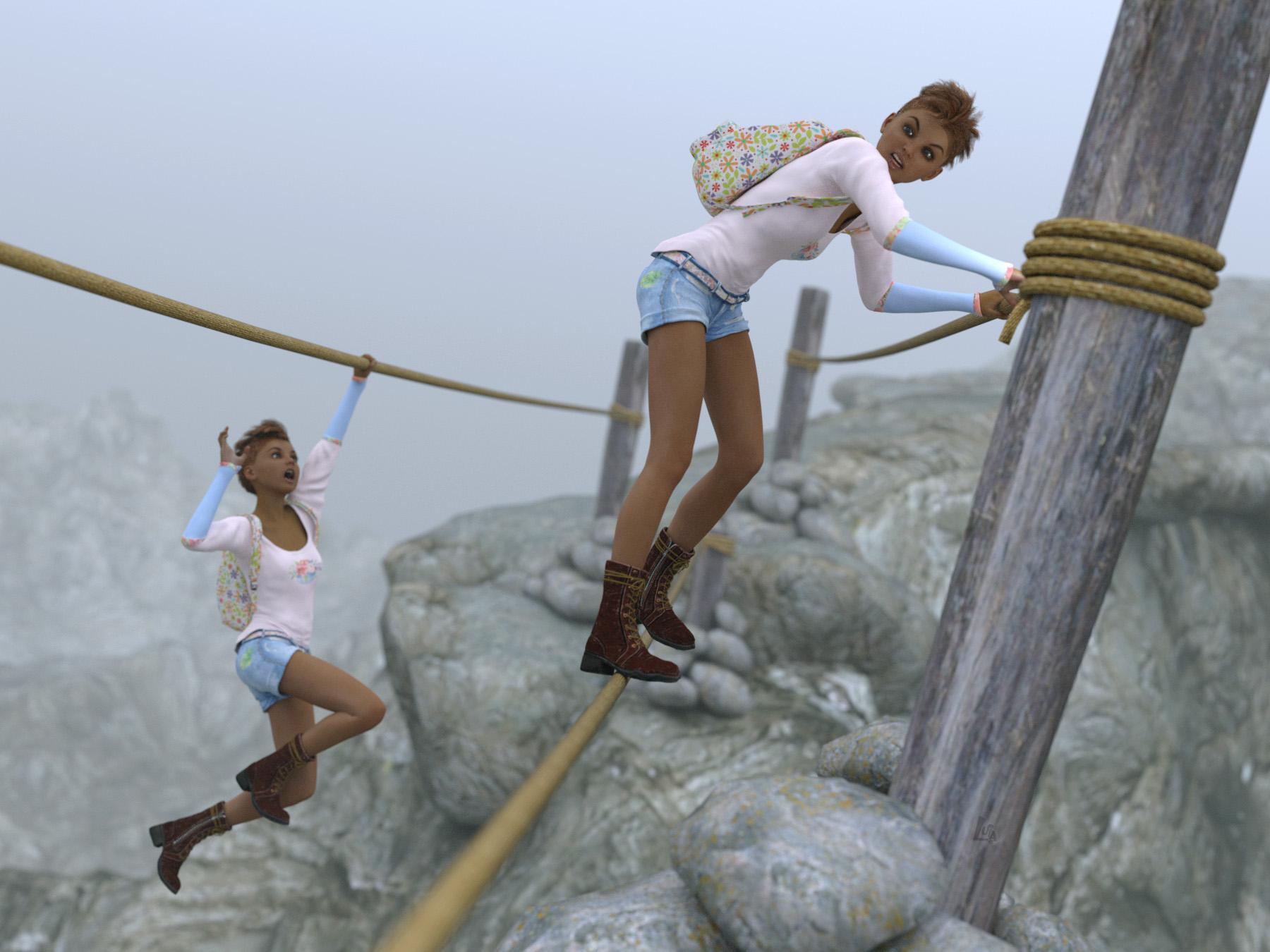
Josie is not pleased with twin sister Joanie's shortcut.
Also used:
Vault Rustler boots
SP3 Backpack (Freebie from Rendo)Summer Trend Outfit for Genesis 3 Female(s)
Chace HairPitfall Poses for Victoria 7
Genesis 3 Female ExpressionsBreastsin my opinion the whole body shape concept is not a big deal but face and head are bad, with V4 one was able to create much better faces than with g3f and if it comes to v7 well, in someway this character looks like a drug addict and has absolutely nothing to do with victoria, sorry
Daz 3D is part of

Connect
DAZ Productions, Inc.
7533 S Center View Ct #4664
West Jordan, UT 84084Licensing Agreement | Terms of Service | Privacy Policy | EULA
© 2026 Daz Productions Inc. All Rights Reserved.