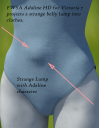
FWSA Adaline for Victoria 7 is projecting a strange belly lump into clothing
 barbult
Posts: 27,620
barbult
Posts: 27,620
This is strange, and I don't understand how it happens or how to fix it. The FWSA Adaline character is projecting a strange belly lump into clothing. There is no visible lump on the character's naked body; the lump is only on clothing fit to the Adaline character. Victoria 7 herself does not have this problem; it is only when the Adaline body morph is dialed in. The problem is not limited to a certain piece of clothing. I have tried several items. I have submitted a bug report, of course.
Is anyone else seeing this?


Daz 3D is part of 
Connect
DAZ Productions, Inc.
7533 S Center View Ct #4664
West Jordan, UT 84084
Licensing Agreement | Terms of Service | Privacy Policy | EULA
© 2026 Daz Productions Inc. All Rights Reserved.
Comments
I don't have the character but it sure looks like she has an embilical hernia ....did you check the belly button morphs in the clothes, could be doubled .....weird place for belly button morphs though
I bet when the morph was created they didn't remember that the navel is set to on ...
They would have to use Reverse deformations in morph loader pro
Gen2Fem (or V7?) is loading with Mouth Realism HD and the Navel ON by default:
http://www.daz3d.com/forums/discussion/58026/P855
Have you seen the movie "Alien"? ...
@carrie58 no, the only morphs in the clothing are two hidden morphs FBMVictoria7 and FBM-FWSAAdaline. If I dial FBM-FWSAAdaline to 0 in the clothes, the lump goes away, but then it doesn't fit the rest of her body (breasts). There is huge poke through.
@Kerya then this is a PA error like the error that caused the teeth to be distorted in two recent morph packages. Hopefully PAs will gain experience and we will see less of this going forward. QA needs to step up their game.
@chris-2599934 Ha Ha, as a matter of fact yes, some years ago, but it didn't occur to me.
I remembered I had rendered her on my Art Studio thread and although I didn't focus on the tummy, I think it can be seen there's no lump? (Click that second one to enlarge, click again- the outfit is skin tight on the midriff and there's no lump.)
I'm not seeing it either. I also haven't seen it in other renders of Adaline.
Try something more form fitting - it is there ;)
oops forgot a pic
Yes, a definate lump there too when wearing a bathing suit.
scary stuff.
I think someone neds to bug report this please. File a support ticket to Tech suppost, and images will help, or a link to this thread.
I decided to see what happens with autofit clothing. It has the same lump problem. The mesh front of SwimWear V6 clearly shows that the lump is in the clothing fit to Adaline, but not Adaline's body itself. It must be an error in the projection morph FBM-FWSAAdaline_proj.dsf.
(I had to try the upload 3 times before it worked. This forum software can try a person's patience for sure.)
Edit: 2 broken image icons deleted. Thanks larsmidnatt.
Done (before I even posted in the forum). You overlooked that in my original post I wrote: " I have submitted a bug report, of course." I think in the future I will put that statement in bold.
u could always delete the broken images. i have to do that my first upload almost always fails.
oops
Thanks, I went back and edited the post to remove those broken image icons.
No problem, I did a similar thing to you a few days ago, where I missed your post entirely!