-
Questions and Concerns about using G8.1 figures
DDCreate said:
Won't that mean I won't be able to use those expressions? Not a HUGE loss because I didn't get tons. If I have to choose between expressions, I'll take the Gen 8's. Just curious.
They are all dummy files in those locations, there are no expressions within the files (see for your self), they are there to disable the real expression files that are located in the G8 morph folders (same path except without the "_1" in one of the folder names)
Questions and Concerns about using G8.1 figuresPerttiA said:
Making the G8 base expressions (and any expressions that are using them) work on G8.1 requires removing dummy/placeholder expressions that are installed to G8.1 morph folders - These dummy/placeholder expression files have no other function than to prevent the base G8 expressions from loading.
The dummy/placeholder files are located in;
...\Data\DAZ 3D\Genesis 8\Female 8_1\Morphs\Daz 3D\Base Pose Head\ (255 files)
...\Data\DAZ 3D\Genesis 8\Female 8_1\Morphs\Daz 3D\Expressions\ (24 files)
...\Data\DAZ 3D\Genesis 8\Male 8_1\Morphs\Daz 3D\Base Pose Head\ (255 files)
...\Data\DAZ 3D\Genesis 8\Male 8_1\Morphs\Daz 3D\Expressions\ (24 files)Please make sure you are removing the files from G8.1 morph folders and not G8 morph folders.
Note. If you are logging in to DS and letting DAZ Connect (within DS) to install/update your content, you may have these also in an other location that has "\Data\Cloud\" in it's path
Wow, awesome! I was able to find and delete the files for Base Pose Head and both folders had 255 files likes you said. But the Expressions Folders for each have 120. Which 24 should I be looking for?
Bend morphs for arm pose with zbrush?It is in my view a rather extreme pose.
But in order to create a morph, my suggestion is to zero out the character, except one arm., and create a morph on that. And when done, do the same for the other arm.
Bend morphs for arm pose with zbrush?Hi everyone! I am trying to make this particular pose look as natural as possible but having som issues with the arms intersecting in a unnatural way.
I have tried sending to zBrush to create my own morph, but it does not let me work on the arms independtly only the whole mesh. Does anyone know how I could mask one arm only? Or is there any bend morphs out there that would work well for this purpose?
Thank you!
Can you delete parts of an item completely?You can delete polygons with the Geometry Editor tool.
But I don't think that will solve your problem, as I think your problem is that the visor is conforming. You can test is by trying to dial the lips to a different shape.
If so, you can for the visor try to enable hidden in parameters and then show currently used. Then there probably is a projection morph, which you can try to dial down and see if that improves your problem.
Another solution is to take it into a modeller and make a corrective morph.
Does GenX Still Work in DS4.20?I am running 4.20.02, and with Genx I do not have the problem of greyed out sources, the only thing I did have to do is locate V4 and M4 manualy to get them into the sources area. I just tried it and successfully transfered a morph from V4 to G3F
Diffeomorphic DAZ Importer version 1.6.0 releasedThomasLarsson said:
Now I managed to import the mesh hair correctly. You need to update the HD export script with the last commit. Here is what I did.
- Export from DS with the updated HD exporter in the last commit.
- Make sure that the global setting Add Armature To HD Meshes is enabled.
- Import the scene.
- Advanced Setup > Mesh > Transfer Vertex Groups from the body to the hair meshes.
I haven't tried to convert the hair to particles yet.
Edit: Hair conversion seems to work too, with the strand type set to Tube.
It doesn't work for me. I downloaded the newest daz importer files. In Daz I replaced the scripts and in Blender I made sure I checked add armature to HD meshes. When I import it with that I get the same as before and the HD version of the body hair is "invisible"? I can't see any mesh.
Edit: Never mind, it works. I'm not sure what the issue was, it suddenly works. Maybe I had to restart one of those programs. Thank you Thomas!
AOBB's Debutante for G8.1F head morph. No textures.I am also looking at you render, BronzeDragon, and thinking that Debutante's facial features look more like those of the generic figure than Debutante. Have you used the preset to apply the head (which would set the Debutante head morph to 100%) or have you dialed the morph just partialy in manually? The ReadMe.txt file in the Debutante for G8.1M.zip file explains where the presets and morph dial are.
Maybe it's just her expression that makes her look that way, I don't know...
Celebrity Look-a-Likes for 3D figures part 3lwaves said:
magikhs said:
Could be an "inspired by" character, absolutely.
I think there's definitely inspiration from Sadie Sink/Max but nothing more. For one, the mouth is too far off to be a likeness and while a couple of other elements fit, it's not enough for me.
The texture might work well and as I have a decent Face Transfer morph of Max (I'm doing all the main Stranger Things cast), that will be very useful.
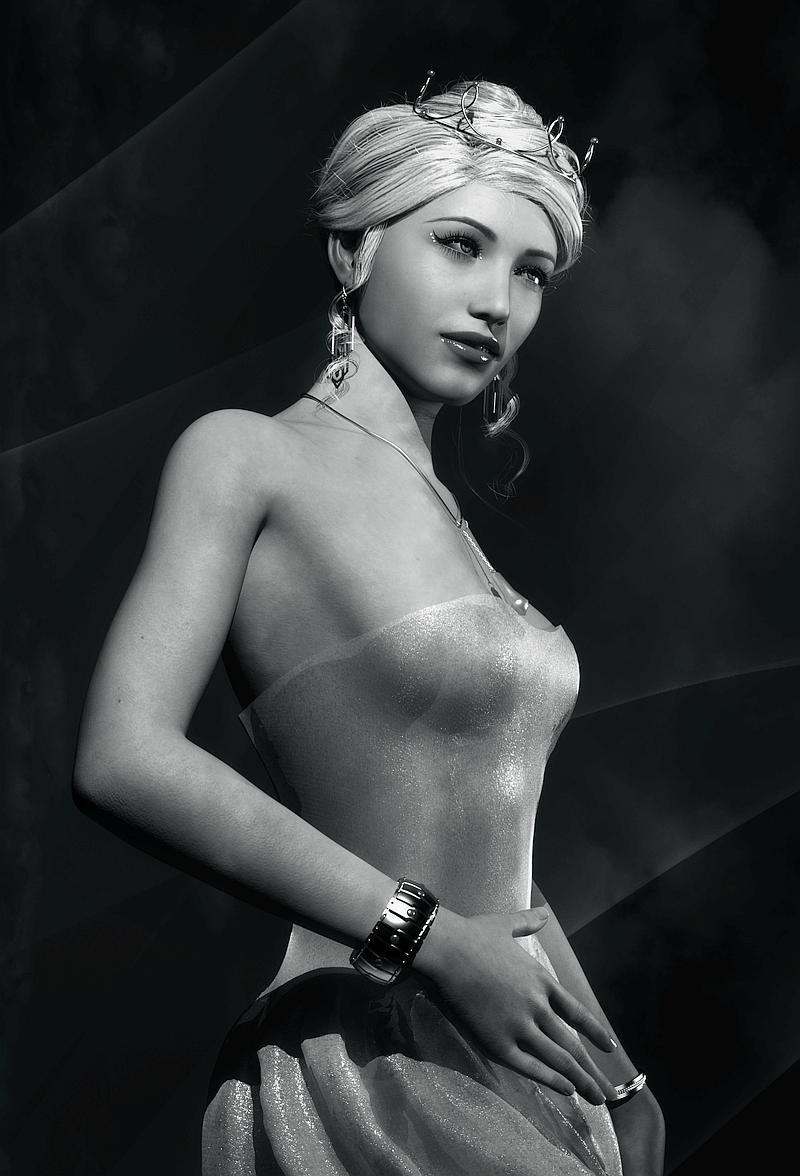
Magnus1781 has made an excellent Sadie Sink (and also a Natalia Dyer): https://www.deviantart.com/magnus1781/art/S-Sink-898108323AOBB's Debutante for G8.1F head morph. No textures.Got a question. I know your morph for the Debutante has no textures. I tried it with the default G8.1F but the skin looks plastic or maybe painted, not like real skin. How did you get your's to come out so well. Any specific changes to the default settings, or did you use a different skin altogether. Any thing you can pass along to those of us who are struggling with this new version. Generally I try to stay away from it, to bad you didn't do it for the plain G8F.
This is the best I could get it to come out, and only the in B&W as the full color one looked just to terrible. So I settled for an image reminiscent of the old 30's or 40's movie openings. Any suggestions?
Thanks.
BronzeDragon
 Blender Addon: Daz For Blender Bridge: Everything from DTB 2022 + 14 more features
butaixianran said:
Charlie.H said:
Hi butaixianran, thank you for your contribution to the updates of the bridge. It works great.
I just find 2 things I don't know how to fix.
First thing is that after importing character, the morph slider values are from -10000 to 10000 which is too large. Is there any way to normalize the range to -1 to 1?
Second thing is that I have been using the bridge since Blender 2.9. I have some characters saved using blender 2.93. When I use Blender 3.0/3.1 to open these character files, the morph list are all gone even tough I refreshed them.
I think this could probably be Blender's problem but I really hope I can just update these character files from 2.9 to 3.0/3.1 directly since I did a lot of fixing inside blender after exported from daz so I don't want to fix them again. So any idea about this situation?
For the first problem, it need to be done in a whole new way to make the range into [-1, 1] . That's a lot of work and gonna break every character which is already imported. So, I just leave it that way. And if you are using drivers, there are a lot of bugs comes with the old official code. So a better way is do not use drivers, just use the shape key.
For the second problem, I left the refresh morph list part untouched, so I'm not sure why this happened. So I can only take a guess.
The morph list you want, is not the real morph, it is a list of drivers, the real morph is on character's mesh, as shape keys.
To use those drivers, the old official DTB writes very complex Python expression on every shape key. But, from Blender 3.0, there is a max length limit on those Driver's Python expression. So, a lot of them won't work in Blender 3.x.
Maybe that's the reason why those drivers won't be loaded in Blender 3.x.
Again, a better way is just use the shape key on body mesh. Even you lost all drivers, all the shape keys should be there, so you don't need to re-fix anything, just don't use drivers anymore.
btw, you may need clear all the drivers on shape keys.
Thanks for making that clear to me. Blender is evoving too fast for addon developers to catch up. I will probably stick with blender 2.93 for a while and test more blender 3 features.
Diffeomorphic DAZ Importer version 1.6.0 releasedNow I managed to import the mesh hair correctly. You need to update the HD export script with the last commit. Here is what I did.
- Export from DS with the updated HD exporter in the last commit.
- Make sure that the global setting Add Armature To HD Meshes is enabled.
- Import the scene.
- Advanced Setup > Mesh > Transfer Vertex Groups from the body to the hair meshes.
I haven't tried to convert the hair to particles yet.
Edit: Hair conversion seems to work too, with the strand type set to Tube.
Question about Morph "Description"Yeah, that would be great if it worked as a hover-over description per morph.
Also, regarding the 'icon_large' vs 'icon_small' -- What BeJaymac said...
The large icon is the default used in the Shaping/Posing tabs, and is used instead of 'icon_small' (reduced down) for the Parameters tab (though, you can create a dedicated 'icon_small' if wanted).
Parameters tab example :

From Daz3d : "A separate Small Image may also be included, but is not necessary. If a Card Image is included, it will be resized and used automatically if there is no Small Image."
You can read more about it, along with specs to create a proper 'Card Image' here :
Celebrity Look-a-Likes for 3D figures part 3magikhs said:
Could be an "inspired by" character, absolutely.
I think there's definitely inspiration from Sadie Sink/Max but nothing more. For one, the mouth is too far off to be a likeness and while a couple of other elements fit, it's not enough for me.
The texture might work well and as I have a decent Face Transfer morph of Max (I'm doing all the main Stranger Things cast), that will be very useful.Question about Morph "Description"I suspect that is was something they planned to implement back in the early days of DS4, but never got around to doing it.
The icons are mainly for use with the Shaping tab, any morph grouped directly under the Actor region uses the large icon, those grouped under the sub regions use the small icon (if they have an icon supplied).
The Parameters tab just crushes both icon sizes down to really small.[Released] Turbo Loader for Genesis 8 and 8.1 [Commercial]RiverSoftArt said:
mathiasdeckman said:
RiverSoftArt said:
diogenese19348 said:
OK, I have a problem, I am either misunderstanding something or my setup on the PC is bonked. When I load the Genesis8 Female figure, 5 zillion or so morphs show up, all unknown products which isn't surprising, I like to use manual folders so if the database is bonked I'd never know.
I uncheck everything except the morphs I want to use as a mininal set, the script runs, fine, everything else has been renamed. But then when I load a specific product that uses disabled morphs, I get the message they can't be loaded, run the script, and the morphs don't show up to re-enable, the only ones that show up were the originally enabled ones.
Any idea what I am doing wrong, or what secret button I'm missing?
Just to be sure... you are running the Turbo Loader Manager? The Scene Config script would only show morphs in use. If you are running the Turbo Loader Manager, did you by accident clear the morph list and re-inspect the figure? That could give you the behavior you are seeing as inspecting the figure (after clearing) that only has the enabled morphs would only show those morphs. If you did, don't panic. Use the Reset Morph Directories button in options to turn everything back on and start over.
So yeah, I likely did exactly this (i was so...excited to be able to load a G8F/G8.1F character in less tahn 20 minutes that I completely forgot to read the user manual to see how to properly use the product). When I loaded up a file- the figure had a crushed side torso cavity (looked like the hulk punched her). I tried reloaded the scene three times. Didn't work. So I reloaded the same figure, figuring the current one was corrupted. No difference. Tried to reload the same figure in a brand new file, same problem. I then loaded the base figure and tried bending joints. Same problem.
I tried to restore things manually thinking missing morphs were the problem (I didn't know the reset button existed until i read the above) (found all the .tlOff files and switched them back to dsf), but it hasn't solved the problem. I'm currently using the 'reset morph' button- as you mentioned above, hoping that undoes the goof I did. If it doesn't...any idea how to fix this? I've already re-installed the base G8F product and updates. I kinda wanted to use Daz studio this weekend for a few things and this self inflicted snafu isn't helping.
I can't reinstall my library due to it being absolutely massive (like multiple terabytes massive) so I'm basically forced to do whatever necessary to fix this. I'll be testing and trying my own fixes inbetween posts and suggestions.
The 'collapsed' mesh- 'smooth shaded' is selected for visual representation.
I would load the deformed G8F and try the Scene Configuration script. It will show you what morphs are actually engaged (and where they are). I think it is a morph too (maybe a JCM?) You need to find them. With Daz Connect, you can have these morphs scattered all over.
Ok, I will do that. However, loading the G8F figure- she doesn't come in deformed, she looks correct in the default pose. Its only when I start moving the limbs, do these crushed meshes show themselves. Just trying to clarify, that's all. Sometimes I get into too big of a rush to get my question posted that I don't include all the details. so apologies for that.
EDIT: I did what you instructed and quite a few came up. Including a few JCM morphs- but they were all selected. So i checked them all and hit the accept button. Time will tell in a bit to see if that worked. Thank you for pointing me in a direction, because I was clueless before.
EDIT 2: your suggestion did not work, sadly. i checked both daz studio 4.11 and 4.15 versions and they had the same issue. I checked g3f and it was fine. I also checked another g8f model and it had the same issue, so something is wonky at the base level. I'm starting to run out of ideas of what it could be, other than reinstalling the content that I had selected in the script.EDIT 3: So I found what went wrong. Remaining a morph's extension from .dsf to .tlOff caused one of them to become corrupted. I went through the ones I changed and deleted them, and extracted brand new files from their IM000 packages. worked.
The following are the ones I replaced:
- Zev0: Body Mixer
- PS: Whimsical Girls
- K.H. Image Studio: Ultimate Natural Bend Morphs for Victoria 8
- HellFishStudios: Ultimate Shapes Collection
Beyond that, I do not know which exact morphs caused the problem and frankly, I don't care. I'm just glad it's working again. But unfortunately, after this episode of my daz studio environment getting borked and me having to spend literally a day to figure it out, I won't be using your product (trust me, I really, really want to!), but I can't risk this happening to the dozens upon dozens of projects I'm working on. However, if the time comes to where Daz Studio / your loader becomes dynamic at loading and unload morphs (wink wink but not @ u), then I'll jump in feet first.
[Released] Turbo Loader for Genesis 8 and 8.1 [Commercial]mathiasdeckman said:
RiverSoftArt said:
diogenese19348 said:
OK, I have a problem, I am either misunderstanding something or my setup on the PC is bonked. When I load the Genesis8 Female figure, 5 zillion or so morphs show up, all unknown products which isn't surprising, I like to use manual folders so if the database is bonked I'd never know.
I uncheck everything except the morphs I want to use as a mininal set, the script runs, fine, everything else has been renamed. But then when I load a specific product that uses disabled morphs, I get the message they can't be loaded, run the script, and the morphs don't show up to re-enable, the only ones that show up were the originally enabled ones.
Any idea what I am doing wrong, or what secret button I'm missing?
Just to be sure... you are running the Turbo Loader Manager? The Scene Config script would only show morphs in use. If you are running the Turbo Loader Manager, did you by accident clear the morph list and re-inspect the figure? That could give you the behavior you are seeing as inspecting the figure (after clearing) that only has the enabled morphs would only show those morphs. If you did, don't panic. Use the Reset Morph Directories button in options to turn everything back on and start over.
So yeah, I likely did exactly this (i was so...excited to be able to load a G8F/G8.1F character in less tahn 20 minutes that I completely forgot to read the user manual to see how to properly use the product). When I loaded up a file- the figure had a crushed side torso cavity (looked like the hulk punched her). I tried reloaded the scene three times. Didn't work. So I reloaded the same figure, figuring the current one was corrupted. No difference. Tried to reload the same figure in a brand new file, same problem. I then loaded the base figure and tried bending joints. Same problem.
I tried to restore things manually thinking missing morphs were the problem (I didn't know the reset button existed until i read the above) (found all the .tlOff files and switched them back to dsf), but it hasn't solved the problem. I'm currently using the 'reset morph' button- as you mentioned above, hoping that undoes the goof I did. If it doesn't...any idea how to fix this? I've already re-installed the base G8F product and updates. I kinda wanted to use Daz studio this weekend for a few things and this self inflicted snafu isn't helping.
I can't reinstall my library due to it being absolutely massive (like multiple terabytes massive) so I'm basically forced to do whatever necessary to fix this. I'll be testing and trying my own fixes inbetween posts and suggestions.
The 'collapsed' mesh- 'smooth shaded' is selected for visual representation.
I would load the deformed G8F and try the Scene Configuration script. It will show you what morphs are actually engaged (and where they are). I think it is a morph too (maybe a JCM?) You need to find them. With Daz Connect, you can have these morphs scattered all over.
[Released] Turbo Loader for Genesis 8 and 8.1 [Commercial]RiverSoftArt said:
diogenese19348 said:
OK, I have a problem, I am either misunderstanding something or my setup on the PC is bonked. When I load the Genesis8 Female figure, 5 zillion or so morphs show up, all unknown products which isn't surprising, I like to use manual folders so if the database is bonked I'd never know.
I uncheck everything except the morphs I want to use as a mininal set, the script runs, fine, everything else has been renamed. But then when I load a specific product that uses disabled morphs, I get the message they can't be loaded, run the script, and the morphs don't show up to re-enable, the only ones that show up were the originally enabled ones.
Any idea what I am doing wrong, or what secret button I'm missing?
Just to be sure... you are running the Turbo Loader Manager? The Scene Config script would only show morphs in use. If you are running the Turbo Loader Manager, did you by accident clear the morph list and re-inspect the figure? That could give you the behavior you are seeing as inspecting the figure (after clearing) that only has the enabled morphs would only show those morphs. If you did, don't panic. Use the Reset Morph Directories button in options to turn everything back on and start over.
So yeah, I likely did exactly this (i was so...excited to be able to load a G8F/G8.1F character in less tahn 20 minutes that I completely forgot to read the user manual to see how to properly use the product). When I loaded up a file- the figure had a crushed side torso cavity (looked like the hulk punched her). I tried reloaded the scene three times. Didn't work. So I reloaded the same figure, figuring the current one was corrupted. No difference. Tried to reload the same figure in a brand new file, same problem. I then loaded the base figure and tried bending joints. Same problem.
I tried to restore things manually thinking missing morphs were the problem (I didn't know the reset button existed until i read the above) (found all the .tlOff files and switched them back to dsf), but it hasn't solved the problem. I'm currently using the 'reset morph' button- as you mentioned above, hoping that undoes the goof I did. If it doesn't...any idea how to fix this? I've already re-installed the base G8F product and updates. I kinda wanted to use Daz studio this weekend for a few things and this self inflicted snafu isn't helping.
I can't reinstall my library due to it being absolutely massive (like multiple terabytes massive) so I'm basically forced to do whatever necessary to fix this. I'll be testing and trying my own fixes inbetween posts and suggestions.
The 'collapsed' mesh- 'smooth shaded' is selected for visual representation.
Will this make it to 2022 Sales Thread:Report Issues Here "There's Always Another Sale™"Thanks, Richard. In case it is needed the two items were: Turbo Loader for Genesis 8 and 8.1 and Projection Morph Manager in order DA22-0328-B6DF-0EA4-7AB6.
[Released] Turbo Loader for Genesis 8 and 8.1 [Commercial]smaker1 said:
RiverSoftArt said:
smaker1 said:
Hello
so far my experiments:
- before any TL optimization : G8F load in 12mn34 sec approx
- I made a config with all base characters, body/faces adjustements , expressions: 1mn 30. GREAT!
Nice! 8.38x speed increase!
 Thank you for sharing this.
I saw that if I do a massive update (e.g. total deactivation for example), the first time I load G8F, time is mostly the same. In the log, I saw an update of a cache file that take a long time. A second G8F loading and time is completely different !
May be another option:
I took an old scene and, of course, plenty of morphs were not found. I activated the missings one as mentionned in the manual and made a config. Would it be possible in TL to read the scene without loading it in DS4 to make a config file ? This option exists but with a loaded scene. That would prevent the time lost to load the scene, list the missing morph, then activate them (paste name is a good way to optimize the search thanks for the idea) and then reload ? I have plenty of old scenes :-)
This is a different problem as it requires reading and understanding the scene file, going to the morphs referenced in the scene, opening and reading their files (as morphs can engage other morphs), repeat. Much harder and more error prone. That said, this is something I am working on as part of something I am tentatively calling Turbo Loader Booster Utilities: an on-demand enabling of the asset/scene morphs.
 Unfortunately, it requires a rewrite of some of Turbo Loader to support it as assets like shape files do not store the relative path of a morph in the file.
Thanks RiverSoft
My base config have still plenty of morphs and it could be better but I'm trying to find the best balance between loading time and number of morphs. 1mn30 is already very good compare to 12mn. I already decreased my coffee consumption :-)
Glad you are working on some utilities !
Congratulations for Turbo loader, It's now permanently integrated in my workflow.
I love to hear that! It makes me happy when people keep using my utilities as they have become indispensible.
Daz 3D is part of

Connect
DAZ Productions, Inc.
7533 S Center View Ct #4664
West Jordan, UT 84084Licensing Agreement | Terms of Service | Privacy Policy | EULA
© 2026 Daz Productions Inc. All Rights Reserved.