-
Diffeomorphic DAZ Importer version 1.6.0 released
Krys Kryngle said:
rugeyohe said:
Can you add clothing in existing genesis figure with this? I mean lets say I have a mesh based genesis but I changed textures or sculpted character mesh changed. I keep my base mesh with diff than I wanted to add clothes without importing character can I do that?
Here are the steps I use to import new clothing to an existing Blender character (previously imported by diffeomorphic).
1) Open up DAZ with the final character save just before it was exported to Blender.
2) Add all clothing outfits to take advantage of DAZ clothing auto-fit.
3) Save and export like you would normally, for example we'll call this file 'new_clothing'.
4) Open up Blender and import your character with the new clothing, calling this file 'new_clothing.blend'. If you converted your rig to rigify or MHX in your original character file, do it here as well. Save and exit Blender.
5) Open up your original character (without clothing).
6) In Blender, go to File -> Append, and append the objects or collection from 'new_clothing.blend'. This will bring in the new clothing already fitted to your original character.
7) Clothing should fit, just 'merge rigs' and 'transfer shapekeys' if you are using diffeomorphic.
If you've sculpted your character and want to fit clothing to the new shape, I think there would be two approaches. You could re-import the new shape back to DAZ using Morph Loader Pro so that DAZ will auto fit the clothing to the new shape and then you can export using the steps above. Another approach would be to save your sculpt to a shapekey and then use the 'transfer shapekey' option in Diffeo. I'm not 100% sure that would work the way we want, but I think it would.
After just watching your tutorial videos (I'm about to re-watch them because there's so much information I can't grasp it all in one go), I have to express my gratitude to you for taking the time to create those tutorials and for adding further tips like this one (above). I watched the first of the videos when you first released them and, though I appreciated your effort, I was put off by the sheer complexity of using Diffeomorphic to transfer all the necessary components of a single character: all the morphs/shapejeys, the JCMs, the rigging, the materials set-up, and merging of geografts, etc. And all the care needed to do things in the right sequence - it was all just too much.
However, now I'm looking at it again and trying to decide whether all that effort will bring benefits such as better animation tools and rendering options (Eevee, for example).
FaceGen help?I just made some morphs with FaceGen. I'm using what I think is the most up-to-date version: does 8.1 as well as scans.
The main issue is that the suggested dot placements on that tiny man's face are not accurate.
This I found to work better:
Centre of pupils
Ends of the nostril holes
Ends of the lips
Not the bottom of the Jaw on the face, but the centre part of the lower jaw that juts out the furthest.
Stay on the front of the face when placing the outside jaw and cheek markers.Keep FaceGen open when opening D/S to check the morph. If/when it's acceptable, close D/S and from FaceGen you can then use the SAME settings, just change the target figure for export - and very easily make the same morph for all the other generations :-) Also on another tab, one can save the .fg file.
IF one uses a profile image with the mouth open, one will get "fuller" lips ;-) Rather important to use passport type portrait/profile images.
How do I use/install 3rd party morphs on G8 Female Model?Hello, I'm a new user to Daz but not a total novice to 3d software.
Ive spent a few days getting used to the software and wathching youtube tutorials and I wanted to try a new model so I searched for compatible models and found this NSFW morph on renderhub, razzledazzle3d's oh-she-thicc
It says the compatible figure is the genesis 8 female.
Which is what I believe I'm using:
Image removed
What I'm now struggling with and have youtubed to death to no avail is how these files that were provided when I purchased off renderhub:
Are useable or installable within Daz.
I'm on a mac so know my file set up is a little different but I've located my library files location and have downloaded and used other third party pose files from the same user and am able to drag and drop those poses onto the G8 model without error from my downloaded files in the content library. I don't beleive thats how morphs work but I'm able to place them alongside my other downloads and see the files BUT they look like this, im sure for a reason I don't know yet:
I'd be grateful for any help or assistance anyone is able to shed on my probably very simple misunderstanding of how to use these files.Thankyou!
FaceGen help?@Blando Calrissian :
First, it is a matter of opinion if you believe FaceGen is ahead of or behind Daz3D FaceTransfer, but as an over two decade user of FaceGen, I can say with certainty FaceGen is still ahead of FaceTransfer due to the Z-axis (front-back) issue with FaceTransfer that is not prevalent in FaceGen.
Hell, Phil W had to create a product to compensate for this in Daz Studio :
https://www.daz3d.com/face-transfer-shapes-for-genesis-8
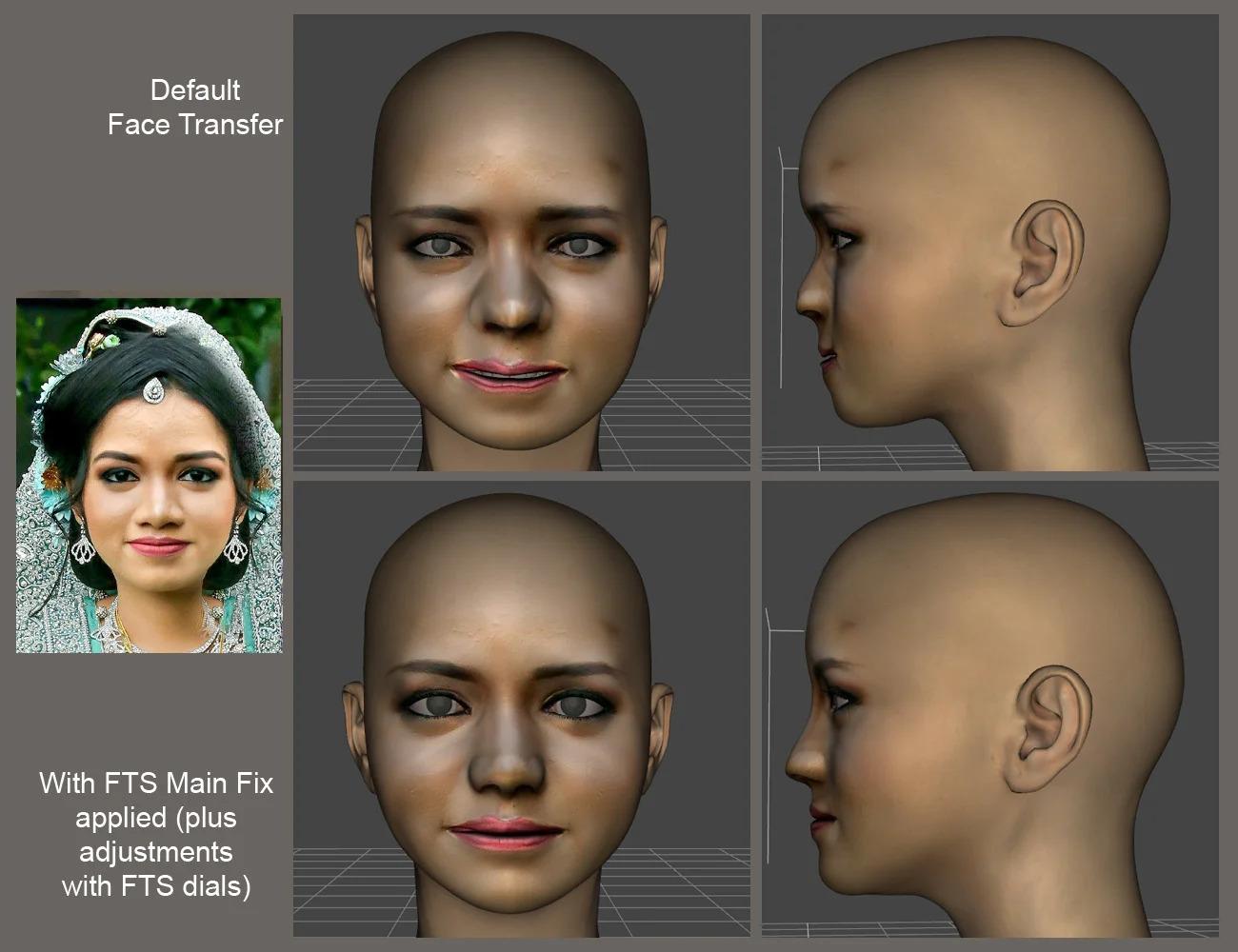
Now, with that out of the way...
Are you using FaceGen Modeller or FaceGen Artist?
And, which version number of either one are you using? You might not believe it matters, but it does.
I still use a two decade old version of Modeller which is way better than the crippled verisons available today, and then I transfer my FG model (.fg) to FaceGenArtist Pro (currently using 3.8, but have from version 1.something - 3.8 for use [just downloaded the latest 3.10 from Singular Inversions, but Daz has yet to update to this version for export use]) for exports to Daz Studio.
Last, how good of a 'traditional' artist are you? Meaning, can you look at something and recreate it on paper or canvas?
You might not think this also matters, but because I can draw anything with a 99% accuracy, using the FaceGen cross-hair targets come easy for me to a tolerance within 1 - 3%.
Even with my keen eye, it is nearly impossible to recreate identical, exact same result from the same input image. If there were a X, Y matching numeric system with the placed targets, one could reliably replicate, or adjust accordingly to minute misses on target. But, sadly, there is not one, so you can only eyeball the targets, and learn to get better at where FaceGen wants the target locations to be at for every cross-hair target.
With that said, even I have experienced the brow issue you see in your image (but not the cheek/jaw), and have created adjustment morphs in Blender to apply to any of my FG creations in DS when needed (along with dozens of other adjustment and correction morphs).
I would recommend when you give it another try to make a screenshot of where you placed all your cross-hair targets before you press the create button, and upload it here, so we can take a look and see if we can make any suggestions for adjustments.
Also, what size input image are you feeding it? The larger the image, the easier the placements will be. Smaller images, even blown up to FG screen size for the target work, can yield slightly inaccurate results compared to the larger images set to FG screen size by the app.
Don't give up just yet...
RDNA Mushrooms -- need helpI have all those mushroom sets (the only way I will enjoy mushrooms, yech!).
RDNA Mushroomz Clusters and Rings 1, RDNA Mushroomz SmClusters and Rings 2, RDNA Mushrooms Vol 3 all load as monolithic props, and cannot be selected individually without breaking up the geometry. Lots of work.
Traveler's Naturals - Mushroom Singles Vol 1, Traveler's Naturals - Mushroom Singles Vol 2 each load individual mushrooms, as the names imply.
RDNA Mushroomz Texture Expansion 1, works directly on RDNA Mushroomz, but not on any of the other mushroom products described here. However, you can transfer the material settings between them all in the Surfaces Pane. Apply the texture to one of the RDNA Mushroomz, then select a surface, copy selected surface(s), go to one of the other mushrooms and select the same surface (cap, stem, gills/underside) and paste to selected surface(s) (the Mushroomz item has "underside", the others have "gills")
Making wrinkleYou can only make morphs based on base resolution.
You could make a morph on the base mesh (if needed), and then increase resolution, sculpt the wrinkles and bake the wrinkles to a normal map
Diffeomorphic DAZ Importer version 1.6.0 releasedhttps://www.daz3d.com/bend-control-for-genesis-8-female-s-46267 Its not spesific to blend control just and example.
So i did not know about the raw and final as expressed in the link you posted its not vary intuative, i have an idea that might help with that.
If when you have show final values ticked(which maybe should be on by defult) have the 'final' values visualy showed over the top of the actual sliders, instead of to the side. Dont know if there is a better propper way to do this but im simply thinking if you make the raw values(the numbers part of the slider) hidden in some way in a visual sence(like forcing them to layer behind the actual slider element so you cant see them) then move the 'final' values to over the top so they overlay over the now blank space so they appar to be in the same place the raw values would have been. It would visualy simplify how its showcased to the user and appar to be more intuative visualy anyway
So with importing morphs over a pose, atm if i import a model then import say the blend control morphs then i import the 'sitter' pose that comes with blend control then if i import say the blend crontrol morphs again(for test sake but really any morphs) the pose brakes but also any now imported pose is also broken from this point on. So now this model can no longer be used with poses i would have to delete it and reimport. Like what on earth is going on there, i would understand if by importing a morph over a pose brakes that pose but then reloading the pose fixes it but it dosnt all poses are broken new or not. yet if you load all the same morphs at the begining then all the poses the poses work. Like thats not really functional tbh, at the very least you could do with a warning box to popup telling the user if it detects your loading morphs after having loaded a pose. So the user knows whats going on, otherwise your allowing the user to brake stuff and not know why. Any regular user would pass it off as a bug and just be fustrated, i would still hope there would be some way to 'reset' the pose data for after the fact or have a toggle to prevent morphs from doing anything to poses in anyway so if we need to import a morph say we forgot to add in the start up but we aready so far in on the project starting again just isnt fesable importing the morph with the 'leave poses alone' option enabled it would give us some way to do this that isnt just start again. Its not so much a feature as it is a user error correction, by putting in a solution that prevents or circumvents user error in this way. Have it on by defult so a user that dosnt quite know what there doing wouldnt know any diffrent but an advanced user can turn it off if that need ect
Id like to ask about hidden morphs, you have an option to import them and there in [] im not sure what the hidden morphs are are they meant to beused why do they exist ect, I just mean im not familier with them as a general thing. The do get imported anyway into blender shapkey if i have the import hidden off i noticed, is this how i should be are they basicly background morphs meant to be controlled by other sliders and not touched users?
Another question could the morph list have an up/down arrow to be able to reorder morphs, In the case of blend control i would like to move the main controllers up to the top, would be nice to maybe be able to hide morphs from the list, many of the morphs in blend controll are not mean to be manual https://www.daz3d.com/forums/uploads/FileUpload/91/0453c9d8379046e16013a40475a69c.jpg you can see the light blue is the main controllers and then the purple ones are manual controllers the rest are not meant to be used id like to be able to 'hide' them from the custom list so that there just over in the blender shapekey menu if i want to see there values I dont know if there would be some why to detect this but a manual way like a eye button on the top of the morph menu when enabled shows eye icons next to each morph, you can then trun the eye off for the morph then when you turn the eye off on the top of the custom menu the morphs with the eye off are now hidden
More Non-photorealistic Renders (NPR III)I adjusted the environment settings to get the sky closer to anime. It's from Orestes Starry Night. I used the JK Outfit and hid the sleeves
I made the hair spheres myself and used ultra sci-fi shaders to color them and added the white part in Clip Studio
The set is Streets of Japan plus some buildings from another site's free pack while I adjusted the lighting on the buildings myself since the windows are their own material zone. I feel like these buildings match Streets of Japan nicely for a background
I used the high schooler morph from the Growing Up bundle then made her calves and thighs longer to match the animation style and made more face adjustments
 Daz Studio and Linux
loopenox said:
Something else: How does Studio run for you guys with quite heavy scenes? Since upgrading to Wine 7.2 (and my new system overall) I've noticed that Studio is running fine until something happens and suddenly everything is getting really sluggish, especially the viewport. For example the highlighting while hovering over parts lags behind the mouse one or two seconds if things get really bad. For example just a couple minutes ago the big scene (which makes Studio use about 12GB or RAM) worked fine until I opened the Property Hierarchy panel. Opening that made Studio freeze for 10 minutes (which is somewhat understandable) but after that it was in that forementioned sluggish state until I closed it and reopened it together with the scene. So maybe some sort of memory leak? I can't reliably reproduce that behavior, it just either happens or it doesn't.
Additionally to that quite often posing also bugs out a bit. For example you have the universal tool activated, grab a hand, click and move but nothing happens. A couple seconds later the hand finally moved. If you grab a finger and move it, sometimes it behaves similarly but on top of it the finger snaps into a different pose first before accepting your posing. First I thought it's some posing morph that interferes but checked for that and it's not the case. This can also be really mixed in the same session. One time grabbing and moving a limb can work perfectly and a couple clicks later it needs some thinking before doing the move. Overall kinda like it was a couple years ago until they more or less fixed it.
So yeah, really curious how things work for you guys in heavy scenes involving multiple characters, items and stuff.
It can be a bit sluggish at times, but i can't say i use extremely advanced scenes. I do not really have a comparison with windows, so for all i know it would be sluggish there aswell. I have noticed sometimes if using 2-3 characters, especially with body hair will cause some lagg. I usually just hide such things from the viewport when doing posing, and enable it again for rendering. I had a lot of random issues and hang/crashing with wine-7.3/7.4, but either i managed to drop a patch, or it was fixed upstream with 7.5.
I do however use a custom wine version + custom kernel with fsync patches. Have not done benchmarks to compare, but it usually gives better performance in games (and is what Steam Proton is using)... And i compile wine optimized to my own system
-march=nativeI like to think this helps :) (Actually typing this while compiling a minor update with some SSE2 patches i found on wine-dev.. like to think it can't hurt).
I don't think i have used past my 16GB ram just loading a scene, but doing renders can pop 20+GB at times, even for my not-so-advanced scenes :) I can do some testing and see what happens if i load some 5-6 furry characters and see what kind of mem consumption i have. But i would expect it to be somewhat laggish to pose characters then. I feel mouse precision is not working that well, but again - i don't really have a comparison with windows. I know upstream WineHQ has worked quite a bit at the whole direct input part of wine, and that Valve is contributing with that, but it IS issues with recent wine when it comes to input in games, so it could be relevant if you compare to older wine versions. I started using DAZ recently, so i have not used older wine versions than like 6.20 or thereabouts with DAZ.
FaceGen help?Catherine3678ab said:
I found that placing the dots ONLY worked best. i.e. not to be adding additional information via the other tabs. I think those work better when one is not trying to photomatch a morph.
{Except that I do check the box to keep the eyes round}
I was really hopeful about the dots. It seemed like that was what was going to put FaceGen ahead of programs like Face Transfer, because the former allows you to tell the program where the landmarks are, and the latter can become confused even when one starts off with a clear photo.
I still don't know why it insists on making dinner plate masks that are larger than the base G8 figure, though. Last night, I tried tweaking the cheekbone and jaw assignments to 'skinny up' the face, but that didn't work at all.
People seem to love the product, and have done so for years, so it's got to be user error of some kind. I just wish I knew what I was doing wrong.
The 'keep the eyes round' box does seem to help keep the eyes from turning into gigantic ovals, so at least that's a step forwards! Thanks!
Split tall and shorten morphs -Solved-Using the same procedure of the video ase figure to ground, then the morph setted from neck to ground cause is a little bit high, then saved and mixed the Y translate value of the morph figure plus the value of the base figure. Result, character placed on the ground, when morphed always on the ground at 0.0, while if I click Move ri Ground it kove on the ground plane. Like all the characters feom Daz as I can see. It's a little bit twisted explain but I think you understood! Lol!
Following this video in few words.
Diffeomorphic DAZ Importer version 1.6.0 releasedrugeyohe said:
Can you add clothing in existing genesis figure with this? I mean lets say I have a mesh based genesis but I changed textures or sculpted character mesh changed. I keep my base mesh with diff than I wanted to add clothes without importing character can I do that?
Here are the steps I use to import new clothing to an existing Blender character (previously imported by diffeomorphic).
1) Open up DAZ with the final character save just before it was exported to Blender.
2) Add all clothing outfits to take advantage of DAZ clothing auto-fit.
3) Save and export like you would normally, for example we'll call this file 'new_clothing'.
4) Open up Blender and import your character with the new clothing, calling this file 'new_clothing.blend'. If you converted your rig to rigify or MHX in your original character file, do it here as well. Save and exit Blender.
5) Open up your original character (without clothing).
6) In Blender, go to File -> Append, and append the objects or collection from 'new_clothing.blend'. This will bring in the new clothing already fitted to your original character.
7) Clothing should fit, just 'merge rigs' and 'transfer shapekeys' if you are using diffeomorphic.
If you've sculpted your character and want to fit clothing to the new shape, I think there would be two approaches. You could re-import the new shape back to DAZ using Morph Loader Pro so that DAZ will auto fit the clothing to the new shape and then you can export using the steps above. Another approach would be to save your sculpt to a shapekey and then use the 'transfer shapekey' option in Diffeo. I'm not 100% sure that would work the way we want, but I think it would.
Genesis 8.1 / Victoria 8.1alienarea said:
Something I noticed:
I use the script by Redz to transfer characters from G3 to G8. Works fine.
As G8F and G8.1F are identical, I tried to transfer a morph to G8.1F directly. The script worked fine as before, but the face looks horrible, lips much too large.
How did you try "transfering" a morph from G8F to G8.1F?
If you are using DS 4.15 or newer, there is no need to "transfer" any morphs from G8 to G8.1, as the G8 morphs are automatically loaded to G8.1
Diffeomorphic DAZ Importer version 1.6.0 released@speaker-60
You may think that "blend control" is obvious to find and everyone knows, but I can't find it in the shop so please give a link to the asset commercial page so I can eventually test it both in diffeo and in the daz bridge to better undestand the difference. Is "blend control" the only asset that doesn't work or there are others ?
As for the LCalf slider, in blender sliders can't drive other sliders as daz studio does. So in diffeo it is implemented the "raw and final" concept and it is normal that LCalf may display a different value than daz studio, depending on the pose, but this doesn't mean that the morph doesn't work.
https://diffeomorphic.blogspot.com/2021/05/on-raw-and-final-slider-values.html
As for loading morphs on a posed figure, in daz studio morphs are used for posing and there's a dependency graph among them. In diffeo not all morphs are loaded for the figure, but only what the user wants to use. This allows to optimize the figure for animation, and to avoid what I friendly call the "daz studio morphs hell". But you have to load the morphs first, then pose and animate. To allow morphs to be added to a posed or animated figure can be a feature request but it may not be easy to implement.
Please let us know if after these explanations there's any request you have.
edit. The intended workflow for diffeo is to bake all the shape morphs in the dbz, as fbm or actor morphs for example. Then only import those needed for animation, as jcms for example. This allows for a good animation workflow in blender.
edit. There'a also support for ERC morphs to allow for shape-shifting figures but this comes around some blender limits. So you may avoid them unless absolutely necessary for your project.
https://diffeomorphic.blogspot.com/2021/11/morphing-armatures-and-rendering.html
https://bitbucket.org/Diffeomorphic/import_daz/issues/936/blender-support-for-morphed-armatures
Genesis 8.1 / Victoria 8.1Something I noticed:
I use the script by Redz to transfer characters from G3 to G8. Works fine.
As G8F and G8.1F are identical, I tried to transfer a morph to G8.1F directly. The script worked fine as before, but the face looks horrible, lips much too large.
FaceGen help?I found that placing the dots ONLY worked best. i.e. not to be adding additional information via the other tabs. I think those work better when one is not trying to photomatch a morph.
{Except that I do check the box to keep the eyes round}
Freebie Challenge April 2022-"New Beginnings" - Main ThreadModernWizard said:
Inspired by the Angel of Death Victorious [photo and basic info in the summary here ], one of my favorite pieces of funerary sculpture, this render arises from recent losses in my life.
It's all freebies this time!
G3F for base figure
Head morph (Ghavandyn) from 9 Custom Head Morphs for G3F -- no other morph packs needed! by ModernWiz https://www.renderosity.com/freestuff/items/75672/9-custom-head-morphs-for-g3f-no-other-morph-packs-needed
dforce big circle skirt for G8F by perlk https://www.renderosity.com/freestuff/items/91378/dforce-big-skirt-circle-for-g8f
Shirt from Ghastly's Basic Set - Genesis 1 by GhastlyH https://www.renderosity.com/freestuff/items/75030/ghasltys-basic-set-genesis-1
Angel Wings By Erlik and Virus https://sharecg.com/v/32304/view/11/Poser/Angel-Wings-By-Erlik-and-Virus
Hair from Cargo Genie for STAR! (DAZ) by adairia https://www.sharecg.com/v/81243/
Seth Scythe by rmxxabes https://www.renderosity.com/freestuff/items/52745/seth-scythe
CS Diorama by Codeman https://www.sharecg.com/v/9561/browse/11/Poser/CS-Diorama
Saxon3d Morphing Fae Leaf by Saxon3d https://www.renderosity.com/freestuff/items/71523/saxon3d-morphing-fae-leaf
...And some postwork, as shown via original and final versions attached.

Beautiful statue recreation! Very somber.
Thanks for the link to the Star Cargo Genie Hair. I didn't realize the hair was actually in that download... I thought it was just textures!
All your links are good! Please move to the Entry Thread.
 2nd of nine lives Cat Girrrl render thread prrr
While I don't know her, here's hoping we hear something soon either way.
Redfern said:
While I did not start this thread I do believe I have been its most prolific (at least most obsessive) contributor. If either carries any weight, then I welcome a more "realistic" take on the subject, something leaning a bit more to the "feral" or "frightening" if that is your forte. I have no objections to males or non-binary forms, either.
Well, I'm not into frightening as I would lose whatever little sleep I already manage to get lol. But I do go for the more realistic for my stories with the occasional toonish just for fun. While I have Melody and Micah for A3 and H3, https://www.daz3d.com/cat-world-regenesis-hd-bundle was my first set. I'm discovering that if I create a human character first, especially for the face, then apply the cat morph from https://www.daz3d.com/hfs-ultimate-shapes-bundle, then I end up with cat people that start looking different in the faces. An issue with this is one has to apply the cat head completely to get the ears and lower the upper cranium. Attempting to do the ears and cranium separately, causes skin wrinkles where the ears attach to the head. Adding head hair can hide that, though.
Skin/fur is my biggest hangup, though. I haven't found any that would look good and I don't know how to add fur, let alone create skin textures. I'm not good at drawing, hence using DS lol.
Diffeomorphic DAZ Importer version 1.6.0 releasedPadone said:
@speaker-60 No you can't. Specifically diffeo has its own drivers for jcms so transferring a bridge figure is not possible. I have to say that I'm not up to date with the bridge but I was helping the daz team with jcms some time ago and I'm curious.
Can you provide a detailed example please ? May be we can workout diffeo to be better if it doesn't work for some reason.
For a spesific example, the product 'blend control' has two slider/morphs that turn on other sliders, the other sliders are then linked to bones and blend like any other corrective shapekey
Here in the first image i have the blend controller and hip blend controler set to 1 this then activates all other morphs to work when needed according to a pose, if you look at the LCalf Smoother, this morph is at 1 in blenders shapekey ui due to the pose but in the custom morph ui its at 0 so the ones in the custom ui isnt updating or something. I can also move the sliderer for these when i shouldnt as in LCalf Smoother in blenders shapekey ui i cant control it as its driven where as the LCalf Smoother in the custom morph ui i can so there seems to be an odd disconect there. In reality LCalf Smoother and many of the morphs shouldnt appar in the custom ui as there not meant to be controlable. If Diffeo could detect that and exclude it from the morph list somehow.
There are also a bunch of other shapekeys named 'smoother ect' these dont appar in the custom ui these are driven in blenders shapekey ui, these are hidden wich i know theres an option to import hidden into the custom ui. am i supposed to do this or not there obviously imported into the model should they be used are they being used ect. this im not sure
I also find if i have a model in a pose and import morphs it resets morphs to 0, is this supposed to happen? if its meant to can it put the sliders back afterwards. If i have alot of sliders defining how a character looks and i import a pose i loose all that defining look. I dont want this and the bridge dosnt have this particular issue - Edit i did jsut find the button to stop it clearing morphs
If i import morphs after i have imported poses it will brake the poses, images of a before and after the hips have been reset or something. Dosnt matter if i have the armiture in the reset pose when importing morphs it brakes anyway. That pose in the picture is the test pose in the blend controll asset, but its brake any pose iv tried. I dont know if this is an issue with the morphs im loading but this issue dosnt happen with bridge with the same assets sooo i dont know
The only issue i have with Bridge is it has next to no rigging options and for me doing the rigify i get a broken hand ik i dont know how to fix, wich happens on any and every character model. this dosnt happen with diffeo with the same models so im torn between two addons each issues the other dose not. Hence the meging idea to use them both for each of there working functions, import with bridge with all the morphs and get diffeo to do the rigify
AIUTO...CHI CONOSCE L’ITALIANO? PARTE TREDICIBuonasera
finalmente dopo tanto tempo lontano da DAZ, avendo un pomeriggio libero, ho approfittato per mettere sul sito R (concorrente di DAZ) il freebie che avevo postato qui un po' di tempo fa.Link: https://www.renderosity.com/freestuff/items/91460/victoria-4-skin-for-g8f
E' la pelle che trasforma la G8F in V4.
Nel pacchetto troverete anche un file video che funge da tutorial a cosa si può fare.
Ci sono però 2 cose a cui stare attenti:- le ciglia della G8F sono oggetti staccati (Eyelashes) mentre quelle della V4 erano un tutt'uno con la figura. La pelle pertanto non contiene ciglia (ma ha unghie, lingua, denti, ecc..). Pertanto se provate ad applicare materiali ciglia della V4 non ottenete nulla
- I morph HD non sono precisi, quelli non HD invece vanno benissimo.
PS file di installazione compatibile con DIM e oggetti già raggruppati come prodotto e con i meta giusti (Victoria 4 Skin for G8F), dunque va solo installato
Daz 3D is part of

Connect
DAZ Productions, Inc.
7533 S Center View Ct #4664
West Jordan, UT 84084Licensing Agreement | Terms of Service | Privacy Policy | EULA
© 2026 Daz Productions Inc. All Rights Reserved.