-
Is there a reason I am unable to select polygons with geometry tool of G8F Shell?
If you want to edit the shell's geometry, export it as obj. Import that obj. And use the Transfer Utility to conform this imported "shell" object to Genesis as you'd do with a custom made cloth.
Edit > Object > Transfer Utility.
Now that the "shell" is rigged to the Genesis bones, as if it were a custom made cloth for example, you can apply the original shell's surface or any other surface to it. And edit its geometry to delete unwanted parts, define new surface groups, etc.
GENERAL FREEBIE REQUESTS part 3The Side Swept ROse Hair has a morph that can make it look OK upsidedown. P2, and and Update
Projection Morph Manager (Commercial)just linkin'...
Diffeomorphic DAZ Importer version 1.6.0 releasedKrys Kryngle said:
After just watching your tutorial videos (I'm about to re-watch them because there's so much information I can't grasp it all in one go), I have to express my gratitude to you for taking the time to create those tutorials and for adding further tips like this one (above). I watched the first of the videos when you first released them and, though I appreciated your effort, I was put off by the sheer complexity of using Diffeomorphic to transfer all the necessary components of a single character: all the morphs/shapejeys, the JCMs, the rigging, the materials set-up, and merging of geografts, etc. And all the care needed to do things in the right sequence - it was all just too much.
However, now I'm looking at it again and trying to decide whether all that effort will bring benefits such as better animation tools and rendering options (Eevee, for example).
Thank you Marble, glad you found some use in those vids. The new HD sculpts for the DAZ 8.1 characters are impressive, and the Blender software keeps getting better and better. I think learning Blender is so worth it, but I also enjoy the challenge. Thanks to Thomas and Padone for making Diffeo the awesome tool that it is. I think with the recent improvements in Blender Cycles and the updated denoiser, we might be able to start animating in Blender with Cycles now. The learning never stops! Check out the render time for the attached image - 2:15 for a 2k image. Pretty exciting stuff.
Anybody have any tips for importing animations into Blender? I'm working through an animation tutorial now and will take any and all advice.
I'm looking forward to your animation tutorial because that's almost the only reason I can find for moving my scenes to Blender at the moment. I wish I understood the big picture when it comes to Blender but I don't so I hope you cover some of the things that you might take for granted that anyone watching should know already. I'm thinking of things like how to pose, what rig to use, how to import or save poses, how to build an asset library and how to apply assets from that library to the characters in your scene.
An example: in DAZ Studio I can load a G8 figure and then dial-in a shape for her, click on clothing from my Content Library, click on a pose from that library, click on a skin texture from another character, apply make-up, etc., etc. My point about understanding the big picture is - how much of that needs to be done in DAZ Studio before exporting using Diffeo and how much can be replicated using assets saved to the Blender library?
Freebie Challenge April 2022-"New Beginnings" -Entries Thread OnlyInspired by the Angel of Death Victorious [photo and basic info in the summary here ], one of my favorite pieces of funerary sculpture, this render arises from recent losses in my life.
It's all freebies this time!
G3F for base figure
Head morph (Ghavandyn) from 9 Custom Head Morphs for G3F -- no other morph packs needed! by ModernWiz https://www.renderosity.com/freestuff/items/75672/9-custom-head-morphs-for-g3f-no-other-morph-packs-needed
dforce big circle skirt for G8F by perlk https://www.renderosity.com/freestuff/items/91378/dforce-big-skirt-circle-for-g8f
Shirt from Ghastly's Basic Set - Genesis 1 by GhastlyH https://www.renderosity.com/freestuff/items/75030/ghasltys-basic-set-genesis-1
Angel Wings By Erlik and Virus https://sharecg.com/v/32304/view/11/Poser/Angel-Wings-By-Erlik-and-Virus
Hair from Cargo Genie for STAR! (DAZ) by adairia https://www.sharecg.com/v/81243/
Seth Scythe by rmxxabes https://www.renderosity.com/freestuff/items/52745/seth-scythe
CS Diorama by Codeman https://www.sharecg.com/v/9561/browse/11/Poser/CS-Diorama
Saxon3d Morphing Fae Leaf by Saxon3d https://www.renderosity.com/freestuff/items/71523/saxon3d-morphing-fae-leaf
...and some postwork...
Victoria 8.1 from Victoria 4.2Hello. I'm an old school user of Poser as well as Daz 3D. I've been using Victoria 4.2 Starter Bundle for sometime now. I'm interested in upgrading to Victoria 8.1. My concern is the accesories and clothing and morphs I've bought for V4.2. Will things that conform to V4.2 also conform to V8.1? Such as shoes and clothing and morph++? If they won't, then I'll just stay with Victoria 4.2 because it would be a waste of money and time to buy Victoria8.1. Thanks.
Can anyone ID Character or Skin?I think the base skin is Lilly (https://www.daz3d.com/lilly-hd-for-genesis-3--8-females) - maybe also a partial morph too? https://www.daz3d.com/lilly-hd-for-genesis-3--8-females
[Released] Character Converter from Genesis 2 Male to Genesis 8 Male [Commercial]N-RArts said:
RiverSoftArt said:
N-RArts said:
I wanted to give to give your converters another try, but I keep getting a message:
The content managment/smart content has be installed and working to use the script
Log in to your account with DS.
Items are installed via DIM.
I've been having a lot of problems with my computer. I've even had to re-install Daz on a couple of occassions (I think Daz is now on my C drive). But everything else (including those scripts), has been tucked away on an external HDD.
Does it need the latest build of Daz to work (I'm still on 4.16)?
Thanks for any help
4.16 should still work for the CC.
Thank you.
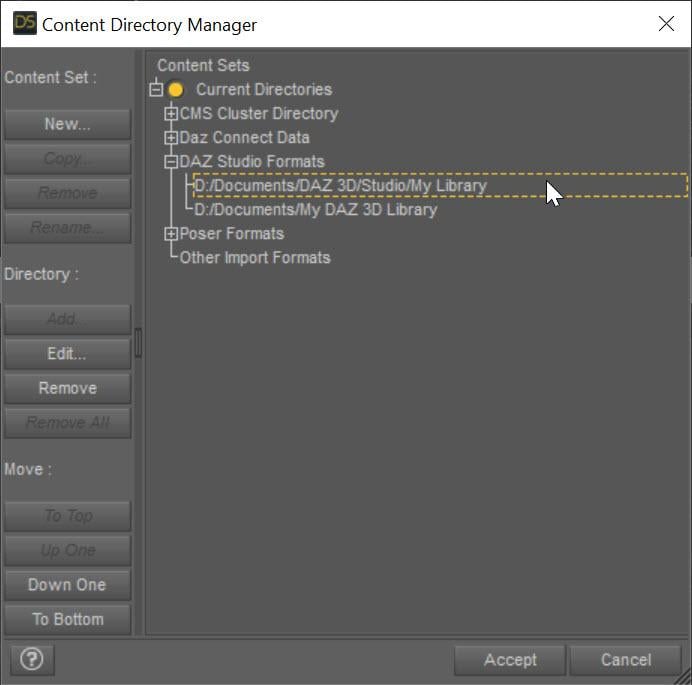
If I'm having problems, and I need to delete a morph, which folder directory should I find it in?
The converted morphs always go in \data\DAZ 3D\Genesis 8\Female\Morphs under the first directory listed in the Daz Studio Formats section of the Content Directory Manager:
 [Released] Turbo Loader for Genesis 8 and 8.1 [Commercial]
firewarden said:
The reduced times with Turbo Loader that I gave below were the first time I loaded the character I was working with and the base GF8.1 after running Turbo Loader. I'm not very technical with Daz, but using it today and loading my character with about 3 morph sets added and then the base Genesis 8.1 into a new scene, they are taking 8.5 seconds and 6 seconds to load, respectively. So, I guess the 1 1/2 minutes and 42 seconds were because it was the first time that I had loaded them after TL? Not sure... Anyway, definitely interstellar rocket fast.
firewarden said:
My results with Turbo Loader:
Loaded the character I was using in a new scene to get the baseline:
Load time: 6:37.38, so over 6 1/2 minutes.Genesis 8.1 Female scanned with Turbo Loader: 19167 morphs
Loaded the character I was using in a new scene again after enabling the morphs that I needed:
Load time: 1:18.15... Wow! Not even 1 1/2 minutes.Loaded the base Genesis 8.1 Female in a new scene:
Load time: 42.92 secondsNot sure why the difference, but still it's a major increase in how fast characters are loading. Not to mention, I will be able to use MetaMixer if I decide to try it again.
Thanks!!!
I believe this has something to do with Daz Studio's cache. Once that is updated, things get even faster.
[Released] Turbo Loader for Genesis 8 and 8.1 [Commercial]ghost_of_delete_key said:
Ah no worries. I have tried, but could not reproduce the bug. I basically followed the manual, open in the second monitor.
Logged in is not it, I am logged through Studio while using the tool, it's been a while since any Daz metadata has updated, and as I run TL again, everything is still Unknown Product.
I wish I knew why some people get this issue. The logging in seems to help most people.
Moreover, I just loaded the same scene file as before (not even remotely named similar to any morph lol) and although it appears fine, during loading the popup complained of 5 newly missing morphs:
/data/DAZ 3D/Genesis 8/Female/Morphs/DogZ&Zev0/200 Plus/Eyes Lower Inner.dsf
/data/DAZ 3D/Genesis 8/Female/Morphs/RareStone/RFMC/Eyes Lower Inner.dsf
/data/DAZ 3D/Genesis 8/Female/Morphs/RareStone/RFMC/Eyes Upper Inner.dsf
/data/DAZ 3D/Genesis 8/Female/Morphs/RareStone/RFMC/Eyes Upper Outer.dsf
/data/DAZ 3D/Genesis 8/Female/Morphs/RareStone/RFMC/Teeth Depth.dsfBUT, these do in fact exist, they are/have been enabled in TL, and are not renamed with .tlOff.
Another thing I noticed is that although I have all my expression kits and shaping kits enabled, certain expressions are broken, operating only the brows on one kit, only the mouth on another...
At this point I'm going to have to restore all morphs and not use this, I'm finding it too unstable to be useful. Thanks though, keep up the good work.
I am sorry it caused you trouble. There was something that went wrong early and I think your problems compounded after that.
<edit>
After restoring all morphs and reloading the scene, those 5 morphs are still reported as missing upon load. However, they appear in the property panel and operate properly. Shutting down Studio, re-installing the products, and reloading the scene has no effect, still "missing" (but not really). Saving the scene and then reloading it fixes the error. So, it seems that altering the delicate ecosystem of morph assets is disruptive to established scenes, if those scenes are subsequently saved with the reduced morph references. Even restoring the morphs does not restore the corrupted references within the scene file until it is once more saved.
Hopefully this info is helpful to you.
Hmmm. Did you try just dropping a G8F in an empty scene first? What about deleting its cache? There might be a missing reference in the cache that was tripping you up. Unfortunately, this stuff is not one of the well documented areas of DS
 FaceGen help?
zombiewhacker said:
Catherine3678ab said:
I just made some morphs with FaceGen. I'm using what I think is the most up-to-date version: does 8.1 as well as scans.
The main issue is that the suggested dot placements on that tiny man's face are not accurate.
This I found to work better:
Centre of pupils
Ends of the nostril holes
Ends of the lips
Not the bottom of the Jaw on the face, but the centre part of the lower jaw that juts out the furthest.
Stay on the front of the face when placing the outside jaw and cheek markers.Keep FaceGen open when opening D/S to check the morph. If/when it's acceptable, close D/S and from FaceGen you can then use the SAME settings, just change the target figure for export - and very easily make the same morph for all the other generations :-) Also on another tab, one can save the .fg file.
IF one uses a profile image with the mouth open, one will get "fuller" lips ;-) Rather important to use passport type portrait/profile images.
Could you post a visual example of this? Doesn't even have to be a FaceGen screenshot, just any front portrait and profile with corrected dot placements.
Okay, this is of a non-real person. The lower jaw placement would be some trial and error - resulting in a long narrow jaw or a more rounded or squared off jawline. As to how wide the upper face goes - varies with the placement of the dots nearer to the ears. Our eyes perceive the depth, do not use the depth ... stay on the "flat" top of the face image.
 FaceGen help?
Catherine3678ab said:
I just made some morphs with FaceGen. I'm using what I think is the most up-to-date version: does 8.1 as well as scans.
The main issue is that the suggested dot placements on that tiny man's face are not accurate.
This I found to work better:
Centre of pupils
Ends of the nostril holes
Ends of the lips
Not the bottom of the Jaw on the face, but the centre part of the lower jaw that juts out the furthest.
Stay on the front of the face when placing the outside jaw and cheek markers.Keep FaceGen open when opening D/S to check the morph. If/when it's acceptable, close D/S and from FaceGen you can then use the SAME settings, just change the target figure for export - and very easily make the same morph for all the other generations :-) Also on another tab, one can save the .fg file.
IF one uses a profile image with the mouth open, one will get "fuller" lips ;-) Rather important to use passport type portrait/profile images.
Could you post a visual example of this? Doesn't even have to be a FaceGen screenshot, just any front portrait and profile with corrected dot placements.
Diffeomorphic DAZ Importer version 1.6.0 releasedKrys Kryngle said:
Anybody have any tips for importing animations into Blender?
That depends on the animation. The daz animations can be very complex in that any morph can be used including ERCs. In general the daz rig or the simple-ik rig are the best to import and export poses and animations because they don't require any retargeting.
https://diffeomorphic.blogspot.com/2021/11/morphing-armatures-and-rendering.html
As for rigify it may need prebending with "optimize pose for ik", though some figures are already bended enough. So it changes the rest pose and animations will somewhat "break". Also both rigify and mhx don't support the full set of daz body morphs, that are mainly useful to pose figures with the daz fk rig, while they're not necessary for ik rigs but daz animations may use them.
https://bitbucket.org/Diffeomorphic/import_daz/issues/498/important-fix-for-rigify-how-to-avoid-pose
edit. note. To avoid importing extra morphs in blender, you can bake a single pose to the bones transformations in daz studio: edit > figure > bake to transforms. But it is not possible to bake animations afaik.
edit. note. To export aniblocks you have first to bake them to the timeline. Animate Lite can be used to bake to the timeline and back you don't need the pro version.
Then of course there's the whole series by @wolf359 that's excellent for mixamo animations.
Diffeomorphic DAZ Importer version 1.6.0 releasedAfter just watching your tutorial videos (I'm about to re-watch them because there's so much information I can't grasp it all in one go), I have to express my gratitude to you for taking the time to create those tutorials and for adding further tips like this one (above). I watched the first of the videos when you first released them and, though I appreciated your effort, I was put off by the sheer complexity of using Diffeomorphic to transfer all the necessary components of a single character: all the morphs/shapejeys, the JCMs, the rigging, the materials set-up, and merging of geografts, etc. And all the care needed to do things in the right sequence - it was all just too much.
However, now I'm looking at it again and trying to decide whether all that effort will bring benefits such as better animation tools and rendering options (Eevee, for example).
Thank you Marble, glad you found some use in those vids. The new HD sculpts for the DAZ 8.1 characters are impressive, and the Blender software keeps getting better and better. I think learning Blender is so worth it, but I also enjoy the challenge. Thanks to Thomas and Padone for making Diffeo the awesome tool that it is. I think with the recent improvements in Blender Cycles and the updated denoiser, we might be able to start animating in Blender with Cycles now. The learning never stops! Check out the render time for the attached image - 2:15 for a 2k image. Pretty exciting stuff.
Anybody have any tips for importing animations into Blender? I'm working through an animation tutorial now and will take any and all advice.
Diffeomorphic DAZ Importer version 1.6.0 releasedThank you for your answer! But I couldnt understand how should I merge rig and transfer shape keys. Yes I use diffo but I have never done this. Where should I look to learn?
Merge Rigs at 21:30
Transfer Shape Keys to clothing at 40:10
Maybe speed the video up to 1.25 or 1.5, I talk slow. :)
 2nd of nine lives Cat Girrrl render thread prrr
Back story first: started writing a story back in 2005, not long after that computer died so no playing with Daz studio. In the story, I had a female main character, her father and his special messenger (a male); all cat people. I didn't get a new computer capable of handling DS until 2012.
In 2018, I wanted to get to know her father so, for NaNoWriMo, I started writing his story and part of his special messenger's story. I also started creating the characters in DS.
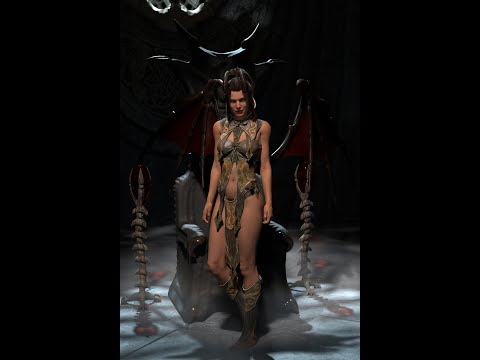
The first two images are close-ups of the two versions of the character and the third is the pair side by side.
The guy on left is G8M with a human character morphs with HFS Ultimate Shapes cat morph applied and he's about 8' tall.
The guy on the right is G8.1M with different human character morphs and with HFS Ultimate Shapes fawn and cat morphs applied. I dressed them up the same so I could see how they looked.
The muzzle of the guy on the left reminds me of Berestain Bears face and it turns out I like the head of G8.1M more. I just need to work on his ears situation but the hair covers that at the moment lol.
Diffeomorphic DAZ Importer version 1.6.0 releasedKrys Kryngle said:
rugeyohe said:
Can you add clothing in existing genesis figure with this? I mean lets say I have a mesh based genesis but I changed textures or sculpted character mesh changed. I keep my base mesh with diff than I wanted to add clothes without importing character can I do that?
Here are the steps I use to import new clothing to an existing Blender character (previously imported by diffeomorphic).
1) Open up DAZ with the final character save just before it was exported to Blender.
2) Add all clothing outfits to take advantage of DAZ clothing auto-fit.
3) Save and export like you would normally, for example we'll call this file 'new_clothing'.
4) Open up Blender and import your character with the new clothing, calling this file 'new_clothing.blend'. If you converted your rig to rigify or MHX in your original character file, do it here as well. Save and exit Blender.
5) Open up your original character (without clothing).
6) In Blender, go to File -> Append, and append the objects or collection from 'new_clothing.blend'. This will bring in the new clothing already fitted to your original character.
7) Clothing should fit, just 'merge rigs' and 'transfer shapekeys' if you are using diffeomorphic.
If you've sculpted your character and want to fit clothing to the new shape, I think there would be two approaches. You could re-import the new shape back to DAZ using Morph Loader Pro so that DAZ will auto fit the clothing to the new shape and then you can export using the steps above. Another approach would be to save your sculpt to a shapekey and then use the 'transfer shapekey' option in Diffeo. I'm not 100% sure that would work the way we want, but I think it would.
Thank you for your answer! But I couldnt understand how should I merge rig and transfer shape keys. Yes I use diffo but I have never done this. Where should I look to learn?
[Released] Character Converter from Genesis 2 Male to Genesis 8 Male [Commercial]RiverSoftArt said:
N-RArts said:
I wanted to give to give your converters another try, but I keep getting a message:
The content managment/smart content has be installed and working to use the script
Log in to your account with DS.
Items are installed via DIM.
I've been having a lot of problems with my computer. I've even had to re-install Daz on a couple of occassions (I think Daz is now on my C drive). But everything else (including those scripts), has been tucked away on an external HDD.
Does it need the latest build of Daz to work (I'm still on 4.16)?
Thanks for any help
4.16 should still work for the CC.
Thank you.
If I'm having problems, and I need to delete a morph, which folder directory should I find it in?
[Released] Turbo Loader for Genesis 8 and 8.1 [Commercial]The reduced times with Turbo Loader that I gave below were the first time I loaded the character I was working with and the base GF8.1 after running Turbo Loader. I'm not very technical with Daz, but using it today and loading my character with about 3 morph sets added and then the base Genesis 8.1 into a new scene, they are taking 8.5 seconds and 6 seconds to load, respectively. So, I guess the 1 1/2 minutes and 42 seconds were because it was the first time that I had loaded them after TL? Not sure... Anyway, definitely interstellar rocket fast.
firewarden said:
My results with Turbo Loader:
Loaded the character I was using in a new scene to get the baseline:
Load time: 6:37.38, so over 6 1/2 minutes.Genesis 8.1 Female scanned with Turbo Loader: 19167 morphs
Loaded the character I was using in a new scene again after enabling the morphs that I needed:
Load time: 1:18.15... Wow! Not even 1 1/2 minutes.Loaded the base Genesis 8.1 Female in a new scene:
Load time: 42.92 secondsNot sure why the difference, but still it's a major increase in how fast characters are loading. Not to mention, I will be able to use MetaMixer if I decide to try it again.
Thanks!!!
[Released] Turbo Loader for Genesis 8 and 8.1 [Commercial]Ah no worries. I have tried, but could not reproduce the bug. I basically followed the manual, open in the second monitor.
Logged in is not it, I am logged through Studio while using the tool, it's been a while since any Daz metadata has updated, and as I run TL again, everything is still Unknown Product.
Moreover, I just loaded the same scene file as before (not even remotely named similar to any morph lol) and although it appears fine, during loading the popup complained of 5 newly missing morphs:
/data/DAZ 3D/Genesis 8/Female/Morphs/DogZ&Zev0/200 Plus/Eyes Lower Inner.dsf
/data/DAZ 3D/Genesis 8/Female/Morphs/RareStone/RFMC/Eyes Lower Inner.dsf
/data/DAZ 3D/Genesis 8/Female/Morphs/RareStone/RFMC/Eyes Upper Inner.dsf
/data/DAZ 3D/Genesis 8/Female/Morphs/RareStone/RFMC/Eyes Upper Outer.dsf
/data/DAZ 3D/Genesis 8/Female/Morphs/RareStone/RFMC/Teeth Depth.dsfBUT, these do in fact exist, they are/have been enabled in TL, and are not renamed with .tlOff.
Another thing I noticed is that although I have all my expression kits and shaping kits enabled, certain expressions are broken, operating only the brows on one kit, only the mouth on another...
At this point I'm going to have to restore all morphs and not use this, I'm finding it too unstable to be useful. Thanks though, keep up the good work.
<edit>
After restoring all morphs and reloading the scene, those 5 morphs are still reported as missing upon load. However, they appear in the property panel and operate properly. Shutting down Studio, re-installing the products, and reloading the scene has no effect, still "missing" (but not really). Saving the scene and then reloading it fixes the error. So, it seems that altering the delicate ecosystem of morph assets is disruptive to established scenes, if those scenes are subsequently saved with the reduced morph references. Even restoring the morphs does not restore the corrupted references within the scene file until it is once more saved.
Hopefully this info is helpful to you.
Daz 3D is part of

Connect
DAZ Productions, Inc.
7533 S Center View Ct #4664
West Jordan, UT 84084Licensing Agreement | Terms of Service | Privacy Policy | EULA
© 2026 Daz Productions Inc. All Rights Reserved.