-
When did you come to DAZ?
Another before it was Daz, though I collected only freebies in the Zygote days. First purchase was, as I recall, Victoria and Michael when they were discounted for the release of Victoria 2.
When did you come to DAZ?Before DAZ was DAZ. I was using Poser back then and the first thing I bought was Victoria 1-The Millenium Woman. I came over to DAZ Studio whan Genesis was released.,
When did you come to DAZ?Must have been 2003, after the Victoria 3 release.
I've started to use DAZStudio Software in 2014? with the release of Genesis 3 and the Iray renderer.When did you come to DAZ?Order Date: 2002-11-08 Victoria 2.0 & Michael 2.0
Looking for a half Vietnamese Female Modeldylan_borg_d673e29d8d said:
I am looking for a half Vietnamese Female Model. Ideally - Victoria 4, otherwise Genesis 3 or 8. The character I want to render is 21 to 31 years old.
Real life reference would be "Haley Pham" and "Eileen Fogarty"
try looking thru the store to find a Vietnamese looking model and then turn the morph down until she looks like you want. There are plenty of Asian characters in the stores
Looking for a half Vietnamese Female ModelI am looking for a half Vietnamese Female Model. Ideally - Victoria 4, otherwise Genesis 3 or 8. The character I want to render is 21 to 31 years old.
Real life reference would be "Haley Pham" and "Eileen Fogarty"
New TriAx Character, clothing to moving with character morph - SolvedI wonder if someone could help me please. I have converted Victoria 3 from Parametric joints to TriAx Weight Mapping. This means I can get autofit clones to fit clothing to the character, and have a rough & ready G8F autofit clone that allows G8F clothing to fit V3.
I do have one problem, though. The clothes don't follow the base character morphs such as 'Slender_Hips'.
I was wondering if that's due to the way I saved the character or whether it's due to something else.
I saved the character using menu item: File| Save As| Support Asset| Figure/Prop Asset... and then in the Figure/Prop Assets Save Options Window, I set the 'Set Content Type' to 'Actor'. Should this have been set to 'Actor/Character' to get the character morphs to follow through to the clothing? Or is there something else I should have done?
Thanks in advance,
Richard.
Diffeo export at base level with geograft, import as morphKeep in mind that blender doesn't work as daz studio. In daz studio it is common to mix figures, in blender this makes little sense. We import the baked final shape but then corrective morphs are from the base figure so they are different from daz studio. There's an option in easy import named "baked correctives" that will import all the corrective morphs, this is good to get a single custom figure as Victoria 8 for example, but will be extremely heavy for a mix of figures.
Is there Victoria 9 without the freckles?Hello,
Not that I know off, but you can use any G9 skin textures with Victoria 9, including the ones provided for free with Daz Studio.
Edit: an example, with on the left, Victoria 9 with her base skin, and on the right, Victoria 9 with one of the four G9F skins provided with Daz Studio. Outside of the skins, everything is the same.
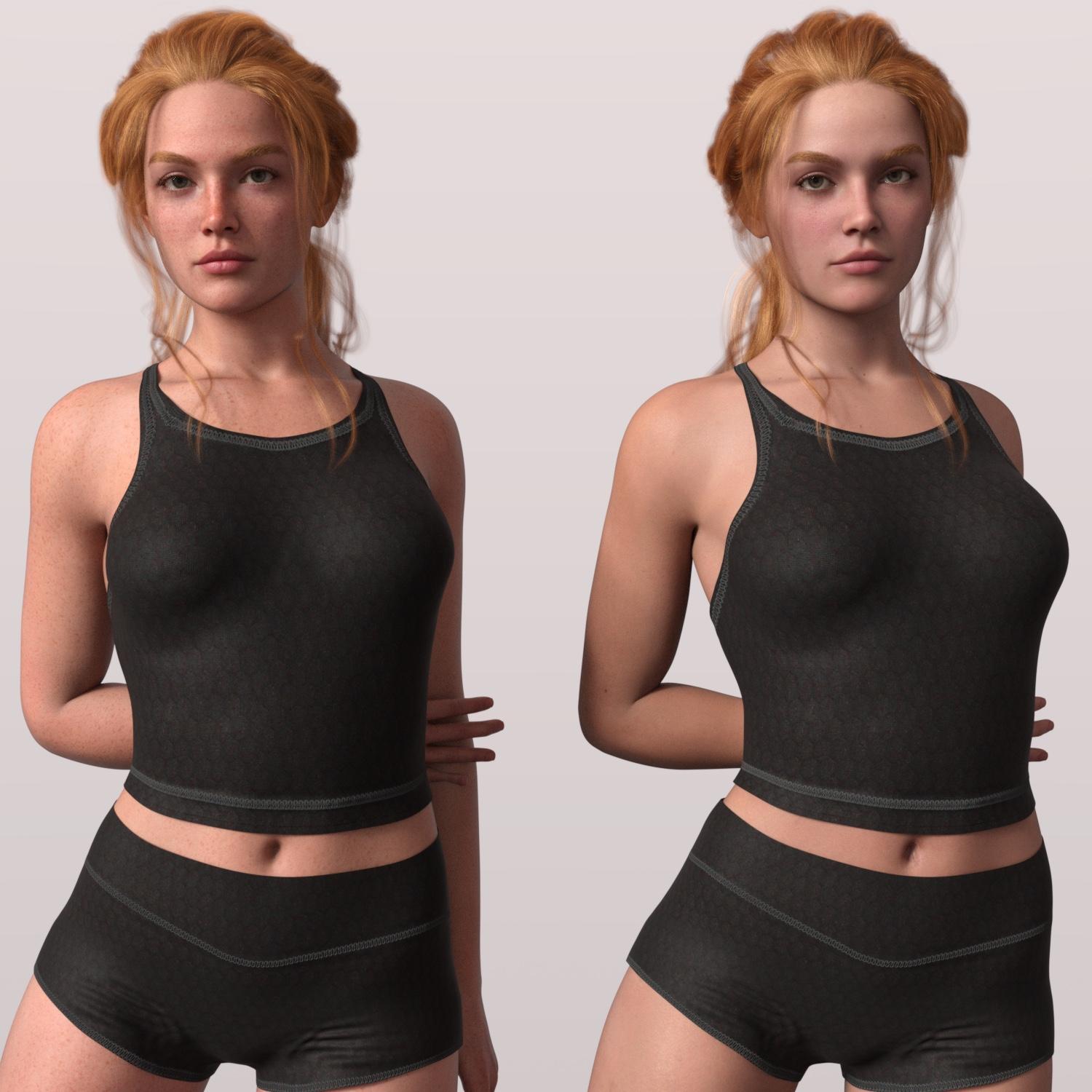 Is there Victoria 9 without the freckles?
Is there Victoria 9 without the freckles?
Karmen 9 HD / Pro BundleYeah, from my experiments you can get a very simalar character dialed up if you start with Kala 9
I assume most of the core characters are made my the same artist or team, so like all our favourite PAs whoever the artist is has a recognisable/distinct style even when going for realism. With the ladies in the lineup they only really change with the thorne-like characters. Even characters that should be outliers - Freja, Angela, Xiu Lin for example, still seem related to the rest.
I really enjoyed Julius and Genghis Khan. I wonder if contiuning to use historical inspiration would lead to more variety? (Historical because there's less problems using a likeness as an inspiration)
https://www.daz3d.com/forums/discussion/642596/list-of-g9-core-figure
Wishlist at the moment: maori, indigenous australia, pacific islander, a young queen victoria and a young prince albert, tall sudenese, indian, more asian, caucasian with sun-damaged skin. All ages, all genders! I'd like the Daz Orignal instagram hotgirl and boy equivalent, and also the mousey-don't-have-time-to-look-after-myself types. Is it possible to do softer body types without noodle arms?
The older generation: Victoria 2/3, Michael 2/3 and their children rendersDo be aware that the greater the difference in generations, the more likely you are to need to resort to simulation & smoothing modifiers.
High Heel feet figures (eg IV and GV3) cannot wear flat feet character's shoes.
Other Generation 3 characters that this process and clones can be applied to:
- Victoria 3 (DAZ)
- Aiko 3 (DAZ)
- Glamorous Vickie 3 (Jim Burton)
- Ingenue Vickie (Jim Burton)
- GND2 (BlackHearted)
- M3 (DAZ)
- Stephanie Petite 3
It can probably be applied to the following (but I don't have them to check):
- The Freak 3
- Hiro 3
It will probably work for any other Generation 3 Unimesh figures not listed above (is The Girl a Generation3 Unimesh? - Edited to add: No, The Girl isn't, having around 55,000 facets, quite a lot fewer than V3).
Remember if you make a clone obj file of any of the characters for G8F/G3F etc, then keep the obj file as it can be used as a clone file for each & every other triax character you choose to create.
The clone figures of V3/GND2/GV3/IV etc can all be used as full body morphs directly so A3 could morph into M3 or V3 or.. The limit is your imagination, and if you wish, you could start loading up your Generation3 Triax figure with all the FBM's you want from the parametric figures and slow loading down enormously.
Regards,
Richard
The older generation: Victoria 2/3, Michael 2/3 and their children rendersThat’s the first autofit clone done, now do a Victoria 3 Autofit Clone so A3 can wear V3 clothing.
- Load the full character obj of V3. This will be used to load V3 clothing. This is done by selecting menu option: Edit| Figure| Morph Loader Advanced…
-

- Note the 100% scale again.
- Press the ‘Accept’ button again.
- In the parameters tab, scroll right down to the bottom, and you’ll see a new morph, called ‘V3’
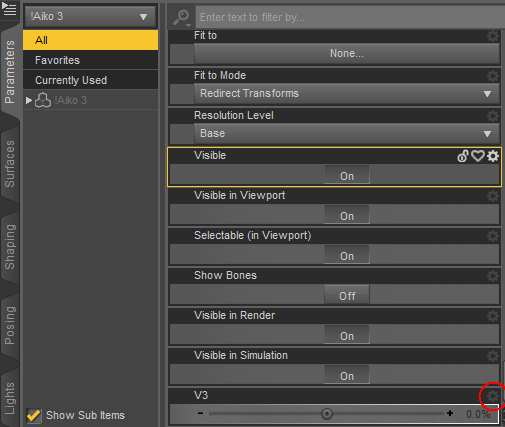
- Right Click on the gear icon outlined in red above, and select menu option ‘Parameter Settings’
- Make the parameters window look as below:
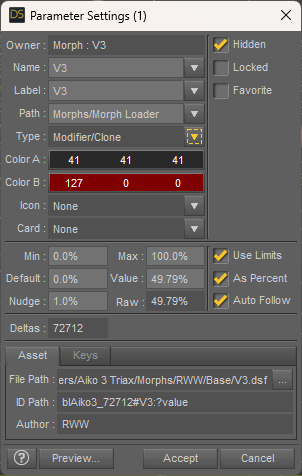
- The ONLY VITAL one is the morph type, it MUST be Modifier/Clone. Once again the author will default to you.
- Press the ‘Accept’ button again.
The older generation: Victoria 2/3, Michael 2/3 and their children rendersTo create a TriAx Version of Aiko 3
Or Victoria 3 or Glamorous Vickie or GND2 or Ingenue Vickie or Stephanie Petite 3 or any other V3 based character. We will start by creating two obj files for autofit clones. This technique will work for V4 too, but there are fewer immediately available clones.
- Load the Poser version of Victoria V3. This may well be in <content>/Runtime/Libraries/Character/DAZ People/Victoria 3 SAE.cr2.
- Zero V3’s pose. Select the character, and then select Menu option Edit| Figure| Zero| Zero Figure
- Double check you have the right version, by opening up the scene info window. To do this select menu option: Window| Panes| Scene Info. Ensure the vertices are 72712 and the total facets is 74510, as below:
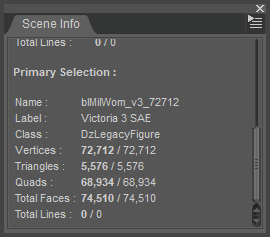
- Now need to save the obj file for the V3 autofit clone. Select Menu Item: File| Export…
-
The save dialogue opens, choose any temporary directory you want. Save under the Name ‘V3’.obj
-
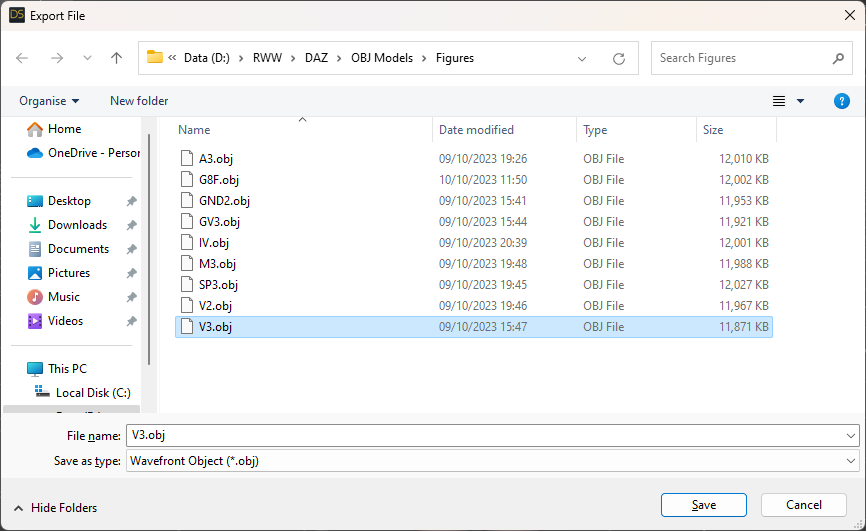
- When the Export options dialogue opens, make sure the scale is 100%, and everything else is as shown:
-
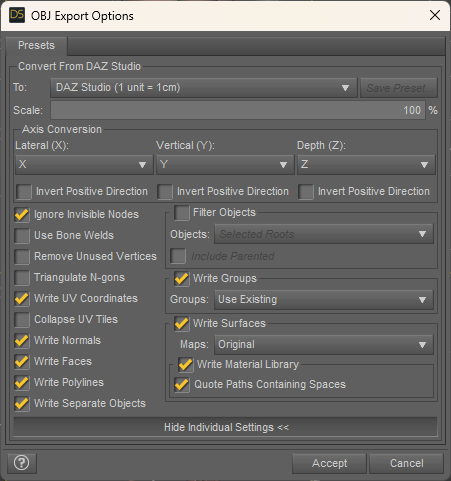
- Press the ‘Accept’ button.
One Skin Texture That’ll Fit Every Generation of Genesis & Michael 4 ?If i got it right, you can use any genesis 1/2/3/8/8.1/9 skin texture on every genesis generation and even between male and female using tools like
https://www.daz3d.com/genesis-3-uvs-for-genesis
or the new
https://www.daz3d.com/genesis-9-uvs-for-genesis-8-and-81-female
and tools like this to use the texture on another gender:
https://www.daz3d.com/genesis-3-uv-swap-male-and-female-base
That is quite easy when you get used to it.
But there it ends, you can't go down to Michael 4 or Victoria 4 without doing all the work with photoshop or gimp yourself...
ETA: Of course, you can use M4/V4 skintextures on higher genesis generations, just like g9 on v4 / m4 is not possible with uv tools alone.
Clothing sets like this?The history lesson part is because too many items in the store (and I also see this on sites selling vintage real-life items) are incorrectly labeling something as belonging to a particular era when it doesn't. This spreads misinformation which eventually becomes regarded as truth by those who are unaware of the actual truth. It's discussed a bit in this thread:
I'm not aware of anything like the pictures you've posted. You may have to kitbash. Perhaps you can make use of some of these items. Some have multiple options. You may be able to use trans maps or turn parts of them off.
https://www.daz3d.com/dforce-hnc-pleated-skirt-outfit-for-genesis-8-females
https://www.daz3d.com/dforce-buttoned-crop-shirt-and-pleated-skirt-for-genesis-9
https://posercontent.com/dforce-office-lady-suit-for-genesis-8-and-81-females
https://www.daz3d.com/dforce-hnc-cropped-shirt-outfits-for-genesis-81-females
https://www.daz3d.com/dforce-chiffon-crop-dress-for-genesis-8-female-s
https://www.daz3d.com/dforce-hnc-basic-jacket-outfit-for-genesis-81-females
https://www.daz3d.com/h-c-fit-flare-dress-for-genesis-3-female-s
https://www.renderosity.com/marketplace/products/129387/dforce-school-uniform-for-victoria-8
The older generation: Victoria 2/3, Michael 2/3 and their children rendersEthin said:
richardandtracy said:
Hmm. I might be very late to the party on this, but I have made a little discovery.
It's possible to convert V3 to Triax Weight Mapping. If you do that, you can then create autofit clones of SP3, M3, GND2, A3, Ingenue Vickie, and GV3 that will allow these characters to mostly wear each other's clothes - except for those with high heel feet. All these characters have the same number of vertices and facets (if you get the right version) which means no modelling is needed to create the clone - If you want the A3 autofit clone, load A3, zero the character and export the figure as an obj file, then load it as an autofit clone morph. I was amazed at how easy it was.
The same can be done with each of the other characters.
Regards,
Richard.
I'm just going to be that guy.
What about converting other generations clothes to generation 3? Because I was told it couldn't be done 'cause generation 3 wasn't weight mapped.
Yes, up to the fourth generation (Victoria/Michael/Kids 4) the figuers used parameteric rigging, with the falloffs being controlled by angles from the joint centre and, optionally, spheres that enclosed the area to move entirely and afalloff to no movement. Those can't simply transfer to another, differently shaped item - the angles/sphere properties will need a lot of tweaking to get a desirable result and the system will fail entirely with some things that are possible with weightmapping.
Making Clones of G9 - Tutorialrichardandtracy said:
This has proved to be very useful, thank you Catherine.
The application I have used it for is with getting additional clothes for the very elderly Victoria 3 based 'Glamorous Vickie' model by Jim Burton. It's a very non- standard morph and few clothes fit. I have found that by converting the figure to Triax Weight Mapping, then adding an obj file of V3 in the default pose and Blackhearted's GND2 as clones, then most rigged V3 & GND2 clothing fits.
And I couldn't have done it without you.
Many, many thanks.
Will be doing the same with GND2 and trying it with A3 and Jim Burton's Ingenue Vickie too.
Regards,
Richard
You're most welcome. Happy it's found a good home over there :-)
Making Clones of G9 - TutorialThis has proved to be very useful, thank you Catherine.
The application I have used it for is with getting additional clothes for the very elderly Victoria 3 based 'Glamorous Vickie' model by Jim Burton. It's a very non- standard morph and few clothes fit. I have found that by converting the figure to Triax Weight Mapping, then adding an obj file of V3 in the default pose and Blackhearted's GND2 as clones, then most rigged V3 & GND2 clothing fits.
And I couldn't have done it without you.
Many, many thanks.
Will be doing the same with GND2 and trying it with A3 and Jim Burton's Ingenue Vickie too.
Regards,
Richard
Ultimate PBRSkin Manager (Commercial) ** 2 additional utility scripts available here **It was scripted to be compatible with all generations (beginning with Victoria 4, and up to Genesis 9) BUT when you launch the script, the skin parts (and eventually the nails) must use PBRSkin.
So, for most Genesis 8.1 and all Genesis 9 figures, you should not have issues (maybe a few warnings concerning the eyesocket or the nails not being pbrskin, but always easy to handle).
For the rest of the figures, the other generations (Genesis 8, 3, 2, 1 and Victoria 4), it requires that the figures are initially converted, for their skin (skin/lips/nails surfaces) to PBRSkin, because most of them will natively come with another skin shaders.
PS : for these old generations, if you manually convert to PBRSkin (select all skin/lips/nails surfaces and apply the PBRSkin shader located in the default content of Daz Studio), the only thing that the managet cannot do for you is to copy the base color maps, or the initial translucency maps, to the translucency color of the converted figure. For this, it can - depending on the case - be interesting to duplicate your figure before you apply the PBRSkin shader so that you can pick up the maps you want more easily on the original version - because applying the shader may make some of those maps disappear. Feel free to ask details here, I know the exact procedure since I had almost finished a multigeneration converter, (but this is not relevant to release it in a short delay).
How do you check that the skin is PBRSkin? simply select one surface, and in the surfaces editor tab, the name of the shader used is located at the top of all the properties.
So said differently : if when you launch the script, the figure (whatever the generation) uses the PBRSkin shader on its skin/lips/(nails), then the product will work on it. If it is not the case it will not, you have to convert the skin surfaces one way or another (this is why it is called "PBRSkin" Manager and not "whatever you skin shader is" Manager). note : lips are ignored for G9 since this surface does not exist.
Daz 3D is part of

Connect
DAZ Productions, Inc.
7533 S Center View Ct #4664
West Jordan, UT 84084Licensing Agreement | Terms of Service | Privacy Policy | EULA
© 2026 Daz Productions Inc. All Rights Reserved.