-
Transfer all Daz Studio content from Mac to PC?
I don't use Daz Connect but that would store it's metadata separately - I think it was json files somewhere in the Daz Connect folder. If the Content DB Maintenance does not re-read it then I don't know how to trigger that. Or even if it's possible. Hopefully you can find a way.
For the Poser stuff, make sure you also added libraries that contain Poser products under "Poser Formats" in the Content Directory Manager. You add them even if they also exist under "Daz Studio Formats" since the products are accessed/handled differently.
Content Directory for 4.23I've been testing some things on the new install and nothing but more problems. At first I thought it was some issue with dazconnect and its DRM-style features. I obtained a new character from the DAZ3D shop, and had the DIM installer install it itself. So I load up the genesis 9 base character, and attempt to load the shape of the new character, and...nothing. not even an error, just a quick flicker of a tiny window, and nothing. So I attempt to load the entire character as a new figure...which results in a base G9 model being loaded with the new character's materials, but not the shape. There are also figures in the My DAZ3D Library folder, but the entire character is called ACTOR, and the morph is labeled SHAPE (in the thumbnails). They did the same thing. I remember way back in Victoria 4.2, that after the base figure was loaded, you had to load morphs right away.
The postgreSQL was installed via DIM installer. I re-installed it twice, and seems to be working because Login is greyed out un the connect tab. So I was able to "update" the metadata and the database manager/install offline files
To keep things simple, I'll upload a log file using only files installed by DIM, on the same drive DAZ 4.23 is on.
Here's exactly what I did from the beginning of the log file.
1. Shut down DAZ studio
2. Open Daz Studio
3. Loaded Genesis 9 full-body actor character obtained from DAZ Shop (G9 base loaded, w/ new materials but no new shape)
4. Loaded Genesis 9 base character
5. With G9 selected in scene hierarchy window (top right), attempted to load full-body shape of new DAZ shop character (shape and material was not applied/loaded)
6. loaded one of the pre-made G9 Characters (loaded just fine)
7. Left DAZ studio running with 3 characters in scene.
I'd like to solve this problem first, it's pretty important, because these are supposed to be official/certified/1st party/compatible products.
Diffeomorphic Add-ons Version 5.1.0 Releasedi was able to import my charcter no prob, however in the Daz Setup tab, the Rigging section/dropdown has no options there. It used to say things like "Convert to MHX" but it's just nothing now...not sure what I may have done wrong. I installed the MHX Runtime zip as well and have it active in my Blender Addons preferfeences, and the MHX tab is in my UI next to the Daz Setup tab.
Create primitive plane throws an errorI tested the primitive plane on my MacMini M4 with the Public Build 4.23.1.8 installed. I noted each primitive has curved brackets in their Name and I was able to create three Planes to test a 'Plane (3)' in the Label: and had no issues. I matched all the other elements that @Pitmatic used.
I will note that I had just rebooted my computer due to loosing internet contact and after a large download from DIM and metadata work on the files.
Mary
Content Directory for 4.23All the Daz studio paths in preferences (content directory manager) are exactly as above, My Daz library and My library in the C: Drive, and the added My library from the D: drive.
C:\Users\NAME\Documents\DAZ 3D\Studio\My Library
D:\Users\NAME\Documents\DAZ 3D\Studio\My Library
Yes it refuses to load, as in the error comes up that the files are missing. Then in the error window, right under where it says files are missing, it says Files found: then lists all of the files it says it can't find. in the list, the paths start at Runtime or Data. For example:
/data/Tim82/Hotrod/Main Body/Main Body.dsf
Since my added base directory is the D: drive, right alongside the C: drive one,
I go into D: drive (where I told DAZ studio the library would be)
D:\Users\NAME\Documents\DAZ 3D\Studio\My Library\Content\data\Tim82\Hotrod\Main Body Mainbody.dsf
There's the file
So why is the error leaving out the beginning \Users\NAME\Documents\DAZ 3D\Studio\My Library\Content part of the path when looking to load the file?
I even re-downloaded the product, and manually installed it into the C: Drive With the proper Library/content hierarchy, and it is still giving a loading error. In addition, i am having the postgreSQL issue, So I can't connect to DAZ server, maybe its a metadata update problem?
DAZ studio used to let us locate the files when it couldn't find them. Now it just makes us click OK and then loads up a big grey blob.
Posing Geograft?I am using Diffeomorphic to import to Blender and none of the geograft has bones or possibility. When I chose not to merge geografts, it did not merge to the mesh but still had no possibility. Is there any tutorial I can follow to import poseable geografts? Also, is there an option to choose specific morphs to export?
Shader and render quality issue?Hi,
I only have 6GB VRAM, and it's a pain to render stuff in Daz. I have to keep restarting Daz and obsess over optimization to the point I can't get anything done.
So, I'm considering going with a blender for the final render. I'm using Diffeomorphic, but I'm not getting proper render. Skin doesn't seem to have a natural look to it and the hair is a mess.
I attached two photos, Daz IRAY render, and Blender Cycles render. In Cycles, other than the skin seeming "flat" for lack of a better word, the hair looks clumped up and not wispy with strands. Any suggestions?
Oh, I noticed that the hair is not clumped up in Blender Material Preview shading mode, so it's not an import model issue, but probably something with Cycles. I tried tweaking the settings but couldn't find a solution.
Transfer all Daz Studio content from Mac to PC?I did get DS to import all installed content. I missed a couple of content directories which is why it missed them on the first go. I did put duplicate dsx files in 3 user locations, DS must have picked whichever one it saw first. Good to know about the first in DIM list as the one DS looks to. The only content not showing up is the daz connect content and some real old poser stuff. Not a surprise on that even though I copied it all to the new drive. I need to work through the connect files one by one and get them installed with DIM. Thanks.
Transfer all Daz Studio content from Mac to PC?The Management said:
I know this is an old post but it's the right topic I've been looking for. I'm setting up a NAS to use between my Mac and PC. I have all my content on the NAS and am trying to use local CMS files.
Things are working very well as far as the content being accessible on both platforms.
I exported data from my mac as Richard said above and saved the 2 .dsx files to my pc. In DS on the pc, I go to Content Library option menu>Content DB Maintenance>Reimport Metadata. And it loads.
My problem is only half my catagories show up. And the Reimport Metadata doesn't ask for a file (the file that I exported) so how would DS know that I even bothered to export the data? It looks like the data is coming from the daz store or something but it doesn't seem to be coming from my .dsx file. Is there something I'm missing here? Shouldn't DS ask for a dsx file?
When you export the metadata from your first machine it will save all your manual changes to a "LOCAL USER" dsx file in the Runtime/Support folder of your primary content library (the first configured one in the list). Therefore, when you want to import this into your second machine make sure that you have added the same set of Content Libraries to that machine and then run the Reimport Metadata. This process should show a list of products to be imported, all pre-checked, before it starts and the LOCAL USER one should be at the top.
The only wrinkle I can see is if you had accidentally created multiple "LOCAL USER" dsx files somehow, not sure how Daz would handle that.
Transfer all Daz Studio content from Mac to PC?I know this is an old post but it's the right topic I've been looking for. I'm setting up a NAS to use between my Mac and PC. I have all my content on the NAS and am trying to use local CMS files.
Things are working very well as far as the content being accessible on both platforms.
I exported data from my mac as Richard said above and saved the 2 .dsx files to my pc. In DS on the pc, I go to Content Library option menu>Content DB Maintenance>Reimport Metadata. And it loads.
My problem is only half my catagories show up. And the Reimport Metadata doesn't ask for a file (the file that I exported) so how would DS know that I even bothered to export the data? It looks like the data is coming from the daz store or something but it doesn't seem to be coming from my .dsx file. Is there something I'm missing here? Shouldn't DS ask for a dsx file?
Disabled keyboard short cutsAre thy listed next to the commans in menus? If not go to Window>Workspace>Customise, click Import, then Actions, and select the layout you use
Are there 2 types of strand based hair? Like a consumer version and locked version?FrankTheTank said:
crosswind said:
Then what really matters in your case is Hair Generation Mode. Fortunately Moshi the Kitten's fur is generated by Target Surace rather than Root Radius. So it's easy to lengthen the fur by tweaking PR/PS hair generation settings...
'You even can "groom" the fur in external modeling software by exporting the polyline of the fur...then import as a morph, or deform the fur by using D-Formers in DS.
Do you know of any good tutorials on this? I'm lost with some of the terminology you're using there. I've found like one tut on SBH, but it doesn't go into all that.
I've seen no full tutorial about settings of hair generation / simulation on SBH's surfaces, but you still can experiment the properties yourself. I quickly tweaked some settings there and use a D-Former to shrink the ear hair after holistically lengthening the fur length. Scene file is attached. You may give it a try and finetune the values. (Preview PR Hair is turned on in the scene, so it'll take some time when opening the DUF file... as per your PC's performance ~~)
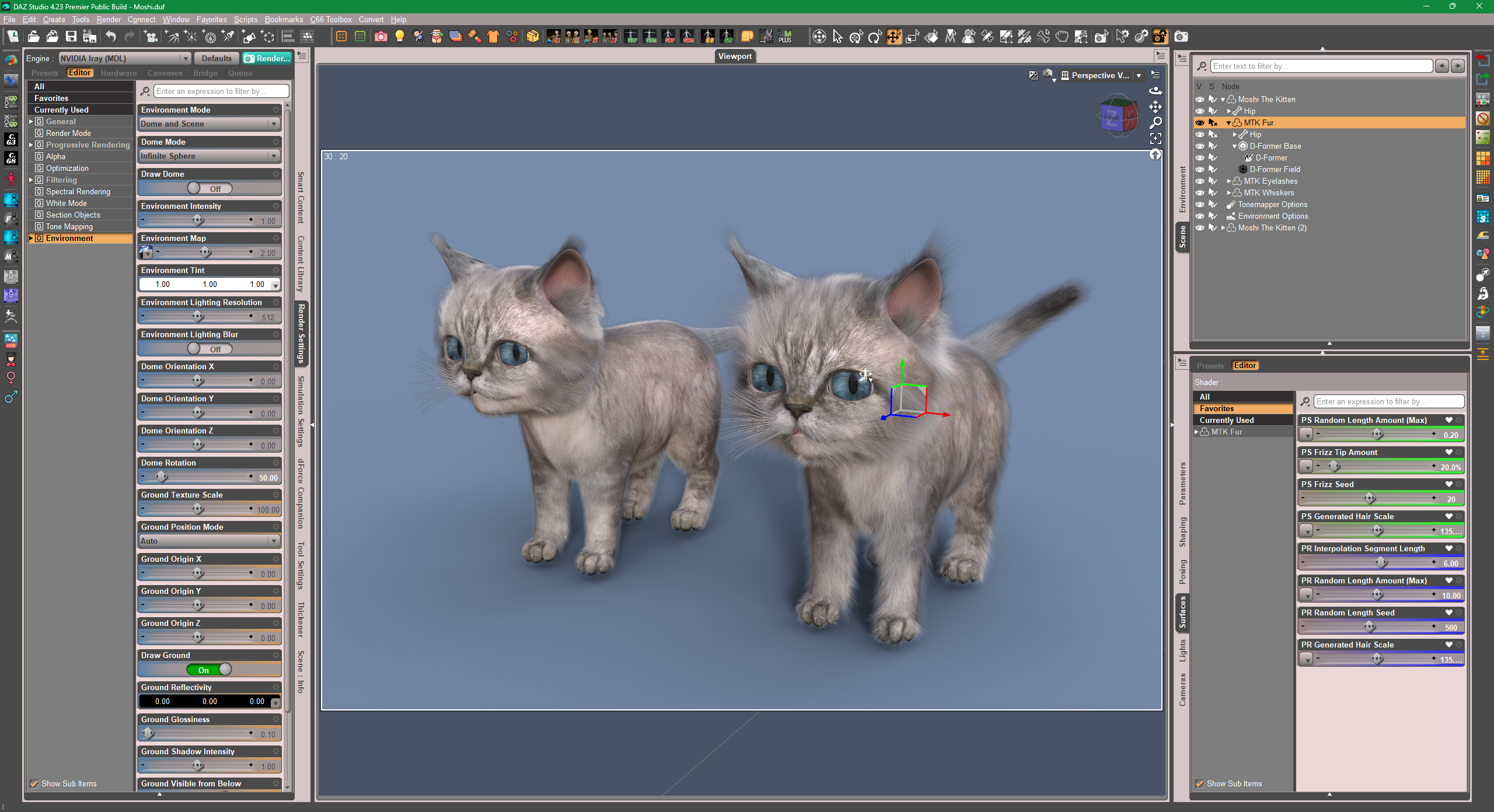
Edit:
Also, you can make separate maps for the mappable slots relating to length and frizz etc.... but that'll be another story. (check some suggestions from OSO... https://www.daz3d.com/forums/discussion/654366/question-about-changing-dforce-hair-length-solved)
Another thread of how to use SBH base polyline to make hair shapes, some tricks as well as the way of using D-Former : https://www.daz3d.com/forums/discussion/706571/really-like-the-look-of-the-bangs-in-the-promo-for-dforce-strand-based-autumn-style-bob-hair-for-gen
Are there 2 types of strand based hair? Like a consumer version and locked version?FrankTheTank said:
crosswind said:
Then what really matters in your case is Hair Generation Mode. Fortunately Moshi the Kitten's fur is generated by Target Surace rather than Root Radius. So it's easy to lengthen the fur by tweaking PR/PS hair generation settings...
'You even can "groom" the fur in external modeling software by exporting the polyline of the fur...then import as a morph, or deform the fur by using D-Formers in DS.
Do you know of any good tutorials on this? I'm lost with some of the terminology you're using there. I've found like one tut on SBH, but it doesn't go into all that.
If you have purchased SBH from the Daz store, it is likely to have the dHair Modifier applied to it, and it will not be editable in the SBH Editor. You can still "tweak" the hair settings because such hair will expose parameters on the Surfaces tab which are similar to the SBH Editor parameters. Therefore, the settings Crosswind is referring to are found on the Surfaces tab.
Re-styling the hair through morphs or d-formers will be more difficult.
Are there 2 types of strand based hair? Like a consumer version and locked version?crosswind said:
Then what really matters in your case is Hair Generation Mode. Fortunately Moshi the Kitten's fur is generated by Target Surace rather than Root Radius. So it's easy to lengthen the fur by tweaking PR/PS hair generation settings...
'You even can "groom" the fur in external modeling software by exporting the polyline of the fur...then import as a morph, or deform the fur by using D-Formers in DS.
Do you know of any good tutorials on this? I'm lost with some of the terminology you're using there. I've found like one tut on SBH, but it doesn't go into all that.
Daz to Unreal bridge: Exported Morph Targets for some clothing items are not showing up in UnrealRan into an issue when trying to export this clothing item fitted on a default Genesis 8 figure: AJC Aero Fitness BodySuit https://www.daz3d.com/ajc-aero-fitness-outfit-bodysuit-for-genesis-8-and-81-females
None of the morph targets selected for export are showing up in the resulting UE skeletal mesh. Several other clothing items I tried earlier have been imported successfully with morphs, with no obvious difference in export settings. This seems to happen with any morph target selected (I tested it with "Scale", "Height" from the parent actor figure, and with several morphs from the clothing item itself - made no difference).
I tried checking the temporary Daz to Unreal bridge folder, there are several .fbx files stored there after the export process finishes:
- [exported_name].fbx
- [exported_name]_base.fbx
- UpdatedFBX\[exported_name].fbx
The exported morphs are present in the first two intermediate FBX files (confirmed by importing them separately into UE via plain FBX import), but not in the FBX stored in the "UpdatedFBX" folder (as far as I can tell, this is the final FBX which includes various import modifications and gets imported into UE by the bridge plugin).
Are there 2 types of strand based hair? Like a consumer version and locked version?Then what really matters in your case is Hair Generation Mode. Fortunately Moshi the Kitten's fur is generated by Target Surace rather than Root Radius. So it's easy to lengthen the fur by tweaking PR/PS hair generation settings...
'You even can "groom" the fur in external modeling software by exporting the polyline of the fur...then import as a morph, or deform the fur by using D-Formers in DS.
WHERE IS SIDHIEL FOR SYLVIA 9 ?daveso said:
Leana said:
Premier-exclusive items can only be downloaded via Daz Connect (ie from the Install tab in DS)
See this thread for more details: https://www.daz3d.com/forums/discussion/704271/installing-activating-and-accessing-daz-studio-premier-features#latest
hats a bummer really, as I only use DIM for downloading. I never log in with DS. When you do log in, does DS immediately try to DL or update everything?
No. It needs to update metadata to show the add-on shapes, but it doesn't download products or product updates unless you tell it to.
Diffeomorphic Import morphs not workingIn general there are limits in what diffeomorphic can import, not all the daz morphs work fine. Especially with scaling there are issues as blender doesn't support scale maps. One way to get around the issue, if we really need a specific morph which doesn't work, is to import as dbz morph.
https://bitbucket.org/Diffeomorphic/import_daz/wiki/Setup/Morphs/Import DBZ Morphs
Then I have no idea what the "shake keys" are, if you need to investigate the issue further I suggest to use bitbucket, where Thomas can give it a look. Also due to the daz rules this is not the best place to deal with genitalia geografts.
Need help!Tweaking weight maps on such auto-fitted garment is pretty cumbersome...I suggest directly go for fixing correctiver morphs, i.e. pJCMs. That'll be much easier and quicker. If you don't know sculpting software, simply export base mesh of Jacket with G8M A-Pose to OBJ file, then update corrective morphs with OBJ file by using Morph Loader Pro. Finally, save a G8 version figure asset with all the fixed pJCMs, with your Vendor Name.
Edit: There're Straps rigged as a sub-node of this Jacket, auto-fitting will make it distorted. You can fix it by: Fit Jacket on G9, dial G8M Clone on G9. Export the Strap base mesh to OBJ, then import OBJ with Morph Loader Pro to the Jacket on G8M to create a "Fix Base" morph. Then dial it.
Diffeomorphic Import morphs not workingI'm not sure what is going wrong here,
I am using blender 3.6.11, I updated diffeo.
I have XY morphs working in Daz. I import following guidelines from the tool devs.
I imported both daz favorites (favoriting relevant morphs), and manually adding morphs. However the shape keys are not working correctly. I bet there's just some simple step I'm missing.
If you could DM me on discord, raybayb, that would be nice, but otherwise I look forward to responses here. Thank you!Daz 3D is part of

Connect
DAZ Productions, Inc.
7533 S Center View Ct #4664
West Jordan, UT 84084Licensing Agreement | Terms of Service | Privacy Policy | EULA
© 2026 Daz Productions Inc. All Rights Reserved.