-
Genesis 8.1 / Victoria 8.1
PerttiA said:
alienarea said:
Something I noticed:
I use the script by Redz to transfer characters from G3 to G8. Works fine.
As G8F and G8.1F are identical, I tried to transfer a morph to G8.1F directly. The script worked fine as before, but the face looks horrible, lips much too large.
How did you try "transfering" a morph from G8F to G8.1F?
If you are using DS 4.15 or newer, there is no need to "transfer" any morphs from G8 to G8.1, as the G8 morphs are automatically loaded to G8.1
I tried to transfer a morph from G3 to G8.1F and that did not work as expected.
Help on ZBrush/DAZ Integration1. You would need to use Edit>Figure>Transfer Utility, setting the armour piece as the target and the base figure as the source. For something like armour you will certainly need to do a lot of adjustments to the weightmaps and probably add morphs to adjust for poses too - it might be better to keep it as a prop, or set of props, and make sure you limit the poses to those that could be achieved wearing such armour.
2. Make sure you are sending the mesh over at base resolution, rather than current, and that you are not adding or removing any geometry in ZBrush. Morphs may only move the existing, base resolution vertices around.
Fitting bracelets, rings and earringsYou must use Transfer Utility like you already did to create the Fit To.
The problem is that Transfer Utility projects weightmaps automatically and many times it's not OK for your use.
You must edit the bracelets, rings and earrings weightmaps.The left earring must be filled with a weightmap of value 1 relative to left ear joint. Same for the right earring (right ear joint), bracelets (neck joint) and rings.
Pratically It's the operation showed in this video: https://youtu.be/Tbhf7cwq9hM to correct Transfer Utility issues.
Umbra Outfit for Genesis 8 & 8.1 Females [Commercial]Herschel Hoffmeyer said:
slender331man said:
If I remember correctly, Daz Studio is incapable of clearing morph data from HD morph via geometry editing.
This, I never knew! I appreciate the detailed post and providing some new knowledge here. Give me some time, and I'll see what I can do to get this morph cleared up and a new fix put in.
The Geometry editor works only on the base vertices, as far as I know. It would not be clear how to extrapolate from those to the SubD vertices.
Diffeomorphic DAZ Importer version 1.6.0 released@speaker-60
In daz studio the morphs can also be used to pose figures. That is, a morph is not only a "geometry shape", but it can also be a "bone pose", or a combination of them. For example all the G8 expressions are bone poses. As for keyframing it's the same in daz studio and any other package you need to use keyframes in animation.
Please describe the exact steps to get the issue since I don't seem to be able to reproduce it. Again I need the exact steps. Keep it as simple as possible if you can avoid to use "bend control". Unless "bend control" is the only one that doesn't work. Also post some pictures so I can see what you get.
Or you can post directly to the tracker so we keep everything in one place.
https://bitbucket.org/Diffeomorphic/import_daz/issues/938/importing-morphs-on-a-posed-figure
EDIT. UPDATE.
Did various tests and everything works fine here. I guess what you were struggling with is the keyframe and morphs concept. That is, when you import a new pose you have to set keyframes and keep the previous morphs. The default values let this to the user for better control, but this doesn't help inexperienced users so may be it should come with better defaults.
steps:
- Import G8F and merge rigs
- import jcms and flexions
- import "bend control" as custom morphs
- import the "strength setter pose" and keyframe it
- set the bend controls as you wish and keyframe them
- import again the "bend control" morphs (this is stupid but just for testing), the keyframed pose and morphs will keep their settings
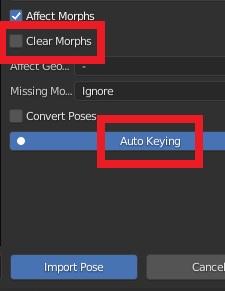
- import another pose, be sure to have clear morphs = off to keep your previous morphs and auto keying = on to keyframe the new pose, or keyframe it by hand for better control
Please let me know if this works for you. Or provide the exact steps if you still get the issue because I can't reproduce it.
 Umbra Outfit for Genesis 8 & 8.1 Females [Commercial]
slender331man said:
If I remember correctly, Daz Studio is incapable of clearing morph data from HD morph via geometry editing.
This, I never knew! I appreciate the detailed post and providing some new knowledge here. Give me some time, and I'll see what I can do to get this morph cleared up and a new fix put in.
MCM does not work correctlyMCM is Morph Controlled Morph, it's a morph that depends on another, usually correcting for the way another property mixes with the cotnroling morph. What are you trying to do or expecting to happen?
Celebrity Look-a-Likes for 3D figures part 3lwaves said:
magikhs said:
Magnus1781 has released a really good Amber Benson (Tara, in "Buffy the Vampire Slayer).
I saw that one and was going with it being Ashley Benson, who I know nothing about aside from her name. As a Buffy, I'd much prefer it to be Amber though. Fingers crossed I'm wrong.
If you are ever in any doubt just open the zip file and drill down the data folder to where the morph is. The morph in there is usually called the full name of the person not just the initial and surname. It is Amber BTW.
 Umbra Outfit for Genesis 8 & 8.1 Females [Commercial]
Herschel Hoffmeyer said:
slender331man said:
<texts>
Were you able to maunally unistall the morphs and then download the latest product updates that fix it? Also when you apply the fix that is used to clear up morphs, you have to make sure to save the morph out to overwrite the old one. If you don't save it, once you clear a scene or reload up anything, the morph will have returned to what it was.
Hi Herschel, thanks for the reply.
Yes, I've uninstalled the Umbra Outfit and checked if there were any remains in the data folder, then re-downloaded the latest and re-installed it via DIM. I've made sure to check "\data\Daz 3D\Genesis 8\Female\Morphs\Herschel Hoffmeyer\Umbra" and "\data\Daz 3D\Genesis 8\Female 8_1\Morphs\Herschel Hoffmeyer\Umbra".
The fix doesn't work not because of the morph isn't being saved by myself after fixing, but it's because nothing is being cleared from the teeth, gum and tongue in the first place. By right when I hop into edit mode, right click on a morph and select "select morph vertices" with geometry editing active, it'll highlight the affected vertices by the morph. And if I favourite the said morph, then select a part affected by the morph, right click and clear selected deltas from favourites, the software will show me that the deltas on the selected part have been cleared from the viewport (basically cleared back to normal shape) and then I can save/overwrite them, either by saving a new morph asset or I just save modified assets.
However in the case of Umbra dials, when using "select morph vertices" the vertices from teeth/gum/tongue aren't being highlighted (for example, the sleeve L micro pressure dial highlights the deltas from the left arm vertices, none from the teeth/gum/tongue). Therefore clearing the delta on the teeth/gum/tongue isn't doing anything. I'll give some image examples (attached images are corresponding to the numbered descriptions):
- The selected morph vertices affected by left sleeve micropressure dial, and we're able to see that it's affecting the left arm, none on the jaw.
- I select the teeth/gum/tongue and clear the selected deltas (I've favourited the left sleeve micropressure dial)
- We can see nothing is being cleared as the teeth distortion is still there.
- Original G8 teeth and tongue
I believe the dsf works correctly, and maybe it's the dhdm files which provide the HD morph data, are having residues on the teeth/gum/tongue. That's because on the base resolution, the teeth/gum/tongue vertices aren't affected at all. However when turning into high resolution (e.g. SubD 1 and above) it becomes visible. If I remember correctly, Daz Studio is incapable of clearing morph data from HD morph via geometry editing. If I simply replace the dhdm files of G8 Umbra morphs (for example the sleeve R micro pressure dhdm file) with the G8.1 ones, the distortion will be lesser (since the Umbra morphs for 8.1 has lesser distortions plus iirc G8 and G8.1 have the same vert count?). Please correct me if I'm wrong though! I don't have a tool to inspect or modify existing dhdm files due to it being available only for the PAs.
Thanks!
character in FE classic bob promoThe morph looks like Ensley, but the freckled skin is from somewhere else and looks like a pasted layer, if you look closely the freckles just end on the nose around the eyes.
Turn obj shoes into library asset
No they don't as it's just an obj. Their size is slightly larger than feet but I tried to scale them and then use transfer utility, that won't do, also tried to import each shoe separately and parent them to feet and then use transfer utility, that won't do either. Maybe it's something about rigging or something.Richard Haseltine said:Do the shoes line up with the figure as they imported?
Robin hood outfit?Misselthwaite said:
The OP was talking Robin Hood, though, so the parts that fail wouldn't be an issue? The shirt isn't right for the period, and boots should always be from the same gen as the figure, IMHO, because it's just vastly easier. I can't comment on anything fitting G8 - I don't use it.
The Wildenlander outfit looks good, but I don't own it, and I can't see the hood very clearly from the promos - it looks like it is attached to a cloak? That isn't the 'classic' Robin-Hood look I thought the OP was going for - though the outfit has lovely linen-y texturing! Plus, there is no tunic, only a vest and surcoat, split up the front (though with no visible fasteners), and both are of a later style by several hundred years, so I wouldn't choose them if you are going for the early medieval era. Just my opinions, of course!
The hood is attached to the cloak and sadly has no morph to go down. Only way to get rid of it is to hide it or delete it with the geometry editor.
I've been beating the drum in the forums for quite a while now about wanting higher quality (and newer) medieval clothing...for men and women (and not just more dresses for women).
Diffeomorphic DAZ Importer version 1.6.0 releasedPadone said:
marble said:
An example: in DAZ Studio I can load a G8 figure and then dial-in a shape for her, click on clothing from my Content Library, click on a pose from that library, click on a skin texture from another character, apply make-up, etc., etc. My point about understanding the big picture is - how much of that needs to be done in DAZ Studio before exporting using Diffeo and how much can be replicated using assets saved to the Blender library?
That's a good question so I'll reply here also for others to know. Basically everything is possible.
1. To apply a shape you have to use erc morphs. https://diffeomorphic.blogspot.com/2021/11/morphing-armatures-and-rendering.html
2. To apply a cloth to the current figure is possible as well. http://diffeomorphic.blogspot.com/2021/07/changing-outfits.html
3. To load poses and animations. https://diffeomorphic.blogspot.com/p/posing-panel-version-16.html
4. To load materials on the current figure is not documented yet was recently added. https://bitbucket.org/Diffeomorphic/import_daz/issues/857/material-import-issues
But the real question is, should it be done in blender or in daz studio ? The "blender way" is to use daz studio as a character generator, then import in blender to animate and render. This is clean and easy for blender since you avoid to import most morphs and there's a file for each figure, as done in a common animation project. Otherwise the "daz way" is to use blender as a sort of replacement for daz studio, where you load a basic figure and do in blender everything you did in daz studio before. This makes very heavy scenes to handle in blender with lots of morphs as daz studio does. That's not what diffeomorphic was designed for, though the features were added under user request.
Oh dear ... all that homework! Ah, well, I had to ask didn't I?
Can I ask for a little further clarification, please? What are the limitations of the "Blender Way"? My mind goes to a character I produce using all the morphs available to me in DAZ Studio so I morph G8F into a muscular ogre and send her to Blender. Does diffeo just see that as a figure shape or are all the morphs adjustable after import into Blender? So when my ogre gets angry, her muscles can bulge and her expression can look vicious? Or is it just a shape with a rig?
Again, an example of what I'm trying to understand: I make a short animation in DAZ Studio where I have two characters interacting. Perhaps they embrace. At frame zero they are all relaxed. At frame 30 they are more braced, certain muscles are tighter, expressions have changed, etc. ... Blender Way or DAZ Way?
Turn obj shoes into library assetMaybe post Transfer Utility settings you are usingGenesis Male 8 Posed Render CrashesI cleaned out the GM8 data morph file and reloaded it one by one to find the corrupt culprit. Thanks for the reply
Turn obj shoes into library assetWhat is the issue with using Transfer Utility?
Turn obj shoes into library assetI made a pair of shoes in blender and figured out how to import it into Daz saving material, but now I'm stuck on the fact that I have no idea how to turn this obj into a clickable asset. Transfer utility doesn't seem to help, and I suppose there is something else I should do before using it. I would be glad if someone explain me this process.Is there a reason I am unable to select polygons with geometry tool of G8F Shell?
Thank you, appreciate the advicehansolocambo said:If you want to edit the shell's geometry, export it as obj. Import that obj. And use the Transfer Utility to conform this imported "shell" object to Genesis as you'd do with a custom made cloth.
Edit > Object > Transfer Utility.
Now that the "shell" is rigged to the Genesis bones, as if it were a custom made cloth for example, you can apply the original shell's surface or any other surface to it. And edit its geometry to delete unwanted parts, define new surface groups, etc.
Question about Licensesnicholaspatton021991 said:
Thanks for the replies, FSMCDesigns and Richard Haseltine. My intention would be to create 3D characters to use as assets for original games I wanna make in the future, not for mods. I just wanna ask to make sure I understood things correctly.
Let's say I used Blender to create a 3D character, including clothing and hair, for the game I wanna make. I then transfer the Blender-made character model to Daz Studio and use only its built-in tools (which I consider as Daz assets) to modify parts of the model - clothes, hair, and other stuff. I would then transfer the modified model back to Blender in order to rig it and other stuff. In order to be able use each of the finished models for my original game, I would need to purchase an interactive license for each of them. Am I understanding this correctly?
Yes, you would need to buy the interactive licenses of everything you have used in this case (clothing, skins, props, accessories, hairs, characters and/or morphs).
Question about LicensesThanks for the replies, FSMCDesigns and Richard Haseltine. My intention would be to create 3D characters to use as assets for original games I wanna make in the future, not for mods. I just wanna ask to make sure I understood things correctly.
Let's say I used Blender to create a 3D character, including clothing and hair, for the game I wanna make. I then transfer the Blender-made character model to Daz Studio and use only its built-in tools (which I consider as Daz assets) to modify parts of the model - clothes, hair, and other stuff. I would then transfer the modified model back to Blender in order to rig it and other stuff. In order to be able use each of the finished models for my original game, I would need to purchase an interactive license for each of them. Am I understanding this correctly?
Daz 3D is part of

Connect
DAZ Productions, Inc.
7533 S Center View Ct #4664
West Jordan, UT 84084Licensing Agreement | Terms of Service | Privacy Policy | EULA
© 2026 Daz Productions Inc. All Rights Reserved.