-
extremly slow scene loading?
3-4 minutes isn't long. It can even take an hour if one has enough conflicts between installed morphs for the figures in the scene.
When loading figures, DS reads all the installed morphs for that base figure (for example G8F) in order to create the morph dials and interdependencies between the dials, the more characters/morphs one has installed for the base figure (G8F), the more time it takes to process the morphs, and if there are morphs that don't want to work together, the time it takes to process the morphs is increased quite a lot. All this is also single threaded process.
Figuring out how to solve the conflicts and optimize the amount of installed morphs, is quite usefull with DS.
Only search 8.1 Expressions in Store ?Making the G8 base expressions (and any expressions that are using them) work on G8.1 requires removing dummy/placeholder expressions that are installed to G8.1 morph folders - These dummy/placeholder expression files have no other function than to prevent the base G8 expressions from loading.
The dummy/placeholder files are located in;
...\Data\DAZ 3D\Genesis 8\Female 8_1\Morphs\Daz 3D\Base Pose Head\ (255 files)
...\Data\DAZ 3D\Genesis 8\Female 8_1\Morphs\Daz 3D\Expressions\ (24 files)
...\Data\DAZ 3D\Genesis 8\Male 8_1\Morphs\Daz 3D\Base Pose Head\ (255 files)
...\Data\DAZ 3D\Genesis 8\Male 8_1\Morphs\Daz 3D\Expressions\ (24 files)Please make sure you are removing the files from G8.1 morph folders and not G8 morph folders.
Note; If you are logging in to DS and letting DAZ Connect (within DS) to install/update your content, you may have these also in an other location that has "\Data\Cloud\" in it's path
Note2; Do not remove any files from "FACS" or "FACSExpressions" foldersCross-Figure Resource Kit and 8.1I just came across this problem and got a solution from Josh Darling that I figured I'd pass along.
If you duplicate the 2 morph files it creates, rename them to have 8_1 instead of just the 8, and then open the files up in edit pad to do a find and replace in the same way... it all ends up working
(I needed it for the "ladies" in the background)
Celebrity Look-a-Likes for 3D figures part 3zombietaggerung said:
magikhs said:
Haruchai said:
Only some of their characters are released for sale. Their Cara Delevigne pictures are exemplary, wish it was avaliable.
Charlotte McKinney is free and I have their Anne Hathaway but some are little too chariacature for me.
The available ones are under the Sale Items tab.
I know, right? :(
Some of them are really good (I especially like Anya Taylor-Joy), while others do cross into caricature-land, with exaggerated features and makeup.
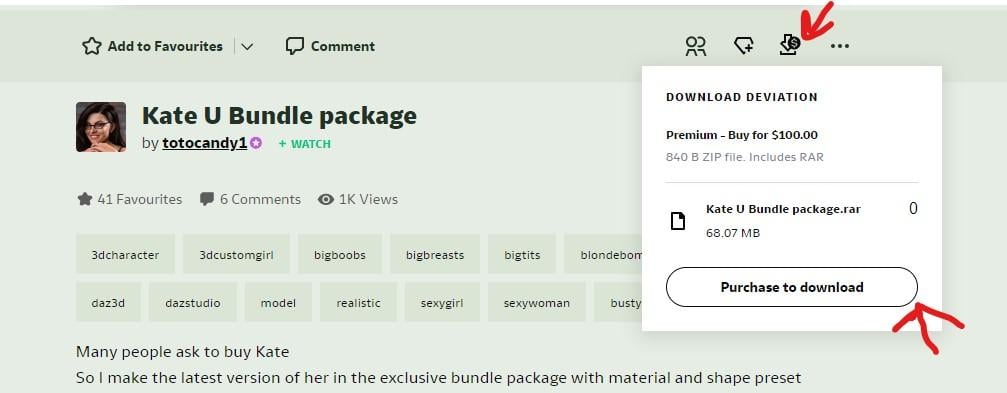
If you want to buy the morph, click on the little Downward pointing arrow with the Dollar sign on it. You get a pop-up and then click "Purchase to Download".
Yes, thanks. Already used that. That process is for the ones in the Sale Items section, however, there are prices listed in the descriptions of other characters in the gallery, though not all. My initial thought was that they might be available for sale somehow. My current thinking is that they are the prices that were paid for the commission of those characters and they are there as advertising for the commission service. The commission page says that the files will not be made public so it looks like they will not be available to others to purchase (unless one was to commission the same character from scratch).
Celebrity Look-a-Likes for 3D figures part 3magikhs said:
Haruchai said:
Only some of their characters are released for sale. Their Cara Delevigne pictures are exemplary, wish it was avaliable.
Charlotte McKinney is free and I have their Anne Hathaway but some are little too chariacature for me.
The available ones are under the Sale Items tab.
I know, right? :(
Some of them are really good (I especially like Anya Taylor-Joy), while others do cross into caricature-land, with exaggerated features and makeup.
If you want to buy the morph, click on the little Downward pointing arrow with the Dollar sign on it. You get a pop-up and then click "Purchase to Download".
 Umbra Outfit for Genesis 8 & 8.1 Females [Commercial]
I have been able find the fix for the teeth morphing issues. I have reimported the HD morphs with the G8F set at the right subdivison level for that particular HD morph when importing it. It seems to have fixed the problem for the first 5 I have tested so far. I will continue to update the rest of them and if they're all working properly, I will provide that fix today here as well as put in an update to Daz to get the files updated.
Update: After going through them one by one and everything looking right I dial them all up and it is still morphing the teeth. Each one may have a very small imprint on the teeth and when multiplied over many morphs, it creates the problem. Still exploring the problem and root cause.Update #2: Ok, the base problem seems that the "Mouth Realism" (for G8.1F) had some play in the creation of the morphs. I have rebuilt the morphs from the ground up for G8F (which will also work on G8.1F) and the problem has been resolved. The key problem here again, like stated in the beginning of finding problems for this outfit, was building this whole outfit off of G8.1F and not G8F. I've learned my lesson hard.
Celebrity Look-a-Likes for 3D figures part 3Haruchai said:
magikhs said:
Totocandy1 @DeviantArt:
(Warning: Some NSFW content)
Also: Elizabeth Olsen, Kate Upton, Amber Heard, Anne Hathaway, Lindsay Lohan... and more!
Only some of their characters are released for sale. Their Cara Delevingne pictures are exemplary, wish it was avaliable.
Charlotte McKinney is free and I have their Anne Hathaway but some are little too chariacature for me.
The available ones are under the Sale Items tab. Others appear to have a price but the process of actually buying them remains a mystery, via the commission page perhaps?
Here's a link to the free Charlotte McKinney
Charlotte for FREE ( Gift for all ) by totocandy1 on DeviantArt
Just had a peek at Charlotte - the morph has not had the rig adjusted to shape. Not a huge issue but might indicate extra work is involved for the other, paid, morphs. Face texture has baked in specular highlights. Not a great advertisment in my opinion.
Celebrity Look-a-Likes for 3D figures part 3magikhs said:
Haruchai said:
I have seen some nice images of celebs that reference the totocandy morphs with most saying they dialled them in at lower values.
Yep! Some minor tweakage or -dial work and most of them are gold. Agreed about their sale method, it's not entirely clear to me either. I'm seriously considering Anya Taylor-Joy, and would buy that Cara Delevingne in a heartbeat. Their Amber Heard / Aquaman's Queen Mera is also beautifully done.
If you do go for Anya let us know how you get on, I'm on the fence on that one and could be persuaded ;)
Also be aware that if it's the same as the one I have there are no duf files, just a data folder for the morph and a Runtime containing the textures. There are instructions on how to set up the textures manually though. Easy enough for anyone who has used Studio for a while but I can see beginners being a bit daunted perhaps.
XTransfer Module 1- Genesis 3 to Genesis 8 Morph Converter (Commercial)MickeyHo said:
Richard Haseltine said:
MickeyHo said:
Richard Haseltine said:
MickeyHo said:
Is there an easy way to remove the prefix XT- on the morphs? I mean the labels of the morphs, not just the file names of the morphs. Some poses include morphs as well but I think the prefix XT- makes them unusable.
Any slider label can be edited by clicking the gear icon on the right of the slider>Parameter Settings, then editing the label field (leave the name alone though). If the issue is having XT-Whatever (2) then first open the Parameter pane's option menu (the lined/hamburger button in the top corner, or right-click the tab) and disable Preferences>Consolidate Proerpties.
Thanks. Well I was thinking along the lines of batch editing but I guess this is the only way. One more question. After I edit the names/labels, if I want to save them for new figures, should I save them as Morph Assets?
File>Save As>Support Assets>Save Modified Assets - if you want to do that i would advise using the dev Build preset for the figure, to make sure that the only changes saved are the ones you made.
Thank you. Although I hate to bugger you any more, I have always wondered what the difference between the dev build and the base figure is. The dev build one seems to be just the base figure without textures.
The Dev Build is in a very basic state, with no extras added, to make it an easy base for creating add-ons without having to remember to zero things out, remove attachments and so on.
XTransfer Module 1- Genesis 3 to Genesis 8 Morph Converter (Commercial)Richard Haseltine said:
MickeyHo said:
Richard Haseltine said:
MickeyHo said:
Is there an easy way to remove the prefix XT- on the morphs? I mean the labels of the morphs, not just the file names of the morphs. Some poses include morphs as well but I think the prefix XT- makes them unusable.
Any slider label can be edited by clicking the gear icon on the right of the slider>Parameter Settings, then editing the label field (leave the name alone though). If the issue is having XT-Whatever (2) then first open the Parameter pane's option menu (the lined/hamburger button in the top corner, or right-click the tab) and disable Preferences>Consolidate Proerpties.
Thanks. Well I was thinking along the lines of batch editing but I guess this is the only way. One more question. After I edit the names/labels, if I want to save them for new figures, should I save them as Morph Assets?
File>Save As>Support Assets>Save Modified Assets - if you want to do that i would advise using the dev Build preset for the figure, to make sure that the only changes saved are the ones you made.
Thank you. Although I hate to bugger you any more, I have always wondered what the difference between the dev build and the base figure is. The dev build one seems to be just the base figure without textures.
Celebrity Look-a-Likes for 3D figures part 3WandW said:
Shinteo's Bianca Helen is now available for download. Apparently she is a Playboy model, so don't search at work...
https://www.patreon.com/posts/bianca-helen-for-63564084
Puredigital101 has a Greta Thunberg morph for G8F ...
https://sharecg.com/v/98863/gallery/5/3D-Model/Greta
They also have several other morphs that I don't recognise; does anyone see any resemblences in this group?
https://sharecg.com/pf/full_uploads.php?pf_user_name=puredigital101"Hermione (Subscription Required: https://www.deviantart.com/puredigital101/subscriptions) is loosely based on Hermione Corfield , while Minola is based on the character from Hellblade most of the others are random creations, although Heffy was loosely based on this lady https://www.deviantart.com/disharmonica "
G8F Walking & Everyday Doorway Poses SetsSorry, I didn't think about different generations of figure. I regularly get asked for male versions of poses, and have done a fair few which is why I answered that way. If you meant different generations...
I have done pose transfer scripts from
- G8F, G3F, G2F and Genesis to V4;
- G8F to V3 and 'Glamorous Vicki 3'
- V3, V4, Genesis & G2F to G8F;
- V4 to G3F;
if that would help. Note A3 & A4/G4 also apply everywhere V3 & V4 are used respectively. All those scripts are available here (difficult to find) over at Renderosity or through the PoserDazFreebie Wiki here: https://poserdazfreebies.miraheze.org/wiki/Category:Richardandtracy
If you need G8F to transfer poses to G1, or G2F, or any (specific one) I can probably do such scripts. I haven't done all of them - I did a matrix of possible options some while ago and was surprised at how many gaps there were. I've done 11 Female->Female pose scripts and there are theoretically another 18 I could do to fully cover back & forth pose transfers between generations on the famale side of the family. In most cases the male side works well with the female scripts, but I have found a few bone zero differences with V4/M4 that meant it was better to give M4 his own scripts to/from G3M and G8M. (F4/H4 also work the same as M4 so can use the same scripts).
Regards,
Richard.
Downgraded to Genesis 3 from Genesis 8kyoto kid said:
...as to UVs be careful as I discovered some textures have hierarchal presets and will not transfer. This applies to skin, hair, and sometimes clothing.
There is a way to make them work but I find it a bit of a bother.
As to older generation genesis characters/figures, I still use G2 for background characters and G1 for some of the toon and special characters that were not updated to later generations.
The clothing converters I am having trouble with are the Gen4 to G3 ones as for some reason they don't "see" the Poser Content folder which is where these install. My system sees it fine so not sure what the issue is..
That shouldn't bother me at all, because I'll go in and manually point to the textures.

I made my own shaders to convert Genesis 3 figures to use Dual Lobe Specular, and Chromatic SSS. Takes some manual fiddling but is worth it IMO.
One thing that has irked me for a while is that most of the skin textures for characters here use JPGs, and use overly aggressive compression at that. I've bought a few Genesis 8 figures when sales have been good, but also with a closer eye towards ones with good textures like Babina 8 whom the forum sold me on.aeon soul ModelHylas said:
FSMCDesigns said:
I agree with the yikes, but that doesn't stop it from happening over and over again. Any user can recreate any person in 3D these days and do.
Ok i think this was a simple misunderstanding. What i meant was, the idea of aeon soul making sexy renders oftheir own daughter was grossing me out, which is why I'm glad to hear it's not true. I see now that my post can also be read differently.Ah, I gotcha now. yeah, probably been spending to much time on sketchy game sites where anything goes, LOL
Funny, I recreated a friend of mine in face gen for her website. She's is really attractive and wanted to share the morph with users to her site. i told her that is probably not a ghood idea unless she is cool with seeing her morph in all kinds of sketchy, porn types images and animations. I then did a few quick images to show her what I mean and she decided against it, LOL
Downgraded to Genesis 3 from Genesis 8...as to UVs be careful as I discovered some textures have hierarchal presets and will not transfer. This applies to skin, hair, and sometimes clothing.
There is a way to make them work but I find it a bit of a bother.
As to older generation genesis characters/figures, I still use G2 for background characters and G1 for some of the toon and special characters that were not updated to later generations.
The clothing converters I am having trouble with are the Gen4 to G3 ones as for some reason they don't "see" the Poser Content folder which is where these install. My system sees it fine so not sure what the issue is..
Downgraded to Genesis 3 from Genesis 8JOdel said:
G8F takes so long to load that I'm about to stop using it. G8M is a bit better. But when I compare them to how fast a saved G1 character loads. I rather think I know what most of my background characters are going to be.
I've kept my Genesis and G2 figures active for years for background use for exactly this reason. That said, keep in mind that one of the main reasons that Genesis 1 will almost always load and save faster than the newer figures is the simple fact that there was hardly anything made specifically for Genesis 1, with the vast majority of the characters made for it using V4 generation skins and many really being just V4 gen characters that came with a morph to apply that shape to Genesis. By comparison, there's been a mega-behind full of add ons and characters released for G8, and in my experience it's the damn morphs, not the textures, that are really causing most of the slow down in the whole process, as one of the fundamental design mis-thinks of the Genesis products is that every single one of the morphs that you've got loaded has to be added onto that base figure every time you load a figure, even if they're not being used. By comparison, materials only load for that one specific character or item. Add in the inevitable errors that occur when something isn't where it thinks it is, which has sadly become much too common in recent years due to the death b7y attrition of QC, plus memory hungry things like fibermesh brows and LIE overlays, and it can take an eternity just for DS to find everything. In my own experience, just going through and deleting most of the redundant expressions sped both G3 and G8 up by a huge margin. At least Riversoft's new Turbo-loader products, which I've purchased but haven't had a chance to use yet, promise to finally address this.
How do I create more material zones? new: how to increase polygons ... Possible?@WillowRaven: From this:

to this:

...try the following (it is not difficult, i still am an absolute beginner with Hexagon!)
Before you start, please test if this method will work with your shirt:
A) Choose "wire shaded" as Draw Mode in the viewport. Then try to loopselect the collar to which you would like to add the second "line" as described in steps 12 to 15. If it works as described, your prop is suitable for this guide and you can continue. (Thanks to Richard Haseltine for spotting this weakness!)
1. Load your shirt and send it to Hexagon

2. Choose Display Mode "Flat Solid and Edges"

3. Leftclick on the shirt to select it which looks like so:

4. Press the "Select Edges" Button:

5. Select one edge in the collar zone where you want to add a second "line"

6. Press the RING Button:

7. Now it looks like this:
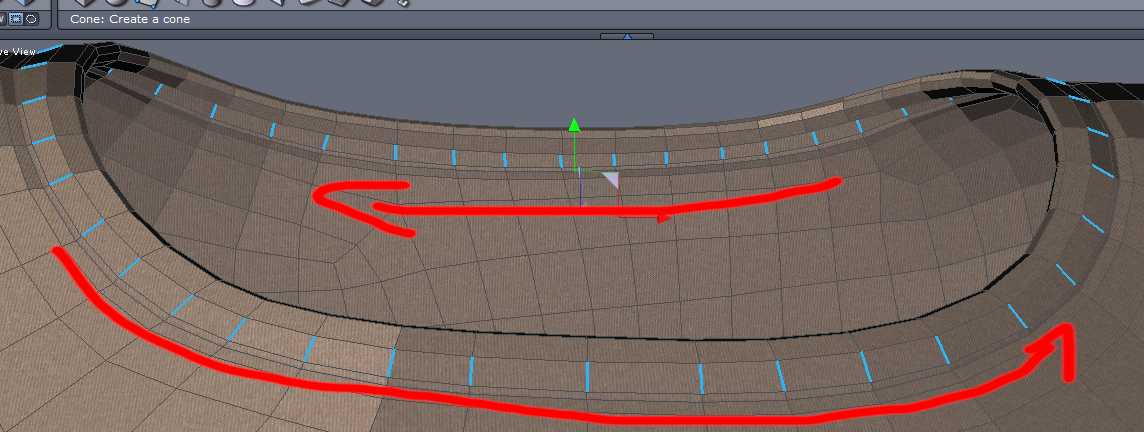
8. Now select Tools --> Lines --> Insert Points:

9. ... which creates the extra geometry. Now send it back to DAZ:

10. In DAZ STudio: Choose import as a prop:

11. If you haven't yet, delete the original shirt in the Scene Tab and select the "new" shirt. Choose "Wire Shaded" as Draw Mode in the Viewport
12. Now activate the Geometry Editor:

13. Select 2 adjacent faces in one of the lines:
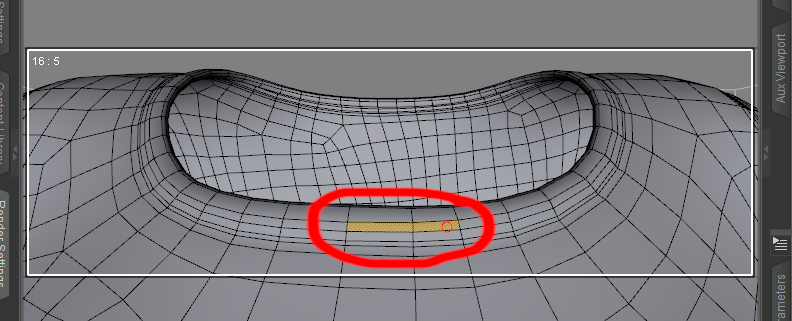
14. Rightclick and choose loop selection:

15. Your first line is selected:

16. Rightclick to choose create surface from selection and choose a name:

17. Repeat steps 13-16 for the second line, then you can already put shaders on the lines and rest of shirt.
18. Now convert the new shirt prop to subd:

19. Load the Genesis Figure the shirt was created for, select the new shirt prop and start the Transfer Utility:

20. Source is the genesis figure and target the new shirt prop:

21. Adapt SubD level and surface settings to your liking.Just to show the UV mapping wasn't destroyed:
 Diffeomorphic DAZ Importer version 1.6.0 released
Padone said:
@plsgohots A more detailed and precise description would help. Anyway mhx has limits to transfer the animation back to daz studio since it uses a different structure than the daz rig and some retargeting is needed. To retarget by hand you can use any retargeting tool available for blender there are many.
Or you can animate with the simple-ik rig that uses the exact daz rig so no retageting is needed.
Thank you so much, retargeting and this plugin for blender works great! I'm just not quite sure if I've set bones for retargeting correctly, have you tried doing that? Maybe you can share the config? Anyway, thank you very much!
Ryilee for Genesis 8.1 females breaks fingernails on base G8.1PerttiA said:
To fix any ill-behaving (non-zero default value) morphs, do as follows;
1. Open DS and load "Genesis 8.1 Basic Female" (to an empty scene)
2. Right Click at Parameters Tab->Preferences->Choose "Show Hidden Properties" (part 3 zeroes only 'visible' dials)
3. Right Click at Parameters Tab->Zero->Zero Figure (Zeroes the value of all the 'visible' dials)
4. Right Click at Parameters Tab->Memorize->Memorize Figure (Sets the current value of all the dials as their default value)
5. Edit->Save As->Support Asset->Save Modified Assets (Writes the changed default value to the morph files that were changed)When saving "Modified Assets" DS shows a dialog and asks for confirmation;
"The following file(s) will be permanently modified:" - "Accept/Cancel" - Choose "Accept"You sir are a life saver. lol.
Earring with joints - how to rig?Use the Transfer utility, then use the Joint Editor to remove unwanted bones and add the new ones specific to the earrings (right-click menu), and then edit the weights.
Daz 3D is part of

Connect
DAZ Productions, Inc.
7533 S Center View Ct #4664
West Jordan, UT 84084Licensing Agreement | Terms of Service | Privacy Policy | EULA
© 2026 Daz Productions Inc. All Rights Reserved.