-
New computer, new install - DIM not seeing my already installed?
Charlie Judge said:
Llola Lane said:
Charlie Judge said:
Llola Lane said:
ok. did a speed test twice for my internet.. I guess mine is waaaaaaay slower than yours Frank (sighs)... And it is NOT cheap what we pay per month :(
What ISP plan do you have? Most cable or fiber optics plans provide at least 300 megabytes per second or more. If you are paying for that and not getting it you may have to contact your ISP.
ETA: I looked your modem/router up on the internet and it looks like it should be cabable of handling up to about 400 mbps:
ok... hubby and I did some chatting... going without a wireless is NOT an option for us.... We have to keep the wireless (for cellphone usage and hubby's computer in the far bedroom (I also plan on doing a speed test with his laptop to see what reading we get for him))... So... We are going to try and move the desktop closer to the wireless to see if speeds improve... if so we know it's the wireless and distance. We have spectrum cable in Ohio.
Just did some rechecking and some of the 1 star reviews say that this modem doesnot work with Spectrum. Also the title has been changed to say it doesnot work with Spectrum. Do you own the modem or does Spectrum provide it? If Spectrum is providing it you may need to contact them for a replacement. Spectrum has modem router combinations you can rent or they will provide a modem and you can purchase a seperate router.
Thanks Charlie.. that is true... we own our wireless... hubby doesn't want to rent any more equipment if he doesn't have to. We pay sooo much already.
Not sure if you saw my CONCLUSION above... We have ordered an antenna for my computer with a 6 foot cord so I can move it way from metal interference... I have the computer sort of in the middle of the room now and I'm getting good speeds downloading DIM.. Today it actually hit 238mbs! Just finished watching TV and I am mostly caught up with downloads... WOO HOOT... My manifest files seem to be all there too. When I load my characters now I'm getting metadata correctly... Still sorting out my favorites... etc... I could not find my old LAYOUTS... but... I've also ordered a case for the old C ssd drive and hopefully I'll be able to grab a few files before it dies completely. I've also ordered a 26tb external hard drive... I plan on putting ALL my files on the new drive... I have about 10 external drives of various sizes with stuff scattered all over them. This will let me get everything sorted on 1 drive. I love organizing! So... slowly getting back to normal with Daz here and I'll be back to rendering in no time (fingers crossed)
Thank you ALL for your support with trying to help me sort this all out. Hopefully it will be a while before anything else goes on my computer... lol
Stay well one and all... Llola huggiezzzzzzzzzzzzzzzzzzzzzzzzzzzzzzzzzzzzzzzzzzzz
Problems with "filter by context" after updateIf you had an Uninstall otpion then DIM was irrelevant, uninstalling through DS was needed to remove those files (which get used in prefrence to the DIM files) and then reinstalling put them backa gain, with correct metadata, at which point the DIM files were again irrelevant.
How to Achieve the Squeezing/Pinching Morph Effect Shown in the Image?lilweep said:
sucan2015 said:
lilweep said:
if subdvision wasnt high enough, you can increase subdivision...
if you cant load hd morphs, then you dont need to, you dont need a poseable figure for a static render. you can just use your subdivided figure as a static mesh.
Do you mean I should increase subdivisions in ZBrush and then export to DAZ?
Zbrush is an example of a sculpting software where you would do this yes
If so, would I lose all the materials and textures in the process?
Well, they wouldnt be "lost" you just need to transfer them. Obviously this process below assumes your method for exporting and importing a sculpt doesnt remove the Surfaces.
Steps:1. Import your subdivided and sculpted obj file from Zbrush (or whatever software you suclpted it in)
2. In the surfaces tab for the imported sculpt, add the same shader that was used on your original figure (e.g., Iray Uber, or PBR Skin, etc)
3. Hide the original figure
.4. Copy the surfaces from the original figure to the imported figure. (Right click and copy in surfaces tab of original figure, paste in surfaces tab for imported figure)
Alternatively for making HD morphs there are options on youtube.
I think I messed up a step earlier—I forgot to set up the shader, so copying the surface didn’t work. I’ll try it again following your advice. Thanks!I think I messed up a step earlier—I forgot to set up the shader, so copying the surface didn’t work. I’ll try it again following your advice. Thanks!
Missing Icons for DAZ Store contentNo, don't delete anything from that file!
The thumbnail image is missing from the installer for quite a lot of products. You could raise a support ticket (but don't hold your breath because the wait for any action will probably be long) or you can fix it yourself.
You see that first "SupportAssets" line in your screenshot: for the metadata file called DAZ_3D_95683_dForce_Ultra_Cut_Dress_for_G8_and_8_1F.dsx?
Get a small thumbnail image of the product (you can use the one that DIM downloads, or photo-reduce the main image from the store page) and copy it into the same place
i.e. [your-content-library]/Runtime/Supportthen rename it to: DAZ_3D_95683_dForce_Ultra_Cut_Dress_for_G8_and_8_1F.png
or .jpg if that's what your thumbnail image isThen next time you start up Daz Studio the iage should appear. (Or you can right-click the Smart Content "All Products" and pick Refresh)
Same applies (obviously with different file names) for ever other product with a .dsx on Runtime/Support but no matching-name image file.
ETA: I've never seen a metadata file with so little in it as the one on the left of your screenshot - what on earth is that product?
Link to Link?fbell said:
nemesis10 said:
fbell said:
I guess it's not available to all Premier members yet, no show on my side!
Just in case you haven't done so, login Daz Studio app and have the app update metadata so the Install Tab can repopulate with new products.
Done multiple times to no avail - still not showing
time for a ticket then...
Genesis 9 FACS – How do you drive hundreds of DAZ morphs with a 2-D facial board in Blender?With diffeomorphic Thomas fixed the G81 face controls to work with G8 G9 as well, so you just apply the G81 face controls to G9 in daz studio, then export to blender. Actually there's a minor issue because the face controls are in a bad position once imported in blender, it's easy to fix this in edit mode, now reported to Thomas.
steps:
- in daz studio apply the G81 face controls to G9
- export as dbz
- in blender easy import with FACS, the face controls will work on G9
https://bitbucket.org/Diffeomorphic/import_daz/issues/2476/
update. Now fixed in the last commit.
Link to Link?nemesis10 said:
fbell said:
I guess it's not available to all Premier members yet, no show on my side!
Just in case you haven't done so, login Daz Studio app and have the app update metadata so the Install Tab can repopulate with new products.
Done multiple times to no avail - still not showing
Exporting a figure with ALL maps in the mtl file?My question was correct. Is there a way to export Genesis 8 Male from DAZ Studio with ALL the maps exported with it and have it open up in 3DCoat WITHOUT having to manually import maps. If it can't be done natively then maybe there is a script (free or pay for) that will do this for me from DAZ Studio?
Hope that's a bit more clear!
How to Achieve the Squeezing/Pinching Morph Effect Shown in the Image?sucan2015 said:
lilweep said:
if subdvision wasnt high enough, you can increase subdivision...
if you cant load hd morphs, then you dont need to, you dont need a poseable figure for a static render. you can just use your subdivided figure as a static mesh.
Do you mean I should increase subdivisions in ZBrush and then export to DAZ?
Zbrush is an example of a sculpting software where you would do this yes
If so, would I lose all the materials and textures in the process?
Well, they wouldnt be "lost" you just need to transfer them. Obviously this process below assumes your method for exporting and importing a sculpt doesnt remove the Surfaces.
Steps:1. Import your subdivided and sculpted obj file from Zbrush (or whatever software you suclpted it in)
2. In the surfaces tab for the imported sculpt, add the same shader that was used on your original figure (e.g., Iray Uber, or PBR Skin, etc)
3. Hide the original figure
.4. Copy the surfaces from the original figure to the imported figure. (Right click and copy in surfaces tab of original figure, paste in surfaces tab for imported figure)
Alternatively for making HD morphs there are options on youtube.
Llola Lane’s RENDER A MONTH Challenge 2025 (ALL are welcome to join)I guess "THE WORD" of the month was UMBRELLA for a bunch of us... Me too... Sorry it's late and I had to be quick cause I just got some metadata to show up to kitbash this together. ENJOY!
 Llola Lane’s RENDER A MONTH Challenge 2025 (ALL are welcome to join)
Oh my everyone... I'm sorry I've not been about for the last week or so... My computer was getting a new C drive and I had to reinstall Daz... ugh... Long story short I am still uploading stuff in DIM... taking a loooooong time... (sighs)... I have about 1500 items to upload still... and I FINALLY got metadata sorted last night after 15+hours! I was just about to give up Daz when things started working again.. so hence my not being here for a while.
I just saw all the wonderful artworks for my birthday and I thank you all ooooooooooooooooodlezzzzzzzz... I give you all virtual hugzzzzzzz... btw.. you USA residents got your tax done? I'm an income tax baby :)
SimonJM... I see you got the three L's sorted ;)... You'd be surprised HOW many peeps call me LloNa... lol so I knew who you meant right away... lol. I guess I answer to anything these days... LOL... THANK YOU kindly for the BD wishes and for the challenge posting!
Elor... Those have to be the tinies umbrellazzzzzzzzz I've ever seen... LOL. Took me a while to find them... and Yes... that's me clicking away behind the camera... SMILE!!! lol. Glad you were able to post for the challenge.
3D-Printing from DAZ Figures ?My filament printer is the Creality Ender 3 Pro. It came with a Creality-doctored version of Cura slicing software.
The slicing software accurately shows where printing flaws will occur - such as a clothing item with no thickness being unprintable.
The workflow I have arrived at (so far) will not give the highly polished result you are probably looking for, given that you mention resin printing. It involves an export first to and then from Hexagon followed by an import to (in my case 3d Coat) for conversion to Voxels. I don't know whether Blender sculpting includes voxel sculpting. I have another, phenomenally-powerful, sculpting software called Nomad Sculpt installed on an Android tablet and which only cost a few dollars. That will probably work - but I have not checked.
Here goes anyway. The figure with clothing can be exported to Hexagon as OBJ. In Hexagon, in polygon editing mode, the polygons for eyelashes and for any hair-cap can be selected and deleted. (Just select a few and grow selection (I think it's SHIFT + PLUS key in Windows) If the mouth is closed forget the teeth - eyes also - just leave them. Any hair from DAZ will give problems so I leave the figure bald.
Export as OBJ from Hexagon and import to 3d Coat. In Voxel sclulpting mode sculpt your own hair. Yes, a big ask but it gets to be fun after a few tries squiggling away. The hair will be part of the head. If desired build support structures for extended limbs, pigtails or whaterver - easily made from tubes. Add a base from a flattened cylinder or cube if you wish.
The voxel sculpture can be exported from 3d Coat or whatever as a one-piece object to slice and print.
Alternatively, 3d Coat can split the figure into parts with 'studs' and holes - see image.
This workflow is probably much more suited to my own aim which is to make simple 'biblical age' clothing of my own fitted to my own figures (sculpted from the simple figures which come with 3d Coat perhaps.)
I have much better images of results I could show than the ones I'm attaching but I'd need to go searching through external hard drives. The hair in these images is very poor but much better can be achieved.
I suspect that this won't be of much use but the general point is that Voxels can turn a multiple piece clothed figure into into one.object for slicing. My images show a self-made clothing mesh fitted to a posed figure after being processed in Hexagon and then after it was made into voxels and split up into separate pieces.
Llola Lane’s RENDER A MONTH Challenge 2025 (ALL are welcome to join)SofaCitizen said:
Really nice scene :) I agree that sometimes it's tough to light your characters when you want a darker or more shadowy look but I'd say you have done a fine job as the characters certainly stand out enough at the centre of the image.
Thank you :)
Llola Lane said:
Just lovely Elor ... I say the lighting on the characters is JUST RIGHT! Thanks for sharing. :)
Thank you

------
I picked umbrella as the key word for my render, and I used two of them, so, no mumbling about bending rules

I had a couple of other ideas in mind, but I spent some time creating metadata for various items without them, so most of my renders in April where thumbnails for Smart Content (I could also have used one where the umbrella is over the ice-cream vendor's bike, but it was way out of focus because it was a thumbnail for a swimsuit, not a ice-cream vendor's bike).
I don't have a story behind this render, but it could be a fancy birthday party for Llola, with Llola behind the camera, flexing her photographer's muscles
At the very least, happy birthday Llola


All items used are named and most are linked in the gallery.
New computer, new install - DIM not seeing my already installed?Happy update everyone... I ran the reinstall metadata command again for about 3 more hours (for a total of about 15hours) and it's finally finding metadata for my characters. I still have about 2000 more items to install with Dim (sighs)... NOT looking forward to having to do this all over again for new bigger hard drive :(.
I'm wondering if I name my new drive D... maybe Daz will find it and I won't have to go through all this again???
Also.. question... I had my screen layout saved many times before I got the new drive but I can't find them.. Does anyone know WHERE they are saved? If I can find my old ones then I won't have to create all new quick tools on my menu bar (not sure what they are called... see attached file) at the top of my screen again.
New computer, new install - DIM not seeing my already installed?felis said:
The image you posted shows that these products are ready to be installed with Connect (which is seperate from DIM). If you installed them from there you would have installed it in 2 different locations.
If the character work just ignore these "ready for download" inside Daz Studio.
If you only use DIM (and not are Premier) you do not have to log into Daz Studio.
Ok.. I get that.. but... When I click on SMART CONTENT tab... and try and look for an outfit for a character (see screenshot below... you can see most of the content is gray except for the swimsuit I had to wait to download) Most of the content is grayed out... I have to wait for it to install to use it... From what I understand that is the re_import Metadata option... Which I tried.... Let it run for over 12 hours and it was only 5percent done :( This is turning into a nightmare for me to use DAZ... :( It's a shame cause I used to render something EVERY day... Now I'm so discouraged I don't even wanna buy anything new. My 4tb hard drive is almost full.. I want to get a bigger drive ... BUT... I don't wanna have to go through these headaches all over again. (sighs...) Looks like my Daz days are coming to an end. :(
UserData files installed into "My Third Party Content." Why?It is most likely still in the database, it just could not link it to real assets. Check your third-party products to see if any metadata you added is still there (icon flashes like Actor, Materials, Pose, etc.) The metadata created when installing (if none is provided by the product itself) is not UserData, but is stored as Vendor data, most of which is really just a list of assets for the product that is displayed in the Product view.
UserData files installed into "My Third Party Content." Why?You wouldn't lose Products, per se, but you might have omitted some metadata associated with them. A UserData dsx file has a maximum size of about 30 MB, so if some data were missed, it probably all fit into one file. Try exporting it again, and you will probably get two files this time.
Daz Studio 6 Beta - version 6.26.2026.26903! (Updated September 29, 2026)Richard Haseltine said:
Totte said:
Richard Haseltine said:
Totte said:
memcneil70 said:
Totte said:
memcneil70 said:
I was finally able to download DS 2025 on my Win11. I had to open DIM, untick the items necessary items needed for download and then tick them again and refresh DIM. The downloads then appeared. I did have to search for the sku 109051, but it was there also now.
I have been working back on 4.23 on my MacMini and I have noticed its performance has degraded. Is there an expected impact of the DS 6 on DS 4? I have started working on updating my Poser/3DL products to .duf/Iray so I won't lose some of my favorite older products when DS 6 goes fully live. Thank you to Code66, RiversoftArt and SickleYield for their work over the past few years.
What exactly is slower in DS 6? I see uo to a three times speed boost with some of my scripts on DS vs. DS4 when it comes to loading stuff (but that did require updating them for DS 6)
It wasn't scripts but when I was adding additional categories for Smart Content to products I had installed from my existing library of products. I have categories that help me find items more easily and that seemed to lag when I was adding them. Or just looking at the product to ensure it had the correct category or where it was located. Sometimes I am able to recall the image better than a name, and having an idea where an obscure item is located helps me save time. And sometimes a character is not assigned the correct category in Smart Content. They may only have 'Figures' but nothing after, or be Male, when they are Female, or a Creatures when they are a Dog and should be an Animal. And as I pause between work, I find the swirly gets longer. I also found with the scripts I did have to reboot my MacMini M4, DS 4.23.1.47 locked up. I had just used it too long. Need to add in a reboot in long sessions of work.
The CMSDB (Postgres databse) sometimes gets really screwed up if it has crashed too many times ( A database is a system that sooner or later will corrupt the data you store there / old djungle maxim )
I sometimes reset the cms 8 by exporting user data then reminit it and reimport metadata), then it usually gets fast and snippy again.Not an option, however, if one installs with Connect.
Are these options not available when installing through connect, or is the metadata not available for reimport when installed through connect?
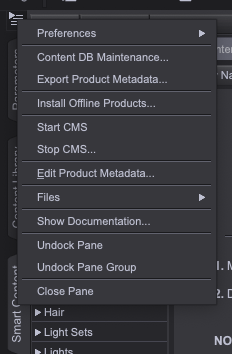
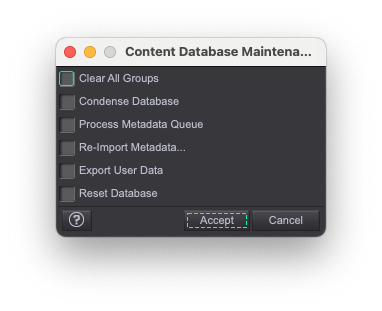
The products certainly aren't available for reimport, they have to be reinstalled (though the system should spot that the ones on disc match the ones on the servers and so not actaully download them, assumning the destination directory is unchanged).
I should add that I only use DIM or Content Wizard to install products into Daz Studio. I generally 'export user data' each day I am in D|S. Of course, with Macs, crashes are expected. It generally takes four crashes when D|S or a opening a script to get D|S stable and then I am good to go in the Beta. It is better than it used to be. But I try to never log into DAZ. It messes everything up.
The dForce Hair ThreadSquishy said:
If you export the hair from D|S as OBJ format (make sure you have "Write Polylines" checked) and then import it into Carrara what do you get? Anything?
e: these are my export options I use to go to Cinema (i.e., these get splines out of D|S hair and into Cinema)
busy rendering so cannot look but Carrara can actually load the duf files which are polylines (with weightmapping if rigged)
and yes can import obj too as strips, triangular tubes or just polylines depending on settings
the latter not much use though as I said, the former way too big to be useful
this is not something someone who is not familiar with the Carrara SDK can likely help with and that includes me
I know absolutely nothing about coding either except Carrara apparently uses C++ and according to Philemo much is not revealed in the SDK including how it's hair works but DAZ added it so they would know
but
again no longer in development
 The dForce Hair Thread
If you export the hair from D|S as OBJ format (make sure you have "Write Polylines" checked) and then import it into Carrara what do you get? Anything?
e: these are my export options I use to go to Cinema (i.e., these get splines out of D|S hair and into Cinema)

Daz 3D is part of

Connect
DAZ Productions, Inc.
7533 S Center View Ct #4664
West Jordan, UT 84084Licensing Agreement | Terms of Service | Privacy Policy | EULA
© 2026 Daz Productions Inc. All Rights Reserved.